

Key Takeaways
- Understand the types of Samsung batteries, including lithium-ion and lithium polymer, to choose the right replacement for your device.
- Recognize key signs your battery may need replacing, such as rapid draining, overheating, visible swelling, and random shutdowns.
- Gather essential tools for battery replacement, including screwdrivers, plastic opening tools, tweezers, suction cups, and a compatible replacement battery.
- Follow a step-by-step guide to safely disassemble your device, remove the old battery, and install the new one.
- Prioritize safety by turning off your device, using proper tools, working in a clean space, and avoiding sharp objects during the replacement process.
- Test the new battery by ensuring compatibility, monitoring charging processes, and checking for overheating after installation.
Is your Samsung phone dying faster than it used to? You’re not alone. Many people face battery issues as their devices age, leading to frustrating moments when you need your phone most.
Understanding Samsung Batteries
Samsung batteries play a crucial role in powering your device. They typically use lithium-ion technology, which offers several advantages, such as lightweight design and efficient energy storage.
Types of Samsung Batteries
- Lithium-ion Batteries: These batteries are common in most Samsung smartphones. They offer a high energy density and long cycle life, making them ideal for daily use.
- Lithium Polymer Batteries: Some Samsung models, like the Galaxy series, may use lithium polymer batteries. They’re slightly thinner and can be shaped to fit various designs, providing more flexibility in device design.
- Removable vs. Non-removable Batteries: Older Samsung models often feature removable batteries, allowing for easy replacement. Newer models typically have non-removable batteries, which require more technical skill to replace.
Signs Your Battery Needs Replacement
- Draining Quickly: If your phone’s battery percentage drops rapidly, it indicates a potential issue. A healthy battery should hold its charge throughout the day.
- Overheating: Excessive heat during charging or usage can signify a failing battery. This can lead to further damage if unchecked.
- Swelling or Bulging: Visible physical changes like swelling indicate battery failure. If you notice this, stop using the device immediately.
- Random Shutdowns: If your phone shuts down unexpectedly, even with a charge, the battery may be losing its ability to hold power.
Recognizing these signs can help you address battery-related issues promptly, ensuring your device continues to function efficiently.
Tools Required for Replacement
Replacing a Samsung battery requires specific tools to ensure a smooth process. Having the right tools on hand makes the replacement safer and more efficient.
Recommended Products

【Spare Battery Specs】EB-BA426ABY Replacement battery has a capacity of 5100mAh, the Voltage is 3.86V.

COMPATIBILITY: The battery model is EB-BR880ABY, it is only compatible with Samsung Galaxy Watch 4 (40 mm), SM-R860 SM-R865 series and Galaxy Watch 4 Classic (42mm) SM-R880 SM-R885, please carefully confirm the model of your smartwatch before purchase.

🔋 High-Capacity 6200mAh Battery for Galaxy S23 Plus Upgraded 6200mAh power delivers longer battery life than original (4700mAh). Enjoy all-day video streaming, gaming, or working without frequent recharging. Perfect for heavy users and travelers.
Essential Tools
- Small Phillips Head Screwdriver: Use this to remove the screws securing the back cover or battery compartment.
- Plastic Opening Tools: Employ these tools to pry open the device gently without damaging the casing.
- Tweezers: Utilize tweezers to assist in removing the battery and delicately handling small components.
- Suction Cup: A suction cup helps lift the screen or back cover while avoiding pressure on fragile parts.
- Battery Replacement: Secure a compatible battery according to your specific Samsung model for optimal performance.
Optional Tools
- Heat Gun or Hair Dryer: Applying low heat can soften adhesive, making it easier to remove the case.
- Magnetized Screw Mat: Use a magnetized mat to keep screws organized during the replacement process.
- ESD Wrist Strap: This protects your device from static damage while you work on it.
- Multi-tool: A multi-tool provides versatility if you don’t want to carry multiple individual tools.
- Multimeter: Optional but useful for checking voltage, ensuring the new battery works properly before installation.
Step-by-Step Guide to Replace Samsung Battery
Replacing a Samsung battery involves several steps. Follow each one carefully to ensure a successful replacement.
Recommended Products

Compatible Model: It is compatible with Samsung Galaxy Note 10+ Plus Only, Model: SM-N975, EB-BN972ABU. Not for Note 10. Please double identify and check your phone model matches before purchasing the battery.
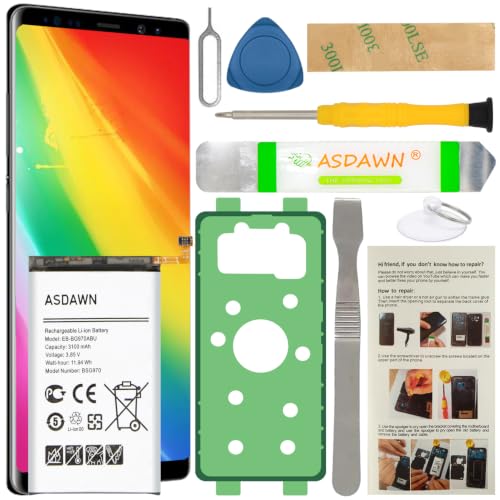
[FOR COMPATIBLE MODEL] -- Contains the instruction to guide you step by step installation, and we have professional engineers to answer all your questions about the repair process. Please verify your old battery part number and model before purchasing this replacement battery. Compatible with Samsung Galaxy S10e SM-G970, EB-BG970ABU, SM-G970F/DS, SM-G970U, SM-G970W ★NOT FOR Samsung Galaxy S10/ S10 Plus/ Note 10/ Note 10 Plus★
Preparing Your Device
Before starting, turn off your phone. Powering down your device prevents any electrical issues. Remove the SIM card tray to get better access to the device. Gather your tools, including the small Phillips head screwdriver, plastic opening tools, and a suction cup.
Disassembling Your Samsung Device
Begin disassembling by applying slight heat with a heat gun or hair dryer around the edges. This softens the adhesive. Use the suction cup to lift the back cover gently. Insert a plastic opening tool into the gap created and slide it around the perimeter to release the clips securing the cover. Lift the back cover off once it’s loose.
Removing the Old Battery
Locate the battery connector. Use a plastic opening tool to carefully lift it from the circuit board. If your battery is glued, gently pry it up with the plastic tool. Avoid using metal tools to prevent damage. If the battery swells, handle it with extra care.
Installing the New Battery
Position the new battery in place. Ensure the connectors align properly. Press the battery down to securely attach it. Reconnect the battery connector to the circuit board, ensuring a snug fit. Confirm the connection is smooth without any obstruction.
Reassembling the Device
Reattach the back cover firmly. Press around the edges to ensure it snaps back into place completely. Insert the SIM card tray back into the device. Turn your phone on and check if it operates normally. Verify that the battery is recognized and charging correctly before using it extensively.
Tips for a Successful Battery Replacement
When replacing a Samsung battery, following a few essential tips ensures a smooth and successful process.
Safety Precautions
- Power Off Your Device: Always shut down your phone before starting the replacement. This prevents any electrical accidents during the process.
- Use Proper Tools: Stick to the tools listed in earlier sections. Using the right tools reduces the risk of damaging your device.
- Work in a Clean Area: Choose a tidy, well-lit workspace. This minimizes the chance of losing small parts like screws or damaging the battery.
- Avoid Sharp Objects: Don’t use sharp tools that could puncture the battery. Lithium-ion batteries can catch fire if damaged.
- Wear Gloves: If possible, wear gloves to avoid any skin contact with battery acids, which can be harmful.
Testing the New Battery
- Check Compatibility: Ensure the new battery matches your device’s model number. An incompatible battery may not function correctly.
- Power On Your Device: After installation, turn on your phone to check if it recognizes the new battery. A successful installation will show the battery percentage.
- Monitor Charging: Charge the device fully after installation. Observe if the phone charges without any issues, indicating a good battery connection.
- Check for Overheating: During initial usage, watch for unusual heating. Excessive heat could signal improper installation or a defective battery.
- Run an App: Use a battery testing app to assess the performance. These apps provide insights into battery health and efficiency.
Following these tips improves the likelihood of a seamless battery replacement experience.
Conclusion
Replacing your Samsung battery can breathe new life into your device and keep it running smoothly. By recognizing the signs of battery issues and following the step-by-step guide, you can tackle the process with confidence.
Remember to gather the right tools and take your time during disassembly and reassembly. With a little patience and care, you’ll have your phone back in action.
Don’t forget to monitor your new battery’s performance to ensure it’s working as it should. Enjoy the improved battery life and the peace of mind that comes with a fully functional device!
Frequently Asked Questions
How do I know if my Samsung phone battery needs replacement?
If your Samsung phone battery is draining quickly, overheating, swelling, or causing random shutdowns, these are signs that it may need replacement. Monitoring these symptoms can help you address battery issues promptly before they worsen.
What types of batteries do Samsung phones use?
Samsung phones typically use lithium-ion and lithium polymer batteries. Lithium-ion batteries are known for their lightweight design and energy efficiency, while lithium polymer batteries can offer increased safety and flexibility in shape.
Are Samsung phone batteries removable?
It depends on the model. Some older Samsung phones have removable batteries, while many recent models feature non-removable batteries. Non-removable batteries usually require professional assistance for replacement.
What tools do I need to replace my Samsung battery?
Essential tools for replacing a Samsung battery include a small Phillips head screwdriver, plastic opening tools, tweezers, and a suction cup. Optional tools like a heat gun, magnetized screw mat, and multimeter can enhance the process.
What steps should I follow to replace my Samsung battery?
Start by turning off your device and removing the SIM card tray. Use heat to soften adhesive, lift the back cover with a suction cup, and carefully release clips using a plastic opening tool. Install the new battery, reconnect it, and reassemble the device securely.
What safety tips should I keep in mind when replacing a battery?
Always power off the device before replacement. Use the correct tools and work in a clean area. Avoid sharp objects to prevent battery damage and consider wearing gloves to protect yourself from battery acids.
How can I test the performance of my new Samsung battery?
After installing the new battery, monitor how it charges and check for overheating. Using a battery testing app can also provide insights into the battery’s performance, helping you ensure it functions correctly.
