

Key Takeaways
- Battery Capacity: The Samsung Galaxy S21 is equipped with a 4,000 mAh battery, offering around 11 to 12 hours of typical usage depending on activities.
- Charging Options: It supports 25W wired fast charging, 15W wireless charging, and reverse wireless charging, making it versatile for various charging needs.
- Usage Variability: Battery performance varies significantly with usage; casual tasks may yield 8 to 10 hours of screen-on time, while intensive activities like gaming can drop it to 5 to 6 hours.
- Power-Saving Features: Utilizing modes like Adaptive Battery and Power Saving Mode can significantly extend battery life by optimizing app usage and display settings.
- Competitor Comparison: The Galaxy S21 competes favorably against similar models, with efficient charging speeds and durable battery performance, but can face challenges during high-demand scenarios.
Wondering how long your Samsung Galaxy S21 will last on a single charge? You’re not alone. Many users find themselves checking their battery percentages throughout the day, hoping their device can keep up with their busy lives.
In this article, you’ll discover the actual battery life of the Galaxy S21 under various conditions. Whether you’re a heavy gamer or just need it for everyday tasks, understanding its battery performance can help you make the most of your phone. With tips on optimizing battery life, you’ll be better equipped to keep your device running longer, so you can stay connected without the constant worry of finding a charger.
Overview of Samsung Galaxy S21
The Samsung Galaxy S21 features a robust design, vibrant display, and impressive performance. You’ll find a 6.2-inch Dynamic AMOLED 2X display that offers stunning visuals and vivid colors. This device supports 120Hz refresh rates, ensuring smooth scrolling and improved gaming experiences.
Battery capacity measures at 4,000 mAh, which provides endurance for daily tasks and multimedia use. Users can expect the Galaxy S21 to last about 11 to 12 hours with regular use, depending on settings and activities.
The S21 supports 25W fast charging, enabling quick recharges. Additionally, it offers wireless charging at 15W and reverse wireless charging for accessories, adding convenience.
For power-saving, the Galaxy S21 features modes such as Adaptive Battery and Power Saving Mode. These settings help optimize battery usage by regulating app activity and display brightness based on your habits.
Engaging in heavy gaming or video streaming may reduce battery life, while standard tasks like browsing or texting extend it. Users can balance performance and battery life effectively with these features.
Battery Specifications
The Samsung Galaxy S21 features a robust battery system designed for efficiency and longevity. Here are the crucial details about its battery specifications.
Recommended Products

Strong Magnetic Alignment|Secure & Stable Charging: Equipped with an advanced magnetic array, the charger automatically aligns to the optimal charging position and holds your Phone firmly in place (✅ no slipping even when shaken). ⚠️ Note: Be must used with a MagSafe/magnetic case to achieve the magnetic effect For stronger attachment, we recommend using a MagSafe-compatible case

Extensive Compatibility: 15W Samsung wireless charger fast charging compatible with Samsung Galaxy S25 Ultra/S25 Plus/S25 edge/S25/S24 FE/S24 Plus/S24 Ultra/S23 Ultra/S23 FE/ Google Pixel 10/10 Pro/10 Pro XL/9a/9/9 Pro XL/9 Pro/8a/8Pro/8/7A/7/7 Pro/6/Motorola razr+ 2024/razr 2024/Edge/G Stylus 5G/G Power 2024 2023 2022, Edge 50 Ultra Pro, X50 Ultra X40, Razr 50 Ultra, Razr 2023-2022. 10W Fast wireless charging mats compatible with Samsung Galaxy S22/S21/S20/S10/S9/S8 . 7.5W wireless Charging docks for iPhone 16/16 Pro Max/16 Plus/15/15 Pro Max/14/13/12. 5W standard wireless charger for Airpods 3/2/Pro. Note:Pls ensure your phone model can support wireless charging.
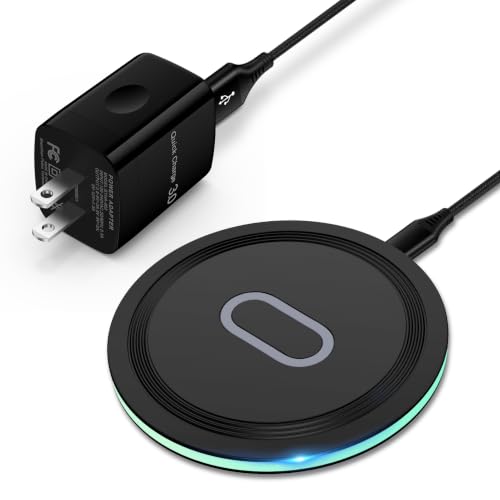
15W Samsung Wireless Charger: Put your phone on the wireless charger samsung Charging Pad Station to get started Charging, up to 1.8X faster than standard wireless charger, 3X faster than the original 5W charger. Wireless charging station provides 15W for Samsung Galaxy S26 S25 S24 S23 S22 S21, 10W for Samsung Galaxy Note 10, 7.5W output for iPhone 14 13 12 11 Series, and 5W for other smartphones and AirPods & Galaxy Buds.The wireless iPhone charger comes with a QC 3.0 18W adapter for a stable power supply.
Battery Capacity
The Galaxy S21 houses a 4,000 mAh battery. This capacity supports about 11 to 12 hours of typical use. Your experience may vary based on applications and settings you employ. For instance, heavy tasks like gaming or video streaming drain the battery faster, while lighter activities like browsing or texting extend its life.
Charging Options
The phone offers multiple charging options for convenience:
- Wired Charging: Supports 25W fast charging, allowing you to quickly recharge your device.
- Wireless Charging: Provides 15W wireless charging, making it easy to power up without cables.
- Reverse Wireless Charging: Enables charging other devices, such as earbuds, wirelessly at 4.5W.
These options ensure that keeping your Samsung Galaxy S21 charged fits seamlessly into your daily routine. Additionally, power-saving modes like Adaptive Battery help further conserve energy by learning your usage patterns.
Real-World Usage
The Samsung Galaxy S21 provides impressive battery life in various scenarios, allowing you to navigate different usage patterns effectively.
Recommended Products

The Galaxy S21 FE sports a sleek polycarbonate back with a premium matte finish that resists fingerprints and feels smooth in hand, giving it a stylish yet practical design.

6.2 inch, 1080 x 2400 pixels, Dynamic AMOLED 2X, 120Hz, HDR10 plus, 1300nits, 4000mAh Battery

Charge Multiple Devices Simultaneously: With two USB-C ports and one USB-A port, this charger is designed to power your smartphone, tablet, and laptop all at once. With a single device charging capacity of up to a powerful 100W, you'll never be left without power.
Screen-On Time
Screen-on time measures how long your device stays active while you’re using it. On average, the Galaxy S21 delivers about 8 to 10 hours of screen-on time with mixed usage. Tasks like casual browsing, messaging, and social media tend to yield longer usage periods. For example, using the phone for email and light web browsing may stretch battery life closer to the higher end, while streaming videos or playing graphics-intensive games can decrease it significantly, often pulling it down to about 5 to 6 hours.
General Performance
General performance matters when assessing battery longevity. Engaging in standard tasks like texting, checking emails, or browsing the internet tends to maintain your battery level better compared to battery-intensive activities. For instance, streaming high-definition content or multitasking between heavy apps quickly drains the battery. To maximize performance, utilize power-saving modes during periods of lower activity. Activating Adaptive Battery helps extend overall battery life by limiting background app activity based on your habits. Adjusting display brightness and refresh rate settings also enhances longevity, ensuring that you can make the most out of each charge while enjoying optimal performance.
Comparison with Competitors
The battery life of the Samsung Galaxy S21 compares favorably to similar smartphones in its class, providing users with reliable performance. Understanding how it stacks up against competitors helps in making informed choices.
Similar Models
- Google Pixel 5: The Pixel 5 features a 4,080 mAh battery, lasting around 8 to 10 hours with mixed usage. Its battery management is efficient, but it doesn’t support fast charging as robustly as the Galaxy S21.
- Apple iPhone 12: The iPhone 12 has a 2,815 mAh battery. Users report about 10 to 12 hours of standard use, yet it lacks the fast charge capability offered by the S21.
- OnePlus 9: This model comes with a 4,500 mAh battery. Users enjoy around 10 to 12 hours of use, along with 65W fast charging, potentially faster than the S21.
Battery Efficiency
- Power-Saving Features: Many competitors offer similar battery-saving modes. For instance, the iPhone 12 has Low Power Mode, which optimizes battery use. The Galaxy S21’s Adaptive Battery fits user habits, adjusting power accordingly.
- Screen-On Time: The Galaxy S21 holds up well, achieving an average of 8 to 10 hours. The OnePlus 9 might extend a bit longer, thanks to its larger battery. During heavy use, the S21 typically lasts about 5 to 6 hours for gaming or streaming.
- Charging Speed: While the Galaxy S21 charges at 25W, competitors like the OnePlus 9 provide faster options (up to 65W). This difference allows for quicker top-ups, beneficial for heavy users.
These comparisons highlight where the Galaxy S21 shines and areas where it faces tough competition. Keeping these insights in mind helps when evaluating battery life needs in your next smartphone purchase.
User Experiences
User experiences with the Samsung Galaxy S21’s battery life reveal a mix of satisfaction and some drawbacks. Many users appreciate its longevity, while others encounter challenges during intensive tasks.
Positive Feedback
Users often share positive experiences regarding the Galaxy S21’s battery performance. Most report lasting approximately 11 to 12 hours under regular usage, like messaging or browsing. Feedback highlights the effectiveness of power-saving modes, particularly Adaptive Battery, which tailors energy consumption based on app use. Users also enjoy the convenience of 25W fast charging, allowing for quick top-ups during busy days. Many commend the device’s ability to handle light gaming and streaming without significant battery drain, typically achieving 8 to 10 hours of use in casual scenarios.
Common Issues
Some users experience issues with the Galaxy S21’s battery life, particularly during high-demand activities. Heavy gaming or continuous video streaming often reduces battery longevity significantly, with reports of usage dropping to 5 to 6 hours. Some users note that the battery can drain quickly when 5G is enabled, which may impact performance. Another common concern is the minimal difference in battery life when using the device at high refresh rates, such as 120Hz. Regular tweaks to display settings and turning off features like Always On Display can help mitigate these issues, enhancing overall battery efficiency.
Conclusion
The Samsung Galaxy S21 offers a solid battery life that caters to a variety of user needs. Whether you’re casually browsing or diving into a gaming session you can expect decent performance. With features like fast charging and power-saving modes you have the tools to keep your device running smoothly throughout the day.
It’s all about finding the right balance for your usage habits. By adjusting settings and utilizing the built-in optimizations you can enhance your experience and reduce the hassle of frequent charging. Overall the Galaxy S21 stands out as a reliable companion that keeps you connected without constant worry about battery life.
Frequently Asked Questions
How long does the Samsung Galaxy S21 battery last on a single charge?
The Samsung Galaxy S21 typically lasts about 11 to 12 hours with regular use. Battery life can vary based on activities and settings, with heavy gaming or video streaming decreasing it to around 5 to 6 hours.
What is the battery capacity of the Galaxy S21?
The Galaxy S21 has a battery capacity of 4,000 mAh, providing a good balance between performance and longevity for various tasks, from casual browsing to more intensive activities.
What charging options does the Galaxy S21 support?
The Galaxy S21 supports 25W fast charging for quick recharges, 15W wireless charging for cable-free convenience, and reverse wireless charging at 4.5W to power other devices.
How can I optimize battery life on my Galaxy S21?
To optimize battery life, use the Adaptive Battery and Power Saving Mode features. Adjusting display brightness and limiting background app activity can also help extend battery longevity during daily use.
How does the Galaxy S21’s battery life compare to competitors?
Compared to its competitors, the Galaxy S21 offers efficient battery life with fast charging. The Google Pixel 5 has a similar usage time but lacks fast charging, while the iPhone 12 has a smaller battery, and the OnePlus 9 offers a larger capacity with faster charging options.
