

Key Takeaways
- Samsung Smart Tags utilize a CR2032 lithium coin battery, providing reliable and long-lasting power for efficient tracking of belongings.
- The average battery life of a Smart Tag is approximately 6 months, influenced by usage frequency, environmental conditions, and Bluetooth connectivity.
- Replacing the battery is a simple process that involves opening the case, removing the old battery, and inserting a new CR2032 battery with the correct orientation.
- Extending the battery life can be achieved by limiting usage, adjusting Bluetooth settings, and regularly checking the battery performance.
- Smart Tags connect seamlessly with the SmartThings app, offering additional features such as sound activation and community finding to enhance the tracking experience.
Have you ever misplaced your keys or wallet and wished you could track them down in seconds? Samsung Smart Tags are here to help you keep tabs on your belongings. But have you ever wondered what powers these handy little devices?
Overview of Samsung Smart Tag
Samsung Smart Tag devices use Bluetooth technology to help you locate lost items like keys, bags, and wallets. Small and lightweight, these tags easily attach to your belongings, ensuring you can find important items when needed.
These smart tags utilize a CR2032 battery, a commonly used coin cell battery found in many electronics. This battery type provides long-lasting power, allowing your Smart Tag to function efficiently over time. Replacing the battery is simple: just twist off the back cover, remove the old battery, and insert a new CR2032 battery with the correct polarity.
Samsung Smart Tags come with a range of features. They sync with the SmartThings app on your smartphone, enabling you to track your belongings on a map. If your item is nearby, you can make the tag emit a sound, making it easier to locate. The tags also include a community finding feature, which allows other SmartThings users to help you locate your lost item.
In practical use, place a Smart Tag on your keychain or attach it to your backpack. If you misplace your keys, the app shows their last known location. If they’re out of range, you can rely on other SmartThings users to help you find them.
The Samsung Smart Tag operates efficiently, combining convenience and practicality, making them an essential tool for anyone prone to misplacing items.
Battery Specifications
Samsung Smart Tags are powered by a reliable battery designed for long-lasting use. Understanding the battery specifics enhances your experience with these handy devices.
Recommended Products

COMPATIBLE WITH AIRTAG & KEY FOBS: Works with Apple AirTag, all major car key fobs (Toyota, Honda, BMW, Ford, Chevrolet, Lexus), fitness trackers, glucose monitors, tire pressure sensors, and any CR2032 / 3V lithium coin battery device.

IN THE BOX: 10-pack of CR2032 3 volt lithium coin cell batteries; replacement for BR2032, DL2032, and ECR2032

COMPATIBLE WITH AIRTAG & KEY FOBS: Works with Apple AirTag, all major car key fobs (Toyota, Honda, BMW, Ford, Chevrolet, Lexus), fitness trackers, glucose monitors, tire pressure sensors, and any CR2032 / 3V lithium coin battery device.
Type of Battery Used
Samsung Smart Tags utilize a standard CR2032 lithium coin battery. This type of battery is commonly used in various electronic devices, including watches and calculators. Its widespread availability makes it convenient for users to replace the battery when necessary.
Battery Size and Model
The CR2032 battery has a diameter of 20 mm and a thickness of 3.2 mm. This compact size allows the Smart Tag to maintain its lightweight, portable design. When replacing the battery, ensure you choose a high-quality CR2032 to guarantee optimal performance and longevity.
Battery Life and Performance
Samsung Smart Tags deliver impressive battery life thanks to their CR2032 lithium coin batteries. These batteries ensure that you can track your belongings without frequent replacements.
Average Battery Life
On average, the battery life of a Samsung Smart Tag lasts about 6 months, depending on usage. Frequent tracking, alerts, and sound activation can drain the battery faster. For optimal battery performance, consider using the Smart Tag intermittently instead of constantly.
Factors Affecting Battery Performance
Several factors can influence the battery life of your Samsung Smart Tag:
- Usage Frequency: High usage of features such as locating and sounding the tag decreases battery life.
- Environmental Conditions: Extreme temperatures, both hot and cold, can negatively impact battery performance.
- Bluetooth Connectivity: Constant connections or interference with other devices can cause the tag to use more power.
- Location Data Requests: Frequent updates to the location can lead to increased battery consumption.
By being mindful of these factors, you can extend the life of your Samsung Smart Tag’s battery. Consider replacing the CR2032 battery every 6 months or when performance noticeably decreases for uninterrupted tracking.
Replacement and Maintenance
Maintaining your Samsung Smart Tag ensures reliable tracking of your belongings. Regularly replacing the battery is essential to keep the device functional.
Recommended Products
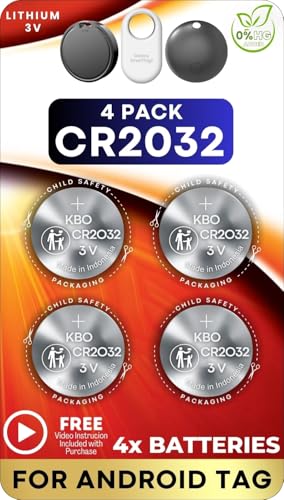
4 PACK - SMART TAG BATTERY REPLACEMENT: Specifically selected to fit Android-compatible trackers including the Samsung Galaxy SmartTag2, Motorola Moto Tag, and Chipolo Point.

Optimized for Air Tracker: Specifically designed to be the perfect for MiLi MiTag, Moto Tag, Samsung Galaxy SmartTag, Samsung Galaxy SmartTag 2 ensuring your device runs smoothly without interruptions.

2 PACK - SMART TAG BATTERY REPLACEMENT: Specifically selected to fit Android-compatible trackers including the Samsung Galaxy SmartTag2, Motorola Moto Tag, and Chipolo Point.
How to Replace the Battery
Replacing the CR2032 battery in your Samsung Smart Tag is a straightforward process. Follow these steps:
- Open the Case: Use a coin or a flat tool to gently pry open the Smart Tag case. Insert it into the slot along the edge and twist to detach the cover.
- Remove the Old Battery: Take out the old CR2032 battery by carefully pushing it from the side. Pay attention to the orientation; the flat side should face up.
- Insert the New Battery: Place the new CR2032 battery into the compartment, ensuring it sits snugly. Again, the flat side should be facing up.
- Close the Case: Align the cover with the tag’s body and press down until it clicks securely in place.
Tips for Extending Battery Life
You can prolong the battery life of your Smart Tag with these easy tips:
- Limit Usage: Use the Smart Tag intermittently instead of continuously. This conserves power.
- Adjust Bluetooth Settings: Turn off features not in use, like location tracking, to reduce battery drain.
- Control Environmental Factors: Keep the Smart Tag in moderate temperatures. Extreme heat or cold can negatively impact battery performance.
- Regular Checks: Monitor battery performance every month. Replace the battery once it shows signs of wear to ensure consistent functioning.
By following these steps and tips, you can effectively maintain your Samsung Smart Tag, ensuring it continues to help you keep track of your belongings.
Conclusion
Keeping track of your belongings has never been easier with Samsung Smart Tags. By using a reliable CR2032 battery, these handy devices ensure you can locate your items without hassle.
Remember to replace the battery every six months or when you notice a dip in performance. With a little maintenance and mindfulness about usage, your Smart Tags will continue to serve you well.
So go ahead and enjoy the peace of mind that comes with knowing your important items are just a tap away. Happy tracking!
Frequently Asked Questions
What are Samsung Smart Tags?
Samsung Smart Tags are small tracking devices designed to help users locate misplaced items like keys and wallets. They use Bluetooth technology and sync with the SmartThings app, allowing users to easily track their belongings on a map.
How do Samsung Smart Tags work?
Samsung Smart Tags work through Bluetooth connectivity. Once attached to an item, users can use the SmartThings app on their smartphone to locate lost possessions, sound the tag for help, or leverage the community finding feature.
What type of battery do Samsung Smart Tags use?
Samsung Smart Tags are powered by a CR2032 lithium coin battery. This type of battery is reliable, widely available, and can easily be replaced when needed.
How long do Samsung Smart Tags last on a single battery?
On average, Samsung Smart Tags can last about 6 months on a single CR2032 battery. Battery life may vary based on usage patterns, environmental conditions, and Bluetooth connectivity.
How can I extend the battery life of my Smart Tag?
To extend battery life, use the Smart Tag intermittently, adjust Bluetooth settings, and keep track of environmental conditions. Regular performance checks and timely battery replacements every 6 months can also help maintain efficiency.
How do I replace the battery in a Samsung Smart Tag?
To replace the battery, open the Smart Tag case, remove the old CR2032 battery, insert a new one, and securely close the case. Ensure that the new battery is of high quality for optimal performance.
Can multiple users track the same Smart Tag?
Yes, multiple users with access to the SmartThings app can assist in locating a Smart Tag. The community finding feature allows others to help locate lost items, enhancing the tracking experience.
