

Key Takeaways
- Recognizing Battery Issues: Common signs that your Sony Vaio laptop battery needs replacement include short battery life, frequent shutdowns, physical damage, overheating, and charging issues.
- Benefits of Replacement: Installing a new battery enhances usage time, improves laptop performance, ensures safety, reduces maintenance needs, and can prolong the device’s lifespan.
- Essential Tools: Gather a precision screwdriver set, plastic pry tool, anti-static wrist strap, tweezers, and a clean cloth for a smooth battery replacement process.
- Step-by-Step Replacement: Follow a clear guide to safely remove the old battery and install the new one, including powering down the laptop, gathering tools, and testing the new battery after installation.
- Maintenance Tips: Extend your battery’s life with strategies like charging wisely, monitoring temperature, managing power settings, conducting regular software updates, and periodically cycling the battery.
- Regular Inspection: Use built-in diagnostic tools to monitor battery health and address issues early, ensuring optimal performance from your Sony Vaio laptop.
Is your Sony Vaio laptop struggling to hold a charge? You’re not alone. Many users face this issue as their devices age, leading to frustration during important tasks. Luckily, replacing the battery isn’t as daunting as it might seem.
Overview Of Sony Vaio Laptops
Sony Vaio laptops are known for their sleek design, robust performance, and high-quality displays. These laptops cater to various users, from professionals needing powerful machines for work to students seeking reliable devices for school tasks. Models range widely in specifications, accommodating different usage needs.
You can find Vaio laptops equipped with Intel and AMD processors, offering options like Core i5, i7, and Ryzen 5. These choices affect performance, battery life, and pricing. Most models feature fast SSDs, which enhance speed and efficiency when opening programs or files.
Screen sizes vary from compact 11-inch models to larger 17-inch options. Screen resolutions, including Full HD and 4K, provide vibrant visuals suitable for media consumption or graphic design work.
Connectivity options on Sony Vaio laptops often include multiple USB ports, HDMI outputs, and SD card slots. Such features ensure you can connect various devices without hassle.
The Vaio brand also emphasizes audio quality, often providing built-in speakers that deliver rich sound. This aspect enhances your multimedia experience, making it enjoyable for watching movies or listening to music.
As Vaio laptops age, battery performance can decline, impacting usability. Understanding the specifics of your model helps you determine when a battery replacement becomes necessary.
Importance Of Battery Replacement
Replacing the battery in your Sony Vaio laptop is crucial for maintaining performance and usability. A new battery enhances your laptop’s ability to hold a charge and can significantly improve your overall experience.
Recommended Products

Specifications: 6 Cell, Li-ion battery, Rated at 11.1V(10.8V Compatible) 5200mAh Compatible Models: Laptop Battery for Sony Vaio VGP-BPS13 VGP-BPS13A VGP-BPS13A/B...
Signs Your Battery Needs Replacement
- Short Battery Life: If your laptop drains power quickly, even with minimal use, it’s time for a new battery.
- Frequent Shutdowns: Unexpected shutdowns, especially while performing simple tasks, indicate battery issues.
- Swelling or Damage: Physical damage or swelling of the battery is a clear sign of failure and requires immediate attention.
- Overheating: Excessive heat during charging suggests a battery problem, as this can affect performance and safety.
- Charging Issues: If your device doesn’t charge despite being plugged in, it’s a strong signal that the battery needs replacement.
Benefits Of A New Battery
- Extended Usage Time: A new battery provides longer usage periods, allowing you to work, study, or enjoy media without interruption.
- Improved Performance: Fresh batteries support optimal performance, as they deliver consistent power to all components.
- Enhanced Safety: Installing a new battery decreases the risk of overheating or fire associated with old, failing batteries.
- Reduced Maintenance: A new battery can lower the frequency of troubleshooting and avoid further repairs related to power supply issues.
- Increased Device Lifespan: Regularly replacing the battery can prolong your laptop’s lifespan, ensuring it serves your needs effectively over time.
Tools Needed For Battery Replacement
Replacing the battery in your Sony Vaio laptop requires a few essential tools. Having these tools ready ensures a smooth battery replacement process.
Recommended Products
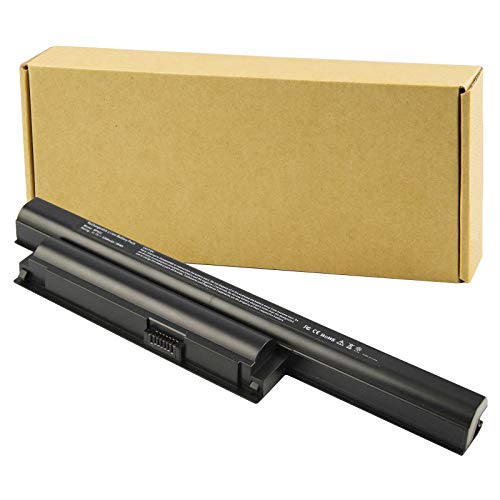
Specifications: 6 Cell, Li-ion battery, Rated at 11.1V(10.8V Compatible) 5200mAh
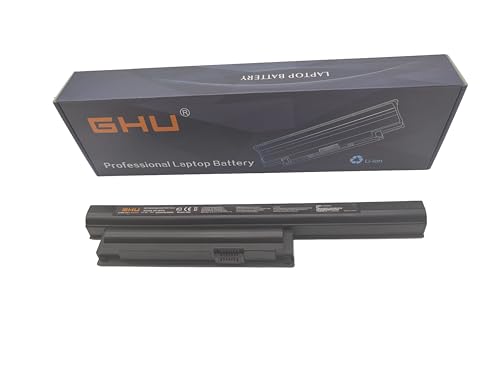
Premium 58Wh Battery: Our bps26 battery is a high-capacity, premium 58Wh model, designed for the sony pcg 71913l battery and sony vaio battery pcg 71913l. It is also compatible with sony vaio vpcea46fm battery and sony vaio vpceb battery, offering extended power for your laptop needs. 58 WH VGP-BPS26 VGP-BPS26A VGP-BPL26 Compatible For Sony Vaio Laptops. We recommend customers to charge your new battery at least 4-8 hours before you use your battery by disconnecting AC power from wall.
Tools List
- Screwdriver Set
A precision screwdriver set, preferably with Phillips and flat-head options, is essential. The screws on your laptop might be small and require specific sizes.
- Plastic Pry Tool
A plastic pry tool helps open the laptop casing without causing damage. It prevents scratches and keeps the surface intact.
- Anti-Static Wrist Strap
An anti-static wrist strap prevents static electricity from damaging your laptop’s internal components. Always wear it while handling sensitive parts.
- Tweezers
Tweezers assist in gripping and manipulating small screws or connectors. They provide better control in tight spaces.
- Clean Cloth
A clean microfiber cloth is useful for wiping down any dust inside the laptop. It keeps your device clean and functioning optimally.
Preparation Steps
- Power Down Your Laptop
Ensure your laptop is completely turned off and unplugged from any power source.
- Gather Your Tools
Collect all tools in one area, so they’re easily accessible during the replacement.
- Create a Workspace
Set up a clean, flat surface to work on. Use a soft cloth to prevent scratches.
Gathering these tools and preparing your workspace simplifies the battery replacement procedure. Make sure to follow each step carefully for a successful outcome.
Step-By-Step Guide On How To Replace Battery In Sony Vaio Laptop
Replacing the battery in your Sony Vaio laptop involves a few straightforward steps. Follow this guide to complete the process efficiently.
Recommended Products

High Quality 58 Wh Battery: Ideal for Sony laptop models such as VGP BPS13, BPS13 battery, and VGP BPS13B. Our battery for Sony Vaio Laptop VGN-FW590F3B ensures efficient power for longer duration. For VGP-BPS13B VGP-BPS13/Q VGP-BPS13B/Q VGP-BPS21A VGP-BPS13 VGP-BPS13A VGP-BPL13 VGP-BPS13A/B VGP-BPS13B/S VGP-BPS21 Replacement For Sony Vaio VGN-AW VGN-CS VGN-FW PCG-61411L Laptop 6 cell 5200 mAh Li-Ion Battery VGP-BPS1321B VGP-BPS21B.

Compatible Models: Replacement for selected Sony VAIO SVE151D11L and VPCEB series laptop notebook models.
Preparing Your Laptop
- Power down your laptop. Ensure it’s completely off and unplugged.
- Gather your tools. You’ll need a precision screwdriver set, a plastic pry tool, an anti-static wrist strap, tweezers, and a clean cloth.
- Create a clean workspace. Clear a flat surface to comfortably work on your laptop.
Removing The Old Battery
- Locate the battery compartment. This is often on the bottom of the laptop.
- Remove the screws. Use the precision screwdriver to unscrew the battery cover.
- Pry open the compartment. Carefully insert the plastic pry tool to loosen the cover, avoiding any damage.
- Disconnect the old battery. Detach any connectors and gently lift the battery out.
- Inspect for debris. Use a clean cloth to wipe any dust or debris from the compartment.
Installing The New Battery
- Align the new battery. Ensure it matches the specifications of your original battery.
- Connect the battery. Secure the battery connectors firmly in their designated slots.
- Replace the cover. Set the battery compartment cover back in place and screw it securely.
Testing The New Battery
- Power on your laptop. Press the power button to start your device.
- Check battery status. Navigate to your laptop’s settings to verify that the new battery is recognized, displaying an accurate charge indicator.
- Run a battery life test. Use the laptop normally for a couple of hours to see how well the new battery holds a charge.
Following these steps ensures a successful battery replacement. You’ll enjoy improved performance and extended usage from your Sony Vaio laptop.
Maintenance Tips For Laptop Batteries
Maintaining your Sony Vaio laptop battery extends its lifespan and enhances performance. Here are some essential tips to consider:
Charge Wisely
- Charge your laptop when battery levels drop to 20%. Avoid letting the battery drain completely.
- Unplug the charger when the battery reaches 100%. Overcharging can diminish battery capacity.
Monitor Temperature
- Keep your laptop in a cool, dry place. Excessive heat can cause battery damage.
- Use a laptop cooling pad during heavy tasks to help regulate temperature.
Manage Power Settings
- Enable power-saving modes while using battery power. This reduces energy consumption and prolongs battery life.
- Dim your screen brightness. Lower brightness settings consume less energy.
Regular Updates
- Update your laptop’s software regularly. Software enhancements can improve battery efficiency.
- Update drivers for better hardware compatibility, which can positively affect battery performance.
Cycle the Battery
- Cycle the battery every few months. Fully charge it, then let it drain to about 5% before recharging. This process helps recalibrate the battery’s capacity.
Inspect Battery Health
- Use built-in battery diagnostic tools to check health status. This helps identify potential issues early.
- Replace batteries showing physical damage, swelling, or significant performance decline.
Clean Connections
- Keep battery terminals free of dust and debris. Clean connections ensure optimal current flow.
- Use a soft cloth to clean the battery’s contacts periodically.
Store Correctly
- If storing your laptop long-term, remove the battery and keep it in a cool place. Aim for about 50% charge at storage.
By following these maintenance tips, you can ensure the longevity and reliability of your Sony Vaio laptop battery. Keeping your battery in shape will enhance your overall laptop experience.
Conclusion
Replacing the battery in your Sony Vaio laptop can breathe new life into your device and enhance your overall experience. With the right tools and a little patience you can tackle this task with confidence. Remember to keep an eye on your battery’s performance and recognize the signs that it might need a replacement.
By following the maintenance tips shared in this guide you can extend the lifespan of your new battery and enjoy uninterrupted productivity. Your Sony Vaio is designed to deliver quality performance so make sure it stays in top shape. Happy computing!
Frequently Asked Questions
Why is my Sony Vaio laptop battery not holding a charge?
As Sony Vaio laptops age, battery performance can decline, leading to short battery life and frequent shutdowns. Common reasons could include physical damage, overheating, or charging problems. If you notice these symptoms, it may be time for a battery replacement.
How do I know if my Sony Vaio battery needs replacement?
Signs of a failing battery include reduced battery life, unexpected shutdowns, visible damage, overheating, or failure to charge. If you experience any of these issues, it’s advisable to consider replacing your battery to maintain performance.
What are the benefits of replacing my Sony Vaio laptop battery?
Replacing your battery can extend usage time, improve performance, and enhance safety. It can also reduce maintenance needs and increase the overall lifespan of your device, ensuring a better user experience and reliability.
How do I replace the battery in my Sony Vaio laptop?
To replace your Sony Vaio battery, start by powering down the laptop and gathering necessary tools. Follow the step-by-step guide in the article, which includes locating the battery compartment, removing the old battery, installing the new one, and testing it.
What maintenance tips can help extend my Sony Vaio battery life?
To extend your battery’s lifespan, avoid complete discharges, monitor temperature, adjust power settings, and regularly update software. Additionally, cycle your battery every few months, inspect its health with diagnostic tools, and clean the connections as needed.
