

Key Takeaways
- Understand Battery Types: Familiarize yourself with lithium-ion and lithium-polymer batteries, along with the differences between removable and non-removable options in Samsung phones.
- Recognize Replacement Signs: Watch for signs like rapid discharge, overheating, swelling, unexpected shutdowns, and charging issues that indicate your battery may need replacement.
- Prepare Proper Tools: Gather essential tools such as screwdrivers, pry tools, tweezers, and a new compatible battery before starting the replacement process.
- Follow Safety Precautions: Always power off your phone, work in a clean environment, wear safety glasses, and handle the battery carefully to avoid hazards.
- Execute Step-by-Step Replacement: Follow a systematic approach to remove the old battery, install the new one, and reassemble your phone to ensure a successful battery replacement.
- Test the Battery: Charge the new battery fully and monitor its performance post-installation to confirm it operates correctly and meets your device’s needs.
Is your Samsung phone struggling to hold a charge? You’re not alone. Many users face battery issues over time, leading to frustration and inconvenience. But don’t worry, replacing your phone’s battery can be simpler than you think.
Understanding Samsung Phone Batteries
Samsung phone batteries play a crucial role in performance and reliability. Knowing the types available and recognizing signs that your battery needs replacement helps maintain your device’s functionality.
Types of Samsung Phone Batteries
- Lithium-Ion Batteries: Common in smartphones, these batteries offer high energy density and long life cycles. They charge quickly and maintain a stable voltage.
- Lithium-Polymer Batteries: These are lighter and often thinner than lithium-ion batteries. They fit well in slim designs but might offer slightly less capacity.
- Removable Batteries: Certain Samsung models, like the Galaxy S5, feature removable batteries. This allows easy replacement without professional help.
- Non-Removable Batteries: Most recent models come with non-removable batteries. Replacement requires some technical skill and appropriate tools.
Signs You Need to Replace Your Battery
- Rapid Discharge: If your phone loses charge within a few hours, even without heavy usage, it’s time to consider a battery replacement.
- Overheating: A battery that feels unusually hot can signal damage and affect performance. This often indicates the need for immediate replacement.
- Swelling: If the battery appears bloated or expands, it poses safety risks. Replace it right away to prevent potential harm to your device.
- Unexpected Shutdowns: If your phone shuts down when the battery percentage shows above 20%, this issue suggests a failing battery.
- Charging Problems: If your phone struggles to charge or takes unusually long, it may be due to battery wear.
By recognizing these signs and understanding the types of Samsung phone batteries, you’ll be better prepared for a successful replacement process.
Preparing for Battery Replacement
Preparing for a battery replacement involves gathering the right tools and taking safety precautions to ensure a smooth and safe process.
Recommended Products
![ITMBET [5800mAh] Galaxy S23 Ultra Battery, 𝗨𝗽𝗴𝗿𝗮𝗱𝗲𝗱 EB-BS918ABY Replacement Battery for S23 Ultra SM-S918U SM-S918U1 SM-S918B with Repair Tool Kits](https://m.media-amazon.com/images/I/413u8eALCsL._SL500_.jpg)
🔋 Premium Quality: Experience a new level of performance with our upgraded 5800mAh 3.85V battery replacement. This high-quality battery will restore your phone’s battery life to like-new condition, ensuring you stay connected longer

🎋【Compatible Model】EB-BG990ABY Replacement Battery for Samsung Galaxy S21 FE SM-G990B, SM-G990B/DS, SM-G990U, SM-G990U1, SM-G990W, SM-G990E, SM-G9900, SM-G990B2, SM-G990U2, SM-G990W2, SM-G990U3[Note: Not for Galaxy S20 FE or other Phone Models]

Compatible Model: This battery replacement kit is only compatible with Samsung Galaxy Watch Active 2nd 40mm with model numbers SM-R830 SM-R835, please carefully check your device model before purchasing
Tools You Will Need
Gather the following tools before starting your battery replacement:
- Pentalobe Screwdriver: Use this for removing screws from the case.
- Phillips Screwdriver: Needed for additional screws inside the phone.
- Plastic Pry Tool: This helps separate the screen from the body without damage.
- Tweezers: Useful for handling small components.
- Suction Cup: Great for lifting the screen off, especially for non-removable batteries.
- Spudger: An alternative to the pry tool for opening and disconnecting internal connectors.
- New Battery: Ensure your replacement battery is compatible with your specific Samsung model.
Safety Precautions
Follow these safety precautions during the battery replacement:
- Power Off the Device: Always shut down your phone to prevent any short circuits.
- Work in a Clean Environment: Avoid static, dust, or clutter that might interfere with the process.
- Use Safety Glasses: Protect your eyes from small components or debris.
- Avoid Puncturing the Battery: Handle the battery carefully to prevent leaks or punctures, which can be dangerous.
- Dispose of Old Batteries Properly: Follow local guidelines for disposing of lithium-ion batteries, as they require special handling.
By preparing adequately, you can ensure a more efficient battery replacement experience.
Step-by-Step Guide to Replace a Samsung Phone Battery
Replacing your Samsung phone battery can refresh your device’s performance. Follow these steps to ensure a smooth battery replacement process.
Recommended Products

✅【Safe And Efficient】: All Galaxy A14 Replacement battery of our batteries have the highest level of security protections. Including, over charging protection, overheating protection, overload protection, short circuit protection, highly effective temperature control, battery cell PTC protection. Our Dual IC design ensures that your battery won't fail under any circumstances.

This battery is specially designed for Galaxy A03s SM-A037U SM-A037U1/Samsung A22 5G SM-A226 , it can replace your old battery, Tech skills may apply when replacing the battery.
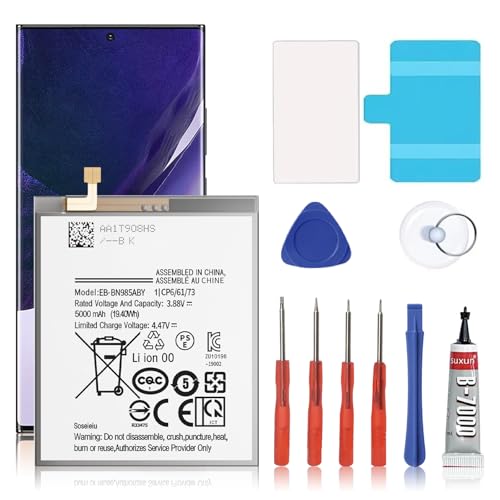
🎋【Compatible Model】EB-BN985ABY Replacement Battery for Samsung Galaxy Note 20 Ultra SM-N985 N986 N986U[Note: Not for GalaxyGalaxy Note 20 Ultra Battery Note 20 other Phone Models]
Powering Down Your Device
Power off your device before starting any repairs. Hold down the power button until the shutdown option appears, then tap “Power Off.” This step ensures your safety while working inside the phone and prevents potential damage.
Removing the Back Cover
Remove the back cover from your phone. Use a plastic pry tool to carefully separate the cover from the device. Start at a corner and work your way around, applying gentle pressure to avoid damaging the clips. If your Samsung model has a removable battery, this step may differ and usually requires simple detachment of the cover.
Disconnecting the Old Battery
Locate the battery connector on the motherboard after removing the back cover. Use a spudger or tweezers to gently lift the connector away from the circuit board. Avoid pulling on the wires, as excessive force can lead to damage. Ensure you’ve disconnected the battery completely, which prevents short circuits during replacement.
Installing the New Battery
Align the new battery with the slot in your phone. Carefully connect the battery’s connector to the motherboard, ensuring a secure fit. If you’re using a non-removable battery, ensure the adhesive is in place to keep the battery snugly attached.
Reassembling Your Phone
Reattach the back cover by aligning it with the phone’s body. Apply gentle pressure around the edges until it snaps into place. Once secured, power on your device to ensure everything functions correctly. Check for any updates or settings adjustments needed after installation.
By following these steps, you can effectively replace your Samsung phone battery and enjoy improved performance.
Testing Your New Battery
Testing your new battery ensures it functions properly and provides reliable performance. Follow these steps for effective testing.
Recommended Products

Power Bank with Built-in Cable for Tangle-Free Charging: Say goodbye to cable clutter! Built-in USB C cable and iOS cable widely compatible with iPhone, Samsung, Android Phone/tablets and more smart devices. This portable charger eliminates the hassle of carrying a bunch of cables, making it the most powerful travel essential for you.** (Single pack; AC wall charger not included; 15000 mAh / 55.5Wh.)**

Fashion Design Ultra-Compact Portable charger: Smooth face and better texture makes it elegant and unique, Size of a lipstick,not need a cord it’s easy to slip in your pocket or your purse and when you need it you have a charger right then and there.
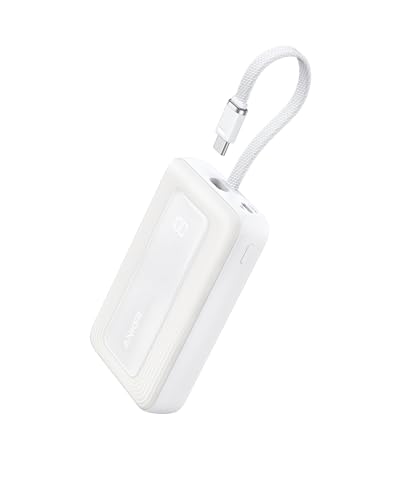
Speedy 30W Charging: Experience cutting-edge 30W fast charging technology—twice as fast as 5V/3A chargers. Boost an iPhone 16 Pro Max to 50% in just 27 minutes, compared to an hour with traditional power banks.
Charging the Battery
Charge the new battery fully before use. Connect your Samsung phone to its charger and allow it to charge uninterrupted for at least two hours. After the initial charge, unplug it, and let it sit for a few hours. This helps calibrate the battery.
To confirm the battery charges correctly, monitor the charging indicator. If it shows an error or does not display at all, check the connections and ensure the charger and port are free from debris.
Monitoring Battery Performance
After charging, turn on your phone and monitor its performance. Use your phone for an hour, checking for issues such as rapid drainage, overheating, or unexpected shutdowns. Keep an eye on battery percentage, especially under various usage conditions like browsing, gaming, or streaming.
You can access battery usage statistics in your phone’s settings. This data gives insight into how the battery performs with different apps. If you notice anything unusual, consider rechecking the installation or compatibility with your specific model.
By following these steps, you confirm your new Samsung phone battery operates correctly, enhancing your device’s overall experience.
Conclusion
Replacing your Samsung phone battery doesn’t have to be a daunting task. With the right tools and a bit of patience you can breathe new life into your device. Remember to take your time and follow the steps carefully to avoid any mishaps.
Once you’ve installed the new battery make sure to monitor its performance. This way you can catch any issues early on and enjoy a smoother experience with your phone. By taking these simple steps you’ll not only save money but also gain a sense of accomplishment. Happy replacing!
Frequently Asked Questions
What are the common signs that my Samsung phone battery needs replacement?
To determine if your Samsung phone battery needs replacement, look for signs like rapid discharge, overheating, swelling, unexpected shutdowns, or problems while charging. These issues often indicate that the battery is failing and may need to be replaced for optimal device performance.
How do I prepare for a Samsung phone battery replacement?
Before replacing your Samsung phone battery, gather essential tools such as screwdrivers, a plastic pry tool, tweezers, a suction cup, and a spudger. It’s also important to ensure the new battery is compatible with your specific Samsung model. Safety preparations are crucial as well.
What safety precautions should I take when replacing my battery?
When replacing a Samsung phone battery, ensure the device is powered off and work in a clean environment. Use safety glasses, handle the battery carefully to avoid punctures, and remember to properly dispose of the old battery to avoid hazards.
Can I replace my Samsung phone battery myself?
Yes, you can replace your Samsung phone battery yourself. The process is straightforward if you follow the step-by-step guide outlined in the article. Just make sure to have the right tools and a suitable replacement battery.
How do I test my new Samsung phone battery?
After replacing your Samsung phone battery, fully charge it before use. Monitor its performance for any issues like rapid drainage or overheating. You can also check battery usage statistics in your phone settings to ensure it functions correctly.
