

Key Takeaways
- Understanding Battery Health: A healthy battery improves device performance, ensuring longer usage between charges and fewer unexpected shutdowns.
- Common Causes of Battery Aging: Key factors include charge cycles, heat exposure, overcharging, app usage, and outdated software that can degrade battery health over time.
- Optimization Strategies: Adjust device settings such as screen brightness, screen timeout, and disabling unused features to enhance battery life.
- Background App Management: Regularly monitor and close background apps to prevent unnecessary battery drain and check for power-hungry apps.
- External Solutions: Utilize battery calibration apps to track and improve usage patterns, or consider battery replacement if health significantly declines.
- Best Practices for Maintenance: Implement proper charging habits and temperature management to extend battery life and optimize device performance.
Is your Android phone’s battery draining faster than it used to? You’re not alone. Many people face this frustrating issue as their devices age. A declining battery health can lead to constant charging and unexpected shutdowns, making it hard to stay connected.
Understanding Battery Health
Battery health impacts your Android device’s performance and longevity. A healthy battery maintains charge effectively, impacting overall user experience.
Importance of Battery Health
Battery health determines how well your device operates over time. When battery health is good, you enjoy longer usage between charges and fewer unexpected shutdowns. Poor battery health leads to rapid draining and unreliable performance. Regularly checking battery health keeps your device running smoothly and enhances its lifespan.
Common Causes of Battery Aging
Several factors contribute to battery aging:
- Number of Charge Cycles: Each complete charge cycle slightly degrades the battery. Typically, lithium-ion batteries last about 300 to 500 cycles before significant performance drops.
- Heat Exposure: High temperatures can affect battery components. Keep devices cool to prevent heat-related degradation.
- Overcharging: Constantly keeping your device plugged in can harm battery health. Disconnect it once fully charged to extend battery life.
- App Usage: Certain apps, especially those running in the background, can drain battery resources. Monitor usage to identify battery-hogging apps.
- Software Issues: Outdated firmware can result in inefficient battery management. Regularly update your device to fix bugs and optimize battery performance.
Tips to Improve Battery Health on Android
Improving battery health on your Android is crucial for ensuring your device runs smoothly. Here are some effective strategies.
Recommended Products

This Device Requires a Subscription. To start using it, simply select the tariff plan that fits your needs. Check the product gallery to see the tariff plans.


LONG BATTERY LIFE FOR ALL-DAY RIDING - Up to 7 hours recording at 1080P and 4.5 hours at 4K. Ideal for long-distance touring, adventure riding and motorcycle road trips
Optimize Device Settings
Adjusting your settings can significantly enhance battery life.
- Reduce Screen Brightness: Lower the brightness or set it to auto-adjust. This feature matches brightness to current lighting conditions.
- Limit Screen Timeout: Set the screen to turn off after 30 seconds to 1 minute of inactivity.
- Disable Unused Features: Turn off Bluetooth, GPS, and Wi-Fi when not in use. These features consume power even when idle.
- Night Mode: If your device supports it, enable dark mode. This can save battery for OLED screens by using less power.
Manage Background Apps
Background apps drain battery by running processes without your knowledge.
- Review App Permissions: Go to settings to see which apps run in the background. Limit permissions for apps that don’t need constant access.
- Close Unused Apps: Regularly exit out of apps not in use. Swipe them away in your recent apps list.
- Check App Battery Usage: Regularly check which apps consume the most battery and consider alternatives if necessary.
Use Battery Saver Mode
Enabling battery saver can extend usage when your device’s charge is low.
- Activate Battery Saver: Navigate to settings and turn on battery saver mode. This reduces background activity and notifications.
- Adjust Battery Saver Settings: Customize options to limit features further while in battery saver mode, such as reducing background data usage.
- Schedule Battery Saver: Set it to turn on automatically at a predetermined battery percentage. This ensures timely activation without manual adjustments.
By implementing these strategies, you can significantly improve your battery health and overall device performance.
External Solutions for Battery Health
External solutions can effectively enhance the battery health of your Android device. These methods include using specialized apps and, if necessary, replacing the battery.
Recommended Products

[POCKET-SIZE 20000mAh.] Massive power for your pocket. Note: True 20,000mAh requires solid, high-density cells (approx. 11 oz). This portable charger is built incredibly dense to deliver 4 full phone charges without the bulk.
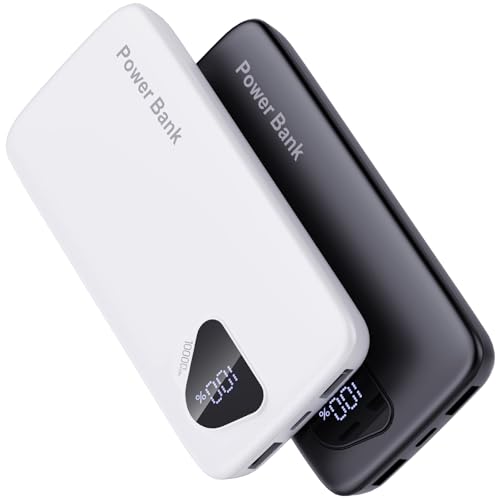
【Charge 4 Devices Simultaneously】Total 4 output ports (built-in 2 cabls,IOS cable and USB-C cable and 2 USB A), supports charging for 4 smart devices simultaneously, All in one portable charger, you would not need to carry various cables or adapter any more, save you time and no more waiting.

10000mAh True Capacity (Lab-Verified) – Real Power, Compact Size--Unlike lightweight power banks that inflate numbers, our lab-verified 10000mAh portable charger delivers honest charging: 2 full charges for iPhone 16/17 or 1.79 charges for Samsung S24. The durable metal construction ensures reliable power in a 0.6-inch ultra-slim body—outlasting 'same-size' plastic competitors by 2X.
Battery Calibration Apps
Battery calibration apps help reset your device’s battery readings. They gather data on battery levels to improve accuracy. Popular options include AccuBattery and GSam Battery Monitor. Using these apps allows you to track battery usage patterns and identify excessive drainers. Follow these steps to use a battery calibration app:
- Download a Calibration App: Choose a reputable app from the Google Play Store.
- Charge Your Device: Fully charge your battery to 100%.
- Use the App: Open the app, then monitor your battery usage for several days.
- Analyze Results: Review the data to spot apps consuming excessive battery.
- Adjust Settings: Modify app permissions or settings based on findings.
Replacing the Battery
If your battery health declines significantly, consider replacing the battery. New batteries can restore performance and extend device lifespan. Here’s how to go about it:
- Confirm Battery Health: Check battery health through settings or a diagnostic app.
- Choose a Replacement: Purchase a genuine battery compatible with your device model.
- Gather Tools: Collect necessary tools, such as a screwdriver and opening picks.
- Power Off the Device: Turn off your phone to ensure safety during replacement.
- Open the Device: Carefully remove the back cover or access panel.
- Disconnect the Old Battery: Locate and gently detach the battery connector.
- Install the New Battery: Connect the new battery securely and place it in the compartment.
- Reassemble the Device: Replace the cover and secure it properly.
- Charge the New Battery: Fully charge the new battery before regular use.
Considering these external solutions effectively contributes to maintaining battery health.
Best Practices for Maintaining Battery Health
Maintaining battery health is crucial for optimal performance and longevity of your Android device. Here are some best practices to follow.
Recommended Products
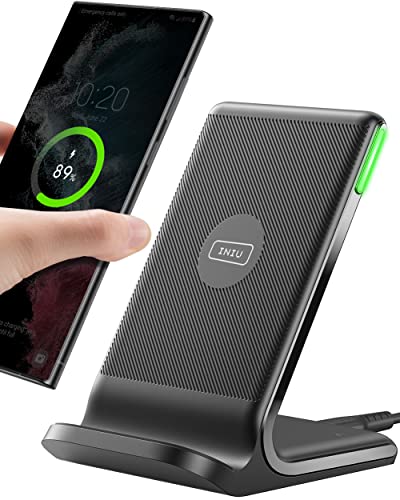
15W Fast Charge for the Morning Rush: Save up to 45 minutes with the INIU Wireless Charger. Powered by AirFuel tech, it’s ideal for commuters needing a rapid power boost before leaving, eliminating the frustration of slow charging.

Ultra-Slim Qi2-Compatible Magnetic Power Bank: At just 0.3 inches thin, this ultra-slim power bank supports Qi2 certification and offers 5,000mAh of reliable wireless charging, making it a travel essentials for daily carry and among the trusted iPhone power banks available.

Fashion Meets Function in Your Car: Spot your cable instantly to avoid mix-ups! Add a popular of personal style to your drive with our chic beaded design—spot your cable instantly to avoid mix-ups! This isn't just a cable; it's a cute accessory that organizes your console and brings a smile every time you see it, perfect for adding a feminine touch to your vehicle
Charging Habits
- Avoid overnight charging. Charging for long periods can lead to overcharging, which damages the battery over time. Instead, unplug your device once it reaches 100%.
- Use the correct charger. Always use a charger that’s compatible with your device. Using the wrong charger can introduce excess heat and harm battery health.
- Charge in moderation. Frequent small charges are better than allowing the battery to fully discharge. Aim to keep your battery level between 20% and 80% for optimal health.
- Limit fast charging. While convenient, fast charging can generate heat. Use it sparingly to help preserve battery life.
Temperature Management
- Keep your device cool. Excessive heat can damage battery cells. Avoid leaving your phone in hot places, like a car or direct sunlight.
- Allow for airflow. When charging, use the phone in a well-ventilated area. Avoid using heavy-duty apps while charging, as they can generate additional heat.
- Be cautious with cases. Some phone cases can trap heat during charging. If your device feels unusually warm, consider removing the case while charging.
- Monitor ambient temperature. Ideal operating temperatures for batteries are between 32°F and 95°F (0°C to 35°C). Exposure to extreme cold or heat affects battery efficiency.
Implementing these practices can significantly extend the life of your battery and enhance your overall Android experience.
Conclusion
Taking care of your Android battery can make a world of difference in how your device performs. By adopting simple habits like optimizing settings and managing app usage, you can keep your battery healthy for longer.
If you notice significant decline, don’t hesitate to explore battery calibration apps or even consider a replacement. Remember that maintaining proper charging practices and keeping your phone cool are key to extending battery life.
With a little effort, you can enjoy a smoother and more reliable experience with your Android device. Happy charging!
Frequently Asked Questions
Why is my Android phone battery draining faster as it ages?
As Android phones age, battery health declines due to factors like charge cycles, heat exposure, and software issues. This leads to faster battery drain, more frequent charging, and potential unexpected shutdowns, affecting your device’s performance and connectivity.
What can I do to improve my Android battery health?
To enhance battery health, adjust device settings by reducing screen brightness, limiting screen timeout, and disabling unused features. Managing background apps and enabling battery saver mode also helps significantly. Regularly checking app battery usage can further optimize performance.
Are there apps to help with Android battery health?
Yes, apps like AccuBattery and GSam Battery Monitor are useful for tracking battery usage and resetting battery readings. These apps can help you understand usage patterns and make adjustments to improve overall battery life.
How often should I check my Android battery health?
Regularly checking your battery health is recommended, ideally every few weeks, to monitor its condition. This helps you identify any significant changes that could indicate declining performance or the need for adjustments.
When should I consider replacing my Android battery?
Consider battery replacement if your phone struggles to hold a charge or frequently shuts down unexpectedly, despite optimizing settings. If battery health falls below 80%, replacement may be necessary for improved performance and longevity.
What are some best practices for charging my Android phone?
To maintain battery health, avoid overnight charging, use the correct charger, and limit fast charging. Charging in moderation and ensuring adequate airflow during charging can help prevent heat damage to the battery.
