

Key Takeaways
- Battery Replacement Benefits: Replacing the Samsung S6 Edge battery can significantly improve performance and prolong the device’s lifespan.
- Essential Tools: Having the right tools, such as a Phillips screwdriver, plastic pry tool, tweezers, and a compatible replacement battery, is crucial for a successful replacement.
- Step-by-Step Process: Follow the detailed steps—including powering off the device, removing the back cover, disconnecting the old battery, and installing the new one—for effective battery replacement.
- Tips for Success: Take necessary precautions, work in a well-lit area, and keep small parts organized to ensure a smooth battery replacement experience.
- Common Issues and Solutions: Be prepared to troubleshoot common problems, such as adhesive challenges or connection issues, to ensure the device functions properly after replacement.
Is your Samsung S6 Edge struggling to keep a charge? You’re not alone. Many users face the frustration of a dying battery, and it can feel like a hassle to get it fixed. But don’t worry—replacing the battery isn’t as daunting as it sounds.
Overview of Samsung S6 Edge Battery Replacement
Replacing the battery in a Samsung S6 Edge can enhance its performance and extend its lifespan. If your battery drains quickly or doesn’t charge, replacing it addresses these issues effectively. This process requires basic tools and some patience but remains straightforward.
Tools You’ll Need
- Screwdriver: A small Phillips screwdriver is essential for removing screws.
- Plastic Pry Tool: This tool helps avoid damaging the phone’s casing.
- Tweezers: Useful for handling small components.
- Replacement Battery: Ensure you get a compatible battery for the Samsung S6 Edge.
Step-by-Step Instructions
- Power Off Your Device: Turn off the phone completely to prevent any electrical issues.
- Remove the Back Cover: Use the plastic pry tool to gently lift the back cover away from the device.
- Unscrew the Battery Connector: Locate the battery connector and use the screwdriver to remove any screws holding it in place.
- Disconnect the Old Battery: Use tweezers to carefully disconnect the old battery from the device.
- Insert the New Battery: Connect the new battery and ensure it fits snugly in place.
- Reattach the Back Cover: Line up the cover and press it back into position until it clicks.
Common Questions
- How long does the battery replacement take? The process typically takes around 15-30 minutes.
- Do I need professional help? Most users can replace the battery independently with the right tools and instructions.
This straightforward approach ensures a more functional device. Following these steps leads to a successfully replaced battery, giving your Samsung S6 Edge a new lease on life.
Tools Required for Battery Replacement
Replacing the battery in your Samsung S6 Edge requires specific tools to ensure a smooth process. Below are the essential and optional tools you’ll need.
Recommended Products
![SHENMZ Galaxy S6 Battery,[Upgraded] 5800mAh High Capacity Li-Polymer EB-BG920ABE Replacement Battery for Samsung Galaxy S6 SM-G920 G920V G920T G920A G920P G920I G920F S906L with Repair Tools](https://m.media-amazon.com/images/I/41pc-APX7ML._SL500_.jpg)
✾【HIGH QUALITY, TRUSTWORTHY PREMIUM BATTERY】:This Upgraded S6 battery uses Grade A+ rated battery cells with CE and ROHS certification,ensure last over 1200 charge cycles. Multiple-protection for safer operation for both user and devices,build-in microchip to prevent over-charging,over-discharging and over-heating.
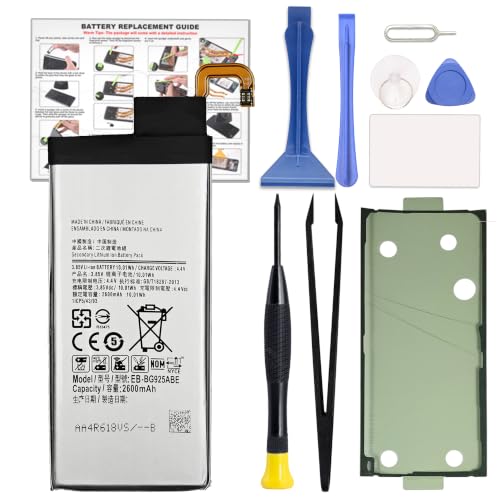
COMPATIBILITY: This battery only fits for Samsung Galaxy S6 Edge, SM-G9250, SM-G925A, SM-G925F, SM-G925FQ, SM-G925I, SM-G925K, SM-G925L, SM-G925S, SM-G925T, SC-04G, 404SC, SM-G925D, SM-G925J. Please carefully confirm your phone model before purchase.
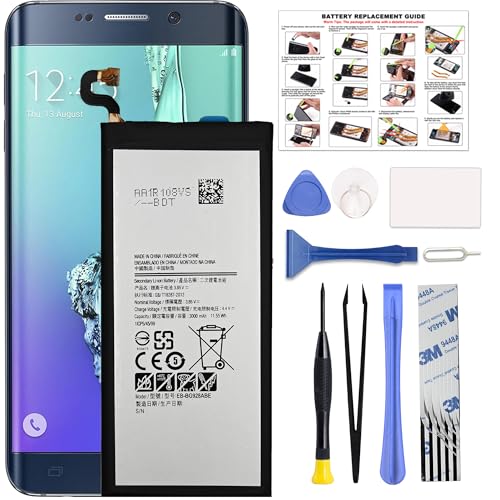
COMPATIBILITY: This battery only fits for Samsung Galaxy S6 Edge+ Plus, SM-G928A, SM-G928F, SM-G928A, SM-G928T, G928I, SM-G928G, SM-G928C, SM-G928I, SCV31, SM-G9280, SM-G928L, SM-G928S, SM-G928K, SM-G928W8. Please carefully confirm your phone model before purchase.
Essential Tools
- Screwdriver: Use a Phillips head screwdriver, typically size #00, to remove the screws from the back cover.
- Plastic Pry Tool: This tool helps to safely detach the back cover without damaging the phone’s casing.
- Tweezers: Tweezers are handy for grasping and maneuvering small components, especially when disconnecting the battery.
- Replacement Battery: Ensure you have a compatible Samsung S6 Edge battery. Look for certified batteries to avoid performance issues.
Optional Tools
- Heat Gun or Hairdryer: Applying gentle heat can soften the adhesive, making it easier to remove the back cover.
- Suction Cup Tool: This tool allows you to safely lift the back cover with minimal effort.
- Magnetic Mat: Keep screws organized by using a magnetic mat, preventing misplacement during the replacement process.
- Safety Glasses: Although not mandatory, glasses provide extra protection from any small parts that might spring out.
Gathering these tools before starting the replacement makes the process more efficient, ensuring you can complete the task without interruptions.
Step-by-Step Guide to Replace the Battery
Replacing the battery in your Samsung S6 Edge involves several straightforward steps. Follow these instructions carefully to ensure a successful battery replacement.
Recommended Products

[PLS CONFIRM DEVICE MODEL] --- The repair kit contains the instruction to guide you step by step installation, and we have professional engineers to answer all your questions about the repair process. Please verify your old battery part number and model before purchasing this replacement battery. Compatible with Samsung Galaxy S7 Edge SM-G935, G935A, G935T, G935P, G935V, EB-BG935ABE. ★NOT FOR Samsung Galaxy S7★

1. Applicable Models:Compatible with Samsung Galaxy S6 Edge SM-G9250, SM-G925A,Please carefully check your mobile phone model before purchasing to avoid purchasing the wrong model and damaging your product

Compatible for Samsung Galaxy S6 edge G925I
Power Off Your Device
Power off your Samsung S6 Edge to prevent any potential damage during the process. Press and hold the power button until the power menu appears, then tap “Power Off.” Wait for the device to fully shut down before proceeding.
Remove the Back Cover
Using a plastic pry tool, gently insert it into the seam between the back cover and the device frame. Slide the tool around the edges to detach the adhesive. If the adhesive is stubborn, a heat gun or hairdryer can soften it. Take care not to apply too much heat, as it may damage the phone. Once loose, carefully lift the back cover off and set it aside.
Disconnect the Old Battery
Locate the battery connector on the motherboard. Using a Phillips head screwdriver, unscrew the screws securing the battery connector’s bracket. Gently lift the connector with tweezers to disconnect the old battery. Take your time with this step to avoid damaging any nearby components.
Install the New Battery
Align the new battery with the connector on the motherboard. Press down firmly but gently to secure the connection. Make sure the battery is positioned properly before proceeding. If necessary, refer to the specifications of your replacement battery to ensure compatibility.
Reassemble Your Samsung S6 Edge
Reattach the battery connector bracket by aligning it and securing it with screws. Place the back cover back onto the device, ensuring it fits snugly. Apply some pressure along the edges to secure the adhesive, if used. Finally, power on the device by pressing the power button. Check that everything functions properly, including the new battery.
By following these steps, you can successfully replace the battery in your Samsung S6 Edge, enhancing its performance and extending its lifespan.
Tips for a Successful Replacement
Replacing the battery in your Samsung S6 Edge requires attention to detail. Following these tips ensures a smooth process.
Precautions to Take
- Always power off your device before starting the replacement.
- Avoid using metal tools that could damage internal components.
- Work in a well-lit area to clearly see small elements.
- Keep track of screws and small parts using a magnetic mat or containers.
- Wear safety glasses to protect your eyes from debris.
Troubleshooting Common Issues
- If the back cover doesn’t detach easily, apply gentle heat using a heat gun or hairdryer to soften the adhesive.
- If the device doesn’t power on after battery installation, double-check the battery connections.
- If the new battery drains quickly, ensure the battery is from a reputable source to avoid counterfeit products.
- If the back cover doesn’t seal properly, check for any remaining adhesive strips and replace them if necessary.
Conclusion
Replacing the battery in your Samsung S6 Edge can breathe new life into your device. With a little patience and the right tools you can tackle this task confidently. Remember to take your time and follow the steps carefully to ensure a smooth replacement.
Once you’ve got that new battery in place you’ll likely notice improved performance and longer usage times. Don’t hesitate to revisit the guide if you need a refresher. Enjoy your revitalized phone and the peace of mind that comes with knowing you can handle simple repairs yourself. Happy fixing!
Frequently Asked Questions
What are common battery problems with the Samsung S6 Edge?
The Samsung S6 Edge may experience issues such as rapid battery drain, slow charging, or the battery not holding a charge. These problems can often be resolved by replacing the battery.
Is replacing the battery on a Samsung S6 Edge difficult?
No, replacing the battery on a Samsung S6 Edge is not difficult, especially with the right tools and guidance. Most users can complete the task independently.
What tools do I need for a Samsung S6 Edge battery replacement?
Essential tools include a Phillips head screwdriver, a plastic pry tool, tweezers, and a compatible replacement battery. Optional tools like a heat gun, suction cup, and magnetic mat can make the process easier.
How long does it take to replace the battery?
Replacing the battery typically takes about 30 minutes to an hour, depending on your experience and whether you have all the necessary tools available.
Do I need professional help to replace the battery?
Most users can replace the battery on their own with the right instructions and tools. However, if you’re uncomfortable doing it, seeking professional help is always an option.
What precautions should I take during the battery replacement?
Work in a well-lit area, use non-metal tools to avoid damaging internal components, and ensure the device is powered off before starting the replacement process.
What if I have trouble removing the back cover?
If the back cover is stubborn, use a heat gun or hairdryer to soften the adhesive. A plastic pry tool can also help you carefully detach the cover.
