

Key Takeaways
- Battery Life Range: Lenovo laptops typically offer battery life between 3 to 12 hours, influenced by model type and usage patterns.
- Battery Types: Most models utilize lithium-ion and lithium-polymer batteries, each with unique benefits regarding longevity and weight.
- Performance Factors: Heavy usage, high screen brightness, and background applications significantly decrease battery life; adjusting these settings can help extend usage time.
- Maintenance Tips: Regular updates, proper charging habits, and temperature control play crucial roles in preserving battery health and maximizing lifespan.
- Real-World Usage: Different tasks impact battery performance variably; for example, web browsing can last 8 to 12 hours, while gaming may only last 2 to 5 hours.
- Optimization Strategies: Adjust power settings, manage background apps, and regularly maintain software to enhance overall battery performance and longevity.
Have you ever found yourself scrambling for a charger when your Lenovo laptop battery dies unexpectedly? You’re not alone. Many users wonder how long their laptop battery should actually last, especially during those crucial moments when you need it most.
Overview Of Lenovo Laptop Batteries
Lenovo laptop batteries vary in capacity and performance. Typically, battery life ranges from 3 to 12 hours, depending on several factors.
Battery Types
- Li-ion Batteries: Most Lenovo laptops use lithium-ion batteries. They offer a combination of high energy density and longevity.
- Li-Polymer Batteries: Found in some models, these batteries are lighter and can be shaped to fit various designs.
Factors Affecting Battery Life
- Usage Patterns: Heavy tasks like gaming or video editing drain batteries faster than web browsing or word processing.
- Screen Brightness: Higher brightness levels consume more power. Adjusting to a lower setting can extend battery life.
- Background Apps: Applications running in the background can use power. Closing unused apps can conserve battery.
Maintaining Battery Health
- Regular Updates: Keep your system up-to-date. Manufacturers often release updates that optimize battery performance.
- Charging Practices: Avoid letting the battery drain completely. Frequent full discharges can shorten overall lifespan.
- Temperature Control: Operating in extreme temperatures can harm battery health. Keep laptops in a moderate range.
Checking Battery Performance
Follow these steps to check your Lenovo laptop battery performance:
- Access Power Options: Go to Control Panel and select “Power Options”.
- Battery Report: Use the command prompt to generate a battery report. Type
powercfg /batteryreportand hit Enter. - Review Battery Usage: Analyze the report to understand battery usage statistics and health.
Understanding your Lenovo laptop battery helps you maximize its lifespan and ensure it meets your daily needs.
Factors Affecting Battery Life
Several elements directly influence the battery life of your Lenovo laptop. Understanding these factors helps you make informed choices to extend battery performance.
Recommended Products

【Tech Specs & 100% New Products】Model: L18M4PH0 Voltage: 7.68V Capacity:60Wh/7820mAh Battery type: Li-ion. (We only use grade A battery cells that provide up to 500 recharge cycles over the life of the battery.Come with screwdrivers.)

【Specifications】Model: 01AV418. Type: Li-ion. Voltage: 14.6V. Capacity: 41Wh 2810mAh. Up to 1000 recharge cycles over the life of the battery

♣Battery type: Li-ion; Capacity: 2600mAh Voltage: 14.8V;Cells: 4-cell. The battery is durable and has overcurrent protection, anti-overcharge, anti-overdischarge and temperature control functions.
Battery Age
Battery age significantly impacts overall performance. As batteries age, their capacity to hold charge diminishes. Typically, a lithium-ion battery lasts around 2 to 3 years, depending on usage. Regularly check your battery health status in the settings. If the capacity drops below 80%, consider replacing the battery for optimal performance.
Usage Patterns
Usage patterns play a critical role in battery longevity. Intensive tasks like gaming or video editing consume more power than basic tasks like web browsing or document editing. To manage power consumption, limit high-energy activities when not plugged in. Close unnecessary applications and tabs when running on battery power.
Power Settings
Power settings allow you to optimize battery use. Selecting the “Power Saver” mode can extend battery life by adjusting screen brightness and limiting background processes. Customize settings under the “Power Options” menu to suit your needs. Reducing screen brightness by 20% alone can significantly prolong battery life during use.
By being mindful of these factors, you’ll maximize your Lenovo laptop’s battery performance and enhance your overall experience.
Average Battery Life Of Lenovo Laptops
Most Lenovo laptops offer a battery life ranging from 3 to 12 hours. Several factors influence this duration, such as the model, usage habits, and settings.
Different Models Comparison
Lenovo’s laptop lineup includes various models. Here’s a breakdown of average battery life for a few popular types:
| Model | Average Battery Life |
|---|---|
| Lenovo Yoga Series | 8 to 15 hours |
| Lenovo ThinkPad Series | 7 to 12 hours |
| Lenovo IdeaPad Series | 5 to 10 hours |
| Lenovo Legion Series | 3 to 6 hours |
Design and components impact battery performance. Higher-end models, like the Yoga series, feature larger batteries and optimized energy consumption, leading to longer usage times. In contrast, gaming models like the Legion prioritize performance, which may reduce battery lifespan under heavy loads.
Real-World Usage Scenarios
Battery life varies in actual use. Here’s how different tasks affect it:
- Web Browsing: Expect 8 to 12 hours, depending on screen brightness and open tabs.
- Video Streaming: Typically lasts 5 to 8 hours due to higher energy demand.
- Gaming: Battery drains quicker, around 2 to 5 hours based on game intensity and settings.
- Office Work: Usual productivity tasks can yield 6 to 10 hours, particularly with moderate brightness.
These scenarios highlight how everyday actions impact battery longevity. Adjust settings accordingly to enhance life, such as reducing brightness during web browsing or closing unnecessary applications.
Tips For Maximizing Battery Life
Maximizing your Lenovo laptop’s battery life ensures longer usage between charges. Implementing effective strategies can enhance performance significantly.
Recommended Products
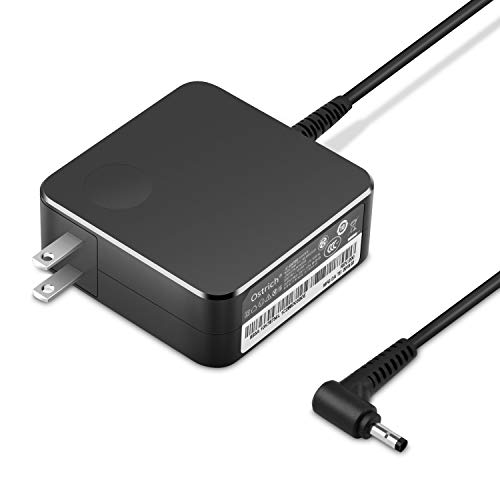
POWER SPECS Output Max: 20V 3.25A 65W/20V 2.25A 45W Input Volt Range: 110-240V/50/60Hz (For Worldwide Use) Compatible with Lenovo Charger Laptop AC Adapter Power Cord
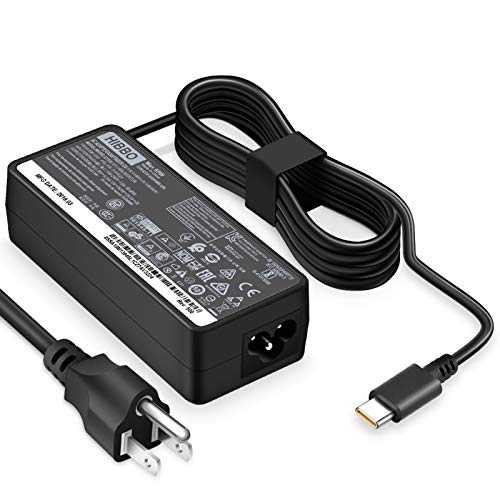
POWER SPECS - Output Max: 65W ~ 20V 3.25A / 15V 3A / 9V 2A Input Volt Range: 110-240V Compatible with Lenovo USB-C Charger Laptop AC Adapter Power Cord

Lenovo Retail Packaged And Factory Sealed Item , Lenovo Part Number 4X20M26268.
Charging Habits
- Avoid Constant Charging: Don’t keep your laptop plugged in all the time. Unplugging it after it reaches 100% helps maintain battery health.
- Optimize Charge Levels: Keep battery levels between 20% and 80% for optimal performance. Charging to full capacity or allowing it to drop to 0% often can shorten battery lifespan.
- Use Lenovo’s Charging Features: Some Lenovo laptops include smart charging options. Use features like “Conservation Mode,” which charges the battery to around 60%, extending its lifespan.
Software Updates
- Update BIOS and Drivers: Keeping BIOS and device drivers current improves battery management. Check Lenovo’s support site regularly for available updates.
- Regular Operating System Updates: OS updates often contain fixes that enhance battery optimization. Ensure your operating system is up to date.
- Manage Background Apps: Close unnecessary applications. Use built-in tools to monitor which apps consume the most power and disable those when not in use.
By adopting these practices, you can effectively maximize your Lenovo laptop’s battery life and improve overall performance.
Conclusion
Understanding how long your Lenovo laptop battery should last can make a big difference in your daily routine. By keeping an eye on your usage habits and following the tips shared, you can extend your battery life and avoid those frustrating moments when you’re searching for a charger.
Remember to monitor your battery health and consider adjustments based on your tasks. Whether you’re working on a project or enjoying some entertainment, a little care goes a long way in maintaining that power. With the right practices, you can enjoy your Lenovo laptop for hours on end without interruption.
Frequently Asked Questions
How long does a Lenovo laptop battery typically last?
Lenovo laptop batteries generally last between 3 to 12 hours, depending on various factors such as the model, battery type, usage patterns, and screen brightness. Higher-end models tend to offer longer battery life due to more efficient components.
What types of batteries do Lenovo laptops use?
Lenovo laptops primarily use lithium-ion and lithium-polymer batteries. Lithium-ion batteries are favored for their high energy density and longevity, while lithium-polymer batteries are lighter and can be shaped to fit various laptop designs.
What factors affect my Lenovo laptop battery life?
Battery life can be influenced by usage patterns, screen brightness, running applications, and battery age. Intensive tasks like gaming and video streaming consume more power, while lower brightness settings can help extend battery longevity.
How can I maintain my Lenovo laptop’s battery health?
To maintain battery health, keep your system updated, practice good charging habits, avoid extreme temperatures, and unplug the charger once it reaches 100%. Additionally, aim to keep battery levels between 20% and 80% for optimal performance.
How do I check my Lenovo laptop battery performance?
You can check battery performance by accessing power options in your control panel and generating a battery report. This report provides insights into battery usage statistics, health, and any potential issues that may need addressing.
When should I consider replacing my Lenovo laptop battery?
Consider replacing your battery when its capacity drops below 80% or if it shows significant performance decline after 2 to 3 years of use. Regular monitoring of battery health can help you decide when it’s time for a replacement.
What power settings can help improve battery life?
To optimize battery life, consider using the “Power Saver” mode in your laptop’s power settings. Additionally, reducing screen brightness and managing background applications will help decrease overall power consumption.
How can I maximize my laptop’s battery life?
Maximize battery life by unplugging the laptop after it’s fully charged, using features like “Conservation Mode” to limit charge to 60%, and managing background applications to reduce power consumption. Regularly updating your operating system also aids battery optimization.
