

Key Takeaways
- Essential Tools Required: Gather a plastic pry tool, suction cup, tweezers, and SIM card eject tool to successfully remove the LG Stylo 5 battery.
- Safety First: Always power off the device before starting the battery removal process to prevent electrical damage.
- Step-by-Step Process: Follow a clear step-by-step guide that includes removing the SIM card, prying off the back cover, disconnecting the battery, and carefully lifting it out.
- Gentle Handling: Be cautious during the removal process to avoid damaging any components; use gentle force and work meticulously.
- Reinstallation Tips: When installing a new battery, ensure it fits securely, and double-check that the back cover is correctly sealed to prevent gaps.
- Test Battery Performance: After installation, power up the device to confirm that the new battery functions properly and holds a charge effectively.
Ever found yourself frustrated with a phone that just won’t hold a charge? If you’re using an LG Stylo 5, you might be wondering how to tackle that battery issue yourself. Whether it’s for a replacement or just a quick fix, knowing how to remove the battery can save you time and money.
Overview of LG Stylo 5 Battery Removal
Removing the LG Stylo 5 battery can improve performance and extend battery life. Understanding the process is essential for quick repairs or battery replacements.
Tools You’ll Need
- Plastic Pry Tool: Use this to gently lift the back cover without causing damage.
- Suction Cup: This helps maintain grip on the phone while prying.
- Tweezers: These assist with handling small components.
- SIM Card Eject Tool: This is necessary for removing the SIM card tray.
Step-by-Step Instructions
- Power Off the Device: Always turn off your LG Stylo 5 before starting any disassembly. This prevents any electrical damage.
- Remove the SIM Card: Use the SIM card eject tool to remove the SIM card tray. This step helps prevent any obstruction during battery removal.
- Pry Off the Back Cover: Utilize the plastic pry tool along the edges of the phone. Begin at one corner and gently work your way around to avoid cracking the cover.
- Disconnect the Battery: After removing the back cover, locate the battery connection. Use tweezers to gently disconnect it from the motherboard.
- Remove the Battery: Carefully lift the battery out of the compartment. Dispose of it properly if it requires replacement.
Tips for Successful Battery Removal
- Work in a Clean Area: A clutter-free space helps prevent losing small components.
- Be Gentle: Avoid using excessive force when prying or lifting parts.
- Refer to Guides: Consider watching tutorial videos for visual guidance.
Removing the battery from your LG Stylo 5 is a straightforward process. By following these steps and using the right tools, you can handle battery issues easily.
Preparation Steps
Before you start removing the battery from your LG Stylo 5, take these preparation steps to ensure a smooth process.
Recommended Products
All the batteries have been inspected and tested before shipping out, and come with repairing tools for installation

Designed exclusively for LG V60 ThinQ 5G variants: LM-V600, A001LG. Double-check your device's model (found under Settings > About Phone) to ensure perfect fitment.

【PLS CONFIRM DEVICE MODEL】-- Same performance as the new OEM. Please verify your old battery part number and model before purchasing this replacement battery. Compatible with LG Stylo 6 Q730 LM-Q730 LM-Q730MM LM-Q730TM LM-Q730QM5 LM-Q730QM6 LM-Q730AM, P/N: BL-T48.
Gather Necessary Tools
Gather these essential tools to help with the battery removal:
- Plastic pry tool: For safely prying open the back cover.
- Suction cup: Helpful for lifting the back cover without damage.
- Tweezers: Useful for disconnecting tiny components, if needed.
- SIM card eject tool: Required for removing the SIM card.
Having these tools ready makes the process easier and reduces the risk of damaging your device.
Ensure Device is Powered Off
Power off your LG Stylo 5 before starting the battery removal process. To do this:
- Press and hold the power button.
- Tap “Power off” on the screen.
- Wait for the device to completely shut down.
Turning off your device prevents any electrical issues or accidental activation during the removal.
Step-by-Step Guide
Removing the LG Stylo 5 battery can enhance your device’s performance and address battery-related issues. Follow these steps for a smooth removal process.
Opening the Back Cover
- Prepare your workspace. Ensure you have a clean, flat surface to work on.
- Use a suction cup. Attach the suction cup to the back cover near the bottom edge.
- Gently pull the suction cup. This creates a small gap between the cover and the phone.
- Insert a plastic pry tool. Carefully place the tool into the gap and slide it around the edges. This helps loosen the adhesive.
- Remove the back cover. Lift it off gently, keeping an eye out for any components attached to the cover.
Disconnecting the Battery
- Locate the battery connector. Find the small connector where the battery links to the phone’s mainboard.
- Use tweezers. Grab the connector using tweezers for better control.
- Disconnect the battery. Pull the connector straight out without applying excessive force. Ensure you’re not tugging on any wires.
Removing the Battery
- Find the battery edges. Look for the sides of the battery to identify where it sits in the phone.
- Insert the pry tool. Carefully slide the plastic pry tool underneath the battery edges.
- Lift the battery gently. Gradually detach the battery from the device, taking care not to bend or damage it.
- Set the battery aside. Place it in a safe spot for replacement or disposal.
Following these steps ensures a successful removal of the LG Stylo 5 battery. Always handle components carefully to maintain their integrity.
Reinstallation and Testing
Once you’ve removed the battery, reinstalling a new one is crucial for restoring your device’s functionality. Here’s how to proceed effectively.
Recommended Products

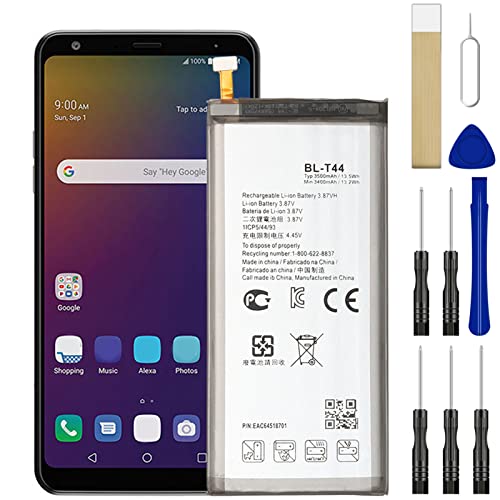
[FOR COMPATIBLE MODEL] - The repair kit contains the instruction to guide you step by step installation, and we have professional engineers to answer all your questions about the repair process. Please verify your old battery part number and model before purchasing this replacement battery. Compatible with LG BL-T44, LG Stylo 5 Q60 LMQ720CS LMQ720PS LMQ720MS LMQ720QM5 LMQ720QM6 LM-X520 X525EAW Q720MS EAC63958201.

🌠【Compatible Devices】Compatible with LG V20 BL-44E1F, LS997, VS995, US996, H910, H918, Stylo 3/Stylo 3 Plus,Please verify your old battery part number and model before purchasing this replacement battery.

This Charging Flex Come with Microphone.
Inserting the New Battery
- Align the Battery: Position the new battery so that the connectors align with the phone’s connector.
- Press Down Gently: Firmly press the battery into place, ensuring it fits snugly against the compartment.
- Check for Secure Fit: Look for any gaps or misalignment. The battery should sit flat without movement.
Closing the Back Cover
- Position the Cover: Lay the back cover over the device, aligning it with the edges of the phone.
- Press Firmly: Apply gentle pressure around the edges to snap the cover back into its original position.
- Examine for Gaps: Inspect the seams to ensure the cover is secure and flush against the phone body.
After installation, power on your device to test the new battery. Confirm that it charges properly and assess battery performance. If any issues arise, revisit the installation steps or consider troubleshooting further.
Conclusion
Taking control of your LG Stylo 5’s battery can really make a difference in its performance. By following the steps outlined, you can easily remove and replace the battery when needed. This not only saves you time and money but also gives your device a new lease on life.
Remember to handle everything with care and double-check your work during reinstallation. If you run into any hiccups don’t hesitate to revisit the steps or seek help. With a little patience and the right tools, you’ll have your phone running smoothly again in no time. Enjoy your refreshed device and the improved battery life that comes with it!
Frequently Asked Questions
How can I improve the battery life of my LG Stylo 5?
To enhance the battery life of your LG Stylo 5, consider adjusting screen brightness, disabling unused apps, and limiting background processes. Regularly updating your software and managing location services can also help conserve battery. If problems persist, removing the battery for replacement may be beneficial.
What tools do I need to remove the LG Stylo 5 battery?
You will need a plastic pry tool, suction cup, tweezers, and a SIM card eject tool. These tools help safely open the device, disconnect the battery, and facilitate its removal without damaging internal components.
Is it difficult to remove the battery from the LG Stylo 5?
Removing the battery from the LG Stylo 5 is relatively straightforward if you follow the proper steps. By preparing your workspace and using the right tools, you can easily complete the process with patience and care.
Do I need to power off my LG Stylo 5 before removing the battery?
Yes, you must power off your LG Stylo 5 before removing the battery. This prevents electrical issues and potential damage during the removal process. Make sure to select “Power off” after holding down the power button.
What should I do if my new battery doesn’t work?
If your new battery isn’t functioning, check its installation to ensure it’s securely connected. Revisit the steps for reinstalling the battery and confirm all components are properly aligned. If issues persist, consider testing with another battery or seeking professional help.
