

Key Takeaways
- Understand the necessity of battery removal for troubleshooting issues like resets or faulty performance in your Motorola G6.
- Gather essential tools, including a plastic pry tool, T5 Torx screwdriver, and suction cup tool, to facilitate a smooth battery removal process.
- Always power off your device before starting the battery removal to prevent damage.
- Follow a step-by-step guide for safely opening the device, disconnecting the battery, and removing it without harming internal components.
- Take precautions such as using an antistatic wrist strap and working on a clean, non-static surface to protect sensitive electronics.
- Properly replace the battery by ensuring correct alignment and secure attachment to the motherboard for optimal device performance.
Are you facing issues with your Motorola G6 and need to remove the battery? You’re not alone. Many users find themselves in situations where a battery replacement or reset is necessary, and knowing how to do it can save you time and frustration.
Overview of Motorola G6 Battery Removal
Removing the battery from your Motorola G6 can seem daunting, but it’s straightforward with the right approach. This process is essential for users dealing with issues like phone resets or faulty battery performance.
Tools Needed
- Plastic Pry Tool: Helps to safely open the device without damaging the plastic.
- T5 Torx Screwdriver: Required for some internal screws.
- Suction Cup Tool: Useful for lifting the screen away from the frame.
Steps for Battery Removal
- Power Off the Device: Ensure your Motorola G6 is completely powered off to prevent damage.
- Remove the Back Cover: Use the suction cup tool near the bottom edge. Pull gently to create a small gap, then insert the plastic pry tool to release the clips.
- Unscrew the Internal Screws: Locate the screws holding the battery in place. Use the T5 Torx screwdriver to remove them carefully.
- Disconnect the Battery: Locate the battery connector on the motherboard. Gently lift it using your plastic pry tool.
- Remove the Battery: Carefully lift the battery out of the device. Make sure to avoid damaging adhesive strips beneath it.
Precautions
- Static Electricity: Ground yourself to prevent static charges from damaging internal components.
- Handle with Care: Avoid using excessive force while removing covers or internal components.
Common Issues
- Difficulty Opening the Device: If you find it hard to pry the back cover, apply a bit of heat to soften the adhesive.
- Battery Replacement: Ensure the new battery is compatible with the Motorola G6 model for optimal performance.
By following these steps, you can successfully remove your Motorola G6 battery. Knowing the process helps you manage repairs efficiently, saving you both time and frustration.
Tools Needed for Battery Removal
Removing the battery from your Motorola G6 requires a few essential tools. Having the right tools ensures a smoother and safer removal process.
Recommended Products
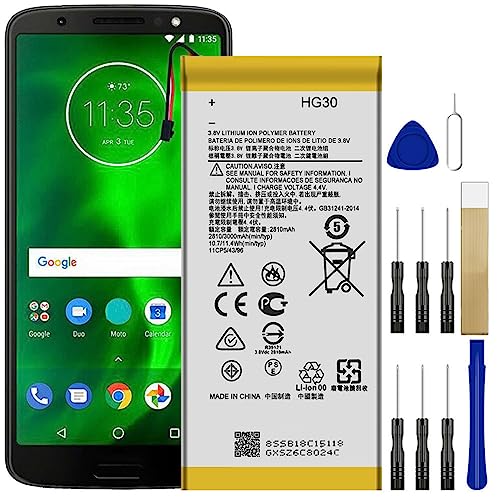
All the batteries have been inspected and tested before shipping out

Includes: 2 Pick Tools, 2 Screwdriver Tools, 2 Scraper Tools, 1 Glass Suction Tool
Recommended Tools
- Plastic pry tool: This tool helps separate the back cover without damaging the surface.
- T5 Torx screwdriver: Use this to unscrew the internal screws securely holding the battery in place.
- Suction cup tool: This creates leverage for gently pulling off the back cover.
- Tweezers: Helpful for disconnecting small connectors carefully.
- Antistatic wrist strap: Prevents static electricity damage to sensitive components.
Safety Precautions
- Power off device: Always turn off your Motorola G6 before starting the battery removal.
- Use antistatic equipment: Wear an antistatic wrist strap to minimize the risk of damaging components.
- Handle tools carefully: Ensure you use tools specifically designed for electronics to avoid breaks or slips.
- Work on a non-static surface: Use a clean, non-static work surface to prevent accidental discharge to your device.
Step-by-Step Guide to Remove Battery
Follow these steps to remove the battery from your Motorola G6 efficiently and safely.
Recommended Products

Model-Specific Compatibility: Designed exclusively for Moto G6 / G5S / G5S Plus with HG30 battery configuration. Note: Installation materials apply only to these specific model variants.

Compatibility: This replacement battery is compatible with Motorola G34 5G XT2363, Moto G 5G 2024 XT2417, ensuring a precise fit and reliable performance tailored to your device.

【Compatible Model】: This GK40 Replacement Battery Suitable for Moto G4 Play XT1607, Moto G5 XT1601, Moto E3, Moto E4, Moto E5 Play, Moto E5 Go, Moto E5 Cruise.
Powering Off the Device
Start by powering off your Motorola G6. Hold down the power button until the shutdown menu appears, then tap “Power Off.” This ensures that the device won’t accidentally turn on during the battery removal process.
Opening the Motorola G6
Use a plastic pry tool to gently separate the back cover from the device. Start at a corner and work your way around the edges. Insert the tool carefully to avoid damaging the back cover. For added leverage, place a suction cup tool on the back cover, pulling it slightly as you pry. This step exposes the internal components.
Disconnecting the Battery
Locate the battery connector, which is usually attached with a small plug. Use tweezers to carefully lift the connector from its socket. Avoid pulling directly on the wires to prevent damage. This step disconnects the battery from the motherboard, allowing for safe removal.
Removing the Battery
Grasp the battery and gently lift it out of the compartment. Pay attention to any adhesive that may hold it in place. If necessary, use a plastic pry tool to help loosen it without damaging the device. Dispose of the old battery or set it aside if you are replacing it with a new one.
By following these straightforward steps, you can efficiently remove the battery from your Motorola G6.
Replacing the Battery
Replacing the battery in your Motorola G6 can enhance its performance. Follow these steps to ensure a smooth installation of the new battery.
Recommended Products

Compatibility: This battery only fits for Motorola G Stylus 5G 2021, XT2131, XT2131DL, XT2131-1, XT2131-3, XT2131-4. Please carefully confirm your phone model before purchase.

Compatible with Motorola Cellphone: Moto G Stylus 2023 4G / 5G XT2315 XT2317. Double-check your device's model (found under Settings > About Phone) to ensure perfect fitment.

🔋【Compatible Model】🔋It is compatible with Moto G Power 2021, Model: XT2117-1, XT2117-2, XT2117-3, XT2117-4, XT2117DL. Please double identify and check your phone model matches before purchasing the battery.
Inserting the New Battery
- Align the new battery with the connectors in the compartment.
- Gently place the battery into the slot. Ensure that it sits flat and fits snugly.
- Connect the battery to the motherboard by pressing the connector securely into place. Avoid using excessive force; it should click in comfortably.
Sealing the Device
- Start by aligning the back cover with the device.
- Firmly press down on the edges to snap it back into place. Ensure there are no gaps.
- Use the T5 Torx screwdriver to reinsert and tighten any screws that were removed.
- If the device has adhesive, press down on the back cover for a few seconds to ensure a proper seal.
Following these steps ensures your Motorola G6 is assembled correctly, maintaining functionality for your needs.
Conclusion
Removing the battery from your Motorola G6 doesn’t have to be a daunting task. With the right tools and a little patience, you can tackle this process with confidence. Remember to follow the steps carefully and prioritize safety to protect your device.
By knowing how to replace your battery, you can boost your phone’s performance and extend its lifespan. Plus, you’ll save time and money by handling repairs on your own. So grab your tools and get started on giving your Motorola G6 a new lease on life. Happy repairing!
Frequently Asked Questions
How do I remove the battery from my Motorola G6?
To remove the battery from your Motorola G6, first, power off the device. Use a plastic pry tool and a suction cup to carefully lift the back cover. Unscrew any T5 Torx screws inside, then disconnect the battery connector with tweezers. Finally, gently lift the battery out, being cautious of any adhesive.
What tools do I need to replace the battery in a Motorola G6?
For battery replacement in a Motorola G6, you’ll need a plastic pry tool, a T5 Torx screwdriver, suction cup tool, tweezers, and an antistatic wrist strap. These tools help open the device safely and handle components without causing damage.
Are there any precautions I should take before removing the battery?
Yes, before removing the battery, make sure to turn off your device to prevent any electrical issues. Use an antistatic wrist strap to avoid static damage and work on a non-static surface. Always handle tools and components with care.
What should I do after removing the old battery?
After removing the old battery, align the new battery with its connectors and gently place it into the slot. Securely connect it to the motherboard without using excessive force, then reassemble the device by replacing the back cover and tightening any screws.
Can replacing the battery improve my Motorola G6’s performance?
Yes, replacing a worn-out battery can enhance your Motorola G6’s performance. A new battery can provide better charge retention and longer usage times, which helps in maintaining the overall functionality of your device.
