

Key Takeaways
- Understanding Battery Temperature: Low battery temperature can lead to performance issues, device slowdowns, and unexpected shutdowns, impacting usability.
- Common Symptoms: Signs include warning messages about low battery temperature, sluggish performance, sudden shutdowns, and charging problems.
- Causes: Factors such as cold environments, older batteries, incompatible chargers, and software glitches can trigger low temperature warnings.
- Quick Fixes: Restarting your smartphone and enabling Battery Saver Mode can help resolve temporary issues and stabilize battery performance.
- Long-Term Solutions: Regularly update your device and use official chargers to maintain battery health and prevent temperature-related problems.
- Preventive Measures: Avoid extreme weather conditions and monitor app usage to prevent unnecessary battery strain and maintain optimal temperature.
Have you ever picked up your Android smartphone only to see a warning that the battery temperature is too low? It’s frustrating, especially when you need your device to stay connected. This issue can pop up unexpectedly, leaving you wondering how to get your phone back to normal.
Understanding Battery Temperature Issues
Battery temperature plays a crucial role in the performance and lifespan of your Android smartphone. A reading below the optimal range indicates potential problems that could affect device usability and safety.
Common Symptoms of Low Battery Temperature
- Warning Messages: You might see alerts on your screen stating “Battery temperature too low.”
- Device Slowdowns: Performance issues, like lag or reduced responsiveness, often accompany low temperatures.
- Unexpected Shutdowns: Your phone may turn off suddenly, even with sufficient battery charge remaining.
- Charging Problems: Difficulty charging can occur, where the device either charges very slowly or not at all.
Causes of Low Battery Temperature
- Cold Environments: Exposure to low temperatures can cause battery cells to cool down excessively.
- Battery Age: Older batteries might struggle to maintain temperature, leading to performance warnings.
- Incompatible Charging Accessories: Using non-standard chargers can affect battery behavior and temperature.
- Software Glitches: Bugs in the operating system can trigger false temperature alerts or improper readings.
Quick Fixes for Low Battery Temperature
Addressing low battery temperature issues on your Android smartphone can improve performance and prevent warning messages. Here are some quick fixes to consider.
Recommended Products

【Smaller & Slimmer】A 0.55-inch power bank that breaks the 10000mAh limit, weighing just 219g and only 14mm thick. Enjoy the days’ worth of charging capacity, enough to top up iPhone 17/16/15 1.9 times, Samsung S25/S24 1.9 times, or Headphones 11.5 times. The battery pack easily slipped into any travel lover's pockets or bag.
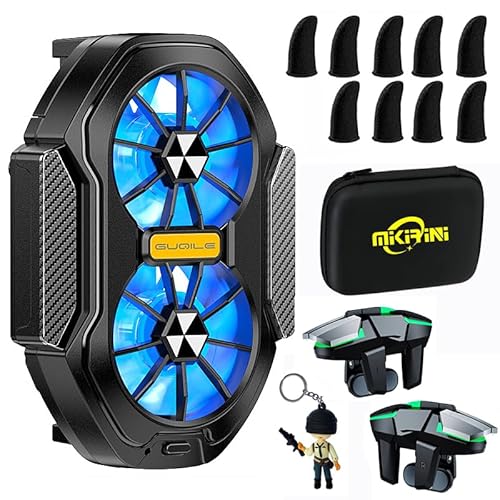
✅【No More Overheating】Is your phone losing the battle during intense gaming sessions due to overheating? You are in the right place. Mikirini phone cooler is designed for mobile gamers, live streamers, bloggers, and others who use devices for extended periods. The phone cooling case can cool your device in seconds and keep it at a suitable temperature.

15W Magnetic Fast Wireless Charger Samsung : This magnetic charger for Samsung automatically adjusts between 5W, 7.5W, 10W and up to 15W to deliver efficient, safe, and stable wireless charging based on your device's power needs. Samsung S26 ULtra magnetic charger can charge Samsung s26 series up to 50% in half an hour and a full charge in about 2.5 hours, up to 1.8X faster than standard wireless charger,3 times faster than the original 5W iPhone charger. In order to get a better fast charging experience, we strongly recommend that you use an 18W/20W or higher USB-C or USB-A power adapter (no adapter).
Restart Your Smartphone
Restarting your smartphone can reset system parameters and resolve temporary glitches. To restart, press and hold the power button until the shutdown menu appears. Select “Restart” to refresh the device’s settings and clear any error messages related to battery temperature.
Enable Battery Saver Mode
Enabling Battery Saver Mode helps stabilize battery performance in colder conditions. To activate, go to Settings, select Battery, then tap on Battery Saver. This mode limits background activity, which can help prevent battery discharge in low-temperature scenarios. You may notice improved device responsiveness as a result.
Long-Term Solutions to Maintain Ideal Battery Temperature
Maintaining an ideal battery temperature is essential for optimal performance. Here are some effective strategies.
Recommended Products

Apple MFi Certified for Guaranteed Safety & Compatibility: Acecene 3ft USB-C Cable officially certified by Apple to ensure safe, stable, and reliable charging for your iPhone, iPad, and other devices with USB-C. Built-in chip protects against overheating and electrical hazards.

【iPhone 18 Charger】20W PD USB Type C power delivery wall plug, PD adapter 3.0 Quickly Charge , USB-C port provides Max 20W output power, 3X faster than standard USB charger. charging your up to 50% in just 30 minutes for i Pad Pro Charging, At 3A Maximum, Helps You Work Efficiently.

[3C Certified Power Bank] - Certified with 3C & UL2056 standards, ensuring high safety and reliability (Checking CCC on China State Administration for Market Regulation: cx.cnca.cn, cert id: 2024010914716113). It packs a 10,000mAh battery, 4 built-in cables, and 20W PD/QC fast charging. Flight-approved and travel-ready, it's a must-have for international trips.
Keep Your Device Updated
Updating your device ensures it runs the latest software. Manufacturers often release updates that enhance battery management systems, improving temperature regulation. To check for updates, navigate to Settings, select System, then Software Update. Install any available updates promptly to benefit from these improvements.
Use Official Chargers and Accessories
Using compatible chargers and accessories prevents battery damage. Official chargers meet specific voltage and current requirements, minimizing risks of overheating or underheating. Avoid third-party chargers that lack certification. Always check for appropriate connectors and specifications. For best results, charge your device with the original charger supplied with the smartphone or a certified replacement.
Preventive Measures to Avoid Battery Temperature Issues
Maintaining an optimal battery temperature keeps your Android smartphone performing well. Here are some effective preventive measures to help you avoid battery temperature issues.
Avoid Extreme Weather Conditions
Keep your smartphone away from extreme temperatures. Cold environments can cause the battery to perform poorly and trigger warnings. For example, avoid leaving your device in a car during winter months or exposing it to cold air conditioning. When outdoors, keep your smartphone in an insulated pocket or case to maintain warmth.
Monitor App Usage and Resources
Monitor your app usage to prevent unnecessary battery drain. Some apps run in the background, consuming power and potentially causing temperature fluctuations. Check battery usage stats in your device settings to identify energy-hungry apps. Limit background activity or uninstall apps that consistently consume high resources. You can also enable data-saving modes in apps to reduce strain on the battery.
By implementing these preventive measures, you enhance your smartphone’s resilience against battery temperature issues.
Conclusion
Dealing with a low battery temperature warning can be annoying but you’ve got the tools to tackle it. By following the quick fixes and long-term solutions we discussed you can keep your smartphone running smoothly. Remember to monitor your device’s environment and app usage to prevent future issues.
Taking these steps not only helps your phone perform better but also extends its lifespan. Keep your device cozy and enjoy uninterrupted connectivity. You deserve a smartphone that works as hard as you do!
Frequently Asked Questions
What does it mean when my Android smartphone shows a low battery temperature warning?
A low battery temperature warning indicates that the battery is operating below its optimal temperature range. This can cause issues like slow performance, unexpected shutdowns, and problems with charging due to the battery’s inability to function correctly.
What causes low battery temperature on Android devices?
Low battery temperature can result from various factors including exposure to cold environments, the age of the battery, incompatible charging accessories, and software glitches that might trigger false alerts.
How can I fix the low battery temperature warning on my smartphone?
To fix this warning, try restarting your smartphone to reset system parameters. You can also enable Battery Saver Mode, which can stabilize battery performance in cold conditions by limiting background activity.
What preventive measures can I take to avoid battery temperature issues?
To prevent battery temperature issues, keep your smartphone away from extreme weather conditions and avoid leaving it in cold environments. Additionally, monitor app usage to limit background activity and reduce battery drain.
How does battery temperature affect smartphone performance?
Battery temperature significantly affects performance and lifespan. When the battery is too cold, it may lead to slower response times, unexpected shutdowns, or difficulty in charging, ultimately hindering device usability and safety.
