

Key Takeaways
- Understand Sony Battery Types: Familiarize yourself with different Sony battery types, including lithium-ion, nickel-metal hydride, lead-acid, and CR-series, to ensure you use the right battery for your device.
- Prioritize Safety When Charging: Always inspect chargers and cables for damage, use approved equipment, and charge in a dry, temperature-controlled environment to prevent malfunctions.
- Follow Proper Charging Steps: Whether using a charger or USB, ensure connections are secure and monitor charging indicators to confirm that your battery is charging correctly.
- Identify Common Charging Problems: Be aware of symptoms like no charging indicator, slow charging, rapid battery drain, and overheating, which can indicate various issues with the battery or charger.
- Implement Troubleshooting Solutions: Check connections, use original equipment, test different power sources, reset the device, and consider battery replacement if charging issues persist.
- Maintain Device Performance: Properly charging and maintaining your Sony batteries enhances the performance and longevity of your devices.
Have you ever found yourself struggling to get your Sony device powered up? It can be frustrating when your battery runs low, especially when you need it most. Whether it’s your camera, headphones, or gaming console, knowing how to charge your Sony battery properly can make all the difference.
Overview of Sony Batteries
Sony produces a diverse range of batteries suitable for various devices. Understanding these options helps you choose the right battery for your needs.
Types of Sony Batteries
- Lithium-Ion Batteries: Common in devices like cameras and smartphones, lithium-ion batteries offer high energy density and rechargeable capabilities.
- Nickel-Metal Hydride Batteries: Found in older cameras and some handheld devices, nickel-metal hydride batteries provide decent performance but less overall capacity compared to lithium-ion.
- Lead-Acid Batteries: Used in larger equipment or tools, lead-acid batteries deliver substantial power but are heavier and bulkier.
- CR-Series Batteries: These include CR123A and CR2450 models. They’re often used in cameras, remote controls, and medical devices due to their reliable voltage output.
Common Uses of Sony Batteries
- Cameras: Sony batteries power DSLRs, mirrorless systems, and compact cameras, ensuring optimal performance during shooting sessions.
- Headphones: Many wireless Sony headphones rely on rechargeable batteries to provide extended listening time without interruptions.
- Gaming Consoles: Sony’s PlayStation controllers use rechargeable batteries, allowing for hours of immersive gaming without frequent charging.
- Portable Devices: Devices like handheld gaming consoles or lighting equipment also benefit from Sony’s battery technology, providing the necessary energy for portable use.
Preparing to Charge Your Sony Battery
Charging your Sony battery correctly ensures that your devices function optimally. Follow these essential steps to prepare for charging.
Recommended Products

Notice:1.Recommended to use a power adapter with 22.5W or higher output; 2.Not compatible with 5V / 1A power adapterss; 3.When using a 5V / 2.4A adapter, the charger operates in slow-charge mode, prioritizing the charging of the battery in Channel 1 first. It automatically switches to Channel 2 once Channel 1 is fully charged

Exact Capacity: Each battery features 3.6V, 1240mAh. Triple your camera runtime with a complete backup package including 3 replacement batteries and a 3-channel charger with Micro USB cable

3-Pack NP-FZ100 Batteries for More Shooting: 3 pack A7iv batteries rated at 7.4V 2280mAh 16.8Wh, ensure extended power for your camera without memory effect. A perfect battery backup to capture the treasure moments during journey or outdoors.
Safety Precautions
- Inspect the Charger: Check for any damage to the charger or cable. If you find frays or cracks, don’t use it.
- Use Approved Equipment: Always use the charger specified by Sony or your device’s manufacturer. Using unapproved chargers may damage your battery.
- Avoid Wet Environments: Ensure the charging area is dry. Moisture can cause malfunctions or short circuits.
- Keep Away from Heat: Charge the battery at room temperature. High temperatures can impact battery performance and lifespan.
Required Equipment
- Sony Charger: Use the correct model for your battery type, ensuring compatibility.
- Power Source: Opt for a reliable outlet, or use a USB port from a computer or power bank.
- Battery: Ensure your Sony battery is suitable for your device. Confirm that it’s clean and free of debris before placing it in the charger.
- Multi-Port USB Hub (Optional): If you charge multiple devices simultaneously, a hub can help manage power distribution effectively.
Steps on How to Charge Sony Battery
Charging your Sony battery correctly ensures your devices function properly. Follow these steps to charge your battery using different methods.
Recommended Products

STANDARD COMPATIBILITY: LP NP-FW50 Battery Charger meets or exceeds the NP-FW50 Battery Charger (BC-TRW W Series Battery Charger). Works with Alpha A3000, A5000, A5100, A6000, A6300, A6500, A7, A7II, A7S, A7SII, A7R, A7RII, SLT-A33, A35, A37, A55, RX10, RX10II, RX10 III, RX10 IV, NEX-3/5/7 series and more.

Battery Type: Lithium-Ion; Battery Voltage: 3.7V; Battery Capacity: 1500mAh.
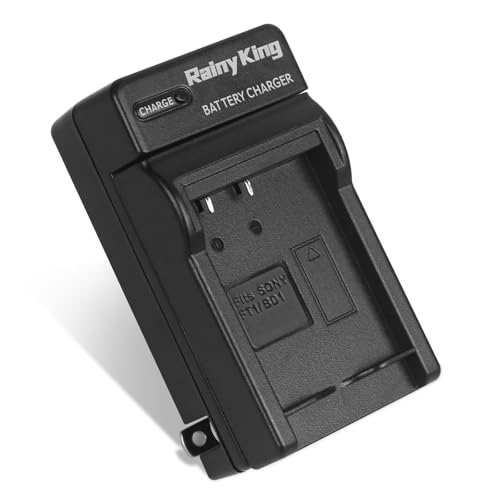
Our NP-BD1 charger is 100% new and compatible with OEM Sony NP-BD1, NP-FD1 Battery Charger(BC-CSD, BC-TR1 Charger). Please confirm the model of your battery or camera before purchasing.
Using a Charger
- Gather Equipment: Use an original Sony charger compatible with your battery type. Check for any visible damage.
- Connect Charger: Plug the charger into a power outlet. Ensure it’s securely connected.
- Insert Battery: Place the battery into the charger. Ensure it’s positioned correctly according to the instructions.
- Verify Charging Indicator: Look for a charging indicator light. This typically shows that the battery is in charging mode.
- Charging Duration: Wait for the specified charging time, usually 1 to 4 hours for most Sony batteries. Refer to your device’s manual for specifics.
Charging via USB
- Select a USB Cable: Use a compatible USB cable designed for your Sony device. Confirm it’s in good condition.
- Connect to Power Source: Plug the USB end into a power adapter or a laptop. Choose a reliable power source for efficient charging.
- Insert Battery: Position the battery into the device. Ensure the device is off to start charging without interruptions.
- Monitor Charging: Keep an eye on any indicators on your device. A LED light usually signals charging status.
- Duration Consideration: Charging via USB can take longer, typically 2 to 6 hours. This varies based on the device and battery capacity.
Follow these steps to ensure your Sony battery charges effectively, maintaining the performance of your devices.
Troubleshooting Charging Issues
Charging problems can arise with Sony batteries, affecting your device’s performance. Identifying and addressing these issues promptly ensures your devices stay functional.
Recommended Products

Battery Type: Lithium-Ion; Battery Voltage: 3.7V; Battery Capacity: 1600mAh.
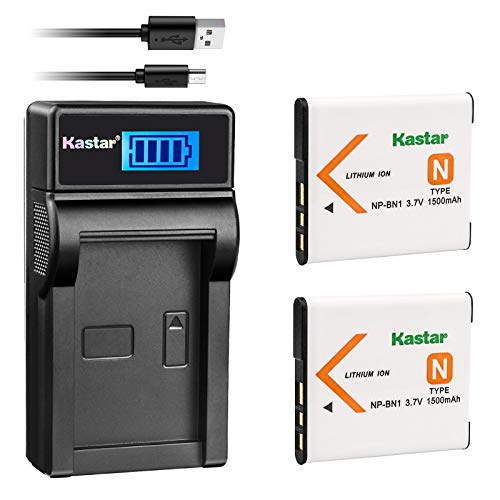
Battery Type: Lithium-Ion; Battery Voltage: 3.7V; Battery Capacity: 1500mAh. Battery Dimensions: 1.6" x 1.38" x 0.19"; Battery weight: 0.8 Oz

Replacement Batteries for NP-FW50: A bigger capacity of 1100mAh/8.1W, can charge inside the camera, or using the 2.1A USB input charger to maximize charging efficiency. NOTE: For optimal battery longevity, please fully charge the battery before first use
Identifying Common Problems
- No Charging Indicator: If the charging light doesn’t turn on, it may indicate a connection problem or a faulty charger.
- Slow Charging: A battery that takes much longer than usual to charge might be experiencing wear or other issues.
- Battery Draining Quickly: If your battery depletes rapidly after charging, it may be reaching the end of its lifespan.
- Overheating: Excessive heat during charging suggests potential battery or charger malfunctions.
Solutions and Tips
- Check Connections: Ensure all cables and ports are securely connected. Inspect for debris or damage in the charging area.
- Use Original Equipment: Stick with Sony-approved chargers and cables to avoid compatibility issues.
- Test Power Source: Plug into a different outlet or device to confirm the issue isn’t with the power source.
- Reset the Device: Sometimes, a simple reset of the device can resolve charging recognition issues.
- Consider Battery Replacement: If problems persist and the battery’s old, consider replacing it for improved performance.
- Monitor Charging Environment: Charge in a temperature-controlled area, avoiding extreme heat or cold conditions.
These steps help troubleshoot and resolve common charging issues with Sony batteries, keeping your devices ready for use.
Conclusion
Keeping your Sony devices charged and ready to go is easier than you think. By following the right steps and using the appropriate equipment you can ensure your batteries stay in top shape. Remember to pay attention to safety precautions and troubleshoot any issues that may arise.
With a little care and attention you can enjoy uninterrupted use of your favorite gadgets. So whether you’re capturing memories with your camera or gaming with friends make sure your Sony battery is always charged and ready for action. Happy charging!
Frequently Asked Questions
What should I do if my Sony device won’t charge?
If your Sony device won’t charge, first check the power source and connections. Ensure the charger and cable are intact and compatible. Inspect the charging port for debris. If all seems fine, try resetting the device. If issues persist, consider contacting Sony support or replacing the battery.
How long does it typically take to charge a Sony battery?
Charging times for Sony batteries generally range from 1 to 6 hours, depending on the type of battery and charging method. Standard chargers may fully charge batteries in 1 to 4 hours, while USB methods might take 2 to 6 hours.
What types of batteries do Sony devices use?
Sony devices commonly use lithium-ion, nickel-metal hydride, lead-acid, and CR-series batteries. Lithium-ion batteries are found in smartphones and cameras, while nickel-metal hydride is in older devices. Lead-acid batteries are for larger equipment, and CR-series batteries are often used in cameras and remote controls.
How can I safely charge my Sony battery?
To charge your Sony battery safely, inspect the charger for damage, avoid wet environments, and ensure the charging area is cool. Always use approved equipment and ensure the battery is clean and compatible with the device before charging.
How can I troubleshoot slow charging issues?
To troubleshoot slow charging, check if the charger and cable are in good condition. Ensure you’re using the original charger, test the power source, and clean the charging port. If problems persist, resetting the device or replacing the battery might be necessary.
What should I do if my Sony battery overheats while charging?
If your Sony battery overheats, immediately unplug it from the charger and allow it to cool down in a safe location. Check that you’re using the correct charger and inspect for any damage. If overheating continues, consider contacting support or replacing the battery.
