

Key Takeaways
- Understand Battery Types: Familiarize yourself with the two main battery types used in Sony cameras—Lithium-Ion, which charges quickly and offers high energy density, and Nickel-Metal Hydride, which is less common and can exhibit memory effect.
- Utilize Proper Charging Methods: Choose the right charging method for your needs, whether through wall chargers, battery grips, external chargers, or USB charging options.
- Follow a Simple Charging Process: Ensure you remove the battery from the camera, select the correct charger, plug it in, and monitor the charging indicator for optimal results.
- Maintain Battery Health: Regularly charge your battery, avoid extreme temperatures, and use compatible chargers to enhance longevity and performance.
- Store Batteries Correctly: Keep batteries in a cool, dry place, partially charge for long-term storage, and remove them from the camera if not in use for extended periods.
Have you ever found yourself ready to capture that perfect moment only to realize your Sony camera’s battery is dead? It’s a frustrating situation that many photographers face, whether you’re a seasoned pro or just starting out. Knowing how to charge your camera battery correctly can save you from missing those precious shots.
In this article, you’ll learn simple steps to ensure your Sony camera battery is always ready to go. We’ll cover everything from the right charging methods to tips on maintaining battery health. By the end, you’ll feel confident about keeping your camera powered up and ready for any adventure.
Understanding Sony Camera Battery Types
Knowing the types of batteries used in Sony cameras helps you charge them effectively. The most common types found in these cameras are Lithium-Ion and Nickel-Metal Hydride.
Lithium-Ion Batteries
Lithium-ion batteries are the primary choice for modern Sony cameras. They offer a high energy density, lightweight design, and minimal memory effect. Commonly found in models such as the Sony Alpha series, they typically provide longer usage times. These batteries often charge within a couple of hours, using either a dedicated charger or the camera itself.
To charge a lithium-ion battery:
- Use the correct charger. Always utilize the charger included with your camera or one designed for your specific battery model.
- Connect to a power source. Plug the charger into a wall outlet, ensuring it’s a stable connection.
- Insert the battery. Place the battery in the charger until it clicks into place.
- Check for charging indicators. Most chargers have LED lights that signify charging status.
Nickel-Metal Hydride Batteries
Nickel-metal hydride (NiMH) batteries, while less common, are still used in some older Sony camera models. They store less energy per unit weight than lithium-ion batteries but are often more affordable. NiMH batteries exhibit a slight memory effect if not fully drained regularly, which can reduce their capacity over time.
To charge a nickel-metal hydride battery:
- Select a compatible charger. Ensure the charger is specifically for NiMH batteries.
- Position the battery correctly. Insert the battery into the charger, aligning the contacts properly.
- Plug in your charger. Connect it to an electrical outlet.
- Monitor the charging process. Some chargers indicate when batteries are fully charged.
By understanding these types, you can ensure the right charging methods are in place for maintaining your Sony camera’s battery health.
Charging Options for Sony Cameras
Charging your Sony camera battery can be done using a few different methods. Each method has its advantages. Familiarizing yourself with these options ensures your camera stays powered for any shoot.
Recommended Products
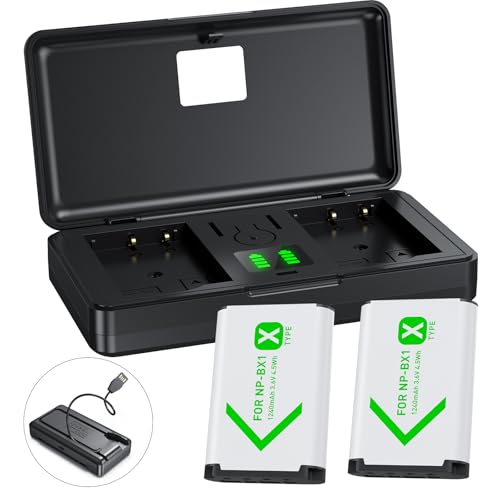
📷【Compact & Portable】The set includes 1 charger and 2 batteries, Battery Type: Lithium-Ion; Battery Voltage: 3.6V; Battery Capacity: 1240mAh*2; Input: 5V/1A; Output: 4.2V/500mAh. This pocket-sized battery charger is designed for maximum portability, it can hold 2 battery and 2 TF card, eliminating the bulk of traditional chargers.

COMPATIBILITY - Works with these popular Sony cameras that use NPBX1 batteries: ZV-1, ZV-1 II, DSC-H400, DSC-HX90V, DSC-HX95, DSC-HX99, DSC-HX300, DSC-HX400V, DSC-RX1, DSC-RX1R, DSC-RX1RM2 (RX1R II), RX100, RX100M2/M3/M4/M5/M5A/M6/M7, DSC-WX300, DSC-WX350, DSC-WX500, FDR-X1000V, FDR-X1000VR, FDR-X3000, HDR-AS50, HDR-AS50R, HDR-AS100V, HDR-AS100VR, HDR-AS200V, HDR-AS200VR, HDR-AS300, HDR-AS300R, HDR-CX240, HDR-CX405, HDR-CX440, HDR-GW66V, HDR-GWP88V, HDR-MV1, HDR-PJ270, HDR-PJ275, & more below

Able to charge NP-BX1 from USB port of PC, AC adaptor, or car via USB adaptor, by connecting with the Micro USB Cable supplied with camera
Charger Types
Sony offers multiple charger types for their cameras. These include:
- Wall Chargers: Compact and convenient, wall chargers plug directly into an outlet. They typically charge the battery in several hours.
- Battery Grips: These grips allow you to install multiple batteries, extending your shooting time. They often include a charging option.
- External Chargers: Portable chargers offer versatility for on-the-go photographers, allowing you to charge batteries away from power sources.
- Multi-Battery Chargers: Ideal for photographers with several batteries, these chargers simultaneously charge multiple batteries, saving time.
USB Charging
USB charging provides a flexible option for recharging your camera battery.
- Compatibility with Power Banks: You can use power banks to charge your camera, making it easy to power up during long shoots.
- Connection to Laptops or Computers: Connecting your camera to a laptop or desktop computer with a USB cable allows for charging while transferring photos.
- Accessing Charging Ports: Check if your specific Sony camera model supports USB charging. Many newer models do, making it a convenient option.
Choose the charging method that best suits your needs. Ensure you’re using the correct charger for your battery type to maintain optimal performance.
Step-by-Step Guide on How to Charge a Sony Camera Battery
Follow these steps to charge your Sony camera battery effectively and keep your gear ready for action.
Preparing the Battery
- Remove the Battery: Open the battery compartment on your Sony camera. Press the release button to detach the battery from the camera body.
- Inspect the Battery: Check for dirt or corrosion on the battery contacts. Clean any residue gently with a dry cloth to ensure a good connection.
- Consult the Manual: Refer to your camera’s user manual for specific instructions on the battery type and charging methods.
Using the Charger
- Select the Right Charger: Use either the official Sony wall charger or a compatible external charger. Make sure the charger matches your battery type, either Lithium-Ion or Nickel-Metal Hydride.
- Insert the Battery: Align the battery’s contacts with the charger’s terminals and push it gently until it locks into place. Ensure it’s seated correctly.
- Plug in the Charger: Connect the charger to a power outlet using the appropriate cable. For USB charging, connect it to a power bank or laptop.
Monitoring the Charging Process
- Check the Indicator Light: Observe the charger’s LED light. It typically turns red or blinks when charging, changing to green or turning off when fully charged.
- Timing: Charging a Lithium-Ion battery usually takes about 1.5 to 3 hours; Nickel-Metal Hydride batteries may require longer. Refer to the battery specifications for precise times.
- Avoid Overcharging: Unplug the charger once charging is complete. Continuous charging can reduce battery lifespan.
By following these steps, you’ll keep your Sony camera battery charged and ready for any shooting opportunity.
Tips for Maintaining Battery Health
Maintaining your Sony camera battery’s health extends its lifespan and improves performance. Follow these essential tips for optimal results.
Optimal Charging Practices
- Charge Regularly: Charge your battery every few months if not in use to keep its capacity up.
- Avoid Extreme Temperatures: Charge in environments between 32°F and 104°F (0°C to 40°C) to prevent damage.
- Use Compatible Chargers: Always use chargers designed for your specific battery type to ensure safety.
- Don’t Overcharge: Disconnect the charger once the battery is full to avoid overheating and capacity loss.
- Monitor Indicator Lights: Pay attention to the indicator lights during charging. A steady green light usually means charging is complete.
Storage Recommendations
- Store in a Cool, Dry Place: Keep your battery in a location with low humidity and stable temperatures.
- Use a Battery Case: Protect your battery from physical damage by storing it in a dedicated battery case or pouch.
- Partial Charge for Long-Term Storage: Store your battery at around 50% charge if not used for an extended period.
- Check Periodically: Inspect and recharge your battery every few months, ensuring it remains in good condition.
- Remove from Camera for Extended Breaks: If you’re not using your camera for a while, take the battery out to prevent unnecessary battery drain.
By implementing these practices, you can enhance your Sony camera battery’s longevity and reliability, ensuring you’re ready to capture every moment.
Conclusion
Keeping your Sony camera battery charged and healthy is key to capturing those unforgettable moments. By following the steps and tips outlined, you can ensure your battery’s always ready when you need it.
Remember that regular charging and proper storage make a big difference in battery life. With the right care and attention, you can enjoy the freedom of shooting without worrying about running out of power.
So go ahead and explore your creativity knowing your camera’s got the energy it needs to keep up with you. Happy shooting!
Frequently Asked Questions
How do I charge my Sony camera battery properly?
To charge your Sony camera battery, remove it from the camera and insert it into a compatible charger. Ensure the charger is connected to a power source. Monitor the charging status through the indicator light and avoid overcharging. Always consult the user manual for specific instructions related to your camera model.
What types of batteries do Sony cameras use?
Sony cameras typically use Lithium-Ion and Nickel-Metal Hydride (NiMH) batteries. Lithium-Ion batteries are popular due to their high energy density and lightweight design. NiMH batteries are more affordable but require proper charging techniques to maintain their capacity.
What are the benefits of Lithium-Ion batteries?
Lithium-Ion batteries offer several advantages, including a high energy density, lightweight design, and a low self-discharge rate. They also have a longer lifespan compared to other battery types and can provide consistent power, making them ideal for photographers on the go.
What are the best charging options for Sony cameras?
The best charging options for Sony cameras include wall chargers, battery grips, external chargers, and multi-battery chargers. USB charging is also convenient, allowing you to charge via power banks, laptops, or computers, making it versatile for travel or on-location shoots.
How can I maintain my Sony camera battery’s health?
To maintain your Sony camera battery’s health, charge it regularly and avoid extreme temperatures. Use compatible chargers and monitor the indicator lights during charging. Store the battery in a cool, dry place, preferably in a designated battery case, and check it periodically for optimal performance.
