

Key Takeaways
- Battery Life Variation: Samsung watch battery life varies by model, usage, and settings, with most lasting between 1 to 3 days on a single charge.
- Key Factors Affecting Performance: Brightness settings, app usage, GPS features, and constant notifications significantly influence battery drain.
- Tip for Maximizing Battery Life: Activate power-saving modes, limit active apps, and adjust notification settings to prolong battery life effectively.
- Common Battery Issues: Users should watch for rapid battery percentage drops, overheating, and unexpected short usage times as indicators of potential battery problems.
- Comparison with Other Brands: Samsung watches generally offer longer battery life compared to competitors like Apple, but shorter than some Fitbit models, making them suitable for varied user needs.
Have you ever wondered how long your Samsung watch battery should really last? You’re not alone. Many users find themselves checking their watch more often than they’d like, worrying about whether it’ll make it through the day.
Understanding battery life can save you from those annoying moments when your watch dies unexpectedly. In this article, you’ll learn what factors affect your Samsung watch’s battery life and how to maximize its performance. With a few simple tips, you can keep your device running smoothly and enjoy all its features without the constant battery anxiety.
Understanding Samsung Watch Battery Life
Samsung watch battery life can vary significantly based on several factors. Knowing what influences battery performance helps you manage your device better.
Factors Affecting Battery Life
- Display Settings: Higher brightness levels and always-on displays drain the battery more quickly. Reducing brightness and turning off the always-on feature extends battery life.
- Applications Usage: Running multiple apps or demanding applications can consume battery power faster. Close unused apps to save energy.
- Workout Tracking: Using GPS and heart rate monitoring during workouts significantly impacts battery consumption. Consider limiting these features to essential sessions to preserve battery.
- Notifications: Frequent notifications can wake the watch and use battery. Customizing notification settings can help manage this power draw.
- Bluetooth and Connectivity: Continuous Bluetooth connection to a smartphone and other devices can shorten battery life. Disconnecting when not in use helps conserve power.
Different Models and Their Battery Capacity
Samsung offers various watch models, each with unique battery capacities. Here’s a breakdown of some popular models:
| Model | Battery Capacity (mAh) | Estimated Battery Life |
|---|---|---|
| Galaxy Watch 4 | 247 | Up to 40 hours |
| Galaxy Watch 4 Classic | 361 | Up to 40 hours |
| Galaxy Watch Active 2 | 247 | Up to 2 days |
| Galaxy Watch 3 | 340 | Up to 2 days |
| Galaxy Watch 5 | 284 | Up to 40 hours |
Understanding the battery capacities of your specific model helps set realistic expectations for daily use.
Tips to Maximize Battery Life
Maximizing battery life on your Samsung watch requires mindful adjustments. Here are strategies to enhance performance and prolong usage throughout the day.
Power Saving Modes
Activate power-saving modes to reduce battery consumption. Samsung watches often feature multiple modes, such as:
- Battery Saver Mode: Limits background applications, notifications, and sensors.
- Low Power Mode: Extends battery by reducing screen brightness and disabling certain features.
- Sleep Mode: Automatically activates during set hours, disabling notifications and minimizing background activity.
Switching to these modes can significantly extend the time between charges, especially during long days or when you’re unable to charge your device.
App Management
Manage applications to avoid unnecessary battery drain. Consider these steps:
- Limit Active Apps: Close unused applications running in the background.
- Uninstall Unused Apps: Remove apps you rarely use to conserve energy.
- Adjust App Permissions: Disable location tracking and background data for apps that don’t need constant updates.
Regularly reviewing your app settings helps you maintain optimal battery life and keeps your watch functional without the need for frequent recharges.
Common Battery Issues
Watch users often encounter battery issues that affect overall performance. Identifying and troubleshooting these problems can enhance your Samsung watch experience.
Identifying Battery Drain Problems
Recognizing signs of battery drain is essential. Monitor these key indicators:
- Rapid Decrease in Battery Percentage: If your battery drops quickly, it indicates a problem.
- Short Usage Times: If your watch lasts significantly less than expected, further investigation is necessary.
- Device Overheating: Excess heat during use or charging often signals battery issues.
- Frequent Notifications or Alerts: Multiple alerts can contribute to drain, particularly from polling apps or Bluetooth connections.
Troubleshooting Steps
Taking a systematic approach can help resolve battery issues effectively. Consider these troubleshooting steps:
- Check for Software Updates: Outdated software can cause inefficiencies. Navigate to settings to ensure your watch is up to date.
- Limit Background Apps: Disable unused apps running in the background. Go to settings to manage active applications.
- Adjust Screen Brightness: High brightness affects battery life. Lower brightness in settings for better longevity.
- Utilize Battery-Saving Modes: Enable Battery Saver or Low Power Mode when you expect low usage. These modes optimize performance.
- Turn Off Unused Features: Disable features like Always-On Display, Bluetooth, and Wi-Fi when not in use to conserve battery.
- Reset Your Watch: If problems persist, resetting the watch can often resolve hidden issues. Backup essential data before performing a reset.
Implementing these tips can help you manage your Samsung watch’s battery life more effectively.
Comparing Samsung Watch to Other Brands
Comparing the battery life of Samsung watches with other brands helps you understand their performance and longevity better.
Recommended Products
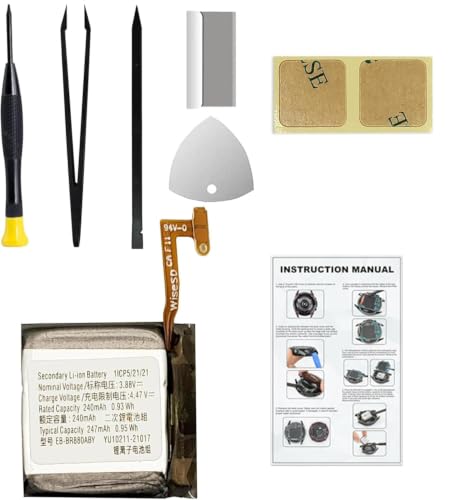
Compatible Smartwatch Model: This battery kit is specifically designed for Samsung Galaxy Watch 4 40mm (with model SM-R860 series) / Watch 4 Classic 42mm (with model SM-R880 series), please double confirm your smartwatch model before purchasing

COMPATIBILITY: The battery model is EB-BR880ABY, it is only compatible with Samsung Galaxy Watch 4 (40 mm), SM-R860 SM-R865 series and Galaxy Watch 4 Classic (42mm) SM-R880 SM-R885, please carefully confirm the model of your smartwatch before purchase.
Battery Longevity Comparison
Samsung watches typically last between 1 to 3 days on a single charge, depending on the model and usage. For instance, the Galaxy Watch 4 has a battery capacity of 361 mAh, supporting about 40 hours of use. In contrast, brands like Apple tend to provide shorter battery life, with the Apple Watch Series 7 lasting around 18 hours under regular use. Fitbit models often extend beyond 5 days, particularly the Fitbit Charge, which can last up to a week with minimal features activated. Understanding these differences allows you to select a smartwatch that meets your lifestyle needs.
| Brand | Model | Battery Capacity | Average Battery Life |
|---|---|---|---|
| Samsung | Galaxy Watch 4 | 361 mAh | ~40 hours |
| Apple | Apple Watch Series 7 | Not specified | ~18 hours |
| Fitbit | Fitbit Charge | Not specified | ~7 days |
Features Impacting Battery Life
Multiple features impact the battery life of your Samsung watch. Here are key elements to consider:
- Display Settings: A bright display consumes more power. Reducing brightness or switching to a watch face with fewer animations can conserve battery.
- Workout Tracking: Continuous GPS tracking during workouts significantly drains battery life. Limiting GPS use or selecting shorter workout sessions helps extend usage time.
- Notifications: Frequent notifications can lead to regular wake-ups of the display, depleting the battery. Controlling which notifications you receive reduces this drain.
- Bluetooth Connectivity: Keeping Bluetooth on consumes battery. Disconnecting from your phone when not needed can save energy.
- Apps: Using resource-intensive applications, like fitness trackers, can impact battery longevity. Focus on essential apps and manage their permissions to reduce background activity.
Adjusting these features can effectively optimize battery performance, ensuring your Samsung watch meets your daily demands.
Conclusion
Understanding your Samsung watch’s battery life helps you make the most of its features. By being mindful of settings and app usage you can significantly extend the time between charges. Remember to utilize power-saving modes and manage your apps to keep that battery running longer.
If you encounter any issues like rapid battery drain or overheating don’t hesitate to troubleshoot. With a little effort you can enjoy all the benefits of your watch without the constant worry of charging. So go ahead and explore your device knowing you have the tools to keep it powered up throughout your day.
Frequently Asked Questions
How long can I expect my Samsung watch’s battery to last?
Samsung watches typically last between 1 to 3 days on a single charge. The exact duration depends on the model and your usage habits, such as app usage and display settings.
What factors influence my Samsung watch’s battery life?
Battery life is affected by several factors, including display brightness, workout tracking, notifications, app usage, and Bluetooth connectivity. Adjusting these settings can help extend battery life.
How can I maximize my Samsung watch’s battery life?
To maximize battery life, activate power-saving modes like Battery Saver, limit active apps, uninstall unused applications, and adjust your display settings. Managing your notifications can also help.
What should I do if my Samsung watch’s battery drains quickly?
If your watch drains quickly, check for software updates, limit background apps, adjust screen brightness, and turn off unused features. If problems persist, consider resetting the device.
Are there specific modes to save battery on my Samsung watch?
Yes, Samsung watches offer modes like Battery Saver Mode, Low Power Mode, and Sleep Mode. Activating these modes can significantly extend the time between charges.
How does Samsung’s battery life compare to other brands?
Samsung watches generally last longer than many competitors. For example, the Galaxy Watch 4 lasts about 40 hours, while Apple Watch Series 7 lasts around 18 hours, and some Fitbit models can last over 5 days.
What common battery issues do Samsung watch users face?
Common issues include rapid battery percentage drops, short usage times, device overheating, and frequent notifications. These can often be resolved through settings adjustments and software updates.
How do I manage my apps to reduce battery drain?
To reduce battery drain, limit the number of active apps, uninstall applications you don’t use, and adjust app permissions. This helps in conserving energy and optimizing performance.
Can the battery capacity of my Samsung watch vary by model?
Yes, each Samsung watch model has a different battery capacity. For instance, the Galaxy Watch 4 has a 361 mAh battery, supporting about 40 hours of use, while other models may vary.
