

Key Takeaways
- Battery Lifespan and Issues: The Samsung A70’s battery typically lasts 2-3 years; signs of deterioration include rapid battery drain, overheating, and physical swelling.
- Battery Replacement Options: Users can opt for DIY battery replacement using the right tools and quality parts, or seek professional help from authorized service centers for a safer, guaranteed outcome.
- DIY Considerations: While DIY replacement can be cost-effective, it poses risks of device damage and potential voiding of warranties due to the phone’s sealed design.
- Essential Tools for Replacement: A successful battery replacement requires specific tools such as a Phillips screwdriver, plastic pry tool, suction cup tool, tweezers, and a heat gun or hairdryer.
- Step-by-Step Process: Following a detailed, methodical approach is crucial for a safe battery replacement, including powering off the device and properly reconnecting the new battery.
- Post-Replacement Care: After installation, monitor the battery’s performance and keep the device in moderate temperatures to enhance battery longevity.
Is your Samsung A70 struggling to hold a charge? You’re not alone. Many users find themselves dealing with battery issues as their phones age. When it’s time for a change, you might wonder if you can tackle the battery replacement yourself.
Overview of Samsung A70 Battery
The Samsung A70 features a Li-Po 4500 mAh battery. This capacity supports a full day of usage under average conditions, including web browsing, streaming, and social media. Over time, however, battery performance may decline, leading to reduced charge retention and premature shutdowns.
Battery Lifespan
Most Lithium-ion batteries, like the one in your A70, typically last about 2-3 years or around 300-500 charge cycles. Frequent full discharges or exposing the device to extreme temperatures can shorten this lifespan.
Battery Replacement
Replacing the battery in your Samsung A70 isn’t straightforward. The device is designed with a sealed body, making it challenging to access the battery without proper tools. If replacing the battery becomes necessary, consider these options:
- DIY Replacement: If you’re tech-savvy, you can find replacement batteries and guides online. Make sure to use a high-quality battery from a reputable supplier. Tools can include a heat gun, pry tools, and screwdrivers.
- Professional Help: You can visit authorized service centers for a safe and hassle-free replacement. This option often comes with a warranty on parts and labor.
Signs of Battery Issues
You might notice the following signs indicating a battery replacement is due:
- Rapid Battery Drain: The battery depletes significantly faster than it once did.
- Device Overheating: The phone becomes unusually hot during use or charging.
- Swelling: The battery physically bulges or pushes against the screen, posing safety risks.
Checking these signs periodically helps maintain your phone’s functionality and safety.
Importance of Battery Replacement
Battery replacement is crucial for maintaining your Samsung A70’s performance. A worn-out battery can lead to inefficient operation or complete device failure. Recognizing the need for a replacement ensures ongoing usability and longevity of your device.
Signs You Need a Battery Replacement
- Rapid Battery Drain: If your phone discharges faster than normal, even without heavy usage, it’s a sign of battery degradation.
- Overheating: Noticeable heating during charging or regular use may indicate battery damage.
- Physical Swelling: If the battery protrudes from the device, it’s time for a replacement.
- Frequent Shutdowns: If your phone turns off unexpectedly despite a charge, the battery’s reliability has diminished.
Benefits of a New Battery
- Extended Device Life: A new battery revitalizes your phone, prolonging its overall lifespan.
- Improved Performance: Fresh batteries provide optimal energy, enhancing your device’s responsiveness and functionality.
- Enhanced Safety: Replacing a damaged battery reduces risks such as overheating or potential fire hazards.
- Environmental Impact: Proper battery replacement and recycling contribute to environmental sustainability by reducing electronic waste.
Can You Replace the Battery in a Samsung A70?
You can replace the battery in a Samsung A70, but it involves certain considerations. The process isn’t simple due to the phone’s sealed design, which poses challenges for DIY enthusiasts. Review the following details before proceeding.
Recommended Products
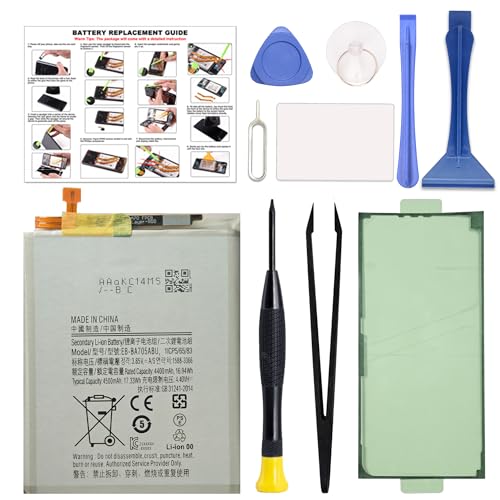
COMPATIBILITY: This battery only fits for Samsung Galaxy A70,SM-A705F, SM-A705FN, SM-A705GM, SM-A705MN, SM-A7050, SM-A705W, SM-A705YN, SM-A705X, SM-A705U. Please carefully confirm your phone model before purchase.
![UNKLOU Galaxy A70 Battery, [Upgraded] 5200mAh Li-Polymer EB-BA705ABU Replacement Battery for Samsung Galaxy A70 A705 SM-A705 with Repair Tool Kit [24 Month Service]](https://m.media-amazon.com/images/I/51smVZXBrBL._SL500_.jpg)
🍁【BRAND New Battery 】: UNKLOU Replacement battery for Galaxy A70 , bring life back to your phone with a replacement battery. Make your phone acting like a brand new

Compatible with Samsung Galaxy A70,SM-A705F, SM-A705FN, SM-A705GM, SM-A705MN, SM-A7050, SM-A705W, SM-A705YN, SM-A705X, SM-A705U.
Official Guidelines from Samsung
Samsung recommends visiting an authorized service center for battery replacement. They have the right tools and trained technicians to ensure a safe and effective process. This option guarantees that your device remains in line with warranty agreements. If you’re considering this route, look for nearby authorized service providers to facilitate the replacement.
DIY Battery Replacement Pros and Cons
Pros:
- Cost-effective: DIY replacement can save money compared to professional services.
- Control: You can choose the battery brand and quality.
- Learning experience: Gaining skills by handling your device can be rewarding.
Cons:
- Complexity: Sealed designs make it challenging to open with standard tools.
- Risk of damage: Improper handling may lead to device damage or void the warranty.
- Quality concerns: Using subpar batteries may affect performance or safety.
When weighing the options, assess your confidence in performing repairs and consider the potential risks involved. If you choose to proceed, invest in quality tools and follow detailed guides specific to Samsung A70 battery replacement to maximize your success.
Tools and Materials Needed
To replace the battery in your Samsung A70, gather these essential tools and materials:
Recommended Products

Compatible with: Samsung Galaxy A70 SM-A705 SM-A705F; Battery Model: EB-BA705ABU; Please check your battery type before purchasing
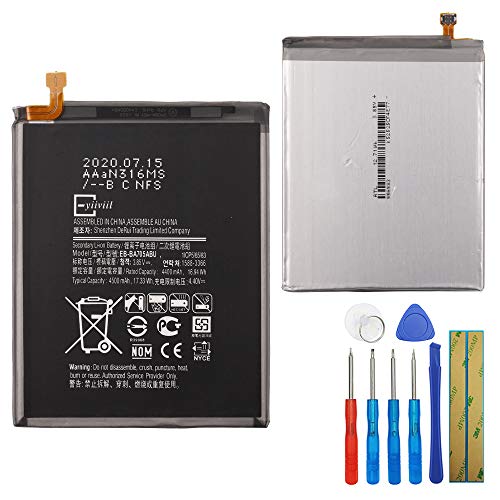
This battery is compatible with Samsung Galaxy A70 A705F GH82-19746A , Universal Extra Battery, please carefully check your phone model before purchase.

Compatibility: Please confirm the phone model when purchasing. An incorrect model will not work or may cause damage to your phone. We have shown detailed applicable models, we hope to help you.
Essential Tools
- Small Phillips screwdriver: You’ll use this to remove screws securing the back panel.
- Plastic pry tool: Use this to gently pry open the phone without damaging the casing.
- Suction cup tool: This helps lift the screen for easier access during the replacement process.
- Tweezers: Ideal for handling small components and positioning the new battery.
- Heat gun or hairdryer: Use this to soften the adhesive holding the back cover.
Battery Replacement Materials
- Replacement battery: Choose a high-quality Li-Po 4500 mAh battery, specifically designed for the Samsung A70.
- Adhesive strips: Use these to secure the new battery in place after installation.
Gathering these tools and materials prior to starting your battery replacement ensures a smooth process.
Step-by-Step Battery Replacement Process
Replacing the battery in your Samsung A70 can seem daunting, but following these steps makes it manageable. Here’s a detailed guide on how to do it safely and effectively.
Recommended Products
✅SHENMZ Galaxy A52 Battery Replacement ONLY Work For Model Samsung Galaxy A52/A52S (4G/5G) SM-A526 SM-A526B/DS SM-A5260 EB-BG781ABY. Note: Galaxy A52 Battery ,NOT for Other Samsung Model. Please Confirm Your Phone Model From Phone Back Cover to Avoid Wrong Order.[Not for Galaxy other Phone Models.]

🌠【Compatible Battery Model】: This a Updated Galaxy J3 Replacement Battery Compatible with Samsung Galaxy J3 (2016) J320V J320A J320F J320P EB-BG530BBE /J3 Prime, Emerge, Star, Orbit, Eclipse, On5, Mission, Luna Pro, Achieve Battery

【Compatible Model】This Battery Model is EB-BA505ABU,Compatible with Samsung Galaxy A505F /A30 SM-A305 /A20 A205FN A202F /A30s SM-A307.Please confirm your phone model and your old battery part number before placing an order.
Tools and Materials Needed
- Small Phillips screwdriver – For removing screws.
- Plastic pry tool – To open the device without damage.
- Suction cup tool – For lifting the screen.
- Tweezers – To handle small components.
- Heat gun or hairdryer – To soften adhesive before opening.
- Replacement battery – Ensure it’s high-quality and compatible.
- Adhesive strips – For securing the new battery.
Preparation
- Power Off Your Device
Turn off your Samsung A70 completely.
- Remove SIM Card Tray
Use a SIM ejector tool or a paperclip to remove the tray.
Opening the Device
- Apply Heat
Gently heat the edges of the back cover using a heat gun or hairdryer for about 30 seconds. This softens the adhesive.
- Insert Suction Cup Tool
Place the suction cup near the bottom edge of the back cover, then pull gently to create a gap.
- Use Pry Tool
Insert the plastic pry tool into the gap. Carefully slide it around the edges to separate the back cover from the phone.
- Remove Back Cover
Once lifted, gently detach the back cover and set it aside.
Disconnecting the Battery
- Locate Battery Connector
Find the battery connector on the motherboard.
- Use Tweezers
Carefully lift the connector using tweezers to disconnect the battery.
Removing the Old Battery
- Deflate the Adhesive
Gently wiggle the pry tool around the battery to break the adhesive seal.
- Lift Battery Out
Carefully lift the old battery out, ensuring not to damage any surrounding components.
Installing the New Battery
- Position New Battery
Place the new battery into the compartment.
- Connect Battery
Firmly attach the new battery connector to the motherboard.
Closing the Device
- Reattach Back Cover
Align the back cover with the device. Press down gently but firmly to secure the adhesive.
- Reinsert SIM Tray
Place the SIM card tray back into its slot.
- Power On Your Device
Turn on your Samsung A70 and check if it powers up normally.
Post-Replacement Care
- Monitor Battery Performance
Observe for any issues like rapid drain or overheating.
- Avoid Extreme Temperatures
Keep your device in moderate temperature conditions to prolong battery life.
Following these steps ensures a successful battery replacement for your Samsung A70. Adjust the process as necessary based on your comfort level and tools.
Conclusion
Taking care of your Samsung A70’s battery is crucial for keeping your device running smoothly. If you notice signs like rapid drain or overheating it might be time to consider a replacement. Whether you choose to tackle the job yourself or seek professional help you can extend your phone’s life and improve its performance.
Remember to weigh the pros and cons of DIY replacement before diving in. With the right tools and a quality battery you can successfully manage the process. Your Samsung A70 deserves the best care so don’t hesitate to make the necessary changes for optimal performance.
Frequently Asked Questions
How long does the Samsung A70 battery last?
The Samsung A70 features a Li-Po 4500 mAh battery that typically provides a full day of usage under average conditions. However, over time, its performance may decline, leading to reduced charge retention, usually around 2-3 years.
Can I replace the battery in my Samsung A70 myself?
Yes, you can replace the battery in your Samsung A70 yourself, but it requires specific tools and careful handling due to the sealed design of the device. Alternatively, you can take it to an authorized service center for replacement.
What are the signs that my Samsung A70 battery needs replacement?
Signs that your Samsung A70 battery may need replacement include rapid battery drain, device overheating, physical swelling of the battery, and frequent shutdowns. Regularly monitoring these signs will help maintain your phone’s performance.
What tools do I need to replace the Samsung A70 battery?
To replace the Samsung A70 battery, you’ll need tools like a small Phillips screwdriver, a plastic pry tool, a suction cup tool, tweezers, and a heat gun or hairdryer to soften the adhesive. Always use a high-quality replacement battery.
What are the benefits of replacing my Samsung A70 battery?
Replacing your Samsung A70 battery can extend the device’s life, improve performance, and enhance safety. It can also have a positive environmental impact through proper recycling practices, ensuring your phone remains functional and efficient.
Should I attempt a DIY battery replacement for my Samsung A70?
If you’re confident in your repair skills and have the right tools, you can attempt a DIY battery replacement. However, be aware of potential risks such as damaging the device or using low-quality batteries, which may affect performance.
What if I am not comfortable replacing the battery myself?
If you’re not comfortable replacing the battery yourself, it’s recommended to take your Samsung A70 to an authorized service center. This ensures safety, compliance with warranty agreements, and professional handling of your device.
