

Key Takeaways
- Battery Replacement Feasibility: Replacing the Samsung S10e battery is a viable option that can significantly improve device performance and extend its lifespan.
- Signs of Battery Failure: Key indicators that your S10e battery needs replacing include rapid battery drain, overheating during use, and unexpected device shutdowns.
- Essential Tools: Before starting the replacement process, gather necessary tools such as a Phillips screwdriver, plastic prying tool, and a genuine Samsung battery to ensure a successful repair.
- Step-by-Step Process: Follow a detailed replacement guide, including powering down the device, safely removing the back cover, and reconnecting the new battery to maintain device functionality.
- DIY vs. Professional Replacement: Consider the benefits and risks of DIY battery replacement, including cost savings and potential device damage, and weigh these against the assurance and expertise offered by professional services.
Is your Samsung S10e battery draining faster than you’d like? You’re not alone. Many users face this common issue, leaving them frustrated and searching for solutions. A worn-out battery can make your favorite device feel like a burden rather than a handy tool.
Good news: replacing the battery is possible, and it can breathe new life into your phone. In this article, we’ll walk you through the process, covering everything from signs that your battery needs a swap to step-by-step instructions for a successful replacement. By the end, you’ll know exactly what to do to keep your S10e running smoothly.
Overview of Samsung S10e Battery
The Samsung S10e features a 3,100 mAh battery. This capacity supports reasonable daily usage, though it may drain quickly under heavy use. Users often notice significant decreases in battery life over time, which can stem from many factors including software updates, app usage, and battery age.
Signs that your S10e battery requires replacement include:
- Rapid Drain: If your phone discharges quickly, even with light usage, it may indicate battery failure.
- Overheating: Frequent overheating during normal operation can also suggest a need for a new battery.
- Unexpected Shutdowns: If your device shuts down unexpectedly, this often signals an aging battery.
When replacing the battery, consider using genuine Samsung parts. While third-party batteries exist, they may not provide the same efficiency or safety. To replace the battery, you need tools such as a plastic opening tool, a small Phillips screwdriver, and adhesive strips.
Steps to Replace Your Samsung S10e Battery:
- Power Down the Device: Ensure your S10e is completely turned off.
- Remove the Back Cover: Use a heating pad or hairdryer to soften the adhesive. Gently pry open using the plastic tool.
- Disconnect the Battery: Unscrew and detach the battery connector from the motherboard.
- Extract the Old Battery: Carefully lift the battery from its compartment.
- Install the New Battery: Place the new battery into the slot. Connect the battery to the motherboard.
- Reattach the Back Cover: Use fresh adhesive strips to secure the back cover.
Resources like repair videos or guides can offer visual support during this process. Always back up your data beforehand, as this protects your information during repairs. Following these steps allows you to maintain your phone’s performance effectively.
Signs You Need a Battery Replacement
Identifying signs that indicate a battery replacement is necessary can help you maintain your Samsung S10e’s performance. Pay attention to the following key indicators.
Recommended Products
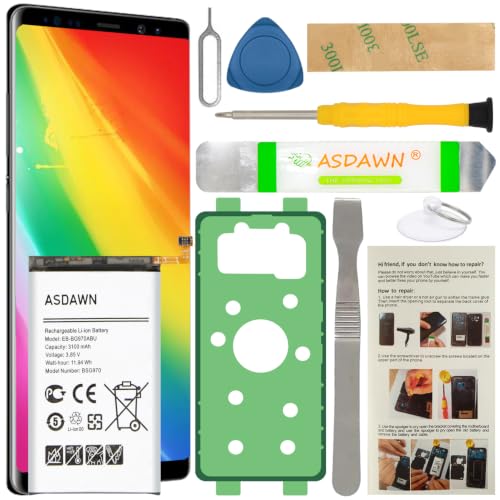
[FOR COMPATIBLE MODEL] -- Contains the instruction to guide you step by step installation, and we have professional engineers to answer all your questions about the repair process. Please verify your old battery part number and model before purchasing this replacement battery. Compatible with Samsung Galaxy S10e SM-G970, EB-BG970ABU, SM-G970F/DS, SM-G970U, SM-G970W ★NOT FOR Samsung Galaxy S10/ S10 Plus/ Note 10/ Note 10 Plus★

HIGH CAPACITY --- This replacement battery for Samsung Galaxy S10E is 3900mAh high capacity, with more power than original battery.You can use your phone for a longer time!

Perfect Match: Only fits Galaxy S10e SM-G970 series. Please check your model carefully.
Decreased Battery Life
If you notice your battery depleting significantly faster than before, it might signal the need for a replacement. For example, if your S10e struggles to last a full day with normal usage, it’s a red flag. Heavy usage, like streaming or gaming, should still leave some charge, so if you’re constantly searching for a charger, your battery likely needs replacing.
Overheating Issues
Experiencing frequent overheating during regular tasks suggests a potential battery problem. When your S10e gets excessively warm while charging or using apps, this abnormal heat can indicate a failing battery. If heat becomes uncomfortable or interferes with your usage, replacing the battery is advisable to prevent further issues or damage.
How to Replace Samsung S10e Battery
Replacing the battery in your Samsung S10e can restore its performance and prolong its life. Follow these guidelines to ensure a successful battery replacement.
Recommended Products
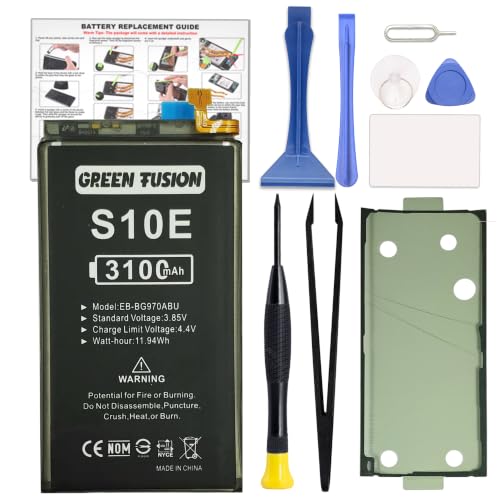
COMPATIBILITY: This battery only fits for Samsung Galaxy S10e, SM-G970F, SM-G970U, SM-G970W, SM-G9700, SM-G970U1, SM-G970N, SM-G970X. Please carefully confirm your phone model before purchase.

【Compatible Model】 It is compatible with Samsung Galaxy S10e SM-G970, EB-BG970ABU, SM-G970F/DS, SM-G970U, SM-G970W. Please double identify check your phone model matches before purchasing the battery.

This battery is compatible with Samsung Galaxy S10E SM-G9708, please carefully check your phone model before purchase.
Tools Required for Replacement
Collect the necessary tools before beginning the process. You’ll need:
- Phillips screwdriver: For removing screws.
- Plastic prying tool: To safely detach the back cover.
- Tweezers: For handling small components.
- Suction cup tool: For lifting the back cover without damage.
- New battery: Ensure it’s a genuine Samsung part.
Step-by-Step Replacement Guide
Follow these steps carefully for a smooth battery replacement:
- Power off your device: Completely shut down your Samsung S10e to avoid any electrical issues.
- Remove the back cover:
- Use the suction cup tool near the rear panel’s bottom.
- Pull gently to create a small gap.
- Insert the plastic prying tool to slide around the edges, releasing the clips.
- Disconnect the old battery:
- Locate the battery connector on the motherboard.
- Use the Phillips screwdriver to remove any screws securing the connector.
- Gently lift the connector using tweezers.
- Replace the battery:
- Remove the old battery from its compartment.
- Place the new battery in position.
- Reconnect the battery harness to the motherboard, ensuring a snug fit.
- Reassemble your device:
- Align the back cover with the device.
- Press it firmly to snap all clips back into place.
- Use the Phillips screwdriver to secure any screws removed earlier.
- Power on the device: Start your Samsung S10e to check if the new battery functions correctly.
Utilizing repair videos may help clarify any steps you’re unsure of. Always back up your data before starting the process to avoid any potential data loss.
Professional vs. DIY Battery Replacement
Deciding between a professional or DIY battery replacement for your Samsung S10e involves weighing various factors. Each option presents unique advantages and drawbacks.
Recommended Products

【Compatible Model】:This Battery Model is EB-BG973ABU,Compatible with Samsung Galaxy S10, SM-G973F, SM-G973U, SM-G973W, SM-G973U1, SM-G9730, SM-G973N, SM-G973X, SCV41, SM-G973C series. NOT work for Galaxy S10 Plus.Please confirm your phone model and your old battery part number before placing an order.

HIGH CAPACITY --- This replacement battery for Samsung Galaxy S10 is 4500mAh high capacity, with more power than original battery.You can use your phone for a longer time!

COMPATIBILITY: This battery only fits for Samsung Galaxy S10, SM-G973F, SM-G973U, SM-G973W, SM-G973U1, SM-G9730, SM-G973N, SM-G973X, SCV41, SM-G973C. Please carefully confirm your phone model before purchase.
Pros and Cons of DIY
Pros:
- Cost-effective: DIY battery replacement saves money on labor costs, allowing you to use budget-friendly components.
- Control over process: You dictate the pace and techniques, ensuring the replacement meets your standards.
- Learning experience: Performing the replacement expands your technical skills, which may benefit future repairs.
Cons:
- Risk of damage: Incorrect handling may lead to damage to the device, voiding warranties or causing expensive repairs.
- Time-consuming: The process requires time for research, gathering tools, and execution, which can be frustrating for beginners.
- Lack of guarantees: DIY fixes don’t often come with the same assurances as professional services, leaving you responsible if issues arise.
When to Seek Professional Help
Seek professional help if you encounter signs of a serious issue, like persistent overheating or battery swelling. Professionals possess the expertise and tools to diagnose deeper problems that might not be apparent. Consider consulting with a technician if you’re uncomfortable with your device’s internal components or if it’s still under warranty. Additionally, using a professional service ensures a quality battery is installed, promoting device longevity and efficiency. If time constraints exist or you prefer peace of mind about the repair, opting for a professional ensures a hassle-free experience.
Conclusion
Replacing your Samsung S10e battery can breathe new life into your device. If you’ve been struggling with battery drain or overheating you now know the signs to look for and how to tackle the replacement process. Whether you choose to go the DIY route or seek professional help it’s all about what feels right for you.
Remember to use genuine parts for the best results and always back up your data before starting any repairs. With a little patience and the right tools you can restore your phone’s performance and enjoy a fully functional device once again. Happy repairing!
Frequently Asked Questions
What causes battery drain in Samsung S10e devices?
Battery drain in Samsung S10e devices can be caused by various factors, including heavy app usage, outdated software, and the natural degradation of battery health over time. Users may also notice rapid depletion due to frequent background activity or intensive tasks that strain the battery’s capacity.
How can I tell if my Samsung S10e needs a battery replacement?
Signs that your Samsung S10e might need a battery replacement include rapid battery drain, excessive overheating during use or charging, and unexpected shutdowns even when the battery level is not low. If your device struggles to last a full day with normal usage, it’s likely time for a replacement.
Can I replace my Samsung S10e battery myself?
Yes, you can replace your Samsung S10e battery yourself. The process can be cost-effective and gives you control over the repair. However, it requires specific tools and caution to avoid damaging the device. If you’re unsure, professional assistance is recommended, especially for complex issues.
What tools do I need to replace the Samsung S10e battery?
To replace the Samsung S10e battery, you will need a Phillips screwdriver, a plastic prying tool, tweezers, a suction cup tool, and a new battery. Having these tools ready will make the replacement process smoother and more efficient.
Should I use original Samsung parts for battery replacement?
Yes, using genuine Samsung parts for battery replacement is highly advisable. Original parts ensure optimal performance and safety for your device. They are designed specifically for your S10e, which can help prevent further issues and maintain the device’s functionality.
Is it better to go for professional battery replacement?
While DIY battery replacement can be rewarding and economical, professional help is generally safer for serious issues like overheating or battery swelling. Professionals have the tools and experience necessary to diagnose and fix deeper problems, likely resulting in a quality repair and peace of mind.
How can I back up my data before replacing the battery?
You can back up your data by using Samsung Cloud or Google Drive, which syncs your contacts, photos, and apps. Additionally, you can connect your device to a computer and transfer important files manually. Ensuring your data is backed up helps prevent any loss during the battery replacement process.
Where can I find step-by-step instructions for battery replacement?
The article provides a detailed step-by-step guide for replacing the battery in a Samsung S10e. You can also find instructional videos on platforms like YouTube that visually demonstrate the process, making it easier to follow along.
