

Key Takeaways
- Understanding Battery Health is Crucial: Regularly check your Samsung phone’s battery health through device settings to identify issues and optimize performance.
- Common Symptoms to Watch For: Rapid battery drain, overheating, unexpected shutdowns, and charging problems indicate potential battery issues that need immediate attention.
- Background Applications Impact Battery Life: Limit background app activity and utilize built-in battery optimization features to conserve battery power effectively.
- Environmental Factors Matter: Extreme temperatures can significantly affect battery performance, so keep your device in a moderate environment during use and charging.
- Implement Power-Saving Strategies: Adjust settings such as screen brightness, timeout duration, and connectivity features while utilizing adaptive and scheduled power-saving modes for extended battery life.
- Seek Professional Help if Needed: If persistent battery issues arise, consider consulting authorized service centers for repairs, replacements, or even exploring trade-in options for a new device.
Is your Samsung phone battery draining faster than you can charge it? You’re not alone. Many people face this frustrating issue, and it can feel like your phone’s battery has a mind of its own.
Understanding why your battery is dying so quickly can save you from the hassle of constant recharging. In this article, you’ll discover common reasons behind rapid battery drain and practical tips to help improve your phone’s performance. By the end, you’ll have a better grip on how to make your phone last longer throughout the day.
Understanding Battery Life
Understanding battery life helps you identify why your Samsung phone’s battery drains quickly. Several factors affect battery performance, and being aware of these can aid in extending your phone’s usability.
Importance of Battery Health
Battery health directly impacts your device’s performance. A healthy battery retains charge efficiently and powers your phone effectively. Over time, batteries deteriorate due to age, temperature fluctuations, and charging habits. Regularly checking battery health ensures you address issues promptly. To check your Samsung phone’s battery health, navigate to Settings > Device care > Battery > Battery usage. Look for apps that consume excessive energy and consider closing or uninstalling them for better performance.
Common Symptoms of Battery Issues
Several symptoms indicate battery problems. Recognizing these can help you take action before the situation worsens.
- Rapid Drain: If the battery percentage drops significantly within a short period during normal use, this signals an issue.
- Overheating: Excess heat during charging or usage often indicates stress on the battery.
- Unexpected Shutdowns: If your phone shuts down unexpectedly despite showing charge, the battery may be faulty.
- Charging Problems: Difficulty in charging or slow charging rates can denote wear on the battery.
By identifying these symptoms early, you may prevent further complications and enhance battery longevity.
Factors Affecting Battery Performance
Several factors contribute to the rapid depletion of battery life in your Samsung phone. Understanding these elements can help you take steps to mitigate their impact.
Recommended Products

POWER ANYWHERE YOU WANT IT: Charge up any of your devices with the Galaxy Magnetic Wireless Battery Pack. Whether you want to plug in to the USB-C port or use the built-in magnetic wireless charger, the 5,000mAh battery is waiting to power you up throughout the whole day.

Massive 20,000mAh capacity delivers extended power for smartphones, tablets, and USB-C devices, ideal for travel, commuting, and backup charging without worrying about battery drain throughout the day
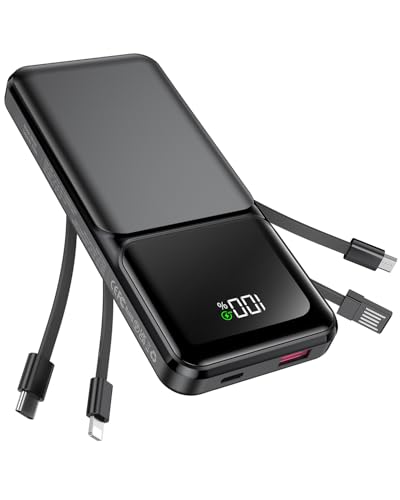
Travel Essentials Portable Charger with Built in Cables: USB C 20000mAh power bank has 4 built in cables (iOS, Type C, USB, Micro) compatible with almost all types smart devices such as for iPhone 16/15/15 Plus/15 Pro/15 Pro Max, Samsung S23,S22,S21,S20, Google, Pixel, Android, iPad, Tablet and more. (Airline-approved)
Background Applications and Usage
Background applications consume battery power even when you’re not actively using them. Apps running in the background, such as social media, location services, and messaging platforms, can drain your battery quickly.
Tips:
- Regularly close unused apps.
- Check app settings to limit background activity.
- Use the built-in battery optimization feature to restrict specific apps.
Software Updates and Bugs
Outdated software or software bugs can lead to increased battery drain. Software updates often include optimizations that improve battery life, while bugs can cause unexpected power consumption.
Tips:
- Keep your phone updated to the latest software version.
- Monitor for unusual battery behavior after an update and report it if needed.
- Restart your phone periodically to refresh software processes.
Environmental Influences
The environment impacts battery performance significantly. Extremes in temperature can affect battery efficiency. High temperatures, in particular, can accelerate battery drain and even cause damage.
- Avoid exposing your phone to extreme heat or cold.
- When possible, keep your phone in a moderate environment while charging.
- Use a protective case that dissipates heat during heavy usage.
Tips to Extend Your Samsung Phone’s Battery Life
Improving your Samsung phone’s battery life is straightforward. Implement these effective strategies to keep your device running longer.
Recommended Products

Portable Charger with 2 Built-in Cables >>>: PB-08 battery pack has 1* iOS cable, 1* Type-C cable, 3* Charging ports(USB-A, Type-C, Micro), which supports charging almost all smart devices on the market. Widely compatible with iPhone 18/17/16/15/14/13/12 series, iPad series, Samsung S23,S22,S21,S20 series, Google series and other smart cell phones, tablets or electronic devices. No need to carry multiple cables during your trip anymore! (Adapter/ Wall Charger are not included) (Airline-friendly)


Adjusting Settings for Optimal Performance
- Reduce Screen Brightness: Lower your screen brightness or set it to auto-adjust to conserve energy.
- Limit Screen Timeout: Decrease the screen timeout setting to turn off the display faster when not in use.
- Turn Off Location Services: Disable GPS and location services for apps not in use, which often drain battery power.
- Switch Off Connectivity Features: Turn off Wi-Fi, Bluetooth, and mobile data when not needed. These features constantly search for connections and consume battery.
Managing Applications Efficiently
- Close Background Apps: Regularly check and close apps running in the background that you aren’t using, as they use battery unnecessarily.
- Uninstall Unused Apps: Remove apps you rarely use to prevent their background processes from draining battery life.
- Check App Battery Usage: Monitor battery usage by apps through settings. Identify and limit apps consuming excessive power.
- Update Apps Regularly: Ensure all apps are updated to benefit from performance improvements that can reduce battery drain.
Utilizing Power Saving Modes
- Activate Power Saving Mode: Use Samsung’s built-in power saving mode to extend battery life by limiting performance and background processes.
- Enable Adaptive Battery: Turn on Adaptive Battery in settings to optimize battery usage based on your habits and app usage patterns.
- Schedule Power Saving Mode: Set a schedule for power saving mode to activate during specific times when you expect low usage.
- Utilize Dark Mode: Switch to dark mode where possible. AMOLED screens on Samsung devices consume less battery power when displaying darker colors.
When to Seek Professional Help
If your Samsung phone shows persistent battery issues, it’s time to seek professional assistance. Recognizing the signs early can save you time and prevent further problems.
Recommended Products
![TQTHL Galaxy J3 Battery,[3600mAh] Upgraded 2025 New Replacement Battery for Samsung Galaxy Grand Prime G530, Galaxy J5, Galaxy J3 J320V J320A J320F J320P J327A J327P J3 Emerge EB-BG530BBC EB-BG530BBE](https://m.media-amazon.com/images/I/41+lo0HzMjL._SL500_.jpg)
Upgraded Battery--100% New High quality updated battery for J3 , Uses Grade A+ battery cells with CE and ROHS certified, Each battery comes with a tested under strict quality control standard, and built-in IC chip to prevent from over-charging, over-heating and other defects. It will provide you with up to 800+ charge cycles with the high-speed and efficient charge.

🌠【Compatible Battery Model】: This a Updated Galaxy J3 Replacement Battery Compatible with Samsung Galaxy J3 (2016) J320V J320A J320F J320P EB-BG530BBE /J3 Prime, Emerge, Star, Orbit, Eclipse, On5, Mission, Luna Pro, Achieve Battery

【HIGH QUALITY GRADE A PREMIUM BATTERY】:This Upgraded Galaxy S3 battery uses Grade A+ rated battery cells with CE and ROHS certification,ensure last over 1200 charge cycles. Multiple-protection for safer operation for both user and devices,build-in microchip to prevent over-charging,over-discharging and over-heating.
Signs That Indicate a Battery Replacement
- Rapid drainage: If your battery drops significantly in a short time, even with minimal usage, it’s a strong sign.
- Overheating: A consistently hot device may indicate battery failure. Always monitor temperatures during charging and use.
- Unexpected shutdowns: If your phone shuts off at 20% or higher, the battery’s health is suspect.
- Swelling or bulging: Physical changes in the battery can be dangerous. Never ignore this issue.
- Charging difficulties: Problems like not charging or disconnecting without user intervention suggest deeper issues.
Options for Battery Repair or Replacement
- Authorized service centers: Seek out Samsung’s authorized service providers for reliable battery replacements that maintain your warranty.
- Local repair shops: Find reputable local options, but confirm they use quality parts to avoid future complications.
- DIY replacement kits: For tech-savvy users, online kits provide tools and batteries, but follow instructions carefully to avoid damage.
- Warranty claims: If your device is under warranty, initiate a claim with Samsung; they might cover repairs or replacements.
- Trade-in programs: Consider trading your device for a newer model, which can save costs and improve performance.
Address these issues promptly to ensure your phone operates smoothly and efficiently.
Conclusion
Taking care of your Samsung phone’s battery doesn’t have to be a hassle. By understanding the factors that contribute to rapid drain and implementing simple solutions you can significantly improve your battery life.
Regularly check your battery health and manage your apps wisely to keep everything running smoothly. Don’t forget to adjust your settings and take advantage of power-saving features.
If problems persist it might be time to consult a professional. With a little effort you can enjoy a longer-lasting battery and a better overall experience with your device.
Frequently Asked Questions
What causes rapid battery drain in Samsung phones?
Rapid battery drain in Samsung phones can stem from several factors, including background apps running, software bugs, and environmental conditions like extreme temperatures. Over time, battery health may decline, which can also contribute to faster depletion.
How can I check my Samsung phone’s battery health?
To check your phone’s battery health, go to Settings > Device care > Battery. From there, you can view details about battery usage and optimize its performance. Regular checks can help identify potential issues early.
What are common symptoms of battery problems?
Common symptoms of battery issues include rapid battery drain, the phone overheating, unexpected shutdowns, and difficulties in charging. Noticing these signs early can help you take action to improve battery health.
How can I extend my Samsung phone’s battery life?
To extend battery life, reduce screen brightness, limit background app activity, use power-saving modes, and turn off unnecessary connectivity features. Regularly updating apps and the phone’s software can also enhance battery performance.
When should I seek professional help for battery issues?
You should seek professional help if you experience persistent battery drainage, overheating, unexpected shutdowns, or if the battery appears swollen or bulging. These signs may indicate that a battery replacement is necessary to ensure optimal performance.
What is Adaptive Battery and how does it help?
Adaptive Battery is a feature on Samsung phones that learns your usage patterns and limits battery power for apps you rarely use. Enabling this feature can help conserve battery life by prioritizing energy for frequently used applications.
Are there any environmental factors that affect battery performance?
Yes, extreme temperatures can negatively impact battery performance. It’s best to avoid exposing your phone to high heat or cold, as these conditions can lead to quicker battery drain and potential damage.
