
Close Menu
Battery Spotlight
    Battery Spotlight
    • Home
    • Phone Batteries
    • Laptop Batteries
    • Car Batteries
      • Golf Cart Batteries
    • Battery Info
      • Battery Chargers
      • Battery Life
      • Battery Maintenance
      • Marine Batteries
      • Rechargeable Batteries
      • Solar Batteries
    • About Us
      • Contact
    Battery Spotlight
    Navigation: Home » Phone Batteries » Android Batteries » Why Is My Samsung 6 Watch Battery Draining So Fast and How to Fix It Efficiently
    Android Batteries

    Why Is My Samsung 6 Watch Battery Draining So Fast and How to Fix It Efficiently

    Leo HudsonBy Leo HudsonApril 9, 20257 Mins Read
    Share Facebook Twitter Pinterest LinkedIn Tumblr Email WhatsApp Copy Link
    Share
    Facebook Twitter LinkedIn Pinterest Email Copy Link

    Key Takeaways

    • Identify Common Causes: Factors like high screen brightness, background app activity, and notifications can significantly contribute to fast battery drain on your Samsung Galaxy Watch 6.
    • Adjust Screen Settings: Lowering screen brightness and enabling auto-brightness can help preserve battery life. Use the “Always On Display” feature sparingly to minimize energy consumption.
    • Utilize Power-Saving Modes: Activating power-saving mode limits background activity, reduces animations, and decreases display brightness, effectively extending battery life during critical times.
    • Keep Software Updated: Regularly updating your watch ensures optimal performance and may resolve battery drain issues through important bug fixes and enhancements.
    • Practice Battery Maintenance: Implement strategies like turning off unused features (Bluetooth, Wi-Fi, GPS) and managing notifications to further reduce battery consumption.
    • Monitor Battery Health: If experiencing rapid discharge, unexpected shutdowns, or overheating, consider battery replacement and seek assistance from certified technicians or Samsung support.

    Is your Samsung Galaxy Watch 6 battery draining faster than you’d like? You’re not alone. Many users face this frustrating issue, wondering why their smartwatch can’t keep up with their busy lives.

    Table of Contents

    Toggle
    • Key Takeaways
    • Common Causes of Battery Drain
    • Screen Brightness and Usage
    • Background Apps and Notifications
    • Power-Saving Modes
    • Activating Power-Saving Features
    • Customizing Settings for Battery Life
    • Software Updates
    • Importance of Keeping Your Watch Updated
    • Checking for Software Issues
    • Battery Health and Maintenance
    • Tips for Extending Battery Life
    • When to Replace the Battery
    • Conclusion
    • Frequently Asked Questions
    • What causes battery drain in the Samsung Galaxy Watch 6?
    • How can I reduce screen brightness on my Galaxy Watch 6?
    • What are power-saving modes, and how can they help?
    • How often should I update my Galaxy Watch 6?
    • What should I do if my watch battery drains quickly despite updates?

    Common Causes of Battery Drain

    Several factors can contribute to fast battery drain on your Samsung Galaxy Watch 6. Understanding these causes helps manage and extend your watch’s battery life.

    Screen Brightness and Usage

    High screen brightness settings can significantly impact battery performance. If the brightness level is set too high, the screen consumes more power. Consider reducing brightness to a comfortable level or enabling the “Auto Brightness” feature. Additionally, prolonged screen usage, especially when using demanding apps or keeping the display on continuously, accelerates battery drainage.

    Background Apps and Notifications

    Apps running in the background contribute to battery drain by constantly refreshing data. Regularly used fitness and health-tracking apps can consume power when they send notifications or track metrics. Limit background activity by disabling notifications for non-essential apps. You can manage which apps run in the background through the settings menu. This adjustment not only saves battery but also minimizes distractions.

    Power-Saving Modes

    Power-saving modes on your Samsung Galaxy Watch 6 can enhance battery life effectively. These features reduce power consumption by limiting certain functions and optimizations.

    Recommended Products

    for Samsung Watch Charger Fast Charging,2 in 1 Galaxy Watch Phone Charger 6ft with 25W USBC Charger Compatible with Galaxy Watch 8/7/Ultra/6/6 Classic/5/5Pro/4/4 Classic/3/Active2/1/S24/S23/S22/21
    for Samsung Watch Charger Fast Charging,2 in 1 Galaxy Watch Phone Charger 6ft with 25W USBC Charger Compatible with Galaxy Watch 8/7/Ultra/6/6 Classic/5/5Pro/4/4 Classic/3/Active2/1/S24/S23/S22/21

    2-in-1 Samsung Phone and Watch Charger Solution:Combine a Samsung watch charger and a phone charger into one unit, featuring 25W USB-C fast charging. Charge your Galaxy Watch series and Samsung phones simultaneously, saving both time and space.

    SEE ALSO  How to Show Battery Percentage on Asus Laptop: Simple Steps for Effective Battery Management
    VIEW LATEST PRICE

    As an affiliate, we earn on qualifying purchases.

    Samsung Galaxy Watch8 Charger, 3 in 1 Wireless Charging Cube for Galaxy Watch Ultra 8 Classic 7 6 5, Double Port USB C + USB A Fast Charger Wall Plug Power Block for Samsung A17 A16 A15 A36 S26-Black
    Samsung Galaxy Watch8 Charger, 3 in 1 Wireless Charging Cube for Galaxy Watch Ultra 8 Classic 7 6 5, Double Port USB C + USB A Fast Charger Wall Plug Power Block for Samsung A17 A16 A15 A36 S26-Black

    1. All-in-One Charging Solution - This 3-in-1 fast charging wall charger block combines dual ports, including a Power Delivery and Quick Charge 3.0 port, and a wireless watch charger, allowing you to charge your Samsung S26, Galaxy Watch8 Classic, and Tablet or other devices simultaneously. Perfect for home, office, or travel usage.

    VIEW LATEST PRICE

    As an affiliate, we earn on qualifying purchases.

    ACEQINGSE for Samsung Galaxy Watch Charger,1800mAh Portable Charger for Samsung Galaxy Watch 7/Ultra/6/6 Classic/5/5 Pro/4/3,Active 2/1,Wireless Magnetic (Pink)
    ACEQINGSE for Samsung Galaxy Watch Charger,1800mAh Portable Charger for Samsung Galaxy Watch 7/Ultra/6/6 Classic/5/5 Pro/4/3,Active 2/1,Wireless Magnetic (Pink)

    Designed for Samsung Watch: This portable charger for Samsung Watch 7/ 7 Ultra / 6 /6 Classic / 5 / 5 Pro / 4 /3, Active 2 / Active 1 ensures seamless compatibility with new and old watches. This for Samsung galaxy watch charger can be carried around without a power source and can solve your low battery anxiety anytime

    VIEW LATEST PRICE

    As an affiliate, we earn on qualifying purchases.

    Activating Power-Saving Features

    Activating power-saving features is straightforward.

    1. Swipe down from the top of the screen to access the Quick Settings panel.
    2. Tap on the battery icon to open battery settings.
    3. Select “Power saving mode.” Choose to enable it. This mode limits background app activity, reduces animations, and lowers display brightness.

    You can easily activate power-saving mode whenever you expect long usage without charging.

    Customizing Settings for Battery Life

    Customizing settings also plays a crucial role in extending battery life.

    1. Navigate to Settings. Open the app drawer and find the Settings icon.
    2. Select “Display.” Here, you can adjust brightness settings.
    3. Lower Brightness. Reduce brightness or turn on “Auto Brightness.”
    4. Activate Always On Display (AOD) only when necessary. Turning it off significantly saves energy.
    5. Limit Wake-up Features. Avoid excessive lifting of the wrist to wake up the watch.

    You can fine-tune your watch settings to minimize battery drain while still using essential functions.

    Software Updates

    Keeping your Samsung Galaxy Watch 6 up to date is crucial for optimal performance and battery life. Software updates often contain enhancements and fixes that can reduce battery drain.

    Recommended Products

    Replacement Battery for Galaxy Watch 4 (40mm) & Galaxy Watch 4 Classic (42mm), EB-BR880ABY Battery for SM-R860 & SM-R880, with Repair Tools & Instruction
    Replacement Battery for Galaxy Watch 4 (40mm) & Galaxy Watch 4 Classic (42mm), EB-BR880ABY Battery for SM-R860 & SM-R880, with Repair Tools & Instruction

    Compatible Smartwatch Model: This battery kit is specifically designed for Samsung Galaxy Watch 4 40mm (with model SM-R860 series) / Watch 4 Classic 42mm (with model SM-R880 series), please double confirm your smartwatch model before purchasing

    SEE ALSO  Where Is the Battery on a Lenovo Ideapad 110: Simple Steps for Safe Removal and Replacement
    VIEW LATEST PRICE

    As an affiliate, we earn on qualifying purchases.

    New EB-BR880ABY Replacement Battery for Galaxy Watch 4 (40mm) and Galaxy Watch 4 Classic (42mm), Includes DIY Tools & Instruction
    New EB-BR880ABY Replacement Battery for Galaxy Watch 4 (40mm) and Galaxy Watch 4 Classic (42mm), Includes DIY Tools & Instruction

    Perfect Compatibility – Designed exclusively for Watch 4 40mm (SM-R860) / Watch 4 Classic 42mm (SM-R880). Ensure your watch model matches before purchase.

    VIEW LATEST PRICE

    As an affiliate, we earn on qualifying purchases.

    SM-R810 SM-R815 for Galaxy Watch (42mm) / Gear S4 Battery Replacement, EB-BR810ABU Battery Compatible with Samsung Galaxy Watch 1st 42mm (Gear S4), with Installation Instruction & Repair Tools
    SM-R810 SM-R815 for Galaxy Watch (42mm) / Gear S4 Battery Replacement, EB-BR810ABU Battery Compatible with Samsung Galaxy Watch 1st 42mm (Gear S4), with Installation Instruction & Repair Tools

    Compatible Model: Samsung Galaxy Watch 1st 42mm SM-R810 SM-R815 series with model numbers SM-R810 SM-R815, please carefully check your device model before purchasing

    VIEW LATEST PRICE

    As an affiliate, we earn on qualifying purchases.

    Importance of Keeping Your Watch Updated

    Regular updates provide essential improvements. They may include bug fixes that address battery consumption issues. By staying updated, you ensure your watch benefits from the latest features and security patches. It’s common for manufacturers to optimize battery usage in later software versions, so don’t skip these updates.

    Checking for Software Issues

    If your battery drains quickly, checking for software issues is important. To verify if your watch is updated, follow these steps:

    1. Open the Settings app on your watch.
    2. Scroll down and select About Watch.
    3. Tap Software Update.
    4. Check for updates and install any available updates.

    Keeping track of your watch’s software performance helps identify and resolve issues that contribute to battery drain. If problems persist after updates, consider reaching out to Samsung support for additional assistance.

    Battery Health and Maintenance

    Maintaining your Samsung Galaxy Watch 6’s battery health can significantly improve its performance. You can take several steps to reduce battery drain and enhance the overall lifespan of your watch.

    Recommended Products
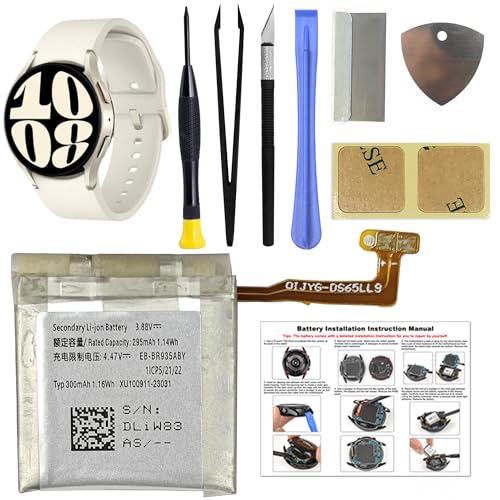
    Senpinkboo for Samsung Galaxy Watch 6 Battery Upgraded [320mAh] EB-BR935ABY Battery for Watch 6 SM-R930 SM-R935 SM-R935U 40mm Replacement with Repair Tool Kit+Screws
    Senpinkboo for Samsung Galaxy Watch 6 Battery Upgraded [320mAh] EB-BR935ABY Battery for Watch 6 SM-R930 SM-R935 SM-R935U 40mm Replacement with Repair Tool Kit+Screws

    Compatible Model:This Replacement Battery model is SM-R930 SM-R935 SM-R935U. please carefully examine your device model and old battery if it fits before purchasing.

    VIEW LATEST PRICE

    As an affiliate, we earn on qualifying purchases.

    Senpinkboo for Samsung Galaxy Watch 6 Battery Upgraded [460mAh] EB-BR945ABY Battery for Watch 6 SM-R940 SM-R945 SM-R945U 44mm Replacement with Repair Tool Kit+Screws
    Senpinkboo for Samsung Galaxy Watch 6 Battery Upgraded [460mAh] EB-BR945ABY Battery for Watch 6 SM-R940 SM-R945 SM-R945U 44mm Replacement with Repair Tool Kit+Screws

    Compatible Model:This Replacement Battery model is SM-R940 SM-R945 SM-R945U. please carefully examine your device model and old battery if it fits before purchasing.

    VIEW LATEST PRICE

    As an affiliate, we earn on qualifying purchases.

    GREEN FUSION New EB-BR935ABY Battery for Galaxy Watch 6 (40mm), Battery Repair Kit with Instruction Compatible with Samsung Watch 6 40mm SM-R930/R935 Series
    GREEN FUSION New EB-BR935ABY Battery for Galaxy Watch 6 (40mm), Battery Repair Kit with Instruction Compatible with Samsung Watch 6 40mm SM-R930/R935 Series

    COMPATIBILITY: The battery model is EB-BR935ABY, it is only compatible with Samsung Galaxy Watch 6 (40 mm), SM-R930 SM-R935 series, please carefully confirm the model of your smartwatch before purchase.

    SEE ALSO  How to Save Battery Life on Samsung Galaxy S8: Tips to Maximize Your Device's Performance
    VIEW LATEST PRICE

    As an affiliate, we earn on qualifying purchases.

    Tips for Extending Battery Life

    • Reduce Screen Brightness: Lower the brightness level. A bright display drains battery life quickly. Set brightness to automatic to adjust based on your environment.
    • Limit Always On Display: Activate the Always On Display feature only when necessary. Frequent use of this option can lead to faster battery depletion.
    • Manage Background Apps: Disable notifications for non-essential apps. Limiting background activity for apps reduces battery consumption.
    • Use Power-Saving Mode: Turn on power-saving mode during times of low battery. This feature limits background activity, reduces animations, and dims your display.
    • Turn Off Unused Features: Switch off features like Bluetooth, Wi-Fi, or GPS when you don’t need them. These functions consume a significant amount of energy.

    When to Replace the Battery

    Consider replacing the battery if your watch frequently needs charging multiple times a day. Signs of battery degradation can include:

    • Rapid Discharge: If your watch drains from 100% to 20% within a few hours without heavy usage.
    • Unexpected Shutdowns: If your watch powers off suddenly, even with a visible charge remaining.
    • Overheating: If your watch becomes excessively hot during regular use, it may indicate battery issues.

    Contact a certified technician or Samsung support for battery replacement services. Regular maintenance and prompt replacement contribute to a better user experience and prolonged device longevity.

    Conclusion

    If you’re dealing with a fast-draining battery on your Samsung Galaxy Watch 6 you’re not alone. By making a few simple adjustments to your settings and habits you can significantly improve battery life. Remember to manage your screen brightness limit background app activity and utilize power-saving modes. Keeping your watch updated is also key for optimal performance.

    Don’t hesitate to reach out for help if you’re still facing issues after trying these tips. Your smartwatch should enhance your daily life not hinder it. With a little attention to your settings and usage you’ll be back to enjoying all the features your watch has to offer without constantly worrying about battery life.

    Frequently Asked Questions

    What causes battery drain in the Samsung Galaxy Watch 6?

    Battery drain in the Samsung Galaxy Watch 6 can be caused by high screen brightness, prolonged screen usage, and background apps. Fitness and health-tracking applications are particularly notorious for consuming battery power. Reducing screen brightness and managing background apps can help extend battery life.

    How can I reduce screen brightness on my Galaxy Watch 6?

    To reduce screen brightness on your Galaxy Watch 6, swipe down from the top of the screen and adjust the brightness slider. You can also enable “Auto Brightness” in settings, allowing the watch to adjust brightness based on your surroundings.

    What are power-saving modes, and how can they help?

    Power-saving modes limit background app activity, reduce animations, and lower display brightness. Activating these features can significantly enhance battery life, especially during low battery situations. You can enable power-saving modes through the settings menu on your watch.

    How often should I update my Galaxy Watch 6?

    It’s essential to keep your Samsung Galaxy Watch 6 updated regularly. Check for software updates every few weeks. Updates often include performance enhancements and bug fixes that can help improve battery life and overall functionality.

    What should I do if my watch battery drains quickly despite updates?

    If your Galaxy Watch 6 still drains quickly after updating, consider reducing screen brightness, managing background apps, and using power-saving mode. If problems persist, contact Samsung support or a certified technician for assistance, especially for battery replacement options.

    Share. Facebook Twitter Pinterest LinkedIn Tumblr Email WhatsApp Copy Link
    Leo-Hudson
    Leo Hudson

      Technical writer with 3+ years of experience. Bachelor of Arts in Environmental Studies from UC Santa Cruz. Passionate about sustainability and providing clear, concise how-to guides for common battery problems.

      Related Posts

      Android Batteries

      How to Replace Battery in Samsung Phone: A Step-by-Step Guide for Easy Replacement

      October 25, 2025
      Android Batteries

      How to Remove Battery from Samsung Smart TV Remote: A Step-by-Step Guide for Easy Replacement

      October 25, 2025
      Android Batteries

      How to Check Your Battery Health on Samsung: Simple Methods to Extend Your Phone’s Lifespan

      October 25, 2025
      Android Batteries

      How Much Is a Battery for a Samsung Galaxy S6: Pricing and Replacement Options Explained

      October 25, 2025
      Android Batteries

      How to Remove Battery from Samsung Galaxy S7: A Step-by-Step Guide for Easy DIY Fixes

      October 25, 2025
      Android Batteries

      Why is My Battery Going Down While Charging Android – Effective Solutions to Fix the Issue

      October 25, 2025
      Add A Comment
      Leave A Reply Cancel Reply

      Search
      Affiliate Disclaimer

      As an Amazon Associate I earn from qualifying purchases.

      Latest Articles

      How to Replace Battery in Samsung Phone: A Step-by-Step Guide for Easy Replacement

      Android Batteries

      How to Remove Battery from Samsung Smart TV Remote: A Step-by-Step Guide for Easy Replacement

      Android Batteries

      How to Check Your Battery Health on Samsung: Simple Methods to Extend Your Phone’s Lifespan

      Android Batteries

      How Much Is a Battery for a Samsung Galaxy S6: Pricing and Replacement Options Explained

      Android Batteries

      How to Remove Battery from Samsung Galaxy S7: A Step-by-Step Guide for Easy DIY Fixes

      Android Batteries

      Why is My Battery Going Down While Charging Android – Effective Solutions to Fix the Issue

      Android Batteries
      Battery Spotlight

      Battery Spotlight is a website dedicated to helping you solve common battery problems.

      Read more about us here

      Affiliate Disclaimer
      As an Amazon Associate I earn from qualifying purchases.

      Site Navigation
      • Above Mirror Bathroom Lighting
      • Android Batteries
      • Bathroom Pendant Lighting
      • Battery Chargers
      • Battery Life
      • Battery Maintenance
      • Car Batteries
      • Ceiling Lighting Ideas
      • Golf Cart Batteries
      • Japandi Lighting
      • Laptop Batteries
      • Marine Batteries
      • Mood Lighting Living Room
      • Phone Batteries
      • Rechargeable Batteries
      • Reviews
      • Solar Batteries
      • Uncategorized
      • Vaulted Ceiling Lighting
      Latest Articles

      How to Replace Battery in Samsung Phone: A Step-by-Step Guide for Easy Replacement

      How to Remove Battery from Samsung Smart TV Remote: A Step-by-Step Guide for Easy Replacement

      How to Check Your Battery Health on Samsung: Simple Methods to Extend Your Phone’s Lifespan

      How Much Is a Battery for a Samsung Galaxy S6: Pricing and Replacement Options Explained

      How to Remove Battery from Samsung Galaxy S7: A Step-by-Step Guide for Easy DIY Fixes

      • Home
      • About
      • Contact
      • Privacy Policy
      • Editorial Policy
      • Disclaimer
      • Terms and Conditions
      • Affiliate Disclosure
      © 2026 Battery Spotlight

      Type above and press Enter to search. Press Esc to cancel.