

Key Takeaways
- Optimal Battery Temperature Range: Android phone batteries perform best between 0°C (32°F) and 35°C (95°F). Staying within this range enhances battery life and performance.
- Maximum Safe Temperature: The critical threshold for most lithium-ion batteries is around 45°C (113°F). Exceeding this can lead to potential damage and safety hazards.
- Signs of Overheating: Be aware of symptoms such as automatic shutdowns, reduced battery performance, and screen discoloration, which indicate overheating issues.
- Preventive Measures: Keep your phone cool by avoiding direct sunlight, closing unused apps, optimizing charging conditions, and limiting resource-heavy activities.
- Monitoring Tools: Utilize built-in settings or third-party apps to monitor battery temperature and identify overheating risks early on.
- Consequences of Overheating: High temperatures can cause performance issues, increased battery drain, and serious risks like battery swelling or fire hazards.
Have you ever wondered why your Android phone feels hot after a long day of use? You’re not alone. Many people experience this and worry about potential damage to their device. Understanding the maximum battery temperature is key to keeping your phone running smoothly and prolonging its lifespan.
Understanding Battery Temperature Limits
Battery temperature directly affects performance and lifespan. Android phone batteries typically operate best between 0°C (32°F) and 35°C (95°F). Exceeding these limits can lead to potential damage or reduced efficiency.
Maximum Safe Temperature
The maximum safe temperature for most lithium-ion batteries used in Android phones is around 45°C (113°F). Operating at or above this temperature for prolonged periods can cause safety hazards and damage.
Signs of Overheating
You might notice several signs indicating your phone is overheating:
- Device Shutdown: Automatic shutdown occurs to prevent damage.
- Battery Performance: Reduced battery life often signals heat-related issues.
- Screen Discoloration: You may see temporary visual distortions on the display.
Preventive Measures
Taking steps to manage battery temperature can enhance your device’s longevity and performance:
- Avoid Direct Sunlight: Keep your phone out of the sun to prevent excessive heat.
- Close Unused Apps: Background apps can generate heat, so close those not in use.
- Optimize Charging Conditions: Use a certified charger and avoid charging overnight.
- Limit Resource-Intensive Activities: Activities like gaming or video streaming can rapidly increase battery temperature.
Monitoring Your Device
Using specific apps can help track your device’s battery temperature. Consider using built-in settings or third-party apps to monitor performance. This proactive approach helps you prevent overheating issues before they start.
Factors Affecting Battery Temperature
Several factors influence the battery temperature of your Android phone. Understanding these elements helps you maintain optimal performance and longevity.
Recommended Products

[2,000mAh External Magnetic Battery] The portable wireless phone cooler is equipped with a large 2,000mAh battery, it can work continuously for about 2 hours. Easily cools your phone without the constraints of power cords, making it ideal for gaming, vlogging, online conferencing, and outdoor use.

Cooling Fan for Phones & Devices: Designed for gaming enthusiasts, vloggers, and heavy long term phone users, this cooling radiator is constructed with durable metal and PC materials. It features a convenient physical power switch and 3-level adjustable refrigeration, so you can easily control cooling intensity. The ultra-quiet fan delivers full sided airflow for efficient, powerful heat dissipation
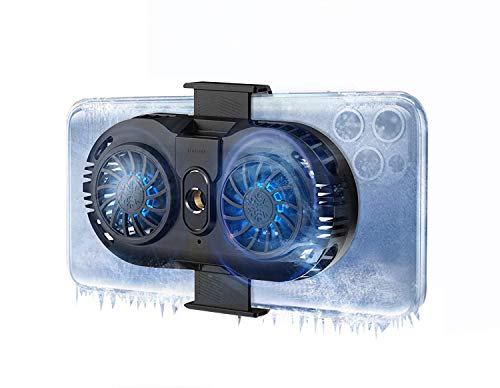
Linear Damping Telescopic Clip: Easy to adjust, perfect for all types of phones with a width of 6 to 8 cm. The NEVEIKIA mobile phone radiator can cool down when connected to the power.
Internal Components
Internal components significantly impact battery temperature. The processor, for instance, generates heat during heavy tasks like gaming and multitasking. When the CPU or GPU operates at high levels, the battery temperature rises. Similarly, the age of the battery plays a role. Older batteries may not dissipate heat as efficiently, leading to higher temperatures. Keeping your software updated can also help optimize performance, reducing excess heat production.
Environmental Conditions
Environmental conditions directly affect battery temperature. Exposure to high ambient temperatures accelerates heat buildup, especially when using resource-intensive apps or charging the phone. Use your phone in cooler areas whenever possible. Additionally, avoid leaving your device in direct sunlight, such as on a dashboard during hot days. Humidity also impacts heat transfer, leading to discomfort during phone use. Consider the environment where you regularly use your phone, as this affects its overall temperature management.
Recommended Maximum Battery Temperature
Understanding the recommended maximum battery temperature for your Android phone is essential for maintaining its performance and longevity.
Recommended Products

【Easy Bluetooth Connection】Features advanced auto-connection technology, effortlessly pairing your smart device with this bluetooth temperature monitor; Simply put batteries in(included), download our app, and you're ready to go - perfect for users of all ages and tech levels

Support temperature and humidity sensors (HT, ETLM, KTLM, KSensor, RAWv1/RAWv2 Telemetry formats)

REVOLUTIONARY HERZP1 SMART RING HEALTH TRACKER - The Herz P1 Smart Ring for women & men is a game-changer in the wearable tech industry. This sleek, lightweight ring provides accurate health metrics including heart rate, temperature, blood oxygen levels, activity, and stress levels. It's not just a fitness tracker, it's the next generation of wearable health tech, designed to fit effortlessly into your life.
Manufacturer Specifications
Most manufacturers specify an optimal maximum battery temperature. For many Android phone batteries, that maximum sits around 45°C (113°F). This temperature is a guideline to prevent potential damage. Exceeding this limit can stress the battery, leading to reduced performance or even failure. Always check your phone’s user manual for specific manufacturer recommendations.
Safe Operating Ranges
Safe operating ranges for Android batteries typically fall between 0°C (32°F) and 35°C (95°F). Operating within this range helps maximize battery life. Temperatures above 45°C (113°F) can trigger safety features to shut down your device temporarily. In colder temperatures, below 0°C (32°F), you may experience slower performance and reduced battery efficiency. Monitoring these temperatures can ensure your device operates smoothly.
Regular checks on your phone’s temperature help avoid overheating issues. Consider using apps designed for temperature monitoring, which can alert you when your phone approaches unsafe levels. By keeping your phone in an optimal temperature range, you protect your device from unnecessary wear and tear.
Consequences of High Battery Temperatures
High battery temperatures can lead to significant performance issues and risks of damage to your Android phone. Understanding these consequences helps you take preventative measures.
Performance Issues
Overheating directly impacts your device’s performance. You may notice sluggish response times, app crashes, or unexpected shutdowns. Apps may take longer to load, and games could lag, affecting your overall user experience. Too much heat can also cause the battery to drain faster, which leads to the need for frequent recharging. Keeping the battery temperature in check ensures smoother operation and extends battery life.
Risks of Damage
Exceeding the maximum battery temperature can result in severe damage. Prolonged exposure to heat increases the risk of battery swelling or leakage, which can compromise your device’s integrity. It may even lead to permanent battery failure, limiting your phone’s functionality. In extreme cases, it can pose safety hazards, causing devices to catch fire or explode. Protecting your battery from excessive heat prevents these dangerous outcomes.
Conclusion
Keeping your Android phone’s battery temperature in check is crucial for its performance and longevity. By understanding the safe operating ranges and recognizing the signs of overheating, you can take proactive steps to protect your device.
Implementing simple strategies like avoiding direct sunlight and monitoring your battery temperature can make a big difference. Remember that a little care goes a long way in ensuring your phone remains reliable and efficient. Stay mindful of how you use your device and enjoy a smoother experience without the worries of overheating.
Frequently Asked Questions
Why do my Android phone and battery get hot after prolonged use?
Extended use, especially during resource-heavy tasks like gaming or multitasking, generates heat. Factors such as processor activity, battery age, and environmental conditions can also contribute to overheating.
What is the optimal battery temperature range for Android phones?
Android phone batteries perform best between 0°C (32°F) and 35°C (95°F). Keeping the battery within this range helps ensure optimal performance and longevity.
What is the maximum safe temperature for lithium-ion batteries in Android phones?
The maximum safe temperature for most lithium-ion batteries is around 45°C (113°F). Exceeding this limit can cause safety hazards and damage to the battery.
How can I prevent my Android phone from overheating?
To prevent overheating, keep your phone out of direct sunlight, close unused apps, limit resource-intensive activities, and optimize charging conditions. You can also use apps to monitor battery temperature.
What are the signs that my Android phone is overheating?
Signs of overheating include automatic device shutdown, reduced battery life, screen discoloration, sluggish performance, and app crashes. If you notice these, it’s essential to take action to cool the device down.
Can environmental conditions affect my phone’s temperature?
Yes, high ambient temperatures and humidity can worsen overheating. Using your phone in cooler conditions helps manage battery temperature effectively.
What could happen if my phone’s battery temperature exceeds safe limits?
Exceeding safe battery temperatures can lead to performance issues, reduced battery lifespan, and severe risks like battery swelling, leakage, or even fires and explosions. Prompt action is necessary to mitigate these dangers.
How often should I check my phone’s battery temperature?
Regular checks are recommended, especially during heavy usage or hot weather. Using temperature monitoring apps can help keep your device in the optimal operating range.
