

Key Takeaways
- Battery Type: The Sony A6400 utilizes the NP-FW50 lithium-ion battery, specifically designed for mirrorless cameras in the Alpha series.
- Battery Life: One NP-FW50 battery provides approximately 360 shots per charge, making it essential to have spares for uninterrupted shooting.
- Compatibility: The NP-FW50 battery is compatible with several Sony models, including Alpha 5000, 5100, 6000, 6300, and 6500, adding versatility and convenience.
- Battery Life Tips: Extend battery performance by turning off unused features, lowering screen brightness, using the viewfinder, limiting video recording time, and carrying extra batteries.
- Charging Options: The A6400 supports convenient USB charging via a power bank or laptop and allows for external chargers to charge multiple batteries simultaneously for greater efficiency.
Are you tired of your camera running out of juice right when you’re about to capture that perfect shot? If you own a Sony A6400, knowing what battery it uses can save you from those frustrating moments. This camera is a favorite among photographers and vloggers alike, but understanding its power source is key to keeping your creative flow uninterrupted.
Overview of Sony A6400 Camera
The Sony A6400 is a versatile mirrorless camera popular among photographers and vloggers. It offers a 24.2-megapixel APS-C sensor that delivers high-resolution images. The camera features fast autofocus with 425 phase-detection points, ensuring sharp focuses even in challenging conditions.
You’ll appreciate its compact design, making it easy to carry during shoots. The 180-degree tiltable touchscreen is perfect for selfies and vlogging. You can also record 4K video, capturing stunning footage for your projects.
Regarding battery use, the A6400 employs the NP-FW50 battery. Knowing this battery type is crucial. It provides approximately 360 shots per charge under standard conditions. Keeping a spare or two on hand can prevent disruptions during important photo sessions or long video shoots.
With connectivity options like Wi-Fi and Bluetooth, you can quickly share your photos and videos. The camera supports various lenses, enhancing your creative possibilities. Embracing the Sony A6400 opens up new avenues for both amateur and professional creators alike.
Battery Specifications
The Sony A6400 utilizes the NP-FW50 battery, specifically designed for its range of mirrorless cameras. Knowing the specifications helps maximize your shooting experience.
Recommended Products

Notice:When using a 5V / 1A adapter, the charger operates in slow-charge mode, prioritizing the charging of the battery in Channel 1 first. It automatically switches to Channel 2 once Channel 1 is fully charged

Replacement Batteries for NP-FW50: A bigger capacity of 1100mAh/8.1W, can charge inside the camera, or using the 2.1A USB input charger to maximize charging efficiency. NOTE: For optimal battery longevity, please fully charge the battery before first use

Higher Capacity, Longer Shooting: 2-Pack 1100mAh zv-e10 batteries outperform the original 1020mAh, delivering up to 3x longer runtime for more photos and videos per charge. With two backup a6400 batteries in hand, you'll never miss a critical shot during travel, outdoor shoots, or wedding videography
Type of Battery
The NP-FW50 is a lithium-ion rechargeable battery. This type offers multiple advantages, including lightweight design and minimal self-discharge. Its compatibility with various Sony cameras also enhances versatility, enabling you to easily swap batteries among devices.
Battery Capacity
The NP-FW50 battery has a capacity of 1020 mAh. This capacity allows for approximately 360 shots on a full charge, depending on usage conditions such as video recording, autofocus, and screen usage. To ensure continuous shooting, keeping one or two spare NP-FW50 batteries handy is wise.
Compatibility and Usage
Understanding battery compatibility enhances your experience with the Sony A6400 camera, ensuring you maximize its potential during shoots.
Recommended Products

Powerful Battery Capacity: Li-ion Rechargeable Battery 7.4V, 1500mAh and 11.1Wh, Professional Replacement NP-FW50 Battery.Premium Li-Ion Battery with no Memory Effect for Longer Battery Life.Fully Compatible With the Camera, Camcorder and Charger.

NP-FW50 BATTERY & CHARGER KIT: Includes two BM Premium rechargeable replacement batteries and one dual-bay USB charger. Prepare a spare battery for travel, family photos and everyday photography.
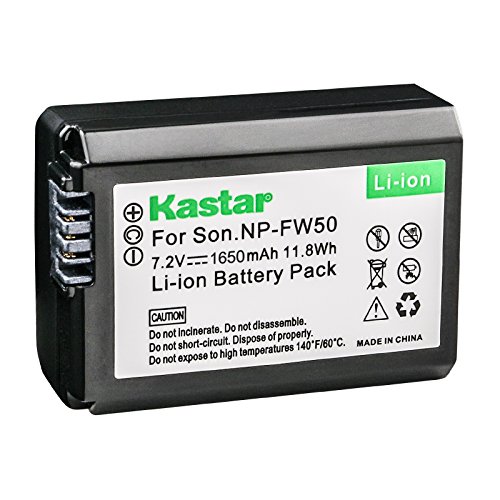
Kastar Brand Replacement Lithium-ion (Li-ion) Battery. High Quality, Long Lasting and Manufacture Price.
Compatible Battery Models
The Sony A6400 uses the NP-FW50 battery. This battery is specifically designed for select Sony cameras, including the Alpha series. Other models that utilize the NP-FW50 include:
- Alpha 5000
- Alpha 5100
- Alpha 6000
- Alpha 6300
- Alpha 6500
These models share battery compatibility, allowing interchangeability for added convenience.
Tips for Extending Battery Life
To get the most out of your NP-FW50 battery, implement these strategies:
- Turn Off Unused Features: Disable Wi-Fi, Bluetooth, and GPS when not in use. This reduces power consumption.
- Lower Screen Brightness: Dimming the display helps conserve battery life during extended shoots.
- Use the Viewfinder: The electronic viewfinder consumes less power than the LCD screen.
- Limit Video Recording: Video recording uses more power than still photography, so alternate between modes when possible.
- Bring Spares: Carry extra NP-FW50 batteries to ensure you maintain power throughout your shooting sessions.
Utilizing these tips extends your camera’s runtime, allowing you to focus on creating without interruptions.
Charging Options
The Sony A6400 offers convenient charging options to keep you shooting. Understanding these options makes it easier to maintain your camera’s power during shoots.
Recommended Products

Powerful Battery Capacity: Li-ion rechargeable battery 7.4V, 1500mAh and 11.1Wh, professional replacement for Sony NP-FW50 Battery. Premium Li-ion cells for longer battery life with no memory effect. Fully compatible with the Sony camera, camcorder and charger.

Extended Battery Life: 1500mAh x2 | 7.4 V | Premium Lithium-ion without memory effect. Higher capacity to help you record more exciting moments, is a reliable professional-grade replacement battery for Sony NP-FW50

【Wide Compatibility】2 Pack np fw50 replacement batteries are 100% compatible with Sony NP-FW50 Li-on Battery. They are suitable for Sony Alpha 7, A7, A7II, A7S, A7SII, A7S2, A7R, A7RII, A7R2, A5000,A6000, A6500, A6300, NEX-3, NEX-3N, NEX-5, NEX-5C, NEX-5N, NEX-5R, NEX-5T, NEX-6, NEX-7, NEX-C3, NEX-F3, DSC-RX10, etc
USB Charging
USB charging provides a flexible solution for powering your A6400. You can connect the camera directly to a power bank, laptop, or wall adapter using a USB Type-C cable. This method is especially useful when you’re on the go or in locations without immediate access to outlets. Just make sure your camera is turned off while charging for quicker results.
External Chargers
Using an external charger provides another efficient way to charge your NP-FW50 batteries. These chargers are designed specifically for this battery type, allowing you to charge multiple batteries simultaneously. You can charge one battery while using another, which ensures you always have a ready power source. Look for external chargers with an LCD display to monitor battery status during the charging process. This feature helps you keep track of your batteries and plan your shoots effectively.
Conclusion
Knowing the battery type for your Sony A6400 is crucial for keeping your creative flow uninterrupted. The NP-FW50 battery offers a decent shot count but having spares handy will save you from unexpected power issues.
With various charging options available you can easily stay powered up whether you’re out on a shoot or at home. By taking simple steps to manage your battery life you can focus more on capturing those perfect moments.
So keep that NP-FW50 charged and ready to go and enjoy every moment of your photography and vlogging adventures!
Frequently Asked Questions
What type of battery does the Sony A6400 use?
The Sony A6400 uses the NP-FW50 lithium-ion rechargeable battery. This battery is known for its lightweight design and provides approximately 360 shots per charge, making it important to have spare batteries for uninterrupted shooting.
How long does the NP-FW50 battery last?
The NP-FW50 battery can last for about 360 shots on a full charge, depending on usage patterns such as video recording and screen brightness. It’s advisable to keep spare batteries handy to ensure you don’t run out of power during critical moments.
Can the NP-FW50 battery be used in other Sony cameras?
Yes, the NP-FW50 battery is compatible with several other Sony models, including the Alpha 5000, 5100, 6000, 6300, and 6500. This interchangeability allows users to maximize their battery resources across different camera models.
How can I extend the battery life of my Sony A6400?
To extend battery life, consider turning off unused features, lowering screen brightness, using the electronic viewfinder, and limiting video recording. Carrying extra batteries is also a practical tip for longer shoots.
How can I charge the Sony A6400 battery?
You can charge the NP-FW50 battery using a USB Type-C cable connected to a power bank, laptop, or wall adapter. External chargers designed for NP-FW50 batteries are also available, allowing for simultaneous charging of multiple batteries with status monitoring options.
