

Key Takeaways
- Battery Type: Samsung 3D glasses typically use a CR2032 lithium coin battery, providing reliable and long-lasting power.
- Battery Specifications: The CR2032 battery features a voltage of 3V, a capacity of approximately 220 mAh, and a compact size suitable for the glasses’ lightweight design.
- Easy Replacement: Replacing the battery is a simple process requiring only a new CR2032 battery, with steps including locating the battery compartment and ensuring proper orientation during installation.
- Battery Maintenance Tips: Regularly check battery levels, store spare batteries in a cool, dry place, and dispose of used batteries responsibly to enhance battery life.
- Common Issues: Low battery levels can lead to intermittent connectivity and reduced brightness; swapping in a fresh CR2032 battery usually resolves these problems.
- Environmental Factors: Extreme temperatures and expired batteries can impact performance; store batteries at room temperature and monitor expiration dates for optimal functioning.
Have you ever wondered what keeps your Samsung 3D glasses powered up during movie night? You’re not alone. Many people enjoy the immersive experience of 3D films but overlook the importance of knowing what battery fuels their glasses.
Overview of Samsung 3D Glasses
Samsung 3D glasses utilize a specific battery type that ensures optimal performance during viewing experiences. Typically, these glasses operate using a CR2032 lithium coin battery, known for its long-lasting power and reliability.
Battery Specifications
- Type: CR2032 lithium coin battery
- Voltage: 3V
- Capacity: Approximately 220 mAh
This battery type combines compact size with high energy density, making it ideal for the lightweight design of Samsung 3D glasses. You may find the battery easily at electronics stores or online retailers.
Replacing the Battery
Replacing the battery in Samsung 3D glasses is straightforward:
- Locate the battery compartment on the temple of the glasses.
- Press the release latch and carefully remove the cover.
- Take out the old battery, noting its orientation.
- Insert the new CR2032 battery, ensuring it sits correctly.
- Replace the cover until it clicks into place.
Make sure to dispose of used batteries responsibly, following local disposal guidelines. Regularly check the battery status to ensure uninterrupted viewing during your movie nights.
Battery Requirements for Samsung 3D Glasses
Samsung 3D glasses rely on a specific battery type to ensure a seamless viewing experience. Understanding these requirements helps you keep your glasses in optimal condition.
Recommended Products

COMPATIBLE WITH AIRTAG & KEY FOBS: Works with Apple AirTag, all major car key fobs (Toyota, Honda, BMW, Ford, Chevrolet, Lexus), fitness trackers, glucose monitors, tire pressure sensors, and any CR2032 / 3V lithium coin battery device.
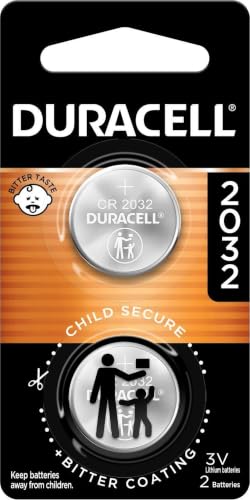
COMPATIBLE WITH AIRTAG & KEY FOBS: Works with Apple AirTag, all major car key fobs (Toyota, Honda, BMW, Ford, Chevrolet, Lexus), fitness trackers, glucose monitors, tire pressure sensors, and any CR2032 / 3V lithium coin battery device.

Types of Batteries Used
Samsung 3D glasses typically use the CR2032 lithium coin battery. This battery type provides reliable power and is widely available in stores. The CR2032 is easy to find, making it convenient for quick replacements.
Battery Specifications
The CR2032 battery has a voltage of 3V and a capacity of around 220 mAh. Its small size contributes to the lightweight design of the glasses. Here’s a quick overview:
| Specification | Value |
|---|---|
| Battery Type | CR2032 |
| Voltage | 3V |
| Capacity | 220 mAh |
| Diameter | 20 mm |
| Thickness | 3.2 mm |
When the battery runs low, you may notice intermittent connection issues or decreased performance during viewing. Regularly check the battery status to avoid interruptions. If it’s time for a replacement, follow the steps provided earlier to ensure you keep enjoying your 3D content.
How to Replace the Battery
Replacing the battery in your Samsung 3D glasses is a straightforward task. Follow the steps below to ensure a smooth replacement process.
Recommended Products

3V LITHIUM COIN 2032 BATTERY PACK: One 10 pack of Energizer lithium 2032 Batteries. Packaging may vary

High Quality Made in Japan
Lithium-ion Coin Cell Battery 3 volt
Step-by-Step Replacement Guide
- Gather Materials: Get a new CR2032 lithium coin battery. Also, a small flathead screwdriver can help if needed.
- Locate the Battery Compartment: Find the battery compartment, usually on the side of the glasses.
- Open the Compartment: Gently slide the cover off, using the screwdriver if it’s snug.
- Remove the Old Battery: Take out the old CR2032 battery. Pay attention to the orientation; the positive side should face up.
- Insert the New Battery: Place the new battery in the compartment, ensuring correct orientation.
- Close the Compartment: Slide the cover back on until it clicks into place.
- Check Functionality: Turn on the glasses to ensure they’re working properly.
Tips for Battery Maintenance
- Store Batteries Properly: Keep spare batteries in a cool, dry place to prolong their life.
- Regular Checks: Check battery levels before movie nights. Change it promptly if you notice dimming or intermittent connection.
- Dispose of Used Batteries: Follow local regulations for battery disposal. Use recycling programs when available.
- Avoid Overuse: Turn off the glasses when not in use to conserve battery life.
Common Issues Related to Battery
When using Samsung 3D glasses, several common battery-related issues may arise.
Recommended Products

Applicable to the following models: CR2032,,2032, CR2032BP,DL2032,ECR2032,KCR2032,BR2032,LM2032,5004LC,5004LB,L14,SB-T15,EA2032C,EA-2032C,L2032,2032,DJ2032,KL2032,E- CR2032,KECR2032,GPCR2032,KT-CR2032


10 pack of cr2032 lithium coin cell batteries compatible with portable electronics. Compatible with key fob battery cr2032, Apple TV remotes, calculators, heart rate monitors, glucose monitors, watches, and other small electronics.
Intermittent Connectivity
Low battery levels can lead to connectivity problems. If you notice the glasses disconnecting or flickering, check the battery status first. Replacing the CR2032 battery often resolves this issue.
Reduced Brightness
You may experience dim or inconsistent brightness in the 3D images. This symptom often indicates that the battery is running low. Swapping in a fresh battery usually fixes the problem and restores optimal brightness.
Battery Drain
Several factors can cause the battery to drain quickly. Frequent use without turning off the glasses when not in use can shorten battery life. To conserve power, turn off the glasses when you’re finished watching.
Improper Battery Installation
Incorrect battery installation can prevent the glasses from working. Ensure you align the new CR2032 battery according to the polarity markings in the compartment. If you notice any issues, double-check that the battery is seated correctly.
Environmental Effects
Extreme temperatures can impact battery performance. Storing or using the glasses in very hot or cold conditions may result in reduced efficiency. Ideal storage occurs at room temperature.
Expiration Dates
Finally, pay attention to the expiration date of your batteries. Old batteries might not perform effectively, even if they appear sealed. Regularly check and replace expired batteries to avoid interruptions during your viewing.
Addressing these issues promptly helps ensure you enjoy a seamless 3D viewing experience. Regular maintenance and proper usage significantly enhance battery life and performance.
Conclusion
Keeping your Samsung 3D glasses powered up is key to enjoying your favorite films in stunning detail. By using the CR2032 lithium coin battery you can ensure a reliable and long-lasting performance. Remember to check the battery status regularly and replace it when needed to avoid any interruptions during your movie nights.
Taking a few moments to follow the replacement guide can save you from potential frustration. Plus with proper care and storage you can extend the life of your batteries. So grab that new battery and get ready to dive back into the immersive world of 3D cinema!
Frequently Asked Questions
What type of battery do Samsung 3D glasses use?
Samsung 3D glasses use a CR2032 lithium coin battery, which provides reliable power for your glasses. This battery has a voltage of 3V and a capacity of approximately 220 mAh, making it suitable for long movie nights.
How do I replace the battery in my Samsung 3D glasses?
To replace the battery, locate the battery compartment, typically found on the side of the glasses. Use a small flathead screwdriver to open it, remove the old battery while noting its orientation, insert the new CR2032 battery, and securely close the compartment.
How can I tell if the battery in my Samsung 3D glasses is low?
Indicators of a low battery include intermittent connectivity, reduced brightness, or the glasses not turning on. Regularly check the battery status to ensure uninterrupted viewing of your 3D content.
What should I do with used batteries?
Dispose of used batteries responsibly, adhering to local regulations for battery disposal. Many retailers offer recycling programs for old batteries, which helps protect the environment.
How can I extend the battery life of my Samsung 3D glasses?
To prolong battery life, turn off the glasses when not in use, store batteries properly, and conduct regular checks to ensure the battery is functioning well. Avoid exposing the glasses to extreme temperatures, which can degrade battery performance.
