

Ever had that sinking feeling when your Viper remote just won’t cooperate after a car battery replacement? It’s like your trusty sidekick suddenly went rogue, leaving you stranded. Picture this: you’re standing there, clicking away, but your car remains stubbornly locked. Frustrating, right? Don’t worry, we’ve got your back! In this article, we’ll unravel the mystery behind why your Viper remote is acting up post-battery swap. Stay tuned to discover quick fixes and expert tips to get you back on the road effortlessly.
Check Remote Battery
When your Viper remote starts acting up after a car battery replacement, one of the first things you should check is the remote battery. Here’s what you can do:
- Open the Remote: Look for a small screw on the back of your remote and use a screwdriver to open it. Check the Battery: Make sure the battery is properly in place and not loose.
- Battery Type: Note down the type of battery used in the remote. Common types include CR2025 or CR2032.
- Voltage Testing: If you have a voltmeter, test the battery’s voltage. A healthy battery should ideally read around 3 volts.
- Replace if Necessary: If the battery voltage is low, it’s time for a replacement. Head to the nearest store and get a new battery of the correct type.
Don’t jump to conclusions when your Viper remote gives you trouble; often, it’s a simple fix like replacing the battery.
Reprogram Remote
- Find the programming button on your vehicle’s alarm system. It’s usually located under the dashboard.
- Turn your vehicle’s ignition to the “On” position.
- Press and release the programming button once.
- The alarm system will chirp to indicate it’s ready for programming.
- Press any button on your Viper remote to pair it with the alarm system.
- The system will chirp again to confirm successful programming.
- Test your remote to see if it now works properly.
| Step | Instructions |
|---|---|
| 1. | Find the programming button on the alarm system. |
| 2. | Turn the ignition to “On.” |
| 3. | Press the programming button. |
| 4. | Press any button on the Viper remote to pair. |
| 5. | Test the remote for functionality. |
Check Remote Antenna
If your Viper remote is not working after a car battery replacement, another troubleshooting step is to check the remote antenna. Here are some pointers to consider:
- The antenna’s location: Ensure that the remote’s antenna is in good condition and securely attached to the main unit.
- Obstructions: Check for any potential obstructions near the antenna that could be interfering with the signal reception.
- Physical damage: Inspect the antenna for any signs of physical damage that may be affecting its functionality.
- Antenna connection: Make sure the antenna is properly connected to the alarm system to maintain a strong and consistent signal.
By examining the remote antenna and addressing any issues related to its performance, you can improve the chances of resolving the problem with your Viper remote.
Recommended Products


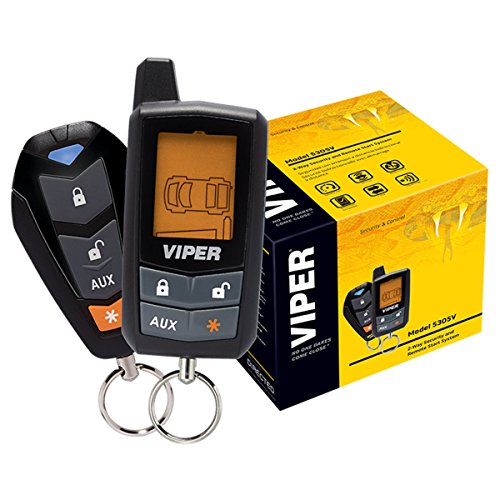
-Way Security + Remote Start System with 5-Button LCD Transmitter
Reset Car’s Computer System
When your Viper remote is still not working after changing the car battery, resetting your car’s computer system can often help resolve the issue. This process can help reestablish communication between the remote and the vehicle. Here’s how to proceed:
- Locate the fuse box: Look for the fuse box in your vehicle. It is typically found under the dashboard or in the engine compartment.
- Identify the correct fuse: Find the fuse associated with the car’s security system or remote keyless entry.
- Remove and reinsert the fuse: Carefully take out the fuse and reinsert it after a few seconds. This action can reset the car’s computer system.
- Start your car: After resetting the fuse, start your car to see if the Viper remote now functions correctly.
By resetting your car’s computer system in this manner, you might be able to restore the connection between the remote and the vehicle, resolving any issues that arose after the battery replacement.
| Steps | Description |
|---|---|
| Locate the fuse box | Find it under the dashboard or in the engine compartment |
| Identify the correct fuse | Look for the one related to the car’s security system or remote keyless entry |
| Remove and reinsert the fuse | Take out the fuse and reinsert it after a few seconds |
| Start your car | Check if the Viper remote now functions correctly |
Contact Viper Customer Support
If you’ve tried various troubleshooting methods and your Viper remote still isn’t working after a car battery replacement, it may be time to reach out to Viper’s customer support. Here are some steps to guide you through this process:
- Visit the Viper Website: Start by visiting Viper’s official website – they often have a dedicated support section with resources to help solve common issues.
- Locate Contact Information: Look for the “Contact Us” or “Support” section on the website to find the appropriate contact information.
- Prepare Relevant Details: Before reaching out, make sure to have essential details handy, such as your Viper remote model number, vehicle make and model, and a brief description of the issue.
- Reach Out: Whether through email, phone, or live chat, get in touch with Viper’s customer support team. Be clear and concise when explaining the problem you’re experiencing.
- Follow Guidance: Customer support may provide troubleshooting steps over the phone or ask you to perform specific actions to diagnose the issue further. Follow their instructions carefully.
- Consider Warranty: If your Viper remote is still under warranty, inquire about potential replacements or repairs covered by the warranty.
By contacting Viper’s customer support, you can receive expert guidance tailored to your specific situation and hopefully resolve the issue with your Viper remote post-battery replacement.
Conclusion
If you’ve tried troubleshooting your Viper remote after a car battery replacement with no success, don’t worry. Contacting Viper’s customer support is your next best step. By providing them with the necessary details, such as your remote model number and vehicle information, you can receive personalized guidance and support. Whether through email, phone, or live chat, Viper’s customer support team is there to assist you. They may even offer warranty coverage for replacements or repairs to help you get your Viper remote working smoothly again. Don’t hesitate to reach out for the help you need.
Frequently Asked Questions
Can’t fix your Viper remote after replacing the car battery? What should you do?
If troubleshooting methods don’t work, contact Viper’s customer support. Go to their website, gather remote model and vehicle details, and reach out via email, phone, or live chat for tailored assistance. Warranty coverage for replacements or repairs may be available.
How can I get help with my Viper remote post-battery replacement?
When troubleshooting doesn’t work, visit Viper’s website and contact customer support with your remote model and vehicle information. Reach out through email, phone, or live chat for customized guidance. Warranty options for replacements or repairs can also be explored.
