

Ever wondered if you should let your laptop battery completely drain? Picture this: you’re working on an important project when suddenly your battery indicator turns red. Should you keep going until it dies, or rush to find a charger? In this article, we’ll explore the age-old question: Should you let your laptop battery drain completely?
Understanding Laptop Battery Health
To enhance your laptop battery’s longevity, it’s crucial to comprehend how battery health works. Here are key points to consider:
- Battery Cycle Count: This refers to the number of complete charge and discharge cycles a battery can undergo before its capacity diminishes.
- Avoiding Extremes: Fully draining the battery or keeping it constantly at full charge can accelerate wear. Aim to keep the charge between 20% and 80%.
- Temperature Impact: Excessive heat and cold can harm the battery.Optimal operating temperature is generally around 50 to 95 degrees Fahrenheit.
- Regular Usage: Occasionally using the battery and keeping it active can help maintain its health. Leaving it inactive for prolonged periods can have negative effects.
- Calibration: Periodic calibration helps the laptop accurately gauge the remaining battery capacity, enhancing its overall performance and lifespan.
- Charging Practices: Avoid leaving your laptop plugged in all the time. Let the battery occasionally discharge and recharge to maintain its health.
By understanding these fundamentals, you can prolong your laptop battery’s lifespan and ensure optimal performance when you need it most.
Recommended Products

【Blue Tip】 Input: AC 100V-240V , DC Output: 19.5V 3.33A 65W
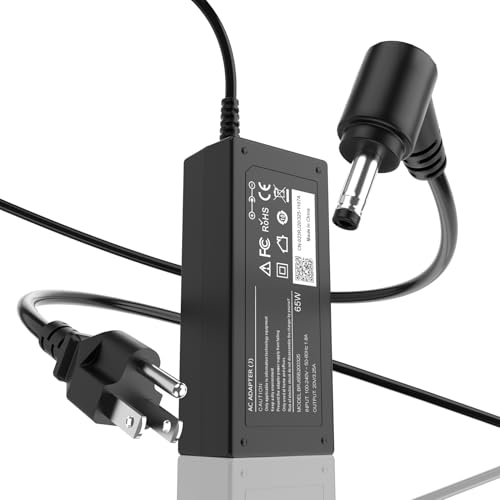
65W Fixed Output Supply: Power your notebook efficiently with the ROLADA laptop power supply. It delivers a steady, fixed output of 20V 3.25A 65W and is backward compatible with 45W (20V 2.25A) devices. Input voltage range: 100-240V, 50-60Hz supports seamless worldwide utility.
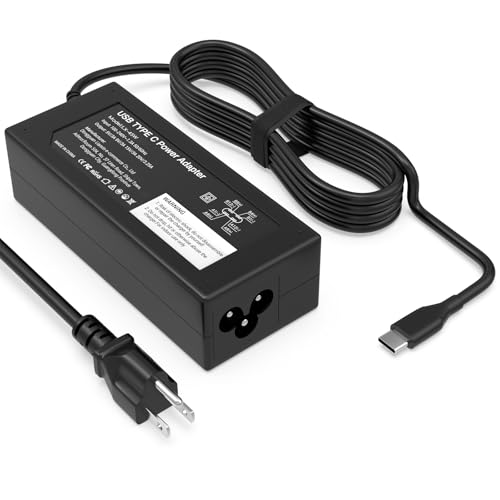
Specifications:Connector Type USB Type-C Wattage 45W Output 5V-3A or 9V-3A or 15V-3A or 20V-2.25A Input100-240V 50-60Hz
Effects of Full Battery Drain on Laptop Battery
When it comes to fully draining your laptop battery, it’s crucial to understand the potential impacts it can have on your device’s overall battery health. Here’s a breakdown of what you need to know:
- Decreased Lifespan: Allowing your laptop battery to completely drain on a regular basis can shorten its overall lifespan. This stress on the battery can lead to a quicker deterioration of its capacity over time.
- Strain on Battery Cells: Full battery drains can put strain on the battery cells, impacting their efficiency and longevity. This can result in reduced battery performance and the need for more frequent replacements.
- Impact on Performance: Full drains may also affect your laptop’s performance, leading to less reliable battery life and potential issues with powering on your device when you need it most.
- Avoiding Extreme Levels: It’s generally recommended to avoid letting your battery fully drain to help preserve its health. Instead, aim to keep your battery within a moderate charge range for optimal performance and longevity.
- Regular Maintenance: By avoiding full battery drains and practicing healthy charging habits, you can help maintain your laptop battery’s health and ensure it performs optimally for years to come.
Myths About Draining Laptop Battery Completely
When it comes to draining your laptop battery completely, there are several myths surrounding this practice. Let’s debunk a few of them:
- Myth 1: “Fully draining your laptop battery before recharging improves its overall lifespan.”
- Truth: This is a common misconception. Modern lithium-ion batteries do not require full discharges to maintain health. In fact, frequent deep discharges can actually be detrimental to the battery’s longevity.
- Myth 2: “Letting your laptop battery die completely helps recalibrate its capacity.”
- Truth: Most laptops have built-in mechanisms to manage battery calibration automatically. Allowing your battery to die completely is unnecessary and can lead to unnecessary wear and tear.
- Myth 3: “Fully discharging your laptop battery periodically can boost its performance.”
- Truth: In reality, constantly letting your battery hit 0% can stress the battery cells and impact its ability to hold a charge over time.
Remember, avoid falling for these myths about draining your laptop battery completely. Healthy charging habits and maintaining a moderate charge range are key to preserving your battery’s health and performance.
Best Practices for Laptop Battery Maintenance
When it comes to laptop battery maintenance, following these best practices can help you maximize its lifespan and performance:
- Avoid deep discharge: Lithium-ion batteries perform best when kept in a moderate charge range. Fully draining the battery frequently can actually shorten its lifespan.
- Partial charges are fine: You don’t need to wait until your battery is nearly empty to recharge. In fact, frequent top-ups between 20% and 80% can be beneficial for your battery.
- Mind the temperature: Extreme temperatures can damage your laptop battery. Avoid exposing it to high heat or cold environments for prolonged periods.
- Unplug when fully charged: Once your laptop battery reaches 100%, it’s best to unplug it to avoid overcharging, which can strain the battery over time.
- Keep it cool: Improper ventilation can cause your laptop to overheat, affecting the battery. Use your laptop on a hard surface to ensure proper airflow.
By incorporating these practices into your routine, you can maintain a healthy laptop battery and enjoy long-lasting performance from your device.
Recommended Products

Ultra-Portable: Slim, portable, and light weight allowing you to protect your investment wherever you go

【High-Speed Cooling Performance】 Equipped with two powerful fans and a precision metal mesh design, KYOLLY’s laptop cooling pad delivers optimal airflow to quickly dissipate heat, preventing overheating—even during extended use. Perfect for gaming, multitasking, or long work sessions.

Conclusion
Remember, it’s best to avoid letting your laptop battery completely drain. Opt for partial charges between 20% and 80% to prolong its lifespan. By following these simple practices, you can ensure your battery stays healthy and your device performs optimally. So, next time you reach for your charger, keep these tips in mind to get the most out of your laptop battery.
Frequently Asked Questions
1. What are the best practices for laptop battery maintenance?
To maintain your laptop battery, avoid deep discharges and keep it in a moderate charge range. Partial charges between 20% and 80% are recommended. Avoid exposing the battery to extreme temperatures. Unplug your laptop when fully charged and use it on a hard surface for proper ventilation.
2. How can I maximize the lifespan of my laptop battery?
To maximize your laptop battery’s lifespan, follow best practices like avoiding deep discharges, keeping it in a moderate charge range, and ensuring proper ventilation. Partial charges between 20% and 80% can help prolong the battery’s lifespan.
3. What should I avoid to prevent damage to my laptop battery?
To prevent damage to your laptop battery, avoid deep discharges, exposure to extreme temperatures, and using your laptop on soft surfaces that obstruct ventilation. Unplug your laptop when it’s fully charged to prevent overcharging, which can harm the battery.
4. How can I ensure my laptop battery performs optimally for a longer time?
To ensure your laptop battery performs optimally for a longer time, follow maintenance best practices like avoiding deep discharges, maintaining a moderate charge range, and using your laptop on a hard surface for proper ventilation. Unplugging the laptop when fully charged can also help optimize performance.
