

Key Takeaways
- Recognize Warning Signs: Be attentive to unexpected shutdowns, rapid battery drain, overheating, slow charging, and battery swelling as indicators of a failing Samsung battery.
- Monitor Battery Health: Utilize built-in diagnostic tools or third-party apps like AccuBattery and GSam Battery Monitor to keep track of your battery’s performance and health.
- Understand Degradation Factors: Familiarize yourself with factors that contribute to battery degradation such as heat exposure, frequent charging cycles, age of the battery, and high-drain apps.
- Troubleshooting Techniques: Implement troubleshooting steps like resetting your device and calibrating your battery to potentially restore performance before considering a replacement.
- Know When to Replace: If you frequently experience unexpected shutdowns, rapid battery drain, or noticeable swelling, it may be time to replace your battery to maintain device reliability.
- Battery Lifespan Awareness: Keep in mind that Samsung batteries generally last between 2 to 3 years; timely replacement can ensure your phone continues to function optimally.
Have you ever found yourself wondering why your Samsung phone suddenly dies even with a decent charge? It’s frustrating when your device doesn’t keep up with your daily needs. You might be dealing with a bad battery, and knowing the signs can save you a lot of hassle.
In this article, you’ll learn how to spot the warning signs of a failing battery. From unexpected shutdowns to slow charging issues, you’ll discover practical tips to assess your battery’s health. Understanding these indicators will help you decide whether it’s time for a replacement, ensuring your phone stays reliable and ready for anything.
Understanding Samsung Battery Performance
Understanding battery performance helps you identify potential issues early. Samsung batteries, like all lithium-ion batteries, can degrade over time due to various factors.
Signs of a Failing Battery
Recognizing the signs of a failing battery allows for timely action. Common indicators include:
- Unexpected Shutdowns: Your phone might turn off suddenly, even with a sufficient charge.
- Slow Charging: Charging takes longer than usual or fails to reach full capacity.
- Overheating: The device heats up significantly during charging or regular use.
- Battery Swelling: The battery may physically swell or bulge, indicating serious issues.
- Diminished Battery Life: A noticeable decrease in how long your device lasts on a single charge.
Each of these signs suggests that your battery may require replacement.
Factors That Contribute to Battery Degradation
Various factors can accelerate battery degradation. Being aware of these helps you extend your battery’s lifespan:
- Heat Exposure: High temperatures can shorten battery life. Avoid leaving your phone in hot environments.
- Frequent Charging Cycles: Regularly charging from 0% to 100% stresses the battery. Instead, aim to keep the charge between 20% and 80%.
- Age of Battery: Batteries naturally degrade over time. Lithium-ion batteries typically last around 2 to 3 years before showing significant capacity loss.
- Software Updates: Sometimes, software updates can strain battery resources. Monitor whether a recent update changes your battery performance.
- Apps and Usage: High-drain apps may deplete your battery faster. Check your battery usage settings to evaluate app performance.
By monitoring these factors and symptoms, you can ensure your Samsung phone remains functional and reliable.
Common Symptoms of a Bad Battery
Identifying a bad battery can prevent further complications. Watch for these key symptoms.
Rapid Battery Drain
Rapid battery drain occurs when your phone discharges energy much faster than expected. If your Samsung phone drops from a full charge to empty within a few hours, something’s not right. Regular usage should last at least a day with moderate use. Use the settings menu to check battery usage details; it helps find which apps consume excessive power. If the battery’s performance degrades significantly over time, a replacement is likely necessary.
Device Overheating
Device overheating can signal battery issues. If your phone feels hot during regular use or charging, that’s a clear red flag. Overheating may stem from faulty batteries or high-demand apps running in the background. If persistent heat occurs, stop using the device and consider a battery check. Excessive heat not only damages the battery but can also impact other internal components.
Checking Battery Health on Samsung Devices
Checking the battery health is essential for maintaining your Samsung device. Use the following methods to assess battery performance.
Recommended Products

Sim Card Slot Count: single_sim; Display Type: AMOLED; Operating System: Android 13.0; Water Resistance Level: not_water_resistant

Fully Unlocked: Fully unlocked and compatible with any carrier of choice (e.g. AT&T, T-Mobile, Sprint, Verizon, US-Cellular, Cricket, Metro, etc.), both domestically and internationally.

This device is locked to T-Mobile only and not compatible with any other carrier.
Using Built-in Diagnostic Tools
Samsung devices come with built-in diagnostic tools that can help you evaluate battery health. Access the diagnostic menu by following these steps:
- Open the Phone app.
- Dial ##4636## to access the Testing menu.
- Select Battery Information.
Here, you’ll find details about your battery’s status, such as its voltage, temperature, and charge cycles. Look for any abnormalities in these values, as they can indicate battery issues.
Apps for Monitoring Battery Status
Several third-party apps can provide comprehensive insights into your battery health. Popular options include:
- AccuBattery: Tracks charge cycles, health percentage, and usage statistics.
- GSam Battery Monitor: Offers usage details, including which apps consume the most power.
- Battery Guru: Provides detailed stats and recommendations for optimizing battery life.
Download one of these apps and regularly check the data they provide. Monitoring battery status through these apps helps identify potential issues before they become significant problems.
Troubleshooting Steps for Battery Issues
To identify and address potential battery problems with your Samsung device, several troubleshooting steps can help restore performance.
Resetting Your Device
Resetting your phone can resolve minor glitches that might affect battery performance. To reset your Samsung device, follow these steps:
- Press and hold the Power button until the power menu appears.
- Tap Restart or Reboot.
- Confirm any prompts to complete the reset.
After restarting, check if the battery issues persist. If problems continue, further investigation is necessary.
Battery Calibration Techniques
Calibrating your battery helps your device accurately measure its charge levels. Follow these steps to calibrate your Samsung battery:
- Charge your phone to 100% and keep it plugged in for an additional hour.
- Unplug the device and use it until it completely drains and shuts off.
- Wait for at least 5-6 hours.
- Charge the device uninterrupted to 100% again.
This process can help the system reset its battery statistics. If battery performance doesn’t improve, consider exploring other diagnostic options or potential replacements.
When to Replace Your Samsung Battery
Recognizing the right time to replace your Samsung battery can prevent frustration. Monitor these signs closely.
Recommended Products
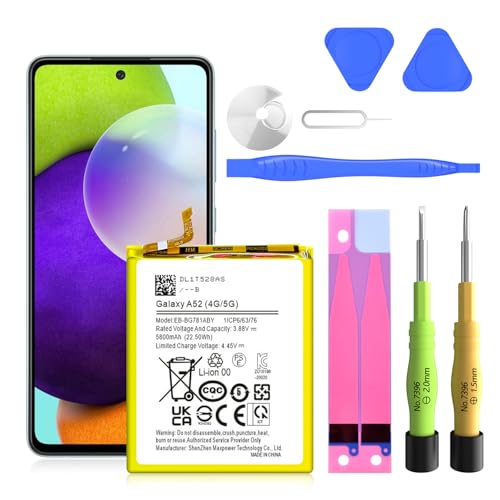
✅SHENMZ Galaxy A52 Battery Replacement ONLY Work For Model Samsung Galaxy A52/A52S (4G/5G) SM-A526 SM-A526B/DS SM-A5260 EB-BG781ABY. Note: Galaxy A52 Battery ,NOT for Other Samsung Model. Please Confirm Your Phone Model From Phone Back Cover to Avoid Wrong Order.[Not for Galaxy other Phone Models.]

This battery is compatible with Samsung Galaxy SCH-U360 a870 a930 U310, to ensure that the battery you purchase is a perfect match for your device, be sure to check the model number of your device before ordering (you can check the model number of your device in the ‘Settings’ of your device).

POWER ANYWHERE YOU WANT IT: Charge up any of your devices with the Galaxy Magnetic Wireless Battery Pack. Whether you want to plug in to the USB-C port or use the built-in magnetic wireless charger, the 5,000mAh battery is waiting to power you up throughout the whole day.
Unexpected Shutdowns
Unexpected shutdowns often indicate a failing battery. If your phone powers off while showing a sufficient charge, it’s a strong sign of battery issues. Consider replacing it if this happens frequently, particularly during phone use or charging.
Rapid Battery Drain
Monitor your battery usage статистics. If your battery drains much faster than expected, it signals potential damage. For instance, if a full charge lasts only a couple of hours without heavy usage, it’s time for a battery check or replacement.
Overheating
Overheating can signify battery trouble. If your Samsung device feels hot during regular use or while charging, assess the battery’s condition. Persistent overheating can lead to more extensive damage, making replacement necessary.
Battery Swelling
Inspect for any physical changes. If you notice your phone’s back cover or screen bulging, the battery may be swelling. A swollen battery poses safety risks and definitely requires immediate replacement.
Diminished Battery Life
Evaluate your battery life over time. If your Samsung phone’s battery life has significantly dropped, it may indicate age-related degradation. If you’re frequently charging throughout the day, replacement could restore optimal performance.
Age of the Battery
Consider the age of your battery. Samsung batteries typically last about two to three years under normal usage. If your battery is older than this and exhibits issues, replacement is advisable.
Monitoring these signs helps you maintain your Samsung phone’s performance. If you identify one or more of these signs, act promptly to ensure your device remains reliable and efficient.
Conclusion
Keeping an eye on your Samsung battery’s health is key to enjoying a smooth user experience. By recognizing the signs of a failing battery you can take action before it leads to bigger issues. If you notice unexpected shutdowns or rapid battery drain don’t hesitate to explore diagnostic tools and troubleshooting techniques.
Remember that a little maintenance goes a long way. Whether it’s calibrating your battery or monitoring your usage habits staying proactive can help extend your battery’s lifespan. If all else fails and your battery’s performance doesn’t improve it might be time for a replacement. Your Samsung phone deserves to run at its best so keep these tips in mind and enjoy reliable performance every day.
Frequently Asked Questions
Why does my Samsung phone shut down unexpectedly even with a charge?
Unexpected shutdowns can indicate a failing battery. Factors like age, overheating, or software issues might also contribute. Monitoring these signs can help determine if a battery replacement is necessary.
What are the signs of a dying battery on a Samsung phone?
Common signs include unexpected shutdowns, rapid battery drain, overheating, and diminished battery life. Keep an eye out for battery swelling, as it can also indicate serious issues.
How can I check the health of my Samsung phone’s battery?
You can check your battery’s health by accessing the built-in diagnostic tools. Dial ##4636## in the Phone app to view details like voltage and temperature, or use third-party apps like AccuBattery or GSam Battery Monitor.
What causes battery degradation in Samsung phones?
Battery degradation can result from heat exposure, frequent charging cycles, the battery’s age, software updates, and high-drain apps. Regular monitoring can help mitigate these effects and extend battery life.
How do I troubleshoot battery issues on my Samsung phone?
Start by resetting your device to clear any minor glitches. Consider calibrating the battery by charging it to 100%, letting it drain completely, and then charging it again uninterrupted.
When should I replace my Samsung phone battery?
Consider replacing your battery if you notice consistent symptoms such as unexpected shutdowns, rapid drain, swelling, overheating, or a significant drop in battery life. Timely action prevents further complications.
