

Key Takeaways
- Understand Battery Basics: Sony Xperia devices feature non-removable lithium-ion batteries, which require careful handling during removal or replacement.
- Required Tools: Utilize specific tools like a Phillips screwdriver, plastic pry tool, and tweezers for safe battery removal to avoid damage.
- Safe Removal Steps: Follow a clear step-by-step guide to power off the device, remove the back cover, disconnect the battery, and lift it out safely.
- Troubleshoot Common Issues: Be prepared to address challenges such as a tight back cover or battery connection problems by using proper techniques and tools.
- Adhere to Safety Precautions: Always power off the device, work in a clean space, wear gloves, and inspect the battery before removal for a safe process.
- Proper Disposal Practices: Ensure to dispose of old batteries correctly and in accordance with local regulations to safeguard the environment.
Have you ever found yourself with a Sony Xperia that just won’t turn on or is acting up? Sometimes, a simple battery removal can be the fix you need. Whether you’re trying to troubleshoot a problem or replace an old battery, knowing how to safely take it out is essential.
Overview of Sony Xperia Batteries
Sony Xperia devices use non-removable lithium-ion batteries. These batteries offer efficient power management, ensuring your phone operates smoothly. Typically, batteries in these models range from 2,500 mAh to 4,000 mAh, depending on the specific model.
Maintaining your battery’s health is essential. Consider these factors:
- Charging Habits: Charge your device when it dips below 20%. Avoid letting it reach 0% frequently.
- Temperature: Keep your phone in a cool, dry place. Extreme heat can shorten battery life.
- Software Updates: Regularly update your software for improved battery performance and security.
You might wonder about battery replacement. If your Xperia device shows signs of a failing battery—like rapid discharges or overheating—replacing the battery can enhance performance. Always use genuine parts for replacement to avoid potential damage.
For troubleshooting, sometimes removing the battery helps reset the device. Although it’s generally more complex due to the non-removable design, knowing the ins and outs of your Sony Xperia battery sets you up for better performance and longevity.
Tools Required for Battery Removal
Removing the battery from your Sony Xperia requires specific tools for safety and efficiency. Having the right tools on hand makes the process more straightforward.
Recommended Products

Removal Release Keys Tool Compatible With Sony Car Stereo/Radio headunit Sold in one pair.

【Compatible Model】 Please Make sure your phone is suitable for this replacement battery before ordering. Battery Model: BL-T33 Battery.

The keys tools are easy to use and will save you a lot of time and money by allowing you to do it yourself! Just insert key tool into the right and left side factory holes and pull release radio out.
Essential Tools
- Screwdriver (Phillips): Use a small Phillips-head screwdriver to remove screws effectively.
- Plastic Pry Tool: This tool helps carefully detach the back panel without causing damage.
- Tweezers: Tweezers assist in handling small connectors or parts during the removal process.
- Soft Cloth: A clean cloth protects your device’s surface from scratches.
Optional Tools
- Heat Gun or Hair Dryer: Applying gentle heat loosens adhesive, making it easier to remove the back panel.
- Magnetic Mat: This keeps screws organized, preventing loss during disassembly.
- Multimeter: Use one to check battery health before removal if needed.
Step-by-Step Guide
Follow these steps to safely remove the battery from your Sony Xperia device.
Recommended Products

JRDDS-D310PRO-01:For TE LEAVYSEAL 2.8 series MQS 2.8 series male&female terminals; Timer ConnectorSystem 2.8 series male&female terminals; AMP MCP 2.8 series male&female terminals;TE 2.8 JPT series male&female terminals.

✅ Perfect Fit & Compatibility – Original front-facing selfie camera module for Sony Xperia 1 II . Go to Settings > About Phone > Regulatory Labels > Model ID to confirm before buying.

✅ Perfect Fit & Compatibility – Original front-facing selfie camera module for Sony Xperia 10 V . Go to Settings > About Phone > Regulatory Labels > Model ID to confirm before buying.
Powering Off the Device
- Hold the power button until the power menu appears.
- Tap “Power off” and confirm.
- Wait for the device to completely turn off before proceeding.
Removing the Back Cover
- Use a plastic pry tool to gently lift the back cover.
- Start from one corner and work your way around to avoid damage.
- Carefully detach the cover from the device, ensuring it doesn’t crack.
Disconnecting the Battery
- Locate the battery connector on the motherboard.
- Use a pair of tweezers to lift the connector away from the port.
- Ensure the connection is fully disconnected before moving on.
Taking Out the Battery
- Confirm the battery is fully disconnected.
- Gently lift the battery out of its compartment with your fingers or plastic pry tool.
- Dispose of the battery properly or replace it with a new one if needed.
These steps allow for safe battery removal, ensuring your device remains functional and intact.
Common Issues and Troubleshooting
You may encounter some common issues when dealing with your Sony Xperia device’s battery removal. Understanding these problems can help ensure a smooth process.
Recommended Products
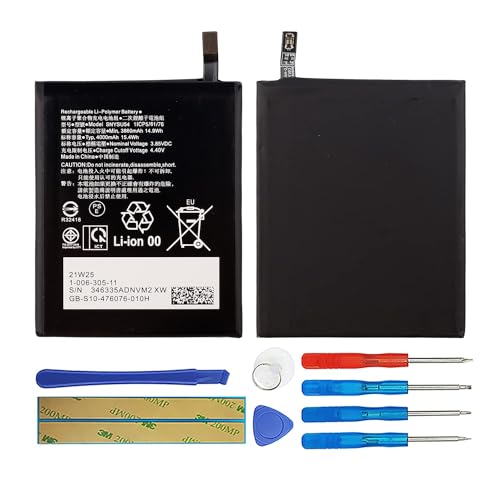
Compatible Models: So-ny Xperia 1 II. Please check your old battery number before buying this battery.

1. Applicable Models:Compatible with Sony Xperia 1 IV/Sony Xperia 5 IV ,Please carefully check your mobile phone model before purchasing to avoid purchasing the wrong model and damaging your product

【Compatible Models】 Sony Xperia XA2 Xperia L2 H3123 H3133 H4113.Please check your old battery number before buying this battery.
Difficulty in Opening the Device
If opening your Sony Xperia proves challenging, verify that you’re using the correct tools. A plastic pry tool effectively prevents damage to the back cover. Ensure you’re applying even pressure to avoid cracking the glass. If the device resists, apply gentle heat from a heat gun or hair dryer to soften adhesive. This approach loosens the cover, allowing for easier access.
Battery Connection Problems
Battery connection issues often arise after disassembly. If the device doesn’t power on even after battery removal, check the battery connector. A loose or damaged connection can prevent power from reaching the device. Use tweezers to firmly reconnect the battery alignment with the motherboard. If you notice corrosion or physical damage, replacing the battery may be necessary. Always opt for genuine parts to maintain device integrity.
Safety Precautions
Taking the battery out of your Sony Xperia requires careful attention to safety. Follow these precautions to ensure a safe and successful battery removal.
- Power Off Your Device
Always power off your device before starting the battery removal process. This prevents electrical shorts and protects both you and the device.
- Use Appropriate Tools
Employ the recommended tools, like a Phillips screwdriver and a plastic pry tool. Using the right tools minimizes the risk of damaging your device or injuring yourself.
- Work in a Clean Area
Set up your workspace in a clean, organized area. This reduces the chances of losing small parts and allows for quick access to tools.
- Remove Jewelry and Wear Gloves
Take off jewelry and consider wearing gloves. This protects your skin from battery chemicals and reduces the risk of short circuits caused by metal objects.
- Avoid Extreme Temperatures
Don’t expose the battery to extreme temperatures. Working in a cool environment keeps components safe and prevents potential hazards.
- Inspect the Battery for Damage
Check the battery for signs of damage like swelling or leaks. If you notice any issues, handle with care and consider proper disposal instead of removal.
- Disconnect the Battery Carefully
When disconnecting the battery connector, do it gently. Avoid using excessive force to prevent damage to the motherboard or connector.
- ** Follow Disposal Regulations**
Dispose of the old battery according to local regulations. Proper disposal ensures you’re not harming the environment and complies with safety laws.
These precautions help you remove the battery safely and effectively.
Conclusion
Taking the battery out of your Sony Xperia can seem daunting but with the right tools and steps, it becomes a manageable task. Remember to prioritize safety by powering off your device and using the appropriate tools.
Maintaining your battery’s health is crucial for optimal performance so don’t hesitate to replace it when needed. By following the guidelines shared in this post, you can ensure your device runs smoothly and lasts longer. Enjoy your Xperia experience and take care of that battery!
Frequently Asked Questions
What should I do if my Sony Xperia device won’t turn on?
If your Sony Xperia device won’t turn on, try performing a soft reset by holding the power button for at least 10 seconds. If that doesn’t work, check the battery charge or try removing and reinserting the battery if it’s accessible. If issues persist, consult a professional technician.
How can I safely remove the battery from my Sony Xperia device?
To safely remove the battery, first, power off the device. Use a plastic pry tool to gently open the back cover and disconnect the battery connector using tweezers. Carefully lift the battery out, ensuring it’s fully disconnected. Follow specific guides for your model to avoid damage.
What tools do I need for Sony Xperia battery removal?
Essential tools include a Phillips screwdriver, a plastic pry tool, tweezers, and a soft cloth. Optional tools that may assist include a heat gun or hair dryer to ease cover removal, a magnetic mat for organizing screws, and a multimeter to check battery health.
How can I maintain my battery’s health?
To maintain your battery’s health, charge your device with the original charger, avoid extreme temperatures, and update software regularly. Additionally, refrain from letting the battery drain completely and avoid leaving it plugged in overnight frequently to prevent excessive wear.
When should I consider replacing my Sony Xperia battery?
Consider replacing your Sony Xperia battery if you experience rapid discharges, overheating, or if the device won’t hold a charge. It’s best to use genuine replacement parts to ensure compatibility and protect your device’s integrity.
What safety precautions should I take when removing a battery?
Always power off your device before battery removal. Use the right tools, work in a clean area, and avoid wearing jewelry to prevent accidental damage. Wear gloves to protect against battery chemicals, and avoid exposing the battery to extreme temperatures during the process.
How can I dispose of a used Sony Xperia battery properly?
Dispose of your used Sony Xperia battery in accordance with local regulations. Many electronics retailers and recycling centers accept batteries for safe disposal. Avoid throwing them in the regular trash, as they can be harmful to the environment.
