

Key Takeaways
- Understand the Samsung S20 Battery: The S20 features a non-removable battery; proper understanding aids in maintenance and troubleshooting.
- Regular Battery Maintenance: Charge between 20%-80%, avoid overheating, and always use Samsung-approved chargers for optimal battery lifespan.
- Recognize Battery Failure Signs: Keep an eye out for rapid battery drain, bulging, overheating, or a device that won’t power on, as these indicate replacement is needed.
- Essential Tools for Removal: Gather a precision screwdriver set, plastic pry tools, tweezers, a suction cup tool, and an anti-static wrist strap before starting the battery removal process.
- Follow a Step-by-Step Guide: Carefully follow the outlined steps for removing the back cover, disconnecting the battery, and installing a new battery to ensure a smooth process.
- Ensure Compatibility When Replacing: Always check that replacement batteries match original specifications and seal the device properly after installation to protect against dust and moisture.
Ever found yourself in a situation where your Samsung S20 just won’t turn on? Maybe you’re dealing with a stubborn app or a battery that’s not holding a charge like it used to. If you’re nodding along, you’re not alone. Knowing how to remove the battery can be a game-changer when troubleshooting these issues.
Understanding The Samsung S20 Battery
The Samsung S20 features a non-removable battery that plays a crucial role in the device’s functionality. Understanding this battery’s characteristics helps you maintain optimal performance.
Importance Of Battery Maintenance
Maintaining your battery ensures longer device life and peak performance. Regular use and care can prevent issues like reduced capacity or unexpected shutdowns. Here are key maintenance tips:
- Charge Regularly: Keep the battery charge between 20% and 80%. This range helps prolong battery life.
- Avoid Overheating: High temperatures can damage the battery. Keep your phone out of direct sunlight or hot environments.
- Use Official Chargers: Always use Samsung-approved chargers. Non-certified chargers may cause damage.
Signs You Need To Replace The Battery
Recognizing the signs of battery failure ensures timely replacements, preventing further device issues. Here are common indicators:
- Rapid Battery Drain: If your battery depletes quickly and the usage patterns haven’t changed, consider a replacement.
- Swelling or Bulging: A swollen battery is dangerous and requires immediate attention.
- Overheating: Frequent overheating during normal use signals potential battery failure.
- Phone Won’t Turn On: If your Samsung S20 fails to power on despite charging, the battery might be the culprit.
Monitoring these signs helps you take action before problems escalate, ensuring your device remains functional.
Tools Needed For Battery Removal
To safely remove the battery from your Samsung S20, you need a few essential tools. Each tool plays a specific role in ensuring a smooth process.
Recommended Products

{COMPATIBLE MODELS}:This Replacement battery Compatible with Samsung Galaxy S20 Plus (Model: SM-G985 SM-G985F S20+ 5G).

Compatible Phone Model: This battery kit is specifically designed for Samsung Galaxy S20 Plus (with model SM-G985 series), NOT work for Galaxy S20 / S20 Ultra, please double confirm your phone model before purchasing
Essential Tools
- Screwdriver Set: Use a precision screwdriver set with a Phillips #00 head to handle the screws properly.
- Plastic Pry Tools: Get a couple of plastic pry tools to help separate the back cover without damaging it.
- Tweezers: Tweezers assist in removing small components and connecting terminals.
- Suction Cup Tool: A suction cup aids in lifting the back cover gently.
- Anti-Static Wrist Strap: Wearing an anti-static wrist strap prevents any static electricity from damaging electronic components.
Safety Precautions
- Work in a Clear Area: Ensure your workspace is clean and clutter-free to avoid losing small parts.
- Power Off Your Device: Always turn off your Samsung S20 before starting any battery removal process.
- Handle Components Carefully: Use caution when removing screws and components to prevent injury and damage.
- Check for Damage: Inspect the battery for swelling or any signs of damage before handling.
- Avoid Metal Tools: Stick to plastic tools to minimize the risk of short-circuiting the battery or other internal parts.
Step-By-Step Guide To Removing The Battery
Removing the battery from your Samsung S20 requires careful attention to detail. Follow these steps to ensure a successful battery removal.
Recommended Products
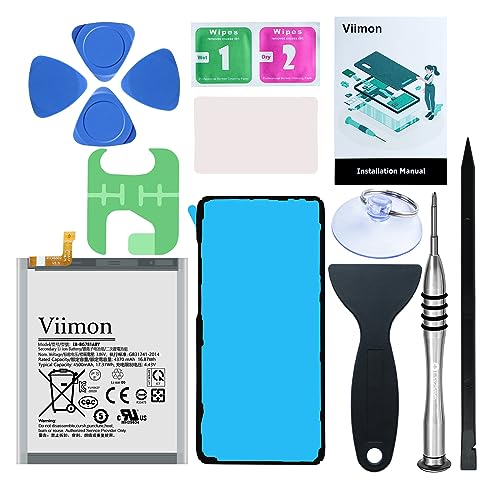
【Compatible Model】It is compatible with Samsung Galaxy S20 FE, A52 and A52S 5G, Model: S20 FE 5G SM-G781B G781U G781W SM-A526 A526B/DS A5260 A526W. Not for S20 and S20+ Plus. Please double identify and check your phone model matches before purchasing the battery.
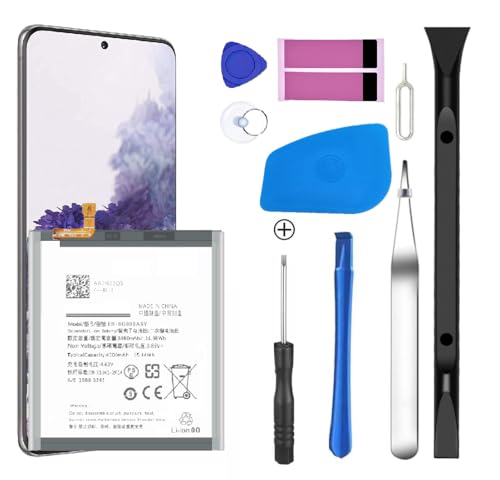
[Compatible Models] Developed especially for Samsung Galaxy S20.Compatible with Samsung Galaxy S20, SM-G980, SM-G980F, SM-G980F/DS Galaxy S20 5G, SM-G981, SM-G981F, SM-G981F/DS, SM-G981B/DS, SM-G981U, SM-G981U1, SM-G981N, SM-G981B, SM-G9810, SM-G981W, SC-51A, SCG01,EB-BG980ABY
Preparing Your Samsung S20
- Gather tools: You’ll need a precision screwdriver set, plastic pry tools, tweezers, a suction cup tool, and an anti-static wrist strap.
- Power off your device: Always turn off your Samsung S20 before starting to avoid any electrical issues.
- Find a clean workspace: Work in a well-lit area free from distractions. This helps you avoid losing small components.
Removing The Back Cover
- Apply heat: Use a heat gun or hairdryer on the back cover for 30 seconds to soften the adhesive.
- Use the suction cup tool: Place it near the bottom edge of the back cover. Pull gently to create a small gap.
- Insert a plastic pry tool: Slide it into the gap created by the suction cup. Carefully run it around the edges to loosen the adhesive.
- Remove the back cover: Lift it off slowly, being cautious of any cables attached.
Disconnecting The Battery
- Identify the battery connector: Locate the battery connector near the bottom of the phone’s interior.
- Use a plastic pry tool: Gently lift the battery connector off the motherboard to disconnect it.
- Be cautious: Handle the connector and surrounding components carefully to prevent damaging them.
Removing The Old Battery
- Locate the battery: The battery sits snugly within the device. You may need to gently lift it using a plastic pry tool.
- Avoid metal tools: Stick to plastic tools to prevent short-circuiting.
- Extract the battery: Once loose, pull it out slowly to avoid damaging any nearby components.
Follow these steps carefully to ensure a smooth battery removal process. Proper handling and preparation play a key role in protecting your device.
Installing A New Battery
Installing a new battery in your Samsung S20 enhances its performance. Here’s what you need to know to ensure a smooth replacement process.
Recommended Products

【100% Same AS OEM And 100% Size Fit】- 100% perfect fit replacement. Good quality of galaxy s20 plus rear back glass replacement same as the original back cover and gives you a good touch feeling, replace your cracked/ scratched/ damaged/ old/ unusable battery door with a new one. Tested one by one by a professional technicist before shipping. It is the most affordable and quickest way to get your phone looking new again!!!

{COMPATIBLE MODELS}:This Replacement battery Compatible with Samsung Galaxy S20 FE (Model: SM-G781B G781U G781W SM-A526 A526B/DS A5260 A526W).

[PLS CONFIRM DEVICE MODEL] --- The repair kit contains the instruction to guide you step by step installation, and we have professional engineers to answer all your questions about the repair process. Please verify your old battery part number and model before purchasing this replacement battery. Compatible with Samsung Galaxy S20 FE SM-G781, G781V, G781A, G781T, G781P, G781R4, G781U, G781U1, EB-BG781ABY. ★NOT FOR Samsung Galaxy S20, S20+, S20 Ultra, Note 20, Note 20 Ultra★
Ensuring Compatibility
Check that the replacement battery matches the original specifications. Look for the model number, which is typically listed on the battery label. You can also buy batteries from trusted sources or authorized retailers to guarantee compatibility and quality. Additionally, read reviews to ensure other users experienced a successful installation with the same battery.
Sealing The Device
After installing the new battery, sealing your device protects it from dust and moisture. Clean the edges of the back cover and the device’s frame to ensure a strong adhesive bond. Use a strong adhesive or double-sided tape to secure the back cover firmly. Apply even pressure around the edges for several seconds to ensure a proper seal. If there’s excess adhesive, trim it carefully with a precision knife. Reassess the closure by checking for any gaps, as a secure seal is vital for your device’s longevity.
Conclusion
Taking the battery out of your Samsung S20 might seem daunting at first but with the right tools and steps, you can do it safely and effectively. Remember to keep an eye on your battery’s performance and address any signs of wear early on. This way, you can extend the life of your device and enjoy a smoother experience.
Whether you’re troubleshooting issues or simply looking to replace an old battery, following the guidelines will help you navigate the process with confidence. With a little patience and care, you’ll have your phone back in top shape in no time. Happy tinkering!
Frequently Asked Questions
What should I do if my Samsung S20 won’t turn on?
If your Samsung S20 won’t turn on, try performing a soft reset by holding the power and volume down buttons simultaneously for about 10 seconds. If that doesn’t work, check the battery connection and charging cable, or consider visiting a professional for further diagnosis.
How can I tell if my Samsung S20 battery needs to be replaced?
Signs that your Samsung S20 battery may need replacing include rapid battery drain, swelling or bulging, frequent overheating, and the phone not turning on. If you notice any of these issues, it’s important to take action before further damage occurs.
What tools do I need to remove the Samsung S20 battery?
To remove the Samsung S20 battery, you’ll need a precision screwdriver set, plastic pry tools, tweezers, a suction cup tool, and an anti-static wrist strap. These tools help ensure a safe and effective battery removal process.
Is it safe to remove the Samsung S20 battery myself?
Yes, it can be safe to remove your Samsung S20 battery yourself if you follow proper procedures. Make sure to power off the device, work in a clear area, and use appropriate tools to avoid damaging components or causing electrical issues.
How do I properly seal my Samsung S20 after installing a new battery?
After installing a new battery, clean the edges of the back cover and use strong adhesive to secure it snugly. Ensure there are no gaps, as proper sealing prevents dust and moisture from entering the device, maintaining optimal performance.
