

Key Takeaways
- Understand the distinction between removable and non-removable Samsung phone batteries to manage power issues effectively.
- Recognize signs of battery problems, including overheating, swelling, and poor charging, to take timely action.
- Removing the battery can serve multiple purposes such as resetting the device, inspecting for damage, and improving performance.
- Follow a step-by-step guide that includes safely powering off the device and using proper tools to remove the battery.
- When replacing the battery, ensure compatibility, prefer original parts, and handle installation with care for optimal performance.
- Test the phone before sealing it up to confirm the proper function of the new battery.
Have you ever found yourself in a situation where your Samsung phone just won’t turn on, and you’re not sure what to do? Maybe it’s freezing or acting up, and you think a battery removal might help. You’re not alone—this is a common issue for many users.
Overview of Samsung Phone Batteries
Samsung phone batteries are integral components that enable your device to function. They typically come in two types: removable and non-removable. Understanding these types helps in effectively managing situations when your phone malfunctions.
Removable Batteries
- Feature: Removable batteries allow easy access for replacement. You can take them out and swap them for a new battery if needed.
- Examples: Older Samsung models like the Galaxy S5 and Galaxy Note 4 feature removable batteries, providing user-friendly maintenance.
Non-Removable Batteries
- Feature: Non-removable batteries are generally sealed inside the phone. They offer a sleeker design but pose challenges for replacements.
- Examples: Recent models, such as the Galaxy S20 and S21, use non-removable batteries. In these cases, professional assistance is often necessary for battery replacement.
Battery Lifespan and Performance
- Lifespan: Most Samsung batteries last between 2 to 3 years, depending on usage habits. High usage can lead to faster degradation.
- Performance Tips: To prolong battery life, avoid extreme temperatures, and disable unnecessary apps running in the background. Regularly updating your phone also optimizes performance.
Signs of Battery Issues
- Sign: Devices may not charge or hold a charge well.
- Sign: Overheating can indicate battery problems.
- Sign: Physical swelling of the battery requires immediate replacement.
Understanding your Samsung phone battery type and its lifespan can enhance your overall experience with the device. By recognizing signs of battery issues, you can take proactive measures.
Reasons to Remove Your Samsung Phone Battery
Removing the battery from your Samsung phone can be beneficial in various situations. Understanding these reasons can help you make an informed decision when issues arise.
Safety Precautions
Removing the battery ensures safety in emergencies. In cases of overheating, swelling, or burning smells, immediate battery removal prevents further damage. Always power off your device before removing the battery to reduce risks like short circuits. Use non-conductive tools and avoid metal objects when handling the battery.
Benefits of Removal
- Resetting the Device: Removing the battery acts as a hard reset. This can resolve freezing or unresponsive situations.
- Identifying Issues: Physical inspection of the battery helps you spot signs of wear, swelling, or damage.
- Improving Performance: Sometimes, removing the battery helps restore performance by clearing temporary issues caused by software glitches.
- Replacing a Faulty Battery: If your battery shows signs of failure, removing it allows for easy replacement with a new one, ensuring optimal phone function.
- Cleaning Contacts: Removing the battery provides access to the battery contacts, allowing you to clean them. Dirty contacts can lead to connectivity issues, affecting charging and performance.
Understanding these reasons for battery removal can enhance your phone’s overall functionality and safety.
Step-by-Step Guide on How to Take Out the Battery of a Samsung Phone
Follow these clear steps to safely remove the battery from your Samsung phone.
Recommended Products
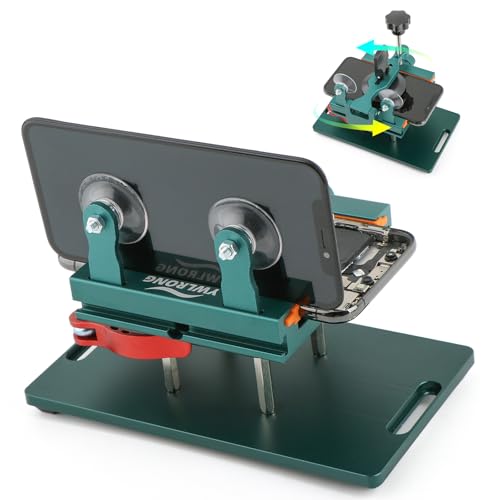
Compatible Model: Please check the product video to confirm how to use. The fixing clamp of phone screen removal tools, which compatible with iPhone 12, for iPhone 12 Pro, for iPhone 12 Pro Max, for iPhone 11, for iPhone 11 Pro, for iPhone 11 Pro Max, for iPhone 13/13 Pro/13 Pro Max, for iPhone 14,for iPhone 8, 8 Plus, SE, X, XS, XS MAX for Samsung S21/S21 Ultra/S21 Plus/S21,/S20 Plus/Samsung S20 Ultra. etc.

HIGH QUALITY: Thin flexible steel blade easily slips between the tightest gaps and corners.

✔ Compatible With: Samsung Galaxy S7 S8 S8 Plus S9 S9 Plus S10,S10 Plus,S20,S20+,S20 Ultra ,S21,S21 Plus,S21 Ultra,Galaxy S22,S22 Plus,S22 Ultra,S23,S23 Ultra,Galaxy S24 Ultra,Galaxy S25 S25 Ultra,S25 Edge,Note8, Note 9,Note 10,Note 10 Plus,Note 20,Note 20 Ultra,Galaxy Z Flip 2 3 4 5 ,Galaxy Z Fold 2 3 4 5 6 7 Galaxy Tab S7 S8 S9 S10 S11Series and other Samsung Galaxy Models
Tools You Will Need
- Screwdriver: A small Phillips head screwdriver for screws on the back cover.
- Plastic Pry Tool: A non-conductive tool to pry open the back cover without damaging it.
- Tweezers: Helpful for handling small components.
- Microfiber Cloth: Clean the interior surfaces and battery contacts.
Preparing Your Phone
- Power Off the Device: Hold the power button and select “Power Off” to turn off the phone completely.
- Find a Safe Workspace: Choose a clean, flat area free of static electricity to work on your phone.
Removing the Back Cover
- Identify the Back Cover Type: Check if your model has a removable back or requires unscrewing.
- Pry Open the Cover: Insert the plastic pry tool into the small indent near the side of the phone. Gently slide the tool around the edges to loosen the cover.
- Remove Screws (if applicable): If screws are present, use the Phillips head screwdriver to remove them before taking off the cover.
Disconnecting the Battery
- Locate the Battery Connector: Identify the battery connection point on the motherboard.
- Use the Pry Tool: Carefully lift the connector using the plastic pry tool. Avoid pulling on wires directly to prevent damage.
- Remove the Battery: If applicable, grasp the battery with your fingers or tweezers and lift it gently from its compartment.
By following these steps, you can safely remove the battery from your Samsung phone.
Tips for Replacing Your Samsung Phone Battery
Replacing your Samsung phone battery can enhance device performance and extend its lifespan. Follow these tips to ensure a smooth process.
Recommended Products

【Spare Battery Specs】EB-BA426ABY Replacement battery has a capacity of 5100mAh, the Voltage is 3.86V.

COMPATIBILITY: The battery model is EB-BR880ABY, it is only compatible with Samsung Galaxy Watch 4 (40 mm), SM-R860 SM-R865 series and Galaxy Watch 4 Classic (42mm) SM-R880 SM-R885, please carefully confirm the model of your smartwatch before purchase.

🔋 High-Capacity 6200mAh Battery for Galaxy S23 Plus Upgraded 6200mAh power delivers longer battery life than original (4700mAh). Enjoy all-day video streaming, gaming, or working without frequent recharging. Perfect for heavy users and travelers.
Choosing the Right Battery
- Check Compatibility: Always verify that the battery matches your specific Samsung phone model. For example, Galaxy S5 batteries differ from those in Galaxy S20 models.
- Opt for Original Batteries: Choosing genuine batteries prevents potential issues. Authentic batteries guarantee proper fit and optimal performance.
- Read Reviews: Look for user feedback on third-party batteries. Quality determines battery life and safety, so consider well-reviewed options.
Proper Installation Techniques
- Work in a Clean Environment: Ensure the workspace is free of dust and debris to prevent contamination.
- Use the Right Tools: Employ tools like a plastic pry tool and Phillips head screwdriver for safe disassembly. Avoid metal tools that may cause damage.
- Handle with Care: Be gentle while removing components. Forcing parts can lead to breakage or functionality loss.
- Reconnect Batteries Securely: Ensure the battery connector clicks into place firmly. A loose connection can lead to charging and performance issues.
- Test Before Sealing: Power on the device once the new battery is installed. Ensure everything functions correctly before replacing the back cover.
By following these tips, you can effectively replace your Samsung phone battery and maintain optimal device performance.
Conclusion
Taking out the battery of your Samsung phone can be a simple yet effective way to address various issues. Whether you’re dealing with a frozen screen or just want to give your device a little maintenance, knowing how to safely remove the battery is key.
Remember to always follow safety precautions and use the right tools to avoid any damage. By understanding your phone’s battery type and recognizing signs of trouble, you can keep your device running smoothly.
With a little care and attention, you can enhance your phone’s performance and extend its lifespan. So go ahead and tackle those battery-related concerns with confidence!
Frequently Asked Questions
What should I do if my Samsung phone won’t turn on?
If your Samsung phone won’t turn on, try performing a soft reset by holding the Power button for a few seconds. If that doesn’t work, remove the battery if it’s removable. If your phone has a non-removable battery, connect it to a charger and let it charge for at least 15 minutes before attempting to turn it on again.
How can I tell if my Samsung battery needs to be replaced?
Signs that your Samsung battery may need replacing include the device not charging properly, rapid battery drain, overheating, or physical swelling. If you notice any of these issues, consider replacing the battery to maintain optimal performance.
How do I remove the battery from my Samsung phone?
To remove your Samsung battery, first, power off the device. For removable batteries, carefully pry off the back cover using a plastic tool, then gently pull out the battery. If your phone has a non-removable battery, seek professional help to avoid damage.
What tools do I need to replace a Samsung phone battery?
To replace a Samsung phone battery, you’ll need a small Phillips head screwdriver, a plastic pry tool, tweezers, and a microfiber cloth for cleaning. Make sure to work in a clean environment to prevent dust and debris from interfering with the replacement.
How can I extend my Samsung phone battery’s lifespan?
To extend your Samsung phone battery’s lifespan, avoid extreme temperatures, keep the battery charged between 20% and 80%, disable unnecessary background apps, and use battery saver modes when possible. Regularly updating your software can also optimize battery performance.
