

Key Takeaways
- Understand Battery Types: Familiarize yourself with the differences between non-removable and removable Samsung batteries to know the right replacement method for your device.
- Recognize Warning Signs: Watch for rapid discharge, overheating, and physical damage as indicators that your battery may need replacement.
- Gather Essential Tools: Prepare necessary tools such as screwdrivers, a plastic pry tool, and tweezers to ensure a smooth battery removal process.
- Follow a Step-by-Step Guide: Adhere to the detailed steps for safely removing your Samsung battery, starting from powering off the device to disconnecting and lifting the battery.
- Prioritize Proper Handling: Handle all components carefully and maintain a clean workspace to avoid losing small parts during the battery replacement process.
- Choose Quality Replacements: Opt for batteries that meet your device’s specifications from reputable sources to ensure reliability and optimal performance.
Ever found yourself struggling with a sluggish Samsung phone? You’re not alone. Many users face the frustration of a battery that just won’t hold a charge. Whether you’re dealing with a device that’s overheating or simply needs a fresh battery, knowing how to take it out can save you time and money.
In this article, you’ll learn the step-by-step process to safely remove your Samsung battery. We’ll make it easy and straightforward, so you can get back to enjoying your device without the hassle. With just a few simple tools and tips, you’ll be on your way to giving your phone the care it deserves.
Understanding Samsung Batteries
Samsung batteries play a crucial role in your device’s performance. Most Samsung devices use lithium-ion batteries, known for their efficiency and longevity. These batteries provide high energy density but can degrade over time, affecting your phone’s runtime and overall performance.
Types of Samsung Batteries
- Non-removable Batteries
Most modern Samsung smartphones feature non-removable batteries. These batteries offer a sleek design but complicate the removal process. If issues arise, professional help may be necessary.
- Removable Batteries
Older Samsung models often include removable batteries. These batteries simplify replacement, allowing for easy upgrades and maintenance. Removing these batteries can enhance your device’s performance by ensuring it functions at peak efficiency.
Battery Lifespan and Indicators
Samsung batteries typically last around 2 to 3 years. Indicators of impending battery failure include:
- Rapid Discharge: If your battery drains quickly, it may be time for a replacement.
- Overheating: Significant heat during use can signal problems within the battery.
- Physical Damage: Bulging or swelling suggests hazardous wear.
Tips for Battery Maintenance
- Keep It Charged: Charge your battery between 20% and 80% to prolong its life.
- Avoid Extreme Temperatures: High heat or extreme cold can impair battery health.
- Optimize Settings: Use power-saving modes and reduce screen brightness to minimize battery strain.
Understanding these aspects of Samsung batteries helps you manage your device effectively. Knowing when to replace or service your battery enhances your phone’s performance, ensuring enjoyable use.
Tools Needed
Before you start removing the Samsung battery, gather the necessary tools for a smooth process. Having the right tools on hand simplifies the task and minimizes the risk of damage.
Recommended Products

High-quality materials: The SIM card removal tool is made of high-quality alloy metal steel, which is lightweight and difficult to bend. Durable and long-lasting. (Note: The SIM card removal tool is small in size and has a pointed bottom; Keep them away from children to avoid accidental swallowing or accidental injury.)

LMQ 22 pcs opening pry tools kit for smart phone,laptop,computer tablet,electronics, apple watch, iPad, iPod, computer, LCD screen, battery and more disassembly and repair.
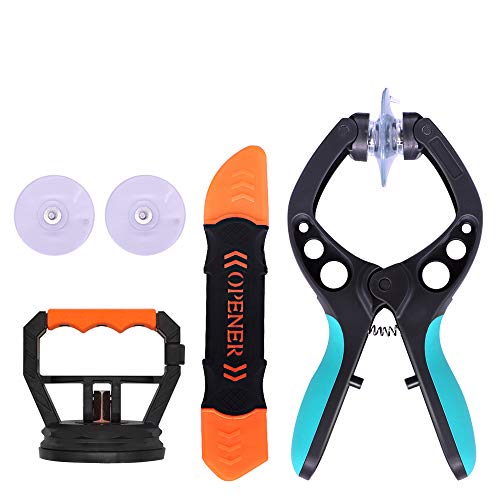
The professional Tools for phone repair, ensure its quality and adjustable, good flexibility and resilience force protect electronic products undamaged from the rigid impact.
Essential Tools
- Screwdrivers: Use a small Phillips or Torx screwdriver, depending on your phone model. These allow you to remove screws holding the battery cover.
- Plastic Pry Tool: A plastic pry tool helps in safely opening your phone without scratching the surface or damaging internal components.
- Tweezers: Tweezers assist in handling small screws and connectors. They offer precision when you need to maneuver components.
Optional Tools
- Magnetic Mat: A magnetic mat keeps screws organized as you remove them, ensuring you don’t lose any pieces during the process.
- Heat Gun or Hair Dryer: If your device has adhesive holding the battery in place, applying gentle heat can soften the adhesive, making removal easier.
- Static-Free Wrist Strap: Wearing a static-free wrist strap prevents static electricity from damaging sensitive components while you’re working inside the phone.
Step-by-Step Guide
Follow these steps to safely remove your Samsung battery. Each stage is crucial for protecting your device.
Removing the Back Cover
- Power Off Your Device: Turn off your phone completely. It prevents any electrical issues during the process.
- Choose the Right Tools: Gather a Phillips or Torx screwdriver, a plastic pry tool, and tweezers. These tools ensure safe and damage-free removal.
- Locate the Rear Cover: Identify where the back cover connects. Most models have clips or screws.
- Pry Open the Cover: Use the plastic pry tool to gently lift the back cover. Start at a corner and work your way around. For models with screws, remove them first before prying.
Disconnecting the Battery
- Find the Battery Connector: After removing the back cover, locate the battery connector. It typically sits near the battery’s edge.
- Use a Plastic Pry Tool: Carefully insert the pry tool between the battery connector and the mainboard. Gently lift until the connector pops free.
- Avoid Force: Don’t use excessive pressure. If it doesn’t detach, check for hidden screws or clips holding the connector.
Taking Out the Battery
- Lift the Battery: Gently lift the battery from its compartment. If the battery is stuck due to adhesive, you may need to soften it using a heat gun or hair dryer.
- Use Tweezers for Precision: If the battery is hard to grip, use tweezers to pull it out securely.
- Dispose or Replace: Choose whether to dispose of the old battery properly or install a new one. Always recycle batteries according to local regulations.
These steps make removing your Samsung battery straightforward.
Tips for Battery Replacement
Replace your Samsung battery carefully to ensure optimal performance and safety. Follow these tips to make the process smoother.
Recommended Products

COMPATIBILITY: The battery model is EB-BR880ABY, it is only compatible with Samsung Galaxy Watch 4 (40 mm), SM-R860 SM-R865 series and Galaxy Watch 4 Classic (42mm) SM-R880 SM-R885, please carefully confirm the model of your smartwatch before purchase.

🔋 High-Capacity 6200mAh Battery for Galaxy S23 Plus Upgraded 6200mAh power delivers longer battery life than original (4700mAh). Enjoy all-day video streaming, gaming, or working without frequent recharging. Perfect for heavy users and travelers.

🎋【Compatible Model】EB-BA217ABY Replacement Battery for Samsung Galaxy A12 SM-A125F SM-A125U SM-A125M[Note: Not for Galaxy A11,Galaxy A13 or other Phone Models]
Ensuring Proper Handling
- Clean workspace: Keep your area tidy to avoid losing small parts like screws.
- Use anti-static tools: This prevents damage to sensitive components. Use a static-free wrist strap if possible.
- Be gentle: Handle all parts of your device with care. Excess force can damage connectors or the screen.
- Take notes: Document each step and the location of screws for easier reassembly. A small notepad or your phone can work well for this.
Choosing the Right Replacement
- Match specifications: Ensure the replacement battery matches your model’s specifications. Check voltage and capacity ratings.
- Buy from reputable sources: Purchase batteries from authorized retailers or trusted brands only. This reduces the risk of using counterfeit products.
- Consider warranty: Look for batteries that come with a warranty. This guarantees performance and reliability.
- Research reviews: Read user reviews and ratings on batteries. This gives insight into their performance and longevity.
Using these tips ensures a smoother battery replacement experience that enhances your device’s performance.
Conclusion
Taking out your Samsung battery doesn’t have to be a daunting task. With the right tools and a little patience you can tackle this process with confidence. Remember to follow the steps carefully and keep your workspace organized to make reassembly a breeze.
If you’re replacing the battery be sure to choose a high-quality option that meets your device’s specifications. Proper battery care can significantly improve your phone’s performance and longevity. So go ahead and give it a try—your device will thank you for it!
Frequently Asked Questions
How can I improve the performance of my Samsung phone?
To improve your Samsung phone’s performance, focus on battery care and management. Regularly charge your battery between 20% and 80%, avoid extreme temperatures, and close unnecessary apps running in the background. Also, keep your operating system and apps updated to ensure optimal performance.
What tools do I need to remove a Samsung battery?
Essential tools for removing a Samsung battery include a Phillips or Torx screwdriver, a plastic pry tool, and tweezers. Optional tools may include a heat gun to soften adhesive, a magnetic mat for organizing screws, and a static-free wrist strap to protect sensitive parts.
How do I safely remove a Samsung battery?
To safely remove a Samsung battery, start by powering off the device. Gather your tools, then use the pry tool to gently open the back cover. Disconnect the battery from the motherboard carefully before removing it from the device. Follow manufacturer guidelines to avoid damage.
What should I do if my battery is failing?
If your battery is failing, you might notice poor performance, rapid charging cycles, or overheating. Consider replacing the battery if it shows signs of swelling or malfunctioning. Always choose a replacement battery that matches the original specifications and purchase from reputable sources.
Why is it important to care for my Samsung phone’s battery?
Caring for your Samsung phone’s battery is essential for maintaining performance and extending battery life. Proper management reduces the risk of overheating, prolongs battery longevity, and enhances the overall user experience, ultimately preventing the need for premature replacements.
Can I replace a non-removable Samsung battery myself?
Replacing a non-removable Samsung battery yourself can be challenging and may void your warranty. If you choose to attempt it, ensure you have the right tools and follow a reliable guide. Alternatively, consider visiting a professional service center for assistance.
What are the signs of a dying lithium-ion battery?
Signs of a dying lithium-ion battery include rapid battery drain, swelling, overheating, and the device shutting down unexpectedly. If you encounter these issues, it may be time to consider a battery replacement to avoid further complications.
