

Key Takeaways
- Understand Battery Optimization: Adjusting settings, such as enabling battery saver mode and updating apps, can significantly enhance your Samsung phone’s battery performance.
- Identify Common Drain Factors: Address high screen brightness, background apps, location services, and unnecessary notifications to minimize battery consumption.
- Adjust Display and App Settings: Lower brightness, enable adaptive brightness, shorten screen timeout, and limit app notifications to conserve energy.
- Utilize Battery Saver Modes: Activate power saving mode and use adaptive battery features to prioritize energy for frequently used apps.
- Limit Background Processes: Restrict background activity for certain apps to reduce unnecessary power usage and improve overall battery efficiency.
- Invest in Accessories: Consider using external battery packs or solar chargers as practical solutions to extend usage time on the go.
Ever found yourself scrambling for a charger when your Samsung phone’s battery is running low? You’re not alone. Many of us rely on our devices throughout the day, and it can be frustrating when they just can’t keep up.
Understanding Samsung Battery Life
Understanding how Samsung battery life works can help you extend the usage of your device throughout the day. Exploring optimization strategies and identifying common issues are key steps in managing battery life effectively.
Importance of Battery Optimization
Battery optimization plays a crucial role in maximizing your Samsung phone’s lifespan. By adjusting settings and turning off unnecessary features, you can improve battery performance significantly. For example, enabling battery saver mode reduces background activity while limiting app usage to essential functions. Regularly updating apps, as well as the operating system, can also enhance efficiency and optimize battery life.
Common Battery Drain Issues
Several factors contribute to battery drain on Samsung devices. Here are common issues to watch for:
- Screen Brightness: High brightness settings consume more power. Lowering brightness or using adaptive brightness can extend battery life.
- Background Apps: Apps running in the background use battery. Close unused apps or restrict background activity in app settings to conserve energy.
- Location Services: GPS and location tracking are energy-intensive. Disable location services for apps that don’t require it.
- Notifications: Frequent notifications from apps can wake your device and drain battery. Limit notifications for non-essential apps.
- Poor Signal Strength: Searching for a signal uses extra battery. In areas with weak reception, consider switching your device to airplane mode.
By addressing these issues proactively, you can enjoy longer battery life on your Samsung phone.
Tips to Save Samsung Battery Life
You can significantly enhance your Samsung phone’s battery life by making a few key adjustments. These strategies help minimize power consumption, ensuring your device stays charged longer throughout the day.
Recommended Products
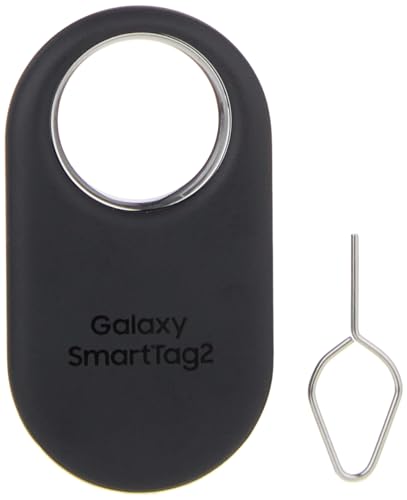
Find your things with ease: The SmartThings Find app uses Bluetooth and ultra-wideband (UWB) technology to locate and keep track of your stuff

Stay Powered with 20,000mAh: Carry the power you need to charge your iPhone 17 Pro up to 3.3 times or your Samsung S25 Ultra up to 3 times. The power is about the weight of 2 iPhone 17, perfect for daily use and travel.
Adjusting Display Settings
Adjusting your display settings provides immediate improvements.
- Lower Brightness: Reduce brightness to the lowest comfortable level. You can do this by swiping down from the top of the screen and moving the brightness slider.
- Enable Adaptive Brightness: Turn on adaptive brightness to automatically adjust screen brightness based on surroundings. Find this option in the display settings.
- Shorten Screen Timeout: Set your screen timeout to 30 seconds or 1 minute. Navigate to Display > Screen timeout in your settings to make this change.
- Dark Mode: Activate dark mode in your device settings. This setting lowers energy use, especially on OLED screens.
Managing App Usage
Managing app usage plays a crucial role in battery conservation.
- Close Background Apps: Frequently check and close apps running in the background. Access the recent apps menu and swipe away unused applications.
- Limit App Notifications: Disable notifications for apps that aren’t essential. Go to Settings > Notifications to customize which alerts you receive.
- Update Apps Regularly: Keep your apps updated. Developers often release updates that improve efficiency and reduce battery drain.
- Monitor Power-Hungry Apps: Identify apps consuming excessive battery. In Settings > Battery, you can view which apps use the most power and consider alternatives.
Utilizing Battery Saver Modes
Utilizing built-in battery saver modes can help extend your battery life.
- Activate Power Saving Mode: Turn on power saving mode during low battery situations. Go to Settings > Battery > Power mode to select this option.
- Use Adaptive Battery: Enable adaptive battery, which prioritizes power for frequently used apps. Find this feature in Settings > Battery > More battery settings.
- Schedule Battery Saver: Configure battery saver to activate during specific times, like at night. You can set this in the battery saver settings.
- Disable Unused Features: Turn off Bluetooth, Wi-Fi, and location services when not needed. Quick access toggles are available in the notifications panel for easy management.
Advanced Techniques for Battery Preservation
To enhance battery life even further, consider implementing advanced techniques that minimize energy consumption without sacrificing performance.
Recommended Products
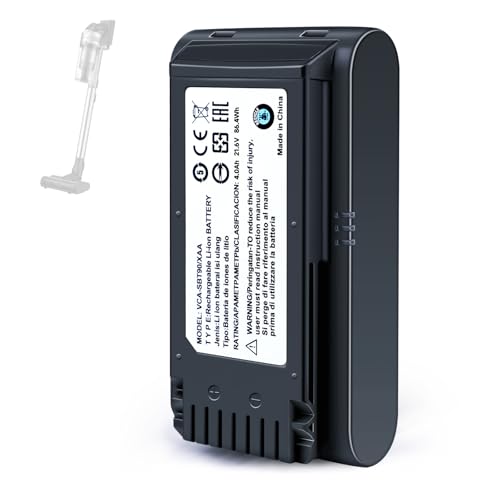
【Specifications】 Model:VCA-SBT90 ;Battery Type: Li_ion, Voltage:21.6V Capacity: 4000mAh ; Color: Gray and black

This battery is compatible with Samsung Galaxy SCH-U360 a870 a930 U310, to ensure that the battery you purchase is a perfect match for your device, be sure to check the model number of your device before ordering (you can check the model number of your device in the ‘Settings’ of your device).

Battery Specifications: 21.6V 3000mAh lithium-ion replacement battery provides stable voltage, consistent power output, and reliable performance for Samsung Jet Bot robot vacuums.
Limiting Background Processes
Limiting background processes can significantly reduce battery drain on your Samsung device. Here’s how to do it:
- Access Settings: Open the Settings app and select “Apps.”
- Select Apps: Choose the apps you want to limit. Look for those that refresh in the background frequently.
- Restrict Background Activity: Tap “Mobile data” or “Battery,” then toggle off “Allow background data usage” or “Allow background activity.” This action prevents selected apps from using resources when not in use.
By limiting background processes, you’ll cut down on unnecessary tasks and improve overall battery efficiency.
Updating Software Regularly
Updating your device’s software regularly ensures you benefit from the latest optimizations and bug fixes that improve battery performance. Follow these steps:
- Open Settings: Locate the Settings app on your device.
- Navigate to Software Update: Scroll down and tap “Software update.”
- Download and Install: If an update is available, select “Download and install.” Your device will automatically update to the latest version.
Regular software updates not only keep your device secure but also fine-tune battery management features, leading to a more efficient experience.
Implement these strategies, and enjoy extended battery life while using your Samsung device.
Accessories That Help Extend Battery Life
Using the right accessories can significantly enhance the battery life of your Samsung device. Here are some options you can consider.
Recommended Products

30% Smaller, Effortlessly Portable: Leveraging industry-first TinyCell high-density battery technology, we’ve shrunk 20,000mAh into a frame 30% smaller than other power banks of the same capacity. At just 11.5oz—the weight of a 330ml can of cola, it slides effortlessly into your crossbody bag.

[POCKET-SIZE 20000mAh.] Massive power for your pocket. Note: True 20,000mAh requires solid, high-density cells (approx. 11 oz). This portable charger is built incredibly dense to deliver 4 full phone charges without the bulk.

87W Power to Share: Distribute 87W across three devices, with a single device receiving up to 65W, to rapidly charge iPhones, Samsung phones. Quickly charge a 14" MacBook Pro to 50% in under 40 minutes.
External Battery Packs
External battery packs provide additional power on the go. These compact devices come in various capacities, often ranging from 10,000 mAh to 20,000 mAh or more. Choose a pack that matches your usage patterns. For example, a 20,000 mAh pack can fully charge most smartphones multiple times. Look for packs with fast charging capabilities to quickly replenish your device. Brands like Anker and RAVPower offer reliable options.
Solar Chargers
Solar chargers harness sunlight to charge your devices, making them ideal for outdoor activities or travel. These chargers often feature portable panels that fold for easy transport. Many models provide USB ports, allowing you to charge multiple devices simultaneously. For best results, place the solar charger in direct sunlight. Depending on the sun’s intensity and the charger’s output, you can expect variable charging times. Brands like BigBlue and Goal Zero produce effective solar chargers tailored to different needs.
Conclusion
With a few simple adjustments and some mindful habits you can significantly extend your Samsung battery life. Remember to tweak your settings and manage your app usage to minimize unnecessary drain.
Don’t forget to explore accessories like external battery packs or solar chargers for those times when you’re away from a power source. By taking these steps you can enjoy your device longer without the constant worry of running out of juice.
Embrace these tips and make the most out of your Samsung experience while keeping your battery healthy and strong. Happy optimizing!
Frequently Asked Questions
How can I improve the battery life on my Samsung phone?
To improve battery life, adjust your display settings by lowering brightness and enabling dark mode. Also, make sure to close background apps, limit notifications, and use battery saver mode. Regular updates and monitoring app usage can help extend battery performance.
What causes fast battery drain on Samsung devices?
Common causes of fast battery drain include high screen brightness, background apps running excessively, location services, frequent notifications, and a weak cellular signal. Identifying and managing these issues can significantly enhance your battery life.
What is battery optimization on Samsung phones?
Battery optimization on Samsung phones involves adjusting settings to minimize battery usage. This includes enabling battery saver modes, reducing screen brightness, managing app activities, and scheduling background processes to conserve power.
How often should I update my Samsung phone’s software for battery health?
It’s essential to regularly update your Samsung phone’s software to benefit from the latest bug fixes and performance enhancements. Keeping your device updated ensures optimal battery management and better overall functionality.
What accessories can help extend my phone’s battery life?
Using external battery packs can provide extra power on the go, while solar chargers are great for sustainable outdoor charging. These accessories help minimize downtime and keep your device running longer between charges.
