

Key Takeaways
- Adjust Screen Brightness: Lowering the screen brightness or enabling adaptive brightness can greatly reduce battery consumption.
- Manage Background Apps: Close unused apps, limit background data, and utilize app sleep features to minimize battery drain from background processes.
- Enable Power Saving Mode: Activating this mode reduces background activity and lowers performance to conserve battery life during critical usage times.
- Limit Location Services: Disabling location services when not in use can significantly enhance battery efficiency by decreasing GPS activity.
- Utilize Battery Management Apps: Tools like Greenify and AccuBattery can help monitor and optimize battery usage, providing insights and recommendations.
- Regularly Update Software: Keeping your tablet’s software up to date improves battery performance and ensures optimal functionality.
Ever find yourself in the middle of a binge-watching session or an important video call, only to be greeted by that dreaded low battery warning? If you’ve got a Samsung tablet, you’re not alone in this struggle. It’s frustrating when your device can’t keep up with your busy life.
Understanding Battery Life
Understanding battery life on your Samsung tablet is essential for maximizing usage. Battery life refers to how long your tablet operates before needing a recharge. It varies based on several factors, including usage patterns, settings, and apps.
Factors Affecting Battery Life
- Screen Brightness: High brightness levels drain battery faster. Adjusting your brightness settings can significantly extend battery life.
- Background Apps: Apps running in the background consume power. Close unused apps to save battery.
- Wireless Connections: Wi-Fi, Bluetooth, and mobile data use battery when active. Turn off these features when not in use.
- Notifications: Frequent notifications can wake your device and deplete battery. Limit notifications for non-essential apps.
- App Usage: Some apps are more demanding than others. Monitor your most battery-draining apps in the settings.
Optimizing Battery Consumption
You can apply specific strategies to optimize your tablet’s battery consumption:
- Enable Power Saving Mode: This feature reduces background activity and lowers performance temporarily to save battery.
- Adjust Display Settings: Use adaptive brightness or reduce screen timeout settings. Shorter display times help conserve energy.
- Update Software: Keeping your tablet’s software up to date often improves battery optimization. Check for updates regularly.
- Uninstall Unnecessary Apps: Remove apps you no longer use to minimize battery drain.
- Limit Live Wallpapers and Widgets: Static images and fewer widgets use less battery compared to dynamic ones.
Tools for Monitoring Battery Life
You can use built-in tools to monitor your battery usage:
- Battery Usage Overview: Access this in settings to see which apps consume the most power.
- Device Care Feature: This tool provides recommendations to enhance battery performance. It can optimize settings automatically.
Take the time to learn how your tablet’s battery functions. Simple adjustments make a significant difference in remaining productive throughout the day.
Essential Tips to Save Battery
Saving battery on your Samsung tablet requires a few simple adjustments. Here are some essential tips for optimizing battery life.
Recommended Products

40% Smaller & Lighter Portable Charger: Powered by the industry’s first TinyCell high-density battery technology, this ultra-compact 10,000mAh portable charger power bank is 40% smaller and 36% lighter than conventional chargers. Whether you are an office user slipping a mini small portable battery into a purse for commuting, or a student looking for lightweight college essentials, you get powerful daily carry convenience without the extra bulk to keep you powered on the go.
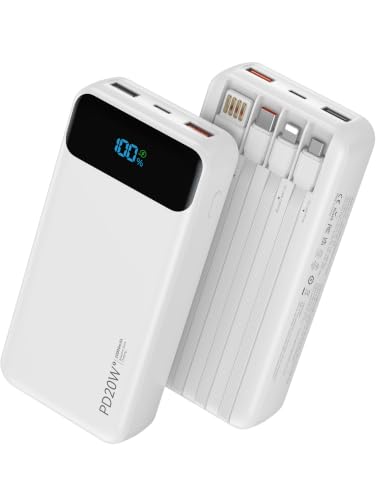
【𝟐𝟎𝟎𝟎𝟎𝐦𝐀𝐡 + 𝐏𝐃𝟐𝟎𝐖 𝐅𝐀𝐒𝐓 𝐂𝐇𝐀𝐑𝐆𝐈𝐍𝐆】▸This 20000mAh portable charger delivers 4.1 charges for iPhone 17, 4.8 charges for iPhone 17 Air, 3.8 charges for Galaxy S25, or 1.9 charges for iPad Pro. This power bank supports PD20W fast charging, enabling your iPhone to charge up to 60% in just 30 minutes. This significantly reduces your charging time, reducing power anxiety and ensuring a seamless travel experience

40% Smaller & Lighter Portable Charger: Powered by the industry’s first TinyCell high-density battery technology, this ultra-compact 10,000mAh portable charger power bank is 40% smaller and 36% lighter than conventional chargers. Whether you are an office user slipping a mini small portable battery into a purse for commuting, or a student looking for lightweight college essentials, you get powerful daily carry convenience without the extra bulk to keep you powered on the go.
Adjust Screen Brightness
Lowering screen brightness significantly reduces battery consumption.
- Access Display Settings: Go to Settings > Display, then adjust the brightness slider.
- Enable Adaptive Brightness: Turn on adaptive brightness in the same menu to automatically adjust based on your environment.
- Use Blue Light Filter: Activate the blue light filter during the night, which can help your eyes and save battery.
Manage Background Apps
Background apps can drain battery life quickly.
- Close Unused Apps: Use the recent apps button and swipe away apps you aren’t using.
- Limit Background Data: Go to Settings > Apps, then select an app and restrict background data to save energy.
- Set App Sleep: Enable app sleep for rarely used apps in Settings > Device care > Battery > App power management.
Implementing these tips keeps your Samsung tablet running longer, providing a better user experience throughout your day.
Settings to Optimize Battery Usage
Optimizing your Samsung tablet’s settings significantly extends battery life. Here are key adjustments to make for better efficiency.
Enable Power Saving Mode
Activating Power Saving Mode reduces background activity and limits performance for battery conservation. To enable this feature:
- Open Settings.
- Tap Battery and Device Care.
- Select Battery.
- Tap Power Saving Mode and toggle it on.
You can customize options, such as limiting CPU speed and adjusting screen brightness. Selecting this mode contributes to longer usage times, especially during intense tasks.
Limit Location Services
Location Services can drain your battery quickly. Disabling them when not in use helps conserve energy. To adjust these settings:
- Go to Settings.
- Tap Privacy.
- Select Location.
- Toggle it off or set it to “While Using the App” for necessary applications only.
By limiting location access, you reduce constant GPS activity, leading to substantial battery savings.
Apps and Tools for Battery Management
Managing battery life effectively involves utilizing various apps and tools tailored for Samsung tablets. These resources help monitor and optimize battery consumption while ensuring you get the most out of your usage.
Recommended Products

Replacement For Tablet: Fit for Samsung Galaxy Tab A8 10.5 Inch SM-X200 SM-X205 SM-X200N SM-X205N SM-X205NZAAEUE SM-X200NZAAEUA Tablet.
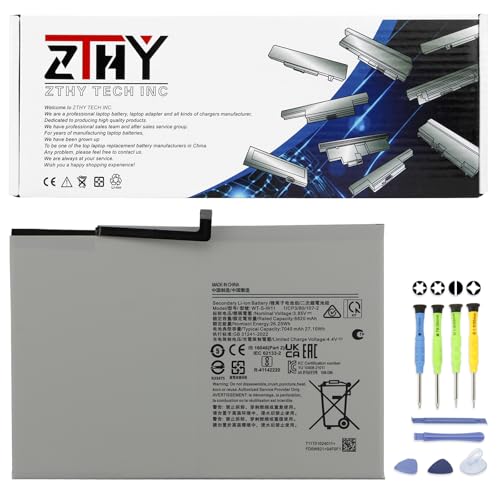
Specifications: Battery type: Li-ion. Color: White. Voltage: 3.85V. Capacity: 27.1Wh. New from Manufacturer

Battery Saver Apps
Battery saver apps can enhance your tablet’s battery performance significantly. Consider the following options:
- Greenify: This app identifies background processes that drain power, allowing you to hibernate them and save energy. You can customize settings for specific apps.
- AccuBattery: Get detailed insights into battery health and usage patterns. This app measures battery charge cycles, providing valuable data for making informed decisions.
- Power Battery: Use this app to monitor battery life in real-time. It offers features like optimization suggestions and alerts for excessive battery usage by apps.
Installing one or more of these apps can provide handy tools for prolonging your tablet’s battery life.
Device Maintenance Features
Samsung tablets come equipped with built-in maintenance features for battery management. Use these tools to streamline performance:
- Device Care: Access this feature through the settings menu. It provides an overview of battery usage, memory, and storage. You can optimize settings based on recommended actions.
- Battery Usage Overview: This tool displays detailed information on which apps consume the most power. Understanding usage patterns helps you identify energy-hogging apps you can limit or uninstall.
- Scheduled Power On/Off: Set specific times for your tablet to power off or on automatically. This feature helps conserve battery during periods of inactivity.
Leveraging these device maintenance tools can lead to significant battery life improvements, ensuring your tablet keeps up with your busy lifestyle.
Conclusion
By taking some simple steps you can significantly extend your Samsung tablet’s battery life. Adjusting settings like screen brightness and managing background apps can make a world of difference. Don’t forget to utilize power-saving modes and explore helpful apps that monitor and optimize battery usage.
With a little effort you can keep your tablet running longer and enjoy your favorite activities without the constant worry of low battery warnings. So go ahead and implement these tips to make the most out of your device throughout the day. Happy tablet-ing!
Frequently Asked Questions
What are common causes of battery drain on Samsung tablets?
Battery drain on Samsung tablets can result from high screen brightness, numerous background apps, active wireless connections, excessive notifications, and resource-heavy apps. Understanding these factors helps users manage battery life effectively.
How can I optimize battery life on my Samsung tablet?
To optimize battery life, enable Power Saving Mode, adjust screen brightness, limit background app activity, uninstall unnecessary apps, and use a blue light filter at night. Additionally, monitor battery usage through device settings.
What is Power Saving Mode and how does it help?
Power Saving Mode reduces background activity and overall CPU performance, helping to conserve battery life. Users can customize settings, including screen brightness and CPU speed, for a tailored experience while extending usage time.
Are there apps to help manage battery life on Samsung tablets?
Yes, several apps, such as Greenify, AccuBattery, and Power Battery, assist in managing battery life. These apps provide insights, hibernate background processes, and monitor battery health for better usage management.
How do I monitor battery usage on my Samsung tablet?
You can monitor battery usage by accessing the Battery Usage Overview in the settings. This tool helps identify apps that consume the most energy, allowing users to make adjustments for better performance.
What should I do to prevent my tablet from draining battery during video calls?
To prevent rapid battery drain during video calls, reduce screen brightness, close unnecessary background apps, and enable Power Saving Mode. Additionally, limit the use of live wallpapers and heavy applications while on a call.
