

Key Takeaways
- Understand Common Battery Drains: Background apps, high screen brightness, weak connectivity, and frequent notifications are major culprits affecting Samsung A14 battery life.
- Optimize Screen Settings: Lowering brightness, enabling adaptive brightness, and reducing screen timeout settings can significantly save battery power.
- Manage Background Apps: Close unused apps, limit background activity for certain apps, and activate data saver mode to reduce battery consumption.
- Utilize Power Saving Modes: Enable power saving mode and maximum power saving mode based on your needs, and consider scheduling these modes for optimal battery efficiency.
- Adjust Location and Connectivity Settings: Limit location accuracy, turn off unused connectivity features such as Bluetooth and NFC, and utilize Airplane Mode in low-signal areas to conserve battery life.
Ever find yourself scrambling for a charger when your Samsung A14 is running low on battery? You’re not alone. Many users face the frustration of their phone dying at the worst possible moments, whether you’re out and about or in the middle of an important call.
Understanding Battery Life on Samsung A14
Battery life concerns can hinder your experience with the Samsung A14. Knowing the common issues and various performance factors can help combat battery drain.
Common Battery Drain Issues
Several situations often lead to faster battery depletion. These include:
- Background Apps: Many apps run in the background, using power even when you’re not actively using them. Apps like social media or location services tend to be the biggest culprits.
- Screen Brightness: High screen brightness settings can significantly impact battery life. Keeping it too bright, especially outdoors, quickly drains energy.
- Connectivity Features: Constantly using Wi-Fi, Bluetooth, or mobile data in areas with weak signals causes your phone to work harder, leading to additional battery usage.
- Notifications: Frequent notifications from apps can wake your screen, constantly consuming battery.
Factors Affecting Battery Performance
- Screen Settings: The screen refresh rate and resolution can influence battery efficiency. Lowering these settings often results in extended battery life.
- App Usage: Applications that require significant processing or data can drain your battery faster. Games, streaming services, or any resource-intensive apps are prime examples.
- Operating System Updates: Software updates can sometimes optimize battery usage. However, they can also introduce new features that strain your battery further.
- Battery Age: As with any device, the battery’s age affects performance. Over time, batteries degrade, holding less charge and requiring more frequent charging.
- Charging Habits: Consistently allowing your battery to drop below a certain level can reduce its lifespan. Opt for partial charging rather than full cycles whenever possible.
Tips to Save Battery on Samsung A14
Saving battery on your Samsung A14 can significantly enhance your device’s usability. Here are some effective strategies to help you maximize battery life.
Recommended Products

Compatible Phone Model: This battery kit is specifically designed for Samsung Galaxy A14 5G (with model SM-A146 series), NOT work for Galaxy A14 4G, please double confirm your phone model before purchasing
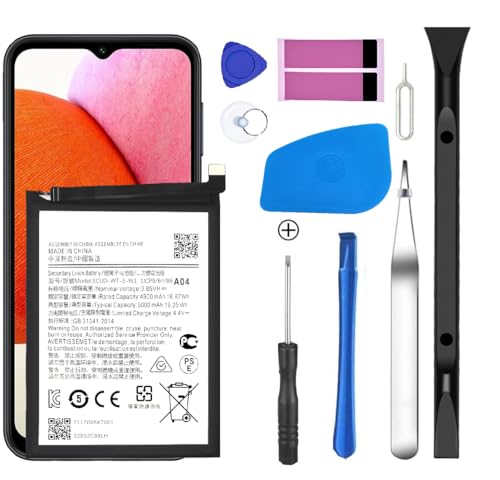
[Compatible Models] Developed especially for Samsung Galaxy A14.Compatible with Samsung Galaxy A14 5G Only, Model:SM-A146U SM-A146U1 SM-A146W SM-S146VL SM-A146M WT-S-W SCUD-WT-S-W1 › See more product details
Adjusting Screen Settings
Optimizing screen settings can reduce battery usage considerably.
- Lower Brightness: Decrease your screen brightness to a comfortable level. You can do this by accessing the quick settings menu and sliding the brightness bar left.
- Enable Adaptive Brightness: This feature adjusts brightness automatically based on your environment. Turn it on in
Settings>Display>Adaptive brightness. - Reduce Screen Timeout: Shorten the time it takes for your screen to turn off when not in use. Go to
Settings>Display>Screen timeoutand select a shorter duration, like 30 seconds.
Managing Background Apps
Background apps contribute heavily to battery drain.
- Close Unused Apps: Swipe up from the bottom of the screen to view all open apps and swipe away those you don’t need.
- Limit Background App Activity: Go to
Settings>Apps, select the app, then tapBatteryto restrict background activity. - Use Data Saver Mode: This limits app activity when you’re not using them. Activate it in
Settings>Connections>Data usage>Data saver.
Utilizing Power Saving Modes
Using power-saving features helps extend battery life when necessary.
- Activate Power Saving Mode: Enable it by swiping down to the quick settings menu and tapping the battery icon. Customize it according to your preferences.
- Use Maximum Power Saving Mode: For extreme cases, switch to this mode to limit your device to essential functions. It’s available under
Settings>Battery and device care>Battery>Power saving mode. - Schedule Power Saving: Set a schedule for power-saving modes to activate automatically during specific times under
Settings>Battery and device care.
Implementing these tips can lead to a significant improvement in battery performance on your Samsung A14, allowing you to stay connected longer.
Additional Strategies for Battery Conservation
Implementing additional strategies further maximizes battery life on your Samsung A14. Simple adjustments can significantly boost your device’s efficiency.
Recommended Products

【Compatible Model】This Battery Model is EB-BA505ABU,Compatible with Samsung Galaxy A505F /A30 SM-A305 /A20 A205FN A202F /A30s SM-A307.Please confirm your phone model and your old battery part number before placing an order.

Massive 20,000mAh capacity delivers extended power for smartphones, tablets, and USB-C devices, ideal for travel, commuting, and backup charging without worrying about battery drain throughout the day

HIGH CAPACITY --- This replacement battery for Samsung Galaxy A10S is 5150mAh high capacity, with more power than original battery.You can use your phone for a longer time!
Optimizing Location Services
Manage location services for better battery performance. To adjust these settings, navigate to Settings > Location. From here, consider these options:
- Limit location accuracy: Choose “Device only” instead of “High accuracy” to minimize battery drain.
- Turn off location for apps: Disable location access for apps that don’t require it.
- Schedule location updates: Set apps to update location less frequently, reducing overall power consumption.
These steps help retain battery life while ensuring essential location functions remain operational.
Reducing Connectivity Features
Adjust your connectivity settings to avoid unnecessary battery strain. Follow these suggestions:
- Turn off Bluetooth and NFC: Disable these features when not needed; activate them only for specific uses.
- Use Airplane Mode: Enable Airplane Mode in areas with poor signals; this feature disables all connectivity, preventing battery waste.
- Manage Wi-Fi settings: Disable Wi-Fi scanning when not in use. Navigate to Settings > Connections > Wi-Fi > Advanced to access these settings.
By managing connectivity features, you preserve battery life and maintain essential functionality.
Conclusion
By taking a few simple steps you can make a big difference in your Samsung A14’s battery life. It’s all about being mindful of your settings and habits. Adjusting your screen brightness managing background apps and turning off unnecessary connectivity features can keep your phone powered up longer.
Don’t forget to make use of power-saving modes and optimize your location services. With these tips in your toolkit you’ll be able to enjoy your device without the constant worry of running out of battery. Staying connected and getting the most out of your phone is within reach. Happy saving!
Frequently Asked Questions
What causes low battery life on the Samsung A14?
Battery life on the Samsung A14 can be affected by several factors, including background apps running continuously, high screen brightness, and connectivity features in weak signal areas. Frequent notifications and outdated software can also drain the battery quickly.
How can I save battery on my Samsung A14?
To save battery on your Samsung A14, adjust screen brightness, limit background apps, and use power-saving modes. Additionally, optimizing location services and managing connectivity features like Bluetooth and Wi-Fi can further enhance battery performance.
Is it helpful to reduce screen brightness?
Yes, reducing screen brightness significantly helps save battery life on your Samsung A14. High brightness settings consume more power, so dimming your screen when possible can prolong battery life during daily use.
What should I do about background apps?
Managing background apps is crucial for battery conservation. Close apps you aren’t actively using and restrict their background activity to prevent them from draining the battery when not in use.
How do connectivity features affect battery life?
Connectivity features like Bluetooth and Wi-Fi consume power, especially in low signal areas. Disabling these features when not needed or using Airplane Mode can help reduce battery drain on the Samsung A14.
Can location settings impact battery performance?
Yes, location settings can significantly impact battery performance. Limiting location accuracy, turning off location access for unnecessary apps, and scheduling updates can help save battery life.
How important is it to keep my phone updated?
Keeping your Samsung A14 updated is essential for optimal battery performance. Software updates often include improvements and fixes that can enhance battery efficiency and overall device performance.
What are the best charging habits for my phone?
For better battery health, avoid letting your Samsung A14 drop to 0% frequently. Charge it when it’s around 20-30%, and try not to keep it plugged in for long periods after reaching 100%. Use quality chargers to maximize battery longevity.
