

Ever wondered why your Ford Fusion is struggling to start? Imagine being late for work because your car won’t budge. Frustrating, right? Well, what if I told you that replacing your Ford Fusion’s battery could be the solution to all your starting troubles?
Checking the battery level
To ensure a successful battery replacement for your Ford Fusion, start by checking the battery level. It’s an essential step that can help you identify if the battery is the root cause of your car troubles. Here’s how to do it:
- Open your car’s hood and locate the battery.
- Inspect the battery terminals for any corrosion. If you see a powdery white substance, that’s a sign of corrosion.
- Check the battery voltage using a multimeter. A healthy car battery typically shows around 12.6 volts when the car is turned off.
- Make sure the battery’s connections are secure. Loose connections can lead to starting issues.
Remember, a weak battery can cause various problems, including difficulty starting your car, dimming headlights, or issues with electrical components. By Checking the battery level, you can determine if it’s time for a replacement.
| Battery Voltage | Battery Condition |
|---|---|
| 12.6V | Healthy |
| Below 12.4V | Needs Recharging |
| Below 12V | Replace Soon |
Now that you’ve assessed the battery level, you’re one step closer to resolving your Ford Fusion’s starting issues.
Tools needed for the replacement
When you’re gearing up to replace the battery in your Ford Fusion, having the right tools on hand ensures a smooth process. Here’s what you’ll need:
- Socket Wrench Set: It’s essential for loosening the nuts on the battery terminals.
- Battery Terminal Cleaner: Helps remove any corrosion buildup for a solid connection.
- Adjustable Wrench or Pliers: Useful for adjusting or removing clamps that secure the battery in place.
- Safety Gear: Don’t forget gloves and goggles to protect yourself from any battery acid.
By having these tools ready, you’ll be well-prepared to tackle the battery replacement in your Ford Fusion.
Recommended Products
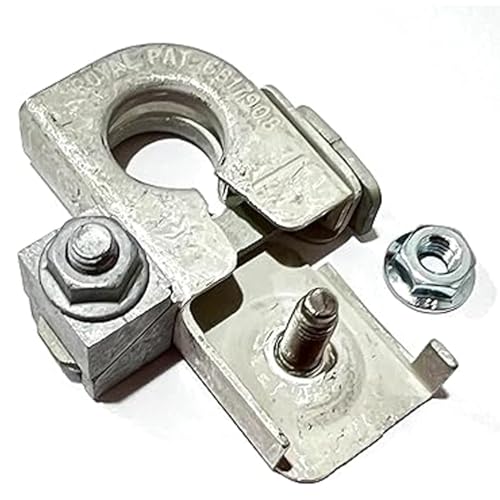
Direct OE-Style Replacement for Ford BT4Z-14450-BA: Engineered as an exact NEGATIVE battery terminal replacement for Ford part number BT4Z-14450-BA, featuring the correct wedge-lock clamp mechanism to maintain a secure ground connection to your vehicle’s battery post.

Wide Model Compatibility: Fits for Ford Edge 2011 2012 2013 2014 2015, for Ford Fusion 2010 2011 2012 2013 2014 2015, for Lincoln MKX 2011 2012 2013 2014 2015, for Lincoln MKZ 2010 2011 2012, and for Mercury Milan 2010 2011. Please Confirm Fitment Before Purchase

Money-saving fix - this positive battery terminal allows you to directly replace a damaged original terminal on certain Ford vehicles
Locating the battery in a Ford Fusion
When it comes to locating the battery in your Ford Fusion, it’s essential to know where to look. In most Ford Fusion models, you can find the battery under the hood. Here are the steps to find it:
- Open the Hood: To locate the battery, you need to pop the hood of your Ford Fusion. Look for the hood release latch usually located inside your vehicle near the driver’s footwell.
- Secure the Hood: Once the hood is open, make sure to secure it in place using the hood support rod.
- Locate the Battery: The battery in a Ford Fusion is typically located near the front of the engine bay or off to the side. It is housed in a rectangular or square-shaped plastic case.
- Identify the Terminals: Take note of the positive (+) and negative (-) terminals on the battery. Learning which is which is crucial for safe replacement.
- Check for Labels: Some Ford Fusion models may have battery covers or labels indicating the location. If available, refer to these for added guidance.
- Keep Safety in Mind: As you locate the battery, ensure you are wearing the proper safety gear like gloves and goggles. Safety should always come first when working with car batteries.
By familiarizing yourself with the location of the battery in your Ford Fusion, you’ll be better prepared for the upcoming steps of the replacement process.
Removing the old battery
When it comes to replacing the battery in your Ford Fusion, the first step is removing the old one safely. Here’s a step-by-step guide to help you through the process:
- Disconnect the negative terminal: Start by using a suitable wrench to loosen the bolt on the negative battery terminal. Remember, the negative terminal is usually marked with a minus (-) sign.
- Disconnect the positive terminal: Similarly, loosen the bolt on the positive terminal, usually marked with a plus (+) sign.
- Remove hold-down clamp or bracket: Depending on your Ford Fusion model, there may be a hold-down clamp or bracket securing the battery in place. Unscrew and remove this mechanism carefully.
- Lift out the old battery: Once the terminals are disconnected and any securing mechanism is removed, you can carefully lift out the old battery from the battery tray.
- Inspect the battery tray: Take a moment to clean and inspect the battery tray for any corrosion or debris. Clear out any dirt or build-up before installing the new battery.
Remember, safety is key when handling car batteries. Wear appropriate safety gear such as gloves and goggles, and ensure the area is well-ventilated.
| Step | Details |
|---|---|
| Disconnect the negative terminal | Loosen bolt on the terminal marked with a minus (-) sign |
| Disconnect the positive terminal | Loosen bolt on the terminal marked with a plus (+) sign |
| Remove hold-down clamp or bracket | Unscrew and remove the securing mechanism carefully |
| Lift out the old battery | Carefully remove the old battery from the battery tray |
| Inspect the battery tray | Clean and inspect for corrosion or debris |
Recommended Products

**Please confirm compatibility using the fitment guide located in the product images** This battery will not fit your fob unless it matches one of the examples provided.
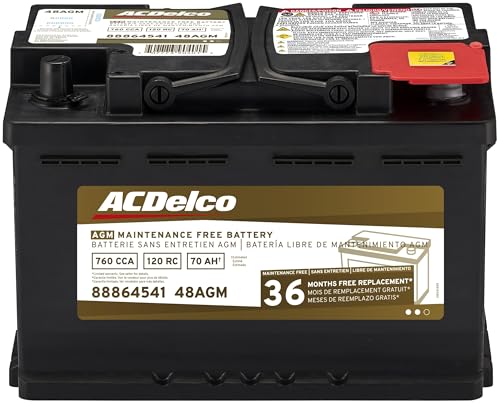
High density negative paste, improves performance and increases battery life
![PHILIPS CR2450 Battery, [5-Pack] cr2450 3v Lithium Coin Cell Batteries, Long-Lasting 2450 batteries, 10-Year Shelf Life, CR 2450 Battery for Car Key Fob, Medical Devices, MyQ battery, Remote Controls.](https://m.media-amazon.com/images/I/41CQv39v+wL._SL500_.jpg)
LONG-LASTING PERFORMANCE: The CR 2450 button battery is built to last, offering reliable power for up to 10 years in storage. Perfect for key fobs, garage door opener sensors, and other everyday devices, ensuring they’re always ready to go.
Installing the new battery
- Positioning the Battery: Set the new battery in place, ensuring it sits securely.
- Connecting Terminals: Attach the positive (+) and negative (-) terminals in the correct order.
- Securing the Battery: Double-check that the battery is properly secured in its place.
- Inspecting Work: Verify all connections are tight and secure before closing the hood.
| Key Steps for Installing New Battery |
|---|
| Position new battery securely |
| Connect positive and negative terminals |
| Secure the battery |
| Inspect work |
Recommended Products

Lithium Coin Battery: Duracell's 2450 3V coin batteries provide reliable, long lasting power for your medical devices, security devices, electronics and more.

PACKAGE INCLUDED : Two (2) CR2450 Remote key Fob Batteries and Opening/Pry Tools , Five item bundle (total 5pcs) , Please confirm compatibility using the fitment guide located in the product images.

Elite Batteries are Compatible with Ford: F-150/F-250 (1999-2025), Escape (2001-2025), Explorer (1999-2025), Focus (2000-2018), Taurus (1999-2019), Expedition (1999-2025), Edge (2007-2015), E-Series (1999-2024), SuperDuty (1999-2025), Fusion (2006-2016), Mustang (1999-2014), Transit (2015-2025), Ranger (1999-2011, 2019-2025), Fiesta (2011-2019), EcoSport (2018-2024), Maverick (2022-2024), Crown Vic (1998-2011), Transit Connect (2010-2023), Flex (2009-2019), C-Max (2013-2018), Bronco (21-22), Windstar (1999-2003), 500 (05-07), Fusion Hybrid (2010-2016), Freestyle (05-07), Escort (1999-2003), Excursion (2000-2005), Taurus X (08-09), Thunderbird (2002-2005), GT (05-06)
Conclusion
You now have all the necessary information to confidently replace the battery in your Ford Fusion. By following the steps outlined in this article and ensuring you have the right tools and safety gear, you can successfully complete the battery replacement process. Remember to prioritize safety by wearing gloves and goggles throughout the procedure. Familiarize yourself with the location of the battery in your Ford Fusion, and carefully follow the steps for removing the old battery and installing the new one. With proper preparation and attention to detail, you’ll be able to efficiently replace the battery in your Ford Fusion and keep your vehicle running smoothly.
Frequently Asked Questions
How can I check the battery level in my Ford Fusion?
To check the battery level in your Ford Fusion, you can use a voltmeter to measure the voltage. Make sure the car is turned off before checking. A healthy battery usually reads around 12.6 to 12.8 volts.
What tools do I need for replacing the battery in a Ford Fusion?
You will need a socket wrench set, battery terminal cleaner, adjustable wrench or pliers, gloves, and goggles for safety.
How do I locate the battery in a Ford Fusion?
To locate the battery in a Ford Fusion, open the hood, secure it in place, identify the terminals, check for labels, and ensure you are wearing safety gear.
What are the steps for removing the old battery?
Disconnect the negative and positive terminals, remove any hold-down clamps or brackets, lift out the old battery, and inspect the battery tray for corrosion or debris.
What are the key steps for installing the new battery?
Position the battery securely, connect the positive and negative terminals, double-check the battery’s secure placement, and verify all connections before closing the hood.
Why is it important to wear safety gear when handling car batteries?
Safety gear like gloves and goggles protect you from any potential battery acid or electrical hazards, ensuring a safe replacement process.
