

Key Takeaways
- Battery Replacement Benefits: Replacing the battery can significantly improve the performance and lifespan of your Samsung S7 Edge, addressing common charging issues faced by users.
- Essential Tools: Gather a small Phillips screwdriver, plastic pry tool, tweezers, and a compatible new battery to streamline the replacement process effectively.
- Step-by-Step Process: Follow a structured approach: power off the device, remove the back cover using a pry tool, disconnect the old battery, and install the new one securely.
- Common Mistakes to Avoid: Prevent frustration by ensuring all tools are prepared, avoiding excessive heat, and never forcing the back cover open or skipping the power-off step.
- Safety Precautions: Use protective gear, maintain a clear workspace, and adhere to manufacturer guidelines to ensure a safe and successful battery replacement.
- Proper Disposal: Always recycle old batteries to adhere to safety standards and local regulations, safeguarding the environment.
Is your Samsung S7 Edge struggling to hold a charge? You’re not alone. Many users face battery issues as their phones age, leading to frustration and constant charging. But don’t worry—replacing the battery isn’t as daunting as it seems.
Overview Of Samsung S7 Edge Battery Replacement
Replacing the battery in a Samsung S7 Edge can restore its performance and extend its lifespan. This process requires some tools and careful handling.
Tools Needed
- Small Phillips screwdriver: For opening the device.
- Plastic pry tool: To separate the screen from the body without damaging it.
- Tweezers: For handling small components.
- New battery: Ensure it’s a compatible battery for your S7 Edge model.
Steps to Replace the Battery
- Power off your device: Always turn off the phone to avoid any electrical issues.
- Remove the back cover: Use the plastic pry tool to carefully lift the back cover away from the phone. Start at a corner and work your way around.
- Unscrew the battery connector: Locate the battery connector and use the Phillips screwdriver to unscrew it.
- Disconnect the old battery: Gently lift the battery from its compartment using the pry tool, ensuring you don’t damage any surrounding parts.
- Insert the new battery: Place the new battery in the compartment and reconnect the connector.
- Reattach the back cover: Once everything is secure, press the back cover firmly into place until it clicks.
Common Issues
- Screen damage: Handle the screen carefully when prying open the back cover.
- Wrong battery type: Always check compatibility before purchasing a new battery.
This battery replacement not only boosts your phone’s functionality but also enhances your user experience, allowing you to enjoy your device to the fullest.
Tools Required For Battery Replacement
Replacing the battery in your Samsung S7 Edge requires specific tools to ensure a smooth process. Gathering these items beforehand can make the task easier and more efficient.
Recommended Products

[PLS CONFIRM DEVICE MODEL] --- The repair kit contains the instruction to guide you step by step installation, and we have professional engineers to answer all your questions about the repair process. Please verify your old battery part number and model before purchasing this replacement battery. Compatible with Samsung Galaxy S7 Edge SM-G935, G935A, G935T, G935P, G935V, EB-BG935ABE. ★NOT FOR Samsung Galaxy S7★

✅【【5800mAh High-Capacity Upgrade】 Upgraded 5800mAh Li-Polymer battery.Li-Polymer battery than the original 5000mAh cell, Extend your Galaxy S7 usage significantly – perfect for heavy users and long days out. Brand new 0-cycle cell with built-in over-charge, over-discharge, short-circuit, and over-heat protection.
![SHENMZ Galaxy S7 Battery, [Upgraded] 5800mAh Li-Polymer EB-BG930ABE Replacement Battery for Samsung Galaxy S7 G930 G930V G930A G930T G930P G920V with Screwdriver Tool Kit](https://m.media-amazon.com/images/I/41qDHngOUVL._SL500_.jpg)
❤【HIGH QUALITY GRADE A PREMIUM BATTERY】:This Upgraded Galaxy S7 Battery uses Grade A+ rated battery cells with CE and ROHS certification,ensure last over 1200 charge cycles. Multiple-protection for safer operation for both user and devices,build-in microchip to prevent over-charging,over-discharging and over-heating.
Essential Tools
- Small Phillips Screwdriver: This screwdriver allows you to remove screws securing the back cover and battery.
- Plastic Pry Tool: Use this tool to gently separate the back cover from the phone without causing damage.
- Tweezers: These help you in handling small components and battery connectors carefully.
- New Battery: Ensure your replacement battery is compatible with the Samsung S7 Edge for the best performance.
Optional Tools
- Heat Gun or Hair Dryer: Applying gentle heat can soften the adhesive holding the back cover, making it easier to remove.
- Suction Cup Tool: If available, this tool can assist in lifting the back cover without risk of scratches.
- Anti-Static Wrist Strap: Wearing this strap prevents static electricity from damaging sensitive electronic components during the procedure.
Gathering these tools sets you up for success in replacing your Samsung S7 Edge battery efficiently and safely.
Step-By-Step Guide To Replace Battery Samsung S7 Edge
Replacing your Samsung S7 Edge battery can rejuvenate your device. Follow these steps to ensure a smooth process.
Recommended Products
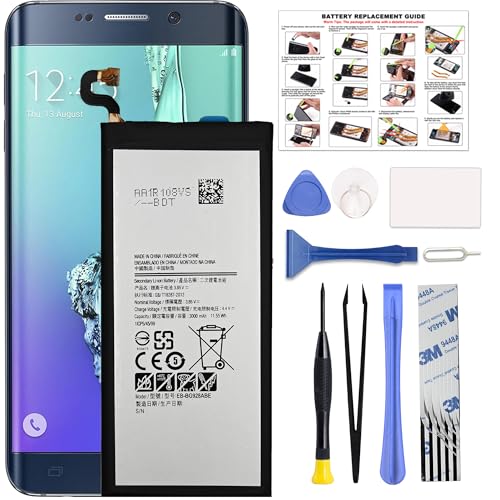
COMPATIBILITY: This battery only fits for Samsung Galaxy S6 Edge+ Plus, SM-G928A, SM-G928F, SM-G928A, SM-G928T, G928I, SM-G928G, SM-G928C, SM-G928I, SCV31, SM-G9280, SM-G928L, SM-G928S, SM-G928K, SM-G928W8. Please carefully confirm your phone model before purchase.

【More Capacity】 Model battery:EB-BG930ABE,3000mAh large capacity .Larger capacity and longer life.This battery prolongs the phone service time, you can use the high capacity battery directly without bothering about running out of power and shut down some apps all the time.
Powering Off The Device
Turn off your Samsung S7 Edge completely. Hold the power button, then tap “Power Off.” Wait for the screen to go dark before proceeding. This step prevents accidental damage during the replacement.
Removing The Back Cover
Use a plastic pry tool to gently slide into the gap between the back cover and the frame. Work it along the edges to loosen the adhesive, applying a little heat with a hair dryer if necessary. Carefully lift the back cover off; avoid using excessive force to prevent cracks.
Disconnecting The Battery
Locate the battery connector on the motherboard. Use a plastic pry tool or tweezers to gently lift the connector straight up, disconnecting it from the device. Make sure to handle this step with care to avoid damaging other components nearby.
Installing The New Battery
Insert your new battery into the designated compartment. Align the battery connector with the motherboard and press it down firmly until it clicks into place. This ensures a solid connection, allowing your phone to charge properly.
Tips For A Successful Battery Replacement
Replacing the battery in your Samsung S7 Edge can be straightforward with the right approach. Follow these tips for a smooth process.
Recommended Products

【Why Don't Sell Increased Capacity Battery 】- Because most of the so-called upgraded batteries on the market are exaggerated, the actual use time does not increase much, but the price is expensive. Our battery capacity and voltage is 100% same as your original s7 edge battery, it is a real 3600mAh can be perfectly compatible with the motherboard of your phone, and will not damage the hardware and reduce the service life of phone, true to providing long-lasting battery life.


[PLS CONFIRM DEVICE MODEL] --- The repair kit contains the instruction to guide you step by step installation, and we have professional engineers to answer all your questions about the repair process. Please verify your old battery part number and model before purchasing this replacement battery. Compatible with Samsung Galaxy S22 SM-S901, S901V, S901A, S901T, S901P, S901R4, S901U, S901U1, EB-BS901ABY. ★NOT FOR Samsung Galaxy S22+, S22 FE, S22 Ultra★
Common Mistakes To Avoid
- Skipping Tool Preparation: Don’t start without gathering all the necessary tools. Missing tools can lead to frustration and delays.
- Applying Excessive Heat: Avoid overheating the back cover. Too much heat can damage components or the cover itself.
- Forcefully Removing the Back Cover: Don’t rush this step. Use a plastic pry tool gently to prevent cracks or damage.
- Neglecting to Disconnect Power: Always power off your device before beginning. This step protects your phone’s internal components.
- Forgetting to Check for Adhesive Residue: Ensure that old adhesive does not interfere with the new battery. Clean the area for proper adhesion.
Safety Precautions
- Use Protective Gear: Wear an anti-static wrist strap to prevent static damage. It protects your phone and you.
- Keep Work Area Clear: Maintain a tidy workspace to minimize accidents. A clutter-free zone allows for focused work.
- Handle Components with Care: When disconnecting wires and connectors, use tweezers for precision. Avoid using your fingers to prevent damage.
- Follow Manufacturer Guidelines: Always refer to the battery replacement instructions specific to the Samsung S7 Edge. These instructions offer vital details for safe procedures.
- Dispose of Old Batteries Properly: Never throw away old batteries in regular trash. Recycle them according to local regulations to ensure safety.
Taking these precautions and avoiding common mistakes fosters a successful battery replacement, enhancing your phone’s performance effectively.
Conclusion
Replacing the battery in your Samsung S7 Edge can breathe new life into your device. With just a few tools and some patience you can tackle this task and enjoy improved performance. Remember to take your time and follow the steps carefully to avoid any mishaps.
By replacing the battery you’re not just fixing a problem; you’re enhancing your overall experience with your phone. So gather your tools and get ready to give your S7 Edge a fresh start. Happy repairing!
Frequently Asked Questions
What are common battery problems with the Samsung S7 Edge?
Battery issues in the Samsung S7 Edge often stem from age, leading to rapid draining, inability to hold a charge, or the device overheating. Users may notice that their phone shuts off unexpectedly or requires frequent charging.
How can I know if I need to replace my S7 Edge battery?
If your phone struggles to hold a charge, shuts down unexpectedly, or charges slowly, it may be time for a battery replacement. A significant decrease in battery life after a full charge is also a strong indicator.
What tools do I need to replace the battery in my S7 Edge?
You’ll need a small Phillips screwdriver, a plastic pry tool, tweezers, and a new compatible battery. Optional tools include a heat gun or hair dryer, a suction cup tool, and an anti-static wrist strap for added safety.
Can I replace the battery myself?
Yes, replacing the battery yourself is manageable with the right tools and instructions. The process can restore your phone’s performance and extend its lifespan, making it a worthwhile DIY project.
What steps should I follow to replace the S7 Edge battery?
Start by powering off your device, then use a plastic pry tool to remove the back cover. Carefully disconnect the old battery from the motherboard, then install the new battery by connecting it securely and pressing it down.
Are there any precautions I should take during battery replacement?
Yes, ensure you use protective gear, keep your work area clean, and handle components gently. Avoid excessive heat when removing the back cover and follow manufacturer guidelines for battery disposal.
How can I avoid common mistakes during battery replacement?
To avoid mistakes, gather all necessary tools beforehand, don’t skip heat application for the back cover, and handle the battery connector carefully. Follow the step-by-step guide closely to ensure a smooth process.
