

Key Takeaways
- Understanding Battery Basics: The LG G5 features a removable 2,800 mAh lithium-ion battery, allowing users to easily replace it and enhance device longevity.
- Symptoms of a Failing Battery: Common indicators of battery issues include rapid drainage, overheating, and the device not holding a charge.
- Essential Tools: Use tools like a plastic pry tool, Phillips head screwdriver, and tweezers to safely and effectively remove the battery without damaging the device.
- Safety Precautions: Always power down your device before removal, work on a soft surface, and handle the battery carefully to avoid potential hazards.
- Step-by-Step Removal Guide: Follow a clear, step-by-step process for removing the battery, starting from powering off the device to properly disposing of the old battery.
- Troubleshooting Techniques: Learn to identify and resolve common post-removal issues, such as charging problems and overheating, to ensure optimal device performance.
Ever found yourself in a situation where your LG G5 just won’t charge, and you suspect it might be time for a battery swap? You’re not alone. Many users face this issue, and knowing how to replace the battery can save you time and money.
Overview of LG G5 Battery
The LG G5 battery is a removable lithium-ion component with a capacity of 2,800 mAh. Its design allows for an easy swap, providing flexibility for users who want extended usage without searching for a charger. Knowing how to remove the battery is essential when troubleshooting charging issues or replacing a malfunctioning battery.
Key Features
- Removable Design: The LG G5 supports easy access to the battery. This feature enables you to replace the battery without special tools.
- Battery Capacity: The 2,800 mAh capacity ensures decent performance for daily activities. Users can expect a full day of use with moderate activities.
- Fast Charge Capability: The battery supports Quick Charge 3.0, allowing for faster charging in comparison to standard chargers.
Compatibility
- Original Parts: Always use a genuine LG G5 battery for optimal performance. Third-party batteries may not provide the same reliability or safety.
- Charging Accessories: Use certified charging cables and adapters to ensure compatibility and protect battery longevity.
Symptoms of a Failing Battery
- Rapid Drain: If the battery depletes quickly despite normal use, it might need replacement.
- Overheating: A battery that overheats during charging or use may indicate a serious issue.
- Device Not Holding Charge: If your LG G5 fails to hold a charge, replacing the battery often resolves this problem.
By understanding these battery characteristics and symptoms, you’ll be equipped to handle battery-related issues effectively. This knowledge not only helps maintain device performance but also supports timely replacements, ultimately saving you time and money.
Tools Required for Battery Removal
To remove the LG G5 battery, you’ll need a few essential tools to ensure a smooth process. Having the right tools makes the task easier and minimizes the risk of damaging your device.
Recommended Tools
- Plastic Pry Tool: This tool helps you safely open the phone without scratching or damaging the casing.
- Phillips Head Screwdriver: A small screwdriver is necessary for removing any screws that secure the battery in place.
- Tweezers: Tweezers assist in handling small components and the battery itself to avoid dropping or misplacing them.
- Anti-Static Wrist Strap: This strap prevents static electricity damage to your phone’s internal components during the removal process.
- T5 Torx Screwdriver (if needed): Some units may require a T5 screwdriver for specific screws inside the device.
Safety Precautions
- Power Down Your Device: Always turn off your LG G5 before starting any battery removal to prevent electrical shorts.
- Work on a Soft Surface: Use a padded or soft surface to avoid scratching or damaging your phone when it’s disassembled.
- Avoid Metal Tools: Stick to plastic or non-conductive tools to reduce the risk of damaging internal components.
- Handle the Battery with Care: Batteries can be punctured or damaged, leading to leaks or swelling. Be cautious and avoid applying excessive pressure.
- Dispose of the Old Battery Properly: Take the old battery to a recycling center or a retail location that accepts electronics to ensure safe disposal.
Step-by-Step Guide to Removing the LG G5 Battery
Follow these steps to effectively remove the battery from your LG G5.
Recommended Products

High Capacity Battery: 2800mAh cell provides solid power for all-day use with fewer recharges needed.

Compatible Model No.:For LG G5/LG VS987/H820/H830/LS992/US992/H845/Dual H850/H858/H860,Capacity:2700mAh,Voltage: 3.85 V. Make sure your device is suitable for this replacement battery before ordering.
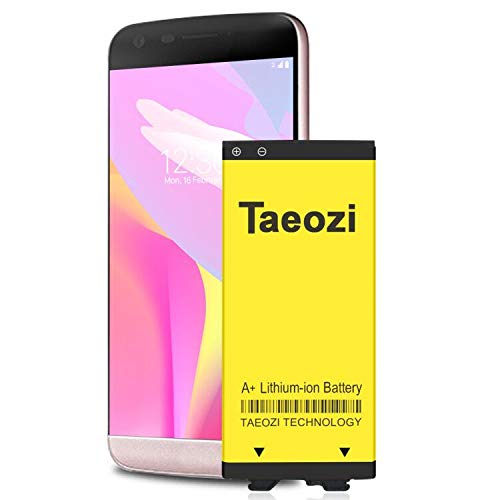
100% Full Compatibility: This a Updated G5 Replacement Battery Compatible with LG G5 BL-42D1F VS987 Verizon, H820 At&T, LS992 Sprint, H830 T-Mobile, US992 US Cellular, H845 H860 Phone.
Preparing the Device
- Power off your LG G5. Long press the power button, then select “Power Off.”
- Ensure you’re working on a soft, clean surface to prevent scratches.
- Gather all necessary tools, including a plastic pry tool, Phillips head screwdriver, tweezers, and an anti-static wrist strap.
Opening the LG G5
- Insert the plastic pry tool into the small gap at the lower edge of the back cover.
- Gently slide the tool around the edges to loosen the back cover.
- Carefully detach the back cover and set it aside.
Detaching the Battery
- Locate the battery pull tab at the bottom of the battery compartment.
- Gently lift the pull tab to unseat the battery from its connectors.
- Use tweezers to help lift the battery out if necessary.
- Dispose of the old battery safely following local regulations.
Following these steps ensures a smooth battery removal process for your LG G5, preparing it for replacement or maintenance.
Troubleshooting Common Issues
If your LG G5 isn’t charging after battery replacement, here are some steps to resolve common problems.
Battery Not Charging
- Check the Charger: Ensure you’re using the original charger. Non-certified chargers can cause issues.
- Inspect the Charging Port: Look for debris in the port. Use a soft brush or compressed air to clean it gently.
- Test with Another Charger: Try different chargers or cables to rule out faulty equipment.
Rapid Drain
- Monitor Background Apps: Check for apps using excessive power. Close anything unnecessary in the background.
- Update Software: Make sure your device software is up to date. Updates often fix bugs and improve battery performance.
- Reset Settings: Resetting can help if the problem persists. Back up your data before doing this.
Overheating
- Remove Cases: If the phone overheats, take off any cases. They can trap heat during charging.
- Limit Heavy Usage: Avoid using demanding applications while charging. This can help regulate temperature.
- Check Charging Time: Charging it overnight may lead to overheating. Consider shorter charging intervals.
Device Won’t Turn On
- Perform a Soft Reset: Press and hold the power button for about 20 seconds. This may restart the device.
- Charge for a While: Plug it in for at least 30 minutes before attempting to power it on again.
- Seek Professional Help: If none of the above work, the device may need professional diagnostics.
Water Damage
- Inspect for Moisture: Check for any signs of moisture inside the device. This could affect battery performance.
- Dry Thoroughly: If moisture is present, turn off the device and let it dry in a well-ventilated area for 48 hours.
- Consult a Professional: Consider taking your phone to a certified technician if you suspect water damage.
By following these troubleshooting steps, you can address common issues that may arise during or after the battery removal process. Keeping your phone well-maintained ensures a better user experience.
Conclusion
Taking the time to learn how to remove and replace your LG G5 battery can make a big difference in your device’s performance. With the right tools and a little patience, you can tackle this task yourself and avoid the hassle of professional repairs.
Remember to always prioritize safety by following the recommended precautions. By being mindful of the symptoms of a failing battery and knowing how to troubleshoot common issues, you can keep your LG G5 running smoothly for longer.
So go ahead and give it a try. You might just find it’s easier than you thought!
Frequently Asked Questions
What should I do if my LG G5 is not charging?
If your LG G5 isn’t charging, check your charger and cable for damage, clean the charging port, and try a different outlet. If these steps don’t work, your battery may need replacement.
How do I know if my LG G5 battery is failing?
Signs of a failing battery include rapid drain, overheating, and the device not holding a charge. If you notice these symptoms, it’s time to consider replacing the battery.
How can I replace the battery in my LG G5?
To replace your LG G5 battery, power off the device, gather the necessary tools, and use a plastic pry tool to open the back cover. Detach the battery by lifting the pull tab and replace it with a new one.
What tools do I need for LG G5 battery replacement?
You will need a plastic pry tool, Phillips head screwdriver, tweezers, an anti-static wrist strap, and a T5 Torx screwdriver (if required) for safely removing the battery.
Are there safety precautions I should take when replacing the battery?
Yes, always power down your device, work on a soft surface, avoid metal tools, handle the battery with care, and dispose of the old battery properly to ensure safety.
What do I do if my LG G5 won’t turn on after replacing the battery?
If your LG G5 won’t turn on, check the charger and charging port, close background apps, update software, and perform a soft reset. If the issue persists, inspect for moisture or consider consulting a professional.
