Close Menu
Battery Spotlight
    Battery Spotlight
    • Home
    • Phone Batteries
    • Laptop Batteries
    • Car Batteries
      • Golf Cart Batteries
    • Battery Info
      • Battery Chargers
      • Battery Life
      • Battery Maintenance
      • Marine Batteries
      • Rechargeable Batteries
      • Solar Batteries
    • About Us
      • Contact
    Battery Spotlight
    Navigation: Home » Phone Batteries » Android Batteries » How to Remove the Battery Samsung Galaxy S6: A Step-by-Step Guide for Easy Replacement
    Android Batteries

    How to Remove the Battery Samsung Galaxy S6: A Step-by-Step Guide for Easy Replacement

    Leo HudsonBy Leo HudsonJuly 1, 20257 Mins Read
    Share Facebook Twitter Pinterest LinkedIn Tumblr Email WhatsApp Copy Link
    Share
    Facebook Twitter LinkedIn Pinterest Email Copy Link

    Key Takeaways

    • Essential Tools: Gather necessary tools such as a SIM card ejector, Phillips screwdriver, plastic prying tool, tweezers, and suction cup for effective battery removal.
    • Prepare the Device: Always power off your Samsung Galaxy S6 before beginning the battery removal process to avoid electrical complications.
    • Removing Back Cover: Carefully remove the back cover using a plastic prying tool to access the battery compartment without causing damage.
    • Safe Battery Removal: Disconnect the battery connector gently using a plastic prying tool, then carefully lift out the battery to avoid damaging internal components.
    • Installing a New Battery: Ensure the new battery’s compatibility, position it correctly, and securely reconnect the battery connector before sealing the back cover.
    • Post-Installation Checks: After installing the new battery, power on the device and check for software updates to ensure optimal performance.

    Have you ever faced a frustrating moment when your Samsung Galaxy S6 just won’t turn on? Maybe your phone’s acting up and you think a battery replacement might be the answer. If you’re nodding along, you’re in the right place.

    Table of Contents

    Toggle
    • Key Takeaways
    • Tools Required
    • Preparing Your Device
    • Powering Down the Device
    • Removing the Back Cover
    • Steps to Remove the Battery
    • Locating the Battery
    • Safely Disconnecting the Battery
    • Installing a New Battery
    • 1. Prepare the New Battery
    • 2. Insert the New Battery
    • 3. Reconnect the Battery Connector
    • 4. Replace the Back Cover
    • 5. Power On Your Device
    • Additional Tips
    • Conclusion
    • Frequently Asked Questions
    • Why is my Samsung Galaxy S6 not turning on?
    • What tools do I need to replace the battery in my Galaxy S6?
    • How do I prepare my device before replacing the battery?
    • How do I remove the back cover of the Galaxy S6?
    • What is the process for removing the battery from the Galaxy S6?
    • How do I install the new battery in my Samsung Galaxy S6?
    • How do I replace the back cover after installing the new battery?
    • What should I do after replacing the battery?

    Tools Required

    To remove the battery from your Samsung Galaxy S6, gather the following tools:

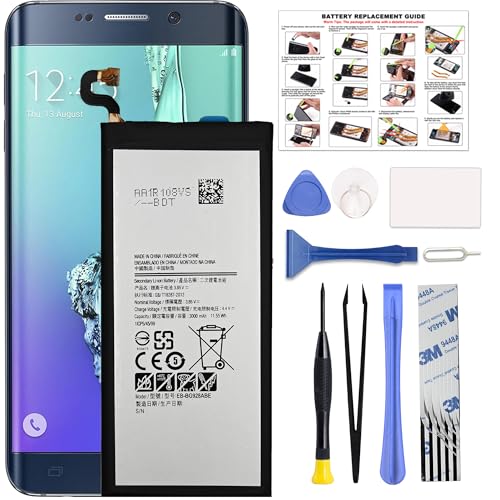
    • SIM card ejector tool: Helps you safely eject the SIM card tray to access the device.
    • Small Phillips screwdriver: Required for loosening screws that hold the back cover in place.
    • Plastic prying tool: Essential for gently separating the back cover from the phone without causing damage.
    • Tweezers: Useful for handling small components and screws during the removal process.
    • Suction cup: Assists in gently lifting the back cover off the device.

    These tools ensure a smooth battery removal experience, allowing you to replace or examine the battery effectively.

    SEE ALSO  What Is Draining My Battery on My Samsung Phone and How to Fix It Quickly

    Recommended Products

    Svenirven Galaxy S6 Battery,2026 New Upgraded Battery for Samsung Galaxy S6 SM-G920 G920V G920T G920A G920P G920I G920F S906L with Repair Tool Kit
    Svenirven Galaxy S6 Battery,2026 New Upgraded Battery for Samsung Galaxy S6 SM-G920 G920V G920T G920A G920P G920I G920F S906L with Repair Tool Kit

    Compatible with Galaxy S6 Only, Model: S6 SM-G9200 SM-G9208 SM-G9208/SS SM-G9209 SM-G920A SM-G920F SM-G920FD SM-G920I SM-G920S SM-G920T SM-G920K SM-G920L SM-G920

    VIEW LATEST PRICE

    As an affiliate, we earn on qualifying purchases.

    GOBAT Replacement for Samsung Galaxy S6 Battery,4800mAh High Capacity Compatible with Samsung Galaxy S6 Model (SM-G920 G920V G920T G920A G920P G920I G920F S906L) with Tool Kits,EB-BG920ABE
    GOBAT Replacement for Samsung Galaxy S6 Battery,4800mAh High Capacity Compatible with Samsung Galaxy S6 Model (SM-G920 G920V G920T G920A G920P G920I G920F S906L) with Tool Kits,EB-BG920ABE

    {COMPATIBLE MODELS}:This Replacement battery Compatible with Samsung Galaxy S6 (Model: SM-G920 G920V G920T G920A G920P G920I G920F S906L).

    VIEW LATEST PRICE

    As an affiliate, we earn on qualifying purchases.

    MULS EB-BT725ABU Replacement Battery Compatible with Samsung Galaxy Tab S6 10.5" SM-T860 T865 Galaxy Tab S5e 10.5" SM-T720 T725 Installation Tools 3.85V 7040mAh 27.11Wh
    MULS EB-BT725ABU Replacement Battery Compatible with Samsung Galaxy Tab S6 10.5" SM-T860 T865 Galaxy Tab S5e 10.5" SM-T720 T725 Installation Tools 3.85V 7040mAh 27.11Wh

    Compatible with: Fit for Samsung Galaxy Tab S6 10.5” SM-T860 T865, Samsung Galaxy Tab S5e 10.5” SM-T720 T725, please check the model of your laptop before purchase.

    VIEW LATEST PRICE

    As an affiliate, we earn on qualifying purchases.

    Preparing Your Device

    Before starting the battery removal process, ensure your Samsung Galaxy S6 is ready. Preparing your device helps prevent damage and supports a smoother experience.

    Powering Down the Device

    Power off your Samsung Galaxy S6 completely. Press and hold the power button until the power menu appears, then select “Power Off.” Wait until the screen goes black. This step is crucial to avoid any electrical issues during the process.

    Removing the Back Cover

    Start by locating the small indentation on the back cover. Use your fingernail or a plastic prying tool to gently lift the cover. Carefully work your way around the edges to release the clips without causing damage. Once it’s loose, lift the back cover off completely and set it aside. This exposes the battery compartment for the next steps.

    Steps to Remove the Battery

    Removing the battery from your Samsung Galaxy S6 requires careful handling. Follow these organized steps for a safe and efficient process.

    Locating the Battery

    1. Open the back cover. You’ve already done this in the previous steps.
    2. Identify the battery compartment. Look for the large rectangular component with a sticker label.
    3. Confirm the battery’s position. It’s the only removable part, distinctly shaped to fit snugly within the device.

    Safely Disconnecting the Battery

    1. Locate the battery connector. This is a small connector pin situated at one end of the battery.
    2. Use the plastic prying tool. Gently slide it under the battery connector to lift it safely. Avoid excessive force.
    3. Disconnect the battery connector. Once loose, gently pull it away from the motherboard to ensure full disconnection.
    4. Remove the battery. Use your fingers or tweezers to lift the battery out of the compartment, ensuring no damage occurs to surrounding components.
    SEE ALSO  How to Check Battery Life on OnePlus: Tips to Extend Your Device's Usage Time

    Following these steps ensures you remove your Samsung Galaxy S6 battery properly and safely.

    Installing a New Battery

    Installing a new battery in your Samsung Galaxy S6 is straightforward when you follow the steps carefully. Here’s how to do it.

    Recommended Products

    SHENMZ Galaxy S6 Battery,[Upgraded] 5800mAh High Capacity Li-Polymer EB-BG920ABE Replacement Battery for Samsung Galaxy S6 SM-G920 G920V G920T G920A G920P G920I G920F S906L with Repair Tools
    SHENMZ Galaxy S6 Battery,[Upgraded] 5800mAh High Capacity Li-Polymer EB-BG920ABE Replacement Battery for Samsung Galaxy S6 SM-G920 G920V G920T G920A G920P G920I G920F S906L with Repair Tools

    ✾【HIGH QUALITY, TRUSTWORTHY PREMIUM BATTERY】:This Upgraded S6 battery uses Grade A+ rated battery cells with CE and ROHS certification,ensure last over 1200 charge cycles. Multiple-protection for safer operation for both user and devices,build-in microchip to prevent over-charging,over-discharging and over-heating.

    VIEW LATEST PRICE

    As an affiliate, we earn on qualifying purchases.

    DDONG for Samsung Galaxy S6 Active G890 G890A G890F Replacement Battery EB-BG890ABA with Replacement Repair Tools Kit
    DDONG for Samsung Galaxy S6 Active G890 G890A G890F Replacement Battery EB-BG890ABA with Replacement Repair Tools Kit

    The battery is manufactured and tested under strict quality control standards before sent out

    VIEW LATEST PRICE

    As an affiliate, we earn on qualifying purchases.

    Vvsialeek EB-BG920ABE Replacement Battery Compatible with Samsung Galaxy S6 SM-G9200 SM-G9208 SM-G9208/SS SM-G9209 SM-G920A SM-G920F SM-G920FD SM-G920I SM-G920S SM-G920T SM-G920K SM-G920L SM-G920
    Vvsialeek EB-BG920ABE Replacement Battery Compatible with Samsung Galaxy S6 SM-G9200 SM-G9208 SM-G9208/SS SM-G9209 SM-G920A SM-G920F SM-G920FD SM-G920I SM-G920S SM-G920T SM-G920K SM-G920L SM-G920

    This battery is specially designed for Samsung Galaxy S6 SM-G9200 SM-G9208 SM-G9208/SS SM-G9209 SM-G920A SM-G920F SM-G920FD SM-G920I SM-G920S SM-G920T SM-G920K SM-G920L SM-G920, it can replace your old battery, Tech skills may apply when replacing the battery.

    VIEW LATEST PRICE

    As an affiliate, we earn on qualifying purchases.

    1. Prepare the New Battery

    Ensure you have the correct replacement battery compatible with the Samsung Galaxy S6. Check for any damage or defects before installation.

    2. Insert the New Battery

    • Align the Battery: Position the new battery in the compartment, aligning the connectors.
    • Press Down Firmly: Gently press down until you feel it click into place. Ensure it sits flat and secure.

    3. Reconnect the Battery Connector

    • Locate the Connector: Find the small connector on the motherboard again, located near the battery compartment.
    • Reconnect: Use your fingers or tweezers to carefully connect the new battery, ensuring it fits snugly.

    4. Replace the Back Cover

    • Position the Back Cover: Align the back cover with the clips on the edges of your phone.
    • Press to Secure: Firmly press around the edges until you hear the clips snap back into place. This step ensures everything is sealed properly.
    SEE ALSO  How to Save Battery Samsung A52: Effective Tips for Long-lasting Power Management

    5. Power On Your Device

    • Power Up: Press and hold the power button until the Samsung logo appears. Your device should boot up normally, indicating successful installation.

    Additional Tips

    • Dispose of the Old Battery: Recycle the old battery following local regulations. Many electronics stores offer battery recycling services.
    • Check for Updates: After installation, check for software updates. This ensures your phone runs optimally with the new battery.

    Following these steps ensures a smooth installation process for your Samsung Galaxy S6 battery replacement.

    Conclusion

    Replacing the battery in your Samsung Galaxy S6 doesn’t have to be a daunting task. By following the steps outlined in this guide you can tackle the process with confidence. Remember to take your time and handle each component carefully to avoid any mishaps.

    Once you’ve successfully swapped out the old battery for a new one you’ll likely notice a significant improvement in your device’s performance. Don’t forget to recycle the old battery responsibly and keep your software updated for the best experience. Enjoy your revitalized phone and all the benefits that come with a fresh battery!

    Frequently Asked Questions

    Why is my Samsung Galaxy S6 not turning on?

    The Samsung Galaxy S6 may not turn on due to a depleted battery, malfunctioning hardware, or software issues. A battery replacement is often a viable solution for users facing this problem.

    What tools do I need to replace the battery in my Galaxy S6?

    To replace the battery in your Galaxy S6, you will need a SIM card ejector tool, a small Phillips screwdriver, a plastic prying tool, tweezers, and a suction cup. These tools help facilitate safe battery removal.

    How do I prepare my device before replacing the battery?

    Before replacing the battery, ensure your device is powered off by pressing and holding the power button, selecting “Power Off.” This step is critical to avoid electrical issues during the process.

    How do I remove the back cover of the Galaxy S6?

    To remove the back cover, locate the small indentation on the edge. Use your fingernail or a plastic prying tool to gently lift the cover and work around the edges to release the clips without causing damage.

    What is the process for removing the battery from the Galaxy S6?

    To remove the battery, locate the battery compartment and the connector pin. Use a plastic prying tool to disconnect the pin carefully, then lift the battery out using fingers or tweezers, avoiding damage to surrounding components.

    How do I install the new battery in my Samsung Galaxy S6?

    To install a new battery, first, check for compatibility and damage. Align the battery in the compartment, press it down until it clicks into place, and reconnect the battery connector to the motherboard securely.

    How do I replace the back cover after installing the new battery?

    To replace the back cover, align it with the clips on the device and press down until it snaps securely into place. This ensures that the cover is properly fitted.

    What should I do after replacing the battery?

    After replacing the battery, power on your device to confirm successful installation when the Samsung logo appears. Additionally, consider recycling the old battery and checking for software updates for optimal performance.

    Share. Facebook Twitter Pinterest LinkedIn Tumblr Email WhatsApp Copy Link
    Leo-Hudson
    Leo Hudson

      Technical writer with 3+ years of experience. Bachelor of Arts in Environmental Studies from UC Santa Cruz. Passionate about sustainability and providing clear, concise how-to guides for common battery problems.

      Related Posts

      Android Batteries

      How to Replace Battery in Samsung Phone: A Step-by-Step Guide for Easy Replacement

      October 25, 2025
      Android Batteries

      How to Remove Battery from Samsung Smart TV Remote: A Step-by-Step Guide for Easy Replacement

      October 25, 2025
      Android Batteries

      How to Check Your Battery Health on Samsung: Simple Methods to Extend Your Phone’s Lifespan

      October 25, 2025
      Android Batteries

      How Much Is a Battery for a Samsung Galaxy S6: Pricing and Replacement Options Explained

      October 25, 2025
      Android Batteries

      How to Remove Battery from Samsung Galaxy S7: A Step-by-Step Guide for Easy DIY Fixes

      October 25, 2025
      Android Batteries

      Why is My Battery Going Down While Charging Android – Effective Solutions to Fix the Issue

      October 25, 2025
      Add A Comment
      Leave A Reply Cancel Reply

      Search
      Affiliate Disclaimer

      As an Amazon Associate I earn from qualifying purchases.

      Latest Articles

      How to Replace Battery in Samsung Phone: A Step-by-Step Guide for Easy Replacement

      Android Batteries

      How to Remove Battery from Samsung Smart TV Remote: A Step-by-Step Guide for Easy Replacement

      Android Batteries

      How to Check Your Battery Health on Samsung: Simple Methods to Extend Your Phone’s Lifespan

      Android Batteries

      How Much Is a Battery for a Samsung Galaxy S6: Pricing and Replacement Options Explained

      Android Batteries

      How to Remove Battery from Samsung Galaxy S7: A Step-by-Step Guide for Easy DIY Fixes

      Android Batteries

      Why is My Battery Going Down While Charging Android – Effective Solutions to Fix the Issue

      Android Batteries
      Battery Spotlight

      Battery Spotlight is a website dedicated to helping you solve common battery problems.

      Read more about us here

      Affiliate Disclaimer
      As an Amazon Associate I earn from qualifying purchases.

      Site Navigation
      • Above Mirror Bathroom Lighting
      • Android Batteries
      • Bathroom Pendant Lighting
      • Battery Chargers
      • Battery Life
      • Battery Maintenance
      • Car Batteries
      • Ceiling Lighting Ideas
      • Golf Cart Batteries
      • Japandi Lighting
      • Laptop Batteries
      • Marine Batteries
      • Mood Lighting Living Room
      • Phone Batteries
      • Rechargeable Batteries
      • Reviews
      • Solar Batteries
      • Uncategorized
      • Vaulted Ceiling Lighting
      Latest Articles

      How to Replace Battery in Samsung Phone: A Step-by-Step Guide for Easy Replacement

      How to Remove Battery from Samsung Smart TV Remote: A Step-by-Step Guide for Easy Replacement

      How to Check Your Battery Health on Samsung: Simple Methods to Extend Your Phone’s Lifespan

      How Much Is a Battery for a Samsung Galaxy S6: Pricing and Replacement Options Explained

      How to Remove Battery from Samsung Galaxy S7: A Step-by-Step Guide for Easy DIY Fixes

      • Home
      • About
      • Contact
      • Privacy Policy
      • Editorial Policy
      • Disclaimer
      • Terms and Conditions
      • Affiliate Disclosure
      © 2026 Battery Spotlight

      Type above and press Enter to search. Press Esc to cancel.