

Key Takeaways
- Know Your Battery Type: Sony Vaio laptops utilize either lithium-ion or lithium-polymer batteries; understanding your specific model’s battery type is crucial for proper removal and maintenance.
- Importance of Battery Removal: Removing the battery can help troubleshoot issues, extend laptop lifespan through replacement, and allow for internal cleaning.
- Preparation is Key: Gather necessary tools (screwdriver, pry tool, soft cloth, flashlight, container) and follow safety precautions (power down the laptop, unplug the charger, prevent static electricity) before beginning the removal process.
- Step-by-Step Process: Ensure a seamless battery removal by following the steps: power down the laptop, disconnect the power source, access the battery compartment, and carefully remove the battery.
- Troubleshooting Tips: Be aware of potential issues such as difficulty removing the battery due to clips or latches, and recognize signs of a faulty battery, like swelling or rapid discharge, to avoid further complications.
Have you ever found yourself struggling with a sluggish Sony Vaio laptop? Sometimes, a simple battery removal can make all the difference. Whether you’re trying to troubleshoot issues or just need to replace an old battery, knowing how to do it correctly can save you time and frustration.
Understanding Sony Vaio Laptops
Sony Vaio laptops combine performance and style. Knowing how to handle components, like the battery, is essential for maintenance and troubleshooting.
Overview of Battery Types
Sony Vaio laptops generally use two main battery types: lithium-ion (Li-ion) and lithium-polymer (Li-po) batteries.
- Lithium-ion (Li-ion): Common in most models, these batteries provide good energy density and lifespan.
- Lithium-polymer (Li-po): Found in some newer models, these batteries are lighter and can be shaped to fit different designs.
Understanding which battery type your laptop uses can impact your removal method.
Importance of Battery Removal
Removing the battery serves multiple purposes.
- Troubleshooting: If your laptop freezes or experiences performance issues, removing the battery can help reset the device.
- Replacement: A worn-out battery leads to inadequate power retention. Knowing how to replace it extends your laptop’s life.
- Cleaning: Dust accumulation can affect performance. Removing the battery allows for better cleaning of internal components.
Ensuring you’re familiar with the battery removal process enhances your overall experience with your Sony Vaio laptop.
Preparing for Battery Removal
Before removing the battery from your Sony Vaio laptop, gather necessary tools and follow safety precautions to ensure a seamless process. Proper preparation makes the task smoother and safer.
Tools You Will Need
- Screwdriver: A Phillips head screwdriver suitable for small screws.
- Pry Tool: A plastic pry tool can prevent damage during the battery removal.
- Soft Cloth: Use a soft cloth to protect the laptop’s surface and prevent scratches.
- Flashlight: A flashlight helps illuminate dark areas inside the laptop.
- Container: A small container to hold screws during the removal process.
Safety Precautions
- Power Down: Always shut down your laptop completely; never remove the battery while the laptop is on.
- Unplug the Charger: Disconnect the power adapter to avoid electrical shock.
- Static Electricity: Prevent static discharge by grounding yourself; touch a metal object before handling internal components.
- Check for Damage: Inspect the battery for any signs of swelling or leaks; do not proceed if they are present.
Following these preparations ensures a safe and effective battery removal process.
Step-by-Step Guide on How to Remove Sony Vaio Laptop Battery
Follow these steps to remove the battery from your Sony Vaio laptop. This process helps troubleshoot issues or replace old batteries.
Powering Down the Laptop
First, shut down your laptop completely. Click the Start menu, select “Shut Down,” and wait for the screen to turn off. This step ensures no data loss and prevents electrical issues during battery removal.
Disconnecting the Power Source
Next, unplug the power adapter from the laptop. Disconnecting the power source avoids accidental electric shock and safeguards your device. Make sure that the charger is also disconnected from the wall outlet.
Accessing the Battery Compartment
Locate the battery compartment on your laptop. Most Sony Vaio laptops feature a sliding latch or a release button near the battery area. Some models may require a Phillips head screwdriver to remove screws securing the panel. Use a soft cloth to wipe away any dust in this area.
Removing the Battery
Finally, release the battery by sliding the latch or pressing the release button. If screws were removed, lift the panel gently. Carefully pull the battery away from the laptop’s compartment, ensuring you handle the battery by its edges. Place it in a safe container for further handling or disposal.
By following these straightforward steps, you can successfully remove the battery from your Sony Vaio laptop.
Troubleshooting Common Issues
You may encounter some common issues while trying to remove the battery from your Sony Vaio laptop. Understanding these can help you tackle any hiccups efficiently.
Recommended Products
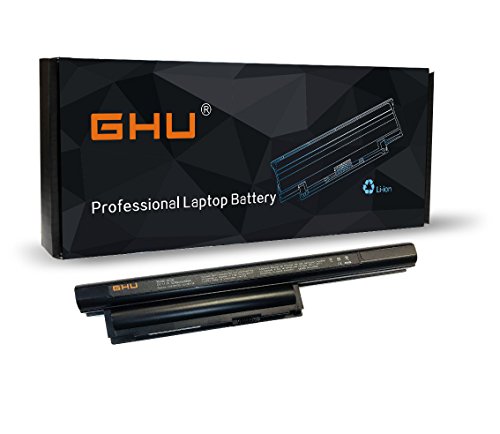
Compatible Models: Replacement for selected Sony VAIO SVE151D11L and VPCEB series laptop notebook models.
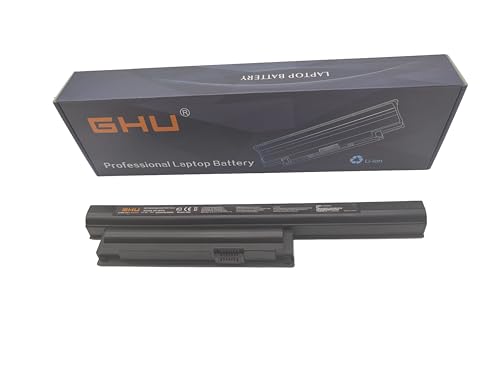
Premium 58Wh Battery: Our bps26 battery is a high-capacity, premium 58Wh model, designed for the sony pcg 71913l battery and sony vaio battery pcg 71913l. It is also compatible with sony vaio vpcea46fm battery and sony vaio vpceb battery, offering extended power for your laptop needs. 58 WH VGP-BPS26 VGP-BPS26A VGP-BPL26 Compatible For Sony Vaio Laptops. We recommend customers to charge your new battery at least 4-8 hours before you use your battery by disconnecting AC power from wall.
![KingSener ETESBAY VGP-BPS35A Battery Replacement for Sony VAIO Fit 14E 15E Series SVF1521A2E SVF15217SC SVF14215SC SVF15218SC SVF152A29M SVF152A27T SVF142C29I BPS35A BPS35 [14.8V, 40WH]](https://m.media-amazon.com/images/I/212JHKs8xTL._SL500_.jpg)
Battery Type:Li-ion; Capacity:2670mAh/40WH; Voltage:14.8V
Difficulty in Removing the Battery
You might face resistance when attempting to remove the battery. This often occurs due to clips or latches that hold the battery securely in place. If you experience this, check for a locking mechanism on the battery compartment. Make sure you applied enough pressure in the right direction. Use a plastic pry tool to gently lift the battery without damaging the surrounding components. If the battery still doesn’t budge, recheck your model specifications to ensure you’re following the correct procedure.
Signs of a Faulty Battery
Recognizing signs of a faulty battery can save you time and frustration. Look for these indicators:
- Swelling: A swollen battery may protrude beyond the normal casing, which can be hazardous.
- Overheating: If the battery or laptop feels excessively hot during use or charging, it’s a warning sign.
- Rapid Discharge: Noticeable depletion of battery life within a short period indicates an issue.
- Frequent Shutdowns: If the laptop shuts down unexpectedly, especially during tasks, the battery may be failing.
If you observe one or more of these symptoms, consider replacing the battery. Always prioritize safety by turning off the laptop and disconnecting it from the power source before further inspection.
Conclusion
Removing the battery from your Sony Vaio laptop can be a game changer for its performance. By following the proper steps and taking necessary precautions you can easily tackle issues that may be slowing you down.
Whether you’re troubleshooting or considering a battery replacement knowing how to safely remove and handle your battery ensures a smoother experience. Just remember to keep an eye out for any signs of battery trouble and address them promptly.
With a little care and attention you’ll keep your laptop running at its best for years to come. Happy computing!
Frequently Asked Questions
What causes a Sony Vaio laptop to become sluggish?
A sluggish Sony Vaio laptop can be caused by various factors, including insufficient RAM, outdated software, multiple background applications, or a failing battery. Regular maintenance, such as software updates and disk cleanups, can help improve performance.
How can removing the battery help with troubleshooting?
Removing the battery can reset the hardware connections and eliminate temporary glitches that may cause performance issues. It can also be necessary for diagnosing problems related to power supply or hardware malfunctions.
What tools do I need to remove the battery from a Sony Vaio laptop?
To safely remove the battery, you’ll need a Phillips head screwdriver, a plastic pry tool, a soft cloth, a flashlight, and a small container for screws. Ensure you have these tools ready before starting the process.
What safety precautions should I take before removing the battery?
Always power down the laptop, unplug the charger, and prevent static discharge by grounding yourself. Inspect the battery for any visible damage, as it’s best to avoid handling a faulty battery.
How do I know if my battery needs to be replaced?
Signs that indicate a battery may need replacing include swelling, overheating, rapid discharge, and frequent shutdowns. If you experience these symptoms, consider replacing the battery for optimal performance.
What are the two main battery types used in Sony Vaio laptops?
Sony Vaio laptops primarily use lithium-ion (Li-ion) and lithium-polymer (Li-po) batteries. Understanding the type of battery in your laptop is essential for proper maintenance and replacement.
Is it difficult to remove the battery from a Sony Vaio laptop?
The difficulty can vary depending on the model. Some users may face challenges with clips or latches. Following a detailed step-by-step guide can help ease the process and ensure safe removal.
What should I do if I encounter difficulties during battery removal?
If you face difficulties, ensure you’re following the correct steps outlined in the guide. You can try gently wiggling the battery or using a plastic pry tool to release clips. If issues persist, consult a professional.
