

Key Takeaways
- Essential Tools: Gather necessary tools such as a Philips screwdriver, plastic opening tools, tweezers, a suction cup, and a soft cloth for a safe battery removal process.
- Safe Procedure: Follow the step-by-step guide to power down the device, remove the back cover, disconnect the battery connector, and finally take out the battery carefully.
- Safety Precautions: Always power off the device before starting, avoid static electricity, use the right tools, and handle the battery carefully to prevent damage and ensure safety.
- Common Issues: Be aware of potential problems such as battery not charging, device not powering on, overheating, unresponsive touchscreen, and frequent shutdowns, and learn how to troubleshoot them.
- Proper Battery Disposal: Dispose of the old battery responsibly or keep it for recycling to protect the environment and comply with local regulations.
Have you ever found yourself in a situation where your Samsung S6 Edge just won’t charge or hold power like it used to? It can be frustrating when your phone’s performance dips, and sometimes the battery is to blame. Knowing how to remove the battery can be a game-changer, especially if you’re looking to replace it or troubleshoot issues.
In this article, you’ll learn a simple step-by-step guide to safely remove your Samsung S6 Edge battery. Whether you’re a tech novice or someone who’s done this before, you’ll find it easy to follow. By the end, you’ll have the confidence to tackle battery issues head-on and keep your phone running smoothly.
Tools Needed
Removing the Samsung S6 Edge battery requires specific tools to ensure a safe and efficient process. Below is a list of essential items you’ll need:
- Philips screwdriver: A small Philips screwdriver is necessary for removing the screws securing the back cover.
- Plastic opening tools: Use plastic opening tools to carefully pry open the device without damaging the casing.
- Tweezers: Tweezers assist in handling small components and the battery itself during removal.
- Suction cup: If the back cover is tightly sealed, a suction cup can help create a gap for easier opening.
- Soft cloth: A soft cloth protects your device from scratches while you work.
Gather these tools before starting the removal process to streamline your efforts and reduce the risk of mishaps.
Step-By-Step Guide
Follow these steps to safely remove the battery from your Samsung S6 Edge. With the right tools and a little patience, you can troubleshoot battery issues effectively.
Recommended Products
![SHENMZ Galaxy S6 Battery,[Upgraded] 5800mAh High Capacity Li-Polymer EB-BG920ABE Replacement Battery for Samsung Galaxy S6 SM-G920 G920V G920T G920A G920P G920I G920F S906L with Repair Tools](https://m.media-amazon.com/images/I/41pc-APX7ML._SL500_.jpg)
✾【HIGH QUALITY, TRUSTWORTHY PREMIUM BATTERY】:This Upgraded S6 battery uses Grade A+ rated battery cells with CE and ROHS certification,ensure last over 1200 charge cycles. Multiple-protection for safer operation for both user and devices,build-in microchip to prevent over-charging,over-discharging and over-heating.
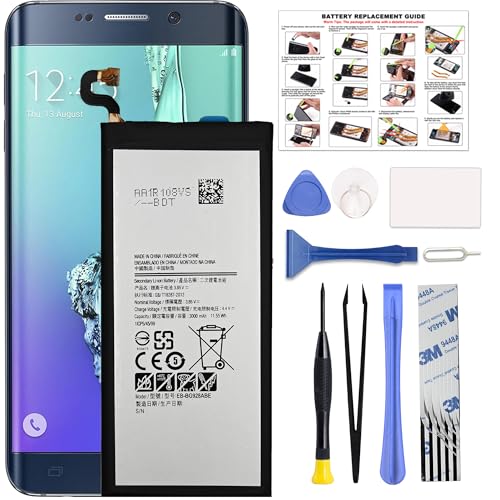
COMPATIBILITY: This battery only fits for Samsung Galaxy S6 Edge+ Plus, SM-G928A, SM-G928F, SM-G928A, SM-G928T, G928I, SM-G928G, SM-G928C, SM-G928I, SCV31, SM-G9280, SM-G928L, SM-G928S, SM-G928K, SM-G928W8. Please carefully confirm your phone model before purchase.

1. Applicable Models:Compatible with Samsung Galaxy S6 Edge SM-G9250, SM-G925A,Please carefully check your mobile phone model before purchasing to avoid purchasing the wrong model and damaging your product
Powering Down the Device
- Power off the device completely.
- Press and hold the power button.
- Tap “Power Off” when prompted.
- Wait for the screen to turn off before proceeding.
Removing the Back Cover
- Prepare your tools: a plastic opening tool and suction cup.
- Place the suction cup on the back cover, near the bottom edge.
- Gently pull the suction cup while using the plastic opening tool to pry the back cover.
- Slide the tool along the edge to release the clips.
- Carefully lift the back cover away from the phone.
Detaching the Battery Connector
- Locate the battery connector at the bottom of the battery.
- Use the tweezers or the plastic tool to gently lift the connector straight up.
- Ensure not to pull too hard; disconnecting should require minimal force.
Taking Out the Battery
- Grip the sides of the battery.
- Lift the battery straight up to avoid damaging any surrounding components.
- Dispose of the old battery responsibly or keep it for recycling.
By following these steps, you can effectively remove your Samsung S6 Edge battery for troubleshooting or replacement. With practice, this task becomes more manageable and faster.
Safety Precautions
When removing the Samsung S6 Edge battery, follow these safety precautions to prevent damage to your device and ensure your safety.
- Power Off the Device
Always turn off your phone before starting. This reduces the risk of electric shock and prevents short circuits.
- Avoid Static Electricity
Discharge any static electricity by touching a grounded metal object. Static can damage the phone’s internal components.
- Use the Right Tools
Utilize the specified tools, such as a Philips screwdriver and plastic opening tools. Improper tools may cause harm to your device.
- Handle the Battery Carefully
Batteries can be sensitive. Avoid puncturing or bending the battery to prevent leaks or explosions.
- Check for Damage
Before removal, inspect the battery for swelling or damage. If the battery appears compromised, do not attempt to remove it. Seek professional help instead.
- Work in a Clean Environment
Ensure your workspace is free of dust and clutter. This prevents debris from entering the device during the battery removal process.
- Store the Battery Properly
After removal, store the battery in a cool, dry space away from direct sunlight. This helps maintain its condition until you’re ready to replace it.
By following these safety precautions, you ensure a smoother battery removal process and protect your device.
Troubleshooting Common Issues
You might experience a few common issues when removing the Samsung S6 Edge battery. Addressing these problems can improve your overall experience and help maintain the device.
Battery Not Charging
If the battery isn’t charging, first check the charging cable and adapter. Use a different cable, or try another power source. If it charges with a different setup, replace the faulty components. To confirm the battery’s condition, remove it and inspect for any signs of swelling or damage.
Device Won’t Power On
Sometimes, the phone may not power on even after a battery removal. To troubleshoot, perform a soft reset. Press and hold the power button for about 10-20 seconds. If it still doesn’t turn on, remove the battery for a few minutes. Reinsert it and attempt to power on again.
Overheating Issues
If the device overheats after battery removal, check for debris in the battery compartment that could cause poor connectivity. Allow the phone to cool down before inserting the battery again. Make sure to use a compatible battery and avoid third-party components to reduce overheating risks.
Unresponsive Touchscreen
An unresponsive touchscreen can occur after battery removal. Check the connections. Ensure the battery connector is seated properly. If the issue persists, try a factory reset after backing up your data, as software glitches may affect touchscreen functionality.
Frequent Shutdowns
If your phone shuts down unexpectedly, the battery may not be securely connected. Remove the battery, clean the connectors gently with a soft cloth, and reinsert the battery firmly. If problems persist, consider replacing the battery since older batteries may not hold a charge effectively.
By keeping these troubleshooting steps in mind, you can address common issues effectively and ensure your Samsung S6 Edge functions properly.
Conclusion
Removing the battery from your Samsung S6 Edge can seem daunting but it’s a valuable skill that can help you troubleshoot and maintain your device. With the right tools and a bit of patience you can tackle this task confidently.
Remember to follow the safety precautions to protect both yourself and your phone. If you run into any issues during the process don’t hesitate to refer back to the troubleshooting tips provided.
With practice you’ll find that this task becomes easier over time and you’ll be better equipped to handle any battery-related concerns that come your way. Happy fixing!
Frequently Asked Questions
What common charging issues do Samsung S6 Edge users face?
Many Samsung S6 Edge users experience problems like the device not charging, frequent shutdowns, or not powering on. These issues can often stem from a faulty battery, charger, or connection problems.
How can I safely remove the battery from my Samsung S6 Edge?
To safely remove the battery, first power down the device. Then, use a suction cup and plastic opening tool to lift the back cover, detach the battery connector, and carefully remove the battery.
What tools do I need to remove the Samsung S6 Edge battery?
You will need a Philips screwdriver, plastic opening tools, tweezers, a suction cup, and a soft cloth. Having these tools on hand will make the battery removal process easier and safer.
What safety precautions should I take when removing the battery?
Always power off your device before starting. Ground yourself to avoid static electricity, use the right tools to prevent damage, and carefully check the battery for signs of damage while working in a clean environment.
What should I do if my Samsung S6 Edge battery isn’t charging even after removal?
Check the charging cable and adapter for functionality, ensure the battery connections are secure, and consider performing a soft reset. If problems persist, the battery may need replacing.
