
Close Menu
Battery Spotlight
    Battery Spotlight
    • Home
    • Phone Batteries
    • Laptop Batteries
    • Car Batteries
      • Golf Cart Batteries
    • Battery Info
      • Battery Chargers
      • Battery Life
      • Battery Maintenance
      • Marine Batteries
      • Rechargeable Batteries
      • Solar Batteries
    • About Us
      • Contact
    Battery Spotlight
    Navigation: Home » Phone Batteries » Android Batteries » How to Remove Nokia Battery: A Step-by-Step Guide for Safe and Easy Battery Replacement
    Android Batteries

    How to Remove Nokia Battery: A Step-by-Step Guide for Safe and Easy Battery Replacement

    Leo HudsonBy Leo HudsonSeptember 18, 20257 Mins Read
    Share Facebook Twitter Pinterest LinkedIn Tumblr Email WhatsApp Copy Link
    Share
    Facebook Twitter LinkedIn Pinterest Email Copy Link

    Key Takeaways

    • Identify Your Battery Type: Understand whether your Nokia phone has a removable or non-removable battery to choose the appropriate removal method.
    • Follow Safe Removal Procedures: Use the right tools and techniques to avoid damaging the battery connectors and internal components, ensuring a safer removal process.
    • Power Off Before Removing: Always turn off your device completely before attempting to remove the battery to prevent electrical issues.
    • Handle with Care: If the battery feels stuck, use a plastic pry tool gently instead of metal tools to avoid scratches or dents on the device.
    • Inspect for Damage: Before removal, check the battery for swelling or leakage to ensure safety during the process.
    • Regular Maintenance: Incorporate battery removal and inspection into your device care routine to optimize performance and extend battery life.

    Have you ever found yourself in a situation where your Nokia phone just won’t turn on, and you suspect it’s the battery? You’re not alone. Many people face this issue and need to remove the battery to troubleshoot or replace it.

    Table of Contents

    Toggle
    • Key Takeaways
    • Understanding Nokia Batteries
    • Types of Nokia Batteries
    • Importance of Proper Battery Removal
    • Preparing to Remove the Battery
    • Necessary Tools
    • Safety Precautions
    • Step-by-Step Guide on How to Remove Nokia Battery
    • Powering Off the Device
    • Accessing the Battery Compartment
    • Removing the Battery
    • Troubleshooting Common Issues
    • Battery Stuck or Difficult to Remove
    • What to Do if the Device Won't Turn Off
    • Conclusion
    • Frequently Asked Questions
    • What should I do if my Nokia phone won’t turn on?
    • How do I safely remove the battery from my Nokia phone?
    • What tools do I need to remove a Nokia battery?
    • What are removable and non-removable batteries?
    • How can I troubleshoot a stuck battery?
    • What precautions should I take before removing the battery?
    • How can I perform a soft reset if my device is unresponsive?

    Knowing how to safely and easily take out your Nokia battery can save you time and frustration. Whether you’re looking to swap out an old battery or reset your device, this guide will walk you through the simple steps. By the end, you’ll feel confident tackling this common task on your own.

    Understanding Nokia Batteries

    Nokia batteries play a crucial role in powering your device. Knowing the types of batteries and the importance of proper removal can enhance your troubleshooting skills.

    Types of Nokia Batteries

    Nokia devices typically use two main types of batteries: removable and non-removable.

    1. Removable Batteries:
    • Common in older Nokia models.
    • Allow users to swap out the battery easily for troubleshooting or replacement.
    1. Non-Removable Batteries:
    • Found in newer models.
    • Require professional assistance for removal and replacement.

    Familiarity with your specific battery type helps you determine the right method for removal and replacement.

    Importance of Proper Battery Removal

    Understanding proper battery removal prevents damage to your device and enhances safety. Here are key reasons why you should follow correct procedures:

    1. Avoiding Damage:
    • Proper techniques prevent harm to battery connectors and internal components.
    SEE ALSO  How to Show Battery Percentage on Samsung S8 Plus: Easy Steps for Better Power Management
    1. Ensuring Safety:
    • Incorrect removal can lead to battery swelling or leakage, posing hazards.
    1. Optimizing Performance:
    • Regularly removing and reinserting the battery can resolve minor issues, ensuring devices run smoothly.

    Incorporating these practices into your device maintenance routine will help extend battery life and improve overall performance.

    Preparing to Remove the Battery

    Removing a Nokia battery requires some preparation to ensure a smooth process. Follow these practical steps to set yourself up for success.

    Recommended Products

    LMQ Professional Electronics Pry Tool Repair Kit with Plastic & Metal
    LMQ Professional Electronics Pry Tool Repair Kit with Plastic & Metal

    LMQ 22 pcs opening pry tools kit for smart phone,laptop,computer tablet,electronics, apple watch, iPad, iPod, computer, LCD screen, battery and more disassembly and repair.

    VIEW LATEST PRICE

    As an affiliate, we earn on qualifying purchases.

    Kaisi Professional Electronics Opening Pry Tool Repair Kit Metal Spudger
    Kaisi Professional Electronics Opening Pry Tool Repair Kit Metal Spudger

    Kaisi 20 pcs opening pry tools kit for smart phone,laptop,computer tablet,electronics, apple watch, iPad, iPod, Macbook, computer, LCD screen, battery and more disassembly and repair

    VIEW LATEST PRICE

    As an affiliate, we earn on qualifying purchases.

    XYIRMCYF 24300mAh Super Capacity Battery Compatible with iPhone 12/12 Pro, 0 Cycle Li-Polymer Replacement Battery for iPhone 12/12 Pro, with Professional Repair Tool Kit
    XYIRMCYF 24300mAh Super Capacity Battery Compatible with iPhone 12/12 Pro, 0 Cycle Li-Polymer Replacement Battery for iPhone 12/12 Pro, with Professional Repair Tool Kit

    【Compatible Model】This Replacement battery compatible with iPhone 12/12 Pro (Model: A2172 A2402 A2403 A2404). (Note: NOT compatible with other iPhone model). Before purchasing this battery, please make sure that the your Phone model number matches!

    VIEW LATEST PRICE

    As an affiliate, we earn on qualifying purchases.

    Necessary Tools

    • Screwdriver: You need a small Philips-head screwdriver for devices with screws.
    • Plastic Pry Tool: This tool helps you safely separate components without damage.
    • Tweezers: Use these to grasp small parts or connectors.
    • Clean Cloth: Keep a lint-free cloth handy to protect surfaces and avoid dirt during the process.

    Safety Precautions

    • Power Off: Always turn off the phone completely before attempting battery removal.
    • Avoid Metal Objects: Keep metal tools away from battery terminals to prevent accidental short circuits.
    • Static Electricity: Ground yourself by touching a metal surface to avoid static damage to the device.
    • Check for Damage: Inspect the battery for swelling or leakage. If the battery shows signs of damage, dispose of it properly.

    Preparing adequately streamlines the battery removal process and enhances safety.

    Step-by-Step Guide on How to Remove Nokia Battery

    Follow these steps to safely remove the battery from your Nokia phone. This process helps ensure you handle the battery properly for troubleshooting or replacements.

    Recommended Products

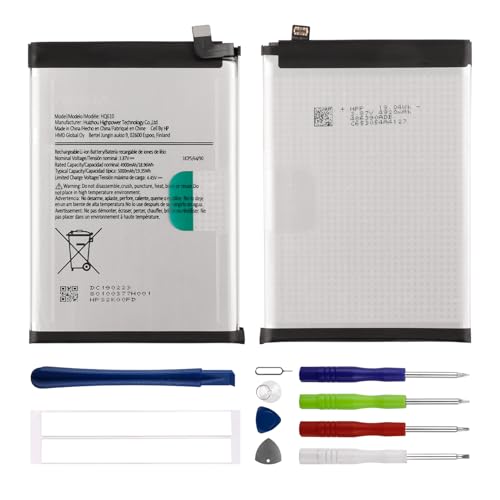
    Duotipa New Replacement Battery HQ610 for Nokia G42/ G310/ G400 with Repair Tools Kit
    Duotipa New Replacement Battery HQ610 for Nokia G42/ G310/ G400 with Repair Tools Kit

    Compatible with:Nokia G42/ G310/ G400 TA-1530, TA-1448, TA-1476, N1530DL; Please check your battery type before purchasing

    VIEW LATEST PRICE

    As an affiliate, we earn on qualifying purchases.

    E-YIIVIIL Replacement Battery BL-4XL Battery Compatible with Nokia 6300 4G with Tools
    E-YIIVIIL Replacement Battery BL-4XL Battery Compatible with Nokia 6300 4G with Tools

    This battery is Compatible with Nokia 6300 4G, please carefully check your phone model before purchase.
    SEE ALSO  How to Increase Size of Battery Icon on Android for Better Visibility and User Experience
    VIEW LATEST PRICE

    As an affiliate, we earn on qualifying purchases.

    Duotipa Battery HQ-510 Compatible with Nokia 2.2 TA-1179 TA-1183 TA-1188 TA-1191 with Repair Tool Kit
    Duotipa Battery HQ-510 Compatible with Nokia 2.2 TA-1179 TA-1183 TA-1188 TA-1191 with Repair Tool Kit

    【Compatible Models】 Nokia 2.2 TA-1179 TA-1183 TA-1188 TA-1191.Please check your old battery number before buying this battery.

    VIEW LATEST PRICE

    As an affiliate, we earn on qualifying purchases.

    Powering Off the Device

    Power off your device before starting. Hold the power button until the power menu appears. Tap “Power off” and confirm the choice. This prevents any electrical issues while you work on the phone.

    Accessing the Battery Compartment

    Find the battery compartment. For older Nokia models, look for a small slot or groove on the back cover. Use your fingers or a plastic pry tool to gently lift the cover, ensuring you don’t damage any clips or latches.

    Removing the Battery

    Once the cover is off, locate the battery. You’ll see a slight indentation to help pry it up. Use your fingers or tweezers to lift the battery out, applying even pressure to avoid bending it. Always check for any connectors or cables attached and gently disconnect them, if present.

    Troubleshooting Common Issues

    Issues may arise during the battery removal process. Knowing how to handle them enhances your confidence and efficiency.

    Recommended Products

    AYWFEY 4 Pcs SIM Card Removal Opening Tool Tray Eject Pins Needle Opener Ejector Compatible with All iPhone Apple iPad HTC Samsung Galaxy Cell Phone Smartphone Watchchain Link Remover (Style A)
    AYWFEY 4 Pcs SIM Card Removal Opening Tool Tray Eject Pins Needle Opener Ejector Compatible with All iPhone Apple iPad HTC Samsung Galaxy Cell Phone Smartphone Watchchain Link Remover (Style A)

    High-quality materials: The SIM card removal tool is made of high-quality alloy metal steel, which is lightweight and difficult to bend. Durable and long-lasting. (Note: The SIM card removal tool is small in size and has a pointed bottom; Keep them away from children to avoid accidental swallowing or accidental injury.)

    VIEW LATEST PRICE

    As an affiliate, we earn on qualifying purchases.

    Showpin Smart Phones Suction Cup Tool Opening Pliers Repair LCD Screen, 3 in 1 iPhone Repair Tool Prying Tool Compatible with Cell Phone/Laptop/Tablet PC
    Showpin Smart Phones Suction Cup Tool Opening Pliers Repair LCD Screen, 3 in 1 iPhone Repair Tool Prying Tool Compatible with Cell Phone/Laptop/Tablet PC

    Professional Tools: Showpin's 3-in-1 iopener includes LCD and double-headed screen opening tool plus a cleaning cloth. Suitable for mobile phones, iPads, and other mobile devices, facilitating the easy removal or replacement of the LCD screen and battery.

    VIEW LATEST PRICE

    As an affiliate, we earn on qualifying purchases.

    iSYFIX SIM Card Tray Eject Pin Removal Tool, 10 Pack
    iSYFIX SIM Card Tray Eject Pin Removal Tool, 10 Pack

    What you get: 10 identical steel SIM ejector needles, one standard size that fits the eject hole of any phone or tablet with a physical SIM slot, so a spare is always within reach

    VIEW LATEST PRICE

    As an affiliate, we earn on qualifying purchases.

    Battery Stuck or Difficult to Remove

    If the battery feels stuck, stay calm. Patience is key. First, gently wiggle the battery to assess movement. If it doesn’t budge, try using a plastic pry tool around the edges. This tool prevents damage to the phone’s casing while providing leverage. Apply even pressure as you pry. Avoid using metal tools, since they can scratch or dent the device. If the battery remains resistant, check for any clips or adhesives that could be holding it in place.

    SEE ALSO  How Long Does Samsung Tag Battery Last and Tips to Maximize Its Lifespan

    What to Do if the Device Won’t Turn Off

    If the Nokia device won’t turn off, perform a soft reset. Press and hold the power button for about 10 seconds until the screen goes dark. This action forces the device to shut down without any harm. If the device remains unresponsive after this, the battery may be critically low or damaged. In such cases, proceed with battery removal following standard procedures. Always ensure the device is powered off before removing the battery to prevent any electrical issues.

    Conclusion

    Taking the time to understand how to remove your Nokia battery can make a big difference when troubleshooting or replacing it. You’ve learned the steps to safely access and detach the battery, which can help you get your device back in working order.

    Remember to always prioritize safety by following the necessary precautions. Keeping your tools handy and knowing what to look for can save you a lot of hassle. With a little practice you’ll feel more confident handling battery issues in the future.

    So the next time you face a battery problem don’t hesitate to put these tips into action. You’ve got this!

    Frequently Asked Questions

    What should I do if my Nokia phone won’t turn on?

    If your Nokia phone won’t turn on, start by checking the battery. It may be dead or damaged. Try charging it for at least 15 minutes, then attempt to power it on. If it still doesn’t work, consider removing the battery for troubleshooting or replacement.

    How do I safely remove the battery from my Nokia phone?

    To safely remove the battery from your Nokia phone, first power off the device. Locate the small slot on the back cover and gently lift it off. Then, apply even pressure on the battery to detach it, ensuring to check for any connectors before fully removing it.

    What tools do I need to remove a Nokia battery?

    For removing a Nokia battery, you’ll need a small Philips-head screwdriver, a plastic pry tool, tweezers, and a clean cloth. These tools help prevent damage and assist in safely accessing and handling the battery.

    What are removable and non-removable batteries?

    Removable batteries are found in older Nokia models and can be easily swapped out. Non-removable batteries, typically in newer models, require professional help for removal. Knowing your battery type is crucial for the correct removal process.

    How can I troubleshoot a stuck battery?

    If your Nokia battery is stuck, use a plastic pry tool for leverage. Avoid metal tools to prevent damage to the device. Gently work around the edges and apply even pressure until the battery pops out.

    What precautions should I take before removing the battery?

    Before removing the battery, ensure the device is powered off to avoid electrical issues. Ground yourself to prevent static damage, check for any battery damage, and avoid touching metal objects around the battery terminals for safety.

    How can I perform a soft reset if my device is unresponsive?

    To perform a soft reset on an unresponsive Nokia phone, hold down the power button for about 10 seconds until the device powers off. If it still doesn’t respond, the battery may be critically low or damaged, and you’ll need to follow battery removal procedures.

    Share. Facebook Twitter Pinterest LinkedIn Tumblr Email WhatsApp Copy Link
    Leo-Hudson
    Leo Hudson

      Technical writer with 3+ years of experience. Bachelor of Arts in Environmental Studies from UC Santa Cruz. Passionate about sustainability and providing clear, concise how-to guides for common battery problems.

      Related Posts

      Android Batteries

      How to Replace Battery in Samsung Phone: A Step-by-Step Guide for Easy Replacement

      October 25, 2025
      Android Batteries

      How to Remove Battery from Samsung Smart TV Remote: A Step-by-Step Guide for Easy Replacement

      October 25, 2025
      Android Batteries

      How to Check Your Battery Health on Samsung: Simple Methods to Extend Your Phone’s Lifespan

      October 25, 2025
      Android Batteries

      How Much Is a Battery for a Samsung Galaxy S6: Pricing and Replacement Options Explained

      October 25, 2025
      Android Batteries

      How to Remove Battery from Samsung Galaxy S7: A Step-by-Step Guide for Easy DIY Fixes

      October 25, 2025
      Android Batteries

      Why is My Battery Going Down While Charging Android – Effective Solutions to Fix the Issue

      October 25, 2025
      Add A Comment
      Leave A Reply Cancel Reply

      Search
      Affiliate Disclaimer

      As an Amazon Associate I earn from qualifying purchases.

      Latest Articles

      How to Replace Battery in Samsung Phone: A Step-by-Step Guide for Easy Replacement

      Android Batteries

      How to Remove Battery from Samsung Smart TV Remote: A Step-by-Step Guide for Easy Replacement

      Android Batteries

      How to Check Your Battery Health on Samsung: Simple Methods to Extend Your Phone’s Lifespan

      Android Batteries

      How Much Is a Battery for a Samsung Galaxy S6: Pricing and Replacement Options Explained

      Android Batteries

      How to Remove Battery from Samsung Galaxy S7: A Step-by-Step Guide for Easy DIY Fixes

      Android Batteries

      Why is My Battery Going Down While Charging Android – Effective Solutions to Fix the Issue

      Android Batteries
      Battery Spotlight

      Battery Spotlight is a website dedicated to helping you solve common battery problems.

      Read more about us here

      Affiliate Disclaimer
      As an Amazon Associate I earn from qualifying purchases.

      Site Navigation
      • Above Mirror Bathroom Lighting
      • Android Batteries
      • Bathroom Pendant Lighting
      • Battery Chargers
      • Battery Life
      • Battery Maintenance
      • Car Batteries
      • Ceiling Lighting Ideas
      • Golf Cart Batteries
      • Japandi Lighting
      • Laptop Batteries
      • Marine Batteries
      • Mood Lighting Living Room
      • Phone Batteries
      • Rechargeable Batteries
      • Reviews
      • Solar Batteries
      • Uncategorized
      • Vaulted Ceiling Lighting
      Latest Articles

      How to Replace Battery in Samsung Phone: A Step-by-Step Guide for Easy Replacement

      How to Remove Battery from Samsung Smart TV Remote: A Step-by-Step Guide for Easy Replacement

      How to Check Your Battery Health on Samsung: Simple Methods to Extend Your Phone’s Lifespan

      How Much Is a Battery for a Samsung Galaxy S6: Pricing and Replacement Options Explained

      How to Remove Battery from Samsung Galaxy S7: A Step-by-Step Guide for Easy DIY Fixes

      • Home
      • About
      • Contact
      • Privacy Policy
      • Editorial Policy
      • Disclaimer
      • Terms and Conditions
      • Affiliate Disclosure
      © 2026 Battery Spotlight

      Type above and press Enter to search. Press Esc to cancel.