

Ever struggled with a Sony Vaio laptop that just won’t hold a charge? What if I told you that the solution might be as simple as removing and replacing the battery? Imagine the freedom of a laptop that powers up without any hiccups – that’s the promise of mastering the art of removing the battery from your Sony Vaio.
You’re probably tired of constantly searching for power outlets or carrying around a bulky charger everywhere you go. Well, fret no more! In this article, I’ll guide you through the step-by-step process of safely removing the battery from your Sony Vaio laptop. Say goodbye to the inconvenience of a dying battery and hello to uninterrupted productivity.
By the end of this quick read, you’ll be equipped with the knowledge and confidence to tackle battery removal like a pro. Get ready to unlock the potential of your Sony Vaio laptop and enjoy the convenience of a fully charged device wherever you are.
Precautions Before Removing the Battery
Before you start removing the battery from your Sony Vaio laptop, it’s essential to take some precautions to ensure a smooth and safe process. Here are a few tips to keep in mind:
- Power Off: Make sure your laptop is completely powered off before attempting to remove the battery. This will prevent any potential damage to both the battery and your laptop.
- Unplug: Always unplug your laptop from any power source before starting the battery removal process. This step is crucial for your safety and to prevent any electrical mishaps.
- Static Electricity: To prevent any static electricity discharge, ground yourself by touching a metal surface before handling the battery. This simple step can help avoid any damage to the battery or laptop components.
- Cool Down: Allow your laptop to cool down for a few minutes before removing the battery. This can help prevent any heat-related issues and ensure a safer removal process.
- Gentle Handling: Handle the battery with care and avoid any rough movements or unnecessary force. Batteries are delicate components that need to be treated gently to prevent any damage.
By following these precautions, you can ensure a safe and efficient battery removal process for your Sony Vaio laptop.
Tools Required for Battery Removal
When removing the battery from your Sony Vaio laptop, you won’t need an extensive toolkit. Here are the basic tools you’ll require:
- Phillips Head Screwdriver: This tool is essential for unscrewing the screws holding the battery in place.
- Anti-static Wrist Strap: To prevent any discharge of static electricity that could harm your laptop components.
- Plastic Pry Tool: Useful for gently prying open the battery compartment without causing any damage.
- A Clean Cloth: To wipe down the battery and surrounding area for cleanliness and better grip.
Recommended Products
![Futurebatt Laptop Battery fit Sony Vaio VGP-BPS13 VGP-BPS13A VGP-BPS13A/B VGP-BPS13B/S VGP-BPL13 VGP-BPS21 VGP-BPS21A VGP-BPS21B PCG-81214L PCG-81114L - [Black 6 Cells 11.1V 5200mAh]](https://m.media-amazon.com/images/I/41crxJQFDuL._SL500_.jpg)
Specifications: 6 Cell, Li-ion battery, Rated at 11.1V(10.8V Compatible) 5200mAh
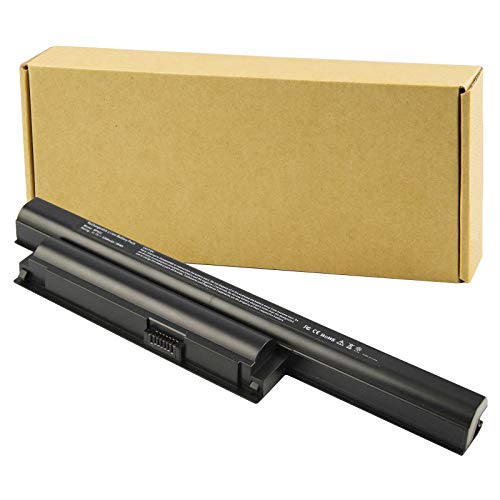
Specifications: 6 Cell, Li-ion battery, Rated at 11.1V(10.8V Compatible) 5200mAh
Step 1: Shutting Down Your Sony Vaio Laptop
To start the battery removal process, it’s crucial to shut down your Sony Vaio laptop properly. Here’s how you can do it:
- Navigate to the Start menu on your laptop.
- Choose the Power option.
- Next, select Shut down.
Ensure you follow these steps to avoid any data loss or potential damage to your laptop.
Step 2: Locating the Battery Compartment
When looking to remove the battery from your Sony Vaio laptop, the next step is locating the battery compartment. This process may vary slightly depending on the specific model of your laptop.
Here’s a general guide to help you find the battery compartment with ease:
- Turn off your laptop before proceeding to ensure safety and avoid potential damage.
- Check the bottom of your laptop. In most Sony Vaio models, the battery compartment is located on the bottom.
- Look for a small latch or release button that secures the battery in place.
- Refer to your laptop’s manual if you’re having trouble locating the battery compartment. It’s always helpful to consult the manufacturer’s instructions for your specific model.
- Once you’ve identified the battery compartment, you’re ready to move on to the next step of removing the battery.
Taking the time to properly locate the battery compartment will make the removal process smoother and ensure that you can safely extract the battery from your Sony Vaio laptop.
Step 3: Removing the Battery
So, it’s time to remove the battery from your Sony Vaio laptop. Here’s how you can do it smoothly:
- Find the battery compartment on the back or bottom of your laptop.
- Slide the battery release latch or press the release button to loosen the battery.
- Gently pull the battery out of its slot.
- Make sure to keep the battery in a safe place, away from heat sources and liquids.
Remember, safety first when handling electronic components.
Step 4: Replacing the Battery
Now that you’ve safely removed the battery from your Sony Vaio laptop, it’s time to replace it with a new one. Here’s how:
- Purchase a Compatible Battery: Ensure you buy a battery that is compatible with your Sony Vaio laptop model.
- Prepare the New Battery: Before inserting the new battery, make sure it is charged according to the manufacturer’s instructions.
- Insert the New Battery: Slide the new battery back into the battery compartment, making sure it fits snugly.
- Secure the Battery: Once inserted, make sure to secure the battery in place using the release latch or button.
Remember, proper maintenance of your laptop battery can prolong its lifespan and ensure optimal performance.
Recommended Products

Specifications:Model:BPS26; Voltage:11.1V;Capacity:58Wh,Cell:6 Cells. Grade A cells ensure fast charges and low power consumption.

High Quality 58 Wh Battery: Ideal for Sony laptop models such as VGP BPS13, BPS13 battery, and VGP BPS13B. Our battery for Sony Vaio Laptop VGN-FW590F3B ensures efficient power for longer duration. For VGP-BPS13B VGP-BPS13/Q VGP-BPS13B/Q VGP-BPS21A VGP-BPS13 VGP-BPS13A VGP-BPL13 VGP-BPS13A/B VGP-BPS13B/S VGP-BPS21 Replacement For Sony Vaio VGN-AW VGN-CS VGN-FW PCG-61411L Laptop 6 cell 5200 mAh Li-Ion Battery VGP-BPS1321B VGP-BPS21B.

【Replacement Battery Type】Voltage: 11.4V; Capacity: 43Wh/3760mAh.
Step 5: Powering Up Your Laptop
When you have securely replaced the battery in your Sony Vaio laptop, it’s time to power it up and ensure everything is functioning as it should. Here are the steps to get your laptop back up and running seamlessly:
- Press the Power Button: Locate the power button on your laptop, usually found near the keyboard or along the sides, and press it to turn on your device.
- Check for Power Indication: Look for lights on the laptop that indicate it’s receiving power. This can include lights near the power button or on the keyboard.
- Ensure Proper Startup: Your laptop should boot up and display the manufacturer’s logo or start loading the operating system. If the laptop doesn’t turn on, double-check the battery installation.
- Run a Quick Functionality Test: Test different functionalities, such as connecting to Wi-Fi, opening applications, and checking sound output, to ensure everything is in working order.
- Charging the Battery: If the battery is not fully charged, plug in your laptop using the power adapter and let it charge to its full capacity.
- Monitor Battery Health: Keep an eye on your battery’s health by observing how quickly it drains and charges. Regularly cycling the battery (fully charging and discharging) can help maintain its performance.
Testing the Battery Removal
When removing the battery from your Sony Vaio laptop, it’s crucial to ensure that the process is completed safely and correctly. Testing the Battery Removal involves verifying that the battery has been detached without issues and that the laptop can still function properly without it.
Here are some key steps to help you test the battery removal effectively:
- Power Up the Laptop: After removing the battery, switch on your laptop to see if it powers up successfully without any complications.
- Check for Power Indication: Look for any power indicators on your laptop to confirm that it is receiving power even without the battery.
- Ensure Proper Startup: Pay attention to the startup process to ensure that your laptop boots up normally and without any errors.
- Run a Quick Functionality Test: Test different features of your laptop, such as the keyboard, touchpad, and ports, to ensure everything is functioning as expected.
- Monitor the Battery Health: Keep an eye on your laptop’s battery health to ensure it remains in optimal condition and performance.
By following these steps, you can verify the successful removal of the battery from your Sony Vaio laptop and ensure that your device continues to function smoothly without it.
Recommended Products

Battery type: Li-ion; Capacity: 5200mAh/58Wh Voltage: 11.1V; Cells: 6-cell.
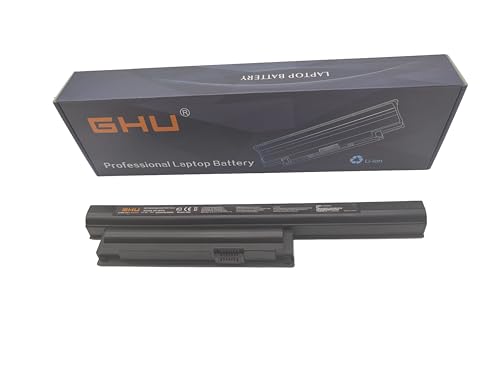
Premium 58Wh Battery: Our bps26 battery is a high-capacity, premium 58Wh model, designed for the sony pcg 71913l battery and sony vaio battery pcg 71913l. It is also compatible with sony vaio vpcea46fm battery and sony vaio vpceb battery, offering extended power for your laptop needs. 58 WH VGP-BPS26 VGP-BPS26A VGP-BPL26 Compatible For Sony Vaio Laptops. We recommend customers to charge your new battery at least 4-8 hours before you use your battery by disconnecting AC power from wall.

Battery type: Li-ion; Voltage: 11.4V; Capacity: 43Wh/3760mAh
Conclusion
That’s it! You now have the knowledge to safely remove the battery from your Sony Vaio laptop. Remember, proper maintenance is key to prolonging your battery’s lifespan and keeping your laptop running smoothly. By following these steps, you can ensure that your device functions optimally and efficiently. Don’t forget to test the battery removal process and monitor its health regularly. With these simple steps, you can confidently manage your Sony Vaio laptop’s battery and enjoy uninterrupted performance.
Frequently Asked Questions
How do I safely locate the battery compartment in a Sony Vaio laptop?
To safely locate the battery compartment in a Sony Vaio laptop, look for a latch or button on the underside of the laptop. Slide or press it to release the battery compartment cover.
How can I remove the battery from my Sony Vaio laptop?
To remove the battery from your Sony Vaio laptop, gently slide the battery out of the compartment once the cover is open. Be sure to handle it carefully to prevent damage.
How do I replace the battery in a Sony Vaio laptop with a new one?
To replace the battery in a Sony Vaio laptop with a new one, simply slide the new battery into the compartment in the same orientation as the old one. Make sure it is secure before closing the cover.
Why is proper maintenance important for extending the battery’s lifespan?
Proper maintenance is essential for extending the battery’s lifespan as it includes practices like regular charging cycles, avoiding extreme temperatures, and not overcharging, which can help preserve the battery’s capacity over time.
How can I test the battery removal and replacement process?
You can test the battery removal and replacement process by powering up the laptop without the battery, checking for power indication, ensuring proper startup, running a functionality test, and monitoring the battery’s health through software to ensure smooth operation.
What steps can I take to ensure optimal performance from my Sony Vaio laptop battery?
To ensure optimal performance from your Sony Vaio laptop battery, practice good charging habits, keep it clean, avoid overcharging, and use power-saving settings when possible to maximize battery life and longevity.
