

Key Takeaways
- Samsung Z Flip Design Understanding: Familiarize yourself with the phone’s unique foldable design and internal components, which are crucial for the safe battery removal process.
- Importance of Battery Removal: Recognize key reasons for removing the battery, such as performance maintenance, troubleshooting device issues, ensuring safety, and upgrading to a better battery.
- Preparation is Key: Gather essential tools, including a Phillips screwdriver, plastic opening tools, tweezers, and safety gloves, to facilitate a smooth and safe battery removal.
- Follow Safety Precautions: Always power off the device, remove SIM and SD cards, work in a static-free area, and take care when handling the battery to prevent hazards.
- Step-by-Step Guide: Follow the outlined steps carefully to power down the device, open the cover, disconnect the battery, and ensure a safe and effective removal process.
- Troubleshooting Tips: Stay aware of common issues, such as difficulty removing the back cover or battery connection problems, and employ effective solutions to overcome these challenges.
Have you ever found yourself needing to replace the battery in your Samsung Z Flip? It can be frustrating when your phone starts acting up, and all you want is a quick fix. Whether you’re dealing with a sluggish performance or just want to swap out an old battery, knowing how to remove it safely is essential.
Understanding The Samsung Z Flip Design
The Samsung Z Flip features a unique foldable design that combines innovation with style. This design impacts how you access and remove the battery.
Components of The Samsung Z Flip
- Display: The Z Flip has a 6.7-inch Dynamic AMOLED display that folds in half. This makes the phone compact and portable.
- Hinge Mechanism: A sophisticated hinge allows the phone to open and close smoothly. It plays a crucial role in the device’s durability.
- Internal Battery: The non-removable battery is located inside the body and designed to fit the compact space. Its rechargeable nature supports quick usage.
- Logic Board: The logic board contains essential components like the processor, memory, and connectors. It connects the battery to the phone’s other parts.
- Casing: The outer casing protects the internal components. It also features a glass back that enhances the device’s aesthetics.
Importance of Battery Removal
Removing the battery from your Samsung Z Flip can be important for several reasons:
- Performance Maintenance: Over time, batteries degrade. Removing it allows for a replacement that may improve overall device performance.
- Troubleshooting: If the phone freezes or overheats, removing the battery can reset the device and resolve minor issues.
- Safety: If you notice swelling or significant battery wear, removing it prevents potential hazards and protects the device.
- Upgrading: If you want longer battery life, consider a new battery. This can significantly enhance usability.
Understanding these design elements helps you navigate battery removal more effectively. The process becomes clearer when you know what components you’re working with and why it’s essential to approach the task carefully.
Preparing For Battery Removal
Preparing adequately is essential for safely removing the battery from your Samsung Z Flip. Gather the right tools and take the necessary precautions to protect yourself and your device.
Tools You Will Need
- Phillips screwdriver: A small size fits for accessing screws.
- Plastic opening tools: Helps separate the components without damaging them.
- Tweezers: Useful for handling small parts.
- Spudger: Assists in prying open the device without scratching.
- Safety gloves: Protects your hands from sharp edges and battery chemicals.
Ensure you have these tools ready before beginning the battery removal process.
Safety Precautions to Consider
- Power off your phone: Turn off the device completely before starting.
- Remove SIM card and SD card: Take out any cards to prevent damage during removal.
- Work in a static-free environment: Avoid electrical discharges by grounding yourself or using an anti-static wrist strap.
- Avoid battery puncture: Handle the battery carefully to prevent leaks or fire hazards.
- Use protective eyewear: Safeguard your eyes from accidental debris or battery explosions.
Following these precautions enhances safety during the battery removal process and prevents potential hazards.
Step-By-Step Guide To Remove Battery
Removing the battery from your Samsung Z Flip involves some careful steps. Follow these instructions to do it safely and effectively.
Recommended Products

NEW 0 CYCLE Battery: This battery supports up to 800+ charging cycles, built with original high quality battery cell. TIPS: The Galaxy Z Flip 5 has two built-in batteries, model EB-BF731ABY (upper part) and EB-BF732ABY (lower part). We recommend ordering both to replace your old batteries for more stable and longer-lasting battery life and performance. You can find them together in our store, and each one comes with complete installation instructions.

Compatible Phone Model: This battery kit is specifically designed for Samsung Galaxy Z Flip 3 (with model SM-F711 series), please double confirm your phone model before purchasing
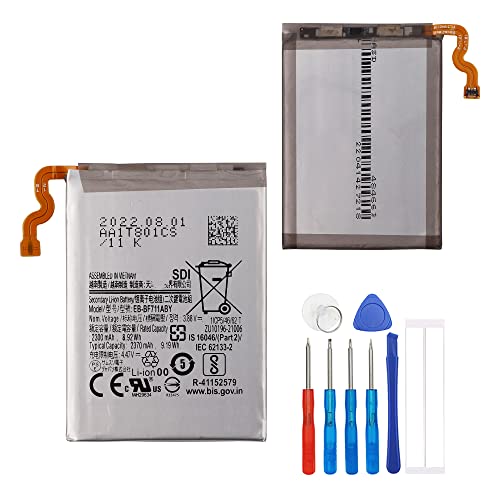
This battery is compatible with Samsung Galaxy Z Flip 3 5G SM-F711U Main Battery, please carefully check your phone model before purchase.
Powering Down The Device
First, turn off your Samsung Z Flip. Press and hold the power button, then select the option to power off. This step ensures your phone is completely inactive, reducing the risk of short circuits during the battery removal process.
Opening The Device Without Damage
Use a plastic opening tool to carefully pry open the back cover. Start at the edge and slide the tool into the gap. Gently work your way around the device to avoid scratching or damaging the frame. Take your time here; a steady hand prevents any unnecessary harm to the phone’s exterior.
Disconnecting The Battery
Once the back cover is off, locate the battery connector. Use a spudger to carefully lift the connector from the motherboard. Handle it delicately to avoid breaking the connector. After disconnecting, carefully remove the battery from its compartment using tweezers. Dispose of or replace the battery as needed. This process allows for safe handling and future use.
Troubleshooting Common Issues
The process of removing the battery from your Samsung Z Flip can present some challenges. Here are common issues you might encounter and how to address them effectively.
Difficulty Removing The Cover
If you’re struggling to open the back cover, you might need to apply a bit more patience and technique. Ensure you’re using a plastic opening tool to gently pry the cover away from the body. Start at one corner, applying slight pressure to avoid damaging clips. If resistance occurs, move along the edges to find less secured spots. Heating the edges with a heat gun for a few seconds can soften the adhesive, making it easier to lift the cover.
Battery Connection Problems
When disconnecting the battery, you may find it doesn’t release easily from the motherboard. Check for any clips or tabs holding it in place. Using a spudger, carefully lift the battery connector without applying too much force. If there’s still resistance, ensure no other components are blocking your path. Sometimes, debris might get stuck, obstructing the connection. Cleaning around the area with a soft brush can also help.
Conclusion
Removing the battery from your Samsung Z Flip can seem daunting but with the right tools and precautions, you can tackle it confidently. Whether you’re looking to improve performance or replace an old battery, following the steps carefully will make the process smoother.
Remember to take your time and don’t rush through each step. If you encounter any issues, don’t hesitate to revisit the troubleshooting tips. With a little patience and care, you’ll have your phone running like new in no time. Enjoy your refreshed device and all the benefits that come with it!
Frequently Asked Questions
How do I start the battery replacement process for my Samsung Z Flip?
To begin, power off your Samsung Z Flip, and remove the SIM and SD cards. Gather necessary tools like a Phillips screwdriver, plastic opening tools, tweezers, and safety gloves. Ensure you are in a static-free environment to prevent damage.
What tools do I need to replace the battery in a Samsung Z Flip?
You will need a Phillips screwdriver, plastic opening tools, tweezers, a spudger, and safety gloves. These tools will help you safely open the device and remove the battery.
What precautions should I take before removing the battery?
Make sure to power off the phone, remove the SIM and SD cards, work in a static-free area, and avoid puncturing the battery. Wearing protective eyewear is also recommended for safety.
How do I carefully open the back cover of my Samsung Z Flip?
Use a plastic opening tool to gently pry open the back cover. Be cautious and avoid applying too much force, as this can damage the phone’s exterior or internal components.
What should I do if I encounter issues while removing the back cover?
If you have trouble, try applying heat to soften the adhesive, then use your plastic opening tool patiently. This can help loosen the cover without causing damage.
How do I disconnect the battery from the motherboard?
Carefully check for clips or tabs securing the battery connection. Use a spudger to gently disconnect it, being mindful of avoiding damage to the motherboard during the process.
What should I do if the battery connection seems blocked?
If you encounter debris or blockages, clean the area around the battery connection with a soft brush. This will help clear any obstructions that might be preventing a proper disconnection.
Can I upgrade my Samsung Z Flip’s battery during replacement?
Yes, replacing the battery with a longer-lasting option can improve your phone’s performance. Ensure the new battery is compatible with the Samsung Z Flip before proceeding with the replacement.
