

Key Takeaways
- Preparation is Key: Gather essential tools such as a screwdriver, plastic pry tool, tweezers, suction cup, and soft cloth before starting the battery removal process.
- Safe Power Down: Always power off your Samsung A52 and remove any accessories to prevent damage during battery removal.
- Gentle Handling: Use a suction cup and plastic pry tool with care to avoid cracking the back cover; excessive force can harm your phone.
- Disconnecting the Battery: Carefully unscrew and disconnect the battery connector from the motherboard to ensure a smooth battery removal.
- Taking Precautions: Inspect the battery and connectors for damage, wear gloves while handling components, and keep your work area clean to avoid losing small parts.
- Post-Removal Safety: After battery removal, check for any bulging or leaks before replacing with a new battery, and consult a professional if needed.
Have you ever found yourself in a situation where your Samsung A52 just won’t turn on, and you’re not sure what to do? Maybe you’re dealing with a stubborn app or need to replace an old battery. Whatever the reason, knowing how to remove the battery can save you time and hassle.
In this article, you’ll learn the simple steps to safely remove the battery from your Samsung A52. With clear instructions and helpful tips, you’ll be able to tackle this task confidently. Whether you’re a tech novice or a seasoned pro, this guide will make the process smooth and straightforward, so you can get back to enjoying your phone in no time.
Tools Needed For Battery Removal
To remove the battery from your Samsung A52, gather a few essential tools. These items ensure a safe and efficient process.
- Screwdriver: A precision Phillips screwdriver is necessary for removing screws.
- Plastic Pry Tool: This tool helps gently lift the back cover without damaging it.
- Tweezers: Use tweezers to handle small screws and connectors easily.
- Suction Cup: A suction cup assists in opening the case without leaving marks.
- Soft Cloth: Keep a soft cloth on hand to prevent scratches on your phone’s surface.
Make sure you have these tools ready before starting the battery removal process. This preparation helps you work smoothly and reduces the risk of damage.
Recommended Products

✔ Compatible With: Samsung Galaxy S7 S8 S8 Plus S9 S9 Plus S10,S10 Plus,S20,S20+,S20 Ultra ,S21,S21 Plus,S21 Ultra,Galaxy S22,S22 Plus,S22 Ultra,S23,S23 Ultra,Galaxy S24 Ultra,Galaxy S25 S25 Ultra,S25 Edge,Note8, Note 9,Note 10,Note 10 Plus,Note 20,Note 20 Ultra,Galaxy Z Flip 2 3 4 5 ,Galaxy Z Fold 2 3 4 5 6 7 Galaxy Tab S7 S8 S9 S10 S11Series and other Samsung Galaxy Models

HIGH QUALITY: Thin flexible steel blade easily slips between the tightest gaps and corners.
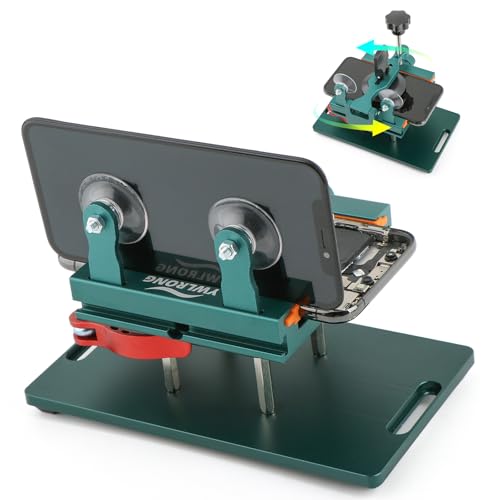
Compatible Model: Please check the product video to confirm how to use. The fixing clamp of phone screen removal tools, which compatible with iPhone 12, for iPhone 12 Pro, for iPhone 12 Pro Max, for iPhone 11, for iPhone 11 Pro, for iPhone 11 Pro Max, for iPhone 13/13 Pro/13 Pro Max, for iPhone 14,for iPhone 8, 8 Plus, SE, X, XS, XS MAX for Samsung S21/S21 Ultra/S21 Plus/S21,/S20 Plus/Samsung S20 Ultra. etc.
Step-by-Step Guide
Follow these steps to safely remove the battery from your Samsung A52. You’ll need basic tools and a careful approach.
Preparing Your Phone
Ensure your phone’s off before starting. Power it down by holding the power button until the power menu appears and selecting “Power Off.” Remove any case or accessories, if applicable. This prevents potential damage.
Removing the Back Cover
Use a suction cup to gently lift the back cover. Position the suction cup near the bottom edge, pull slightly, and insert a plastic pry tool into the gap. Slide the tool around the edges to unclip the cover. Avoid excessive force; it’s important to be gentle to prevent cracks.
Disconnecting the Battery
Locate the battery connector on the motherboard. Use a precision Phillips screwdriver to remove screws securing the connector flex cable. Once the screws are out, gently lift the flex cable using tweezers or your fingers. Ensure it’s fully disconnected before proceeding.
Removing the Battery
Use the plastic pry tool to carefully slide under the battery. Lift it up slowly, avoiding damage to surrounding parts. If the battery feels stuck, apply a bit of heat using a soft cloth and warm water. This can sometimes help loosen the adhesive. Once freed, lift the battery out completely.
By following each step carefully, you’ll successfully remove the battery from your Samsung A52 without any issues.
Precautions To Consider
Removing the battery from your Samsung A52 requires careful attention to avoid complications. Follow these important guidelines to ensure a safe process.
Avoiding Damage
- Power Off Your Device: Always turn off your phone before starting. This prevents short circuits.
- Remove Accessories: Take off any cases, screen protectors, or accessories. This helps avoid scratches or breaks during the removal process.
- Handle with Care: Use your tools gently. Excessive force can damage the phone shell or internal components.
- Keep Work Area Clean: Clear away clutter to prevent losing small screws or tools. A tidy workspace contributes to efficiency and safety.
Ensuring Safety
- Use Proper Tools: Stick with recommended tools like a precision Phillips screwdriver and a plastic pry tool. Using the right tools minimizes risks.
- Check for Damage: Inspect the battery and connectors for any signs of damage before removal. If you notice bulging or leaks, it’s best to consult a professional.
- Wear Protective Gear: Consider wearing gloves to protect your hands from sharp edges or battery chemicals. Safety first!
- Avoid Heat Sources: Keep the phone away from heat sources while working. High temperatures can compromise the battery’s integrity.
By taking these precautions, you ensure a smoother battery removal experience, setting the stage for a successful operation.
Conclusion
Removing the battery from your Samsung A52 can seem daunting but with the right tools and steps it’s a straightforward process. By following the guidelines provided you can tackle any issues that arise with confidence.
Remember to take your time and handle everything with care. A clean workspace and proper safety precautions will go a long way in ensuring a smooth experience.
Once you’ve successfully removed the battery you’ll be one step closer to resolving any problems your phone might be facing. Enjoy getting your device back in working order and don’t hesitate to reach out if you have any questions along the way!
Frequently Asked Questions
How do I know if I need to remove the battery from my Samsung A52?
If your Samsung A52 won’t turn on, experiences frequent app crashes, or exhibits unusual behavior, removing the battery may help. It can also be necessary if you need to replace a faulty battery.
What tools do I need to remove the battery from a Samsung A52?
You’ll need a precision Phillips screwdriver, a plastic pry tool, tweezers, a suction cup, and a soft cloth. Having these tools ready will make the process smoother and safer.
Can I remove the battery without professional help?
Yes, the battery can be removed safely with proper guidance. Following a step-by-step guide like the one provided in the article will help even beginners manage the task successfully.
What precautions should I take before removing the battery?
Ensure your phone is powered off, remove any cases, and work in a clean area to prevent losing small screws. Handle tools gently to avoid damaging your device.
How can I safely disconnect the battery?
Locate the connector on the motherboard, then carefully remove the screws with a precision screwdriver. Use the plastic pry tool to lift the flex cable without applying excessive force.
What should I do if the battery is stuck?
If the battery is stuck, you can apply gentle heat to loosen the adhesive. A soft cloth can help protect your phone while using a pry tool to carefully lift the battery.
