

Ever found yourself staring at your 2017 Ford Escape, wondering how to tackle that stubborn battery? Picture this: you’re all set to replace it, but the thought of where to even start leaves you feeling a bit lost. Don’t worry – we’ve got your back!
Locate the Battery in a 2017 Ford Escape
Let’s dive into finding and removing the battery in your 2017 Ford Escape. Here’s a step-by-step guide:
- Open the hood: Pull the hood release lever located below the steering wheel and above the driver’s side footwell.
- Locate the battery: In the engine bay, you’ll find the battery situated towards the front of the vehicle, usually on the right-hand side.
- Identify the terminals: The battery has two terminals – a positive (+) terminal usually marked red, and a negative (-) terminal typically marked black.
- Check for cover: Some vehicles come with a protective cover over the battery terminals. If present, carefully remove it.
- Inspect the battery: Look for any signs of damage such as corrosion, leaks, or a bloated casing. If you notice any issues, consider seeking professional help.
- Prepare for removal: Before proceeding, make sure the engine is off, and you have any necessary tools like gloves and a wrench for disconnecting the terminals.
- Follow safety precautions: Ensure you’re working in a well-ventilated area, and remember to disconnect the negative terminal first to avoid short-circuiting.
- Disconnect the terminals: Loosen the nut on the negative terminal, followed by the positive terminal. Gently lift the terminals away from the battery.
- Remove the battery: Depending on the securing method, unbolt the clamp or holder and lift the battery out of its tray.
- Handle with care: Batteries can be heavy, so lift with your legs to avoid strain. Place the battery on a stable surface to avoid tipping or spills.
That’s it! You’ve successfully located and removed the battery from your 2017 Ford Escape.
Prepare for Battery Removal
Before you start removing the battery from your 2017 Ford Escape, it’s essential to prepare properly. Take the following steps to ensure a smooth removal process:
- Gather the necessary tools: You’ll need basic tools like gloves, safety glasses, a wrench set, and a battery terminal cleaner.
- Wear appropriate safety gear: Safety should always come first, so make sure you have gloves and safety glasses on to protect yourself from any accidents.
- Park your vehicle: Find a flat, stable surface to park your car. Engage the parking brake for added safety.
- Turn off all electrical components: Before disconnecting the battery, ensure that all lights, radio, and other electrical components are turned off to avoid any electrical issues.
- Let the engine cool down: Working on a hot engine can be dangerous. Ensure that the engine has enough time to cool down before you start the removal process.
By following these steps, you’ll be well-prepared to safely remove the battery from your 2017 Ford Escape.
Disconnect the Negative Terminal
When disconnecting the negative terminal of your Ford Escape’s battery, it’s essential to follow the correct steps to ensure safety and prevent damage. Here’s how you can do it smoothly:
- Identify the Negative Terminal: Locate the negative terminal of the battery, usually marked with a “-“ symbol.
- Safety First: Always prioritize safety by wearing protective gear like gloves and safety glasses.
- Loosen the Negative Terminal: Use the appropriate wrench size to loosen the nut securing the negative terminal cable.
- Disconnect the Cable: Once the nut is loose, carefully remove the negative cable from the terminal. Be cautious not to touch any metal surfaces to avoid accidental sparking.
- Secure the Cable: After the negative cable is detached, ensure it is placed in a position where it won’t accidentally come into contact with the battery terminal again.
Following these steps correctly will help you safely disconnect the negative terminal of your Ford Escape’s battery.
Recommended Products

🔧 COMPLETE KIT – BATTERY CABLE NEGATIVE REPLACEMENT Direct replacement battery cable negative for Ford C-Max (2013-2018), Ford Escape (2013-2019), Ford Focus (2012-2018), and Ford Transit Connect (2014-2018). Plug-and-play installation with factory-style connector (Replaces OEM #AV6Z10C679P, AV6Z-10C679-P,AV6Z-10C679-M, AV6Z-10C679-N, AV6N-10C679-BC, AV6N-0C679-BG, F1FZ-10C679-E, AV6N10C679GB.
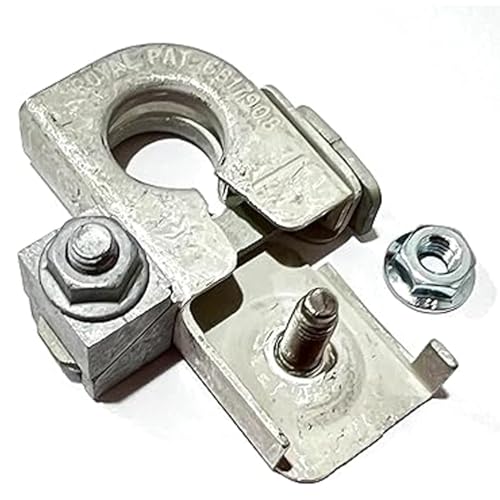
Direct OE-Style Replacement for Ford BT4Z-14450-BA: Engineered as an exact NEGATIVE battery terminal replacement for Ford part number BT4Z-14450-BA, featuring the correct wedge-lock clamp mechanism to maintain a secure ground connection to your vehicle’s battery post.

Replace Part Number: V6Z-10C679-P,AV6Z-10C679-M, AV6Z-10C679-N, AV6N-10C679-BC, AV6N-0C679-BG.
Disconnect the Positive Terminal
When handling car batteries, safety should always be your top priority. To Disconnect the Positive Terminal:
- Start by locating the positive terminal, typically marked with a “+” sign.
- Ensure you have the right tools, like the appropriate wrench size.
- Before proceeding, put on safety gear like gloves and goggles.
- Carefully loosen the nut on the positive terminal, ensuring the wrench doesn’t touch any metal surfaces.
- Once loosened, gently detach the cable from the terminal to prevent any sparking.
- Remember to securely position the cable away from the terminal to avoid accidental contact.
Stay focused on each step to ensure a smooth and safe process.
Remove the Battery from the Ford Escape
When it comes to removing the battery from your 2017 Ford Escape, the process may seem daunting at first, but with the right guidance, you can tackle it with confidence and ease. Here’s a step-by-step breakdown to help you through the battery removal process:
- Step 1: Preparation
Ensure the car is parked on a flat surface and the engine is turned off. Put on your safety gear, including gloves and safety glasses, to protect yourself during the process. - Step 2: Locate the Battery
The battery in a 2017 Ford Escape is typically located in the engine bay. Look for a black box with cables attached; this is where the battery is housed. - Step 3: Disconnect the Cables
Start by removing the negative cable first. Use the appropriate tool to loosen the nut on the terminal and detach the cable gently. Repeat the same process for the positive terminal. - Step 4: Remove the Battery
After disconnecting the cables, carefully lift the battery out of its housing. Be mindful of its weight and ensure a firm grip to prevent any accidents. - Step 5: Dispose of the Old Battery
Once the old battery is removed, it’s essential to dispose of it properly. Take it to a recycling center or an auto parts store that accepts old batteries for recycling.
By following these steps diligently, you can successfully remove the battery from your 2017 Ford Escape and ensure a smooth transition for any replacements or maintenance required.
Conclusion
You now have a clear understanding of how to safely remove the battery from your 2017 Ford Escape. By following the steps outlined in this guide, you can confidently tackle this task and ensure proper maintenance of your vehicle. Remember to prioritize safety by preparing adequately and handling the battery with care. Don’t forget the importance of recycling the old battery responsibly. With these insights, you’re equipped to successfully remove and replace the battery in your Ford Escape whenever needed.
Frequently Asked Questions
Q: Where should I start when removing the battery from a 2017 Ford Escape?
A: Begin by parking the car on a flat surface, turning off the engine, and wearing safety gear before proceeding.
Q: How do I locate the battery in a 2017 Ford Escape?
A: The battery is typically located in the engine bay of the Ford Escape.
Q: What is the correct way to disconnect the battery cables?
A: Start by disconnecting the negative cable first, followed by the positive cable.
Q: How can I safely remove the battery from a Ford Escape?
A: Carefully lift and remove the battery from its compartment in the engine bay.
Q: What should I do with the old battery after removing it from the Ford Escape?
A: It is recommended to take the old battery to a recycling center for proper disposal.
