

Key Takeaways
- Understanding Battery Types: LG phones typically use lithium-ion batteries, which offer efficient performance and longevity, with some models featuring swappable batteries and others with built-in variants.
- Common Problems: Issues like battery drain, charging problems, overheating, and unresponsiveness can often be resolved by removing and reinserting the battery.
- Tools for Success: Essential tools for battery removal include a screwdriver, plastic spudger, tweezers, a soft cloth, and a clean work surface to ensure a safe and effective procedure.
- Step-by-Step Process: Start by powering down the device, carefully removing the back cover, disconnecting the battery, and finally installing the new battery to restore functionality.
- Importance of Replacement: Always check for physical damage to the battery and consider professional help for models with non-removable batteries to avoid safety risks.
- Preventative Maintenance: Regularly back up your data, keep apps updated, and maintain a clean environment to enhance battery life and device performance.
Have you ever found yourself struggling with a phone that just won’t charge? Maybe your LG phone’s battery is acting up, and you need to remove it for a quick fix. You’re not alone—this is a common issue many face.
Overview of LG Phone Batteries
LG phone batteries come in different types and sizes, depending on the model. Most LG phones feature lithium-ion batteries due to their efficiency and longevity. These batteries charge quickly and maintain their performance over time.
Key Features
- Lithium-Ion Technology: This technology helps minimize battery memory effect, meaning you can recharge without fully depleting the battery.
- Battery Life: Depending on usage, LG batteries can last anywhere from 8 to 24 hours on a single charge. Heavy usage leads to shorter lifespans.
- Swappable vs. Non-Swappable: Some older LG models have removable batteries, while newer ones tend to have built-in batteries that require professional assistance for removal.
Common Issues
- Battery Drain: Apps running in the background often cause excessive battery drain. Regular updates can improve performance.
- Charging Problems: If a battery doesn’t charge, removing it may reset the connection to the device, resolving the issue temporarily.
- Physical Damage: Look for signs of swelling or corrosion. A damaged battery poses safety risks and should be replaced immediately.
Replacement Tips
- Purchasing a New Battery: Ensure you’re buying a battery compatible with your specific LG phone model. Genuine batteries typically provide the best performance.
- DIY Replacement: If your model allows for battery replacement, follow the manufacturer’s guidelines. Use appropriate tools for success.
- Professional Help: For models with non-removable batteries, seek professional services to avoid damage.
By understanding your LG phone battery’s features, potential issues, and replacement options, you can enhance your device’s performance and longevity.
Tools Required for Battery Removal
To successfully remove a battery from your LG phone, gather the following tools:
- Screwdriver: Use a small Phillips or Torx screwdriver to access the battery compartment. Ensure it fits the screws without stripping them.
- Plastic Spudger: A plastic spudger helps pry open the phone casing without causing damage. Metal tools may scratch or dent your phone.
- Tweezers: Tweezers assist in handling small screws and components. Opt for non-metallic tweezers to reduce the risk of short circuits.
- Soft Cloth: A soft cloth protects your screen and provides a clean surface as you work. Keep the phone stable and prevent scratches.
- Work Surface: Use a clean, flat work surface to avoid losing screws and small parts. A magnetic tray can help keep small components organized.
By gathering these tools before starting the battery removal process, you’ll enhance efficiency and minimize potential issues.
Recommended Products
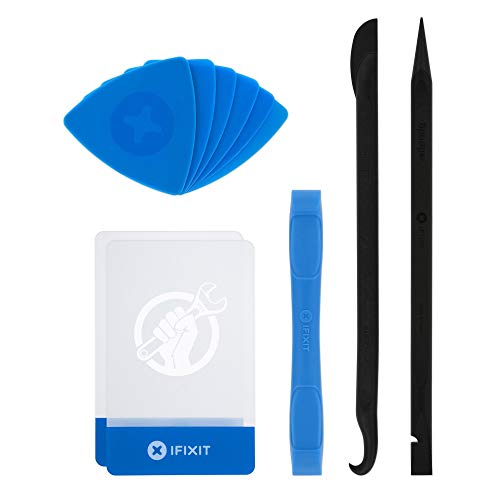
EFFECTIVE: Open your tech device and safely remove components with ease. Essential for DIY repairs like displays, batteries, motherboards, headphone jacks, joysticks, and more.

Professional Tools: Showpin's 3-in-1 iopener includes LCD and double-headed screen opening tool plus a cleaning cloth. Suitable for mobile phones, iPads, and other mobile devices, facilitating the easy removal or replacement of the LCD screen and battery.

High-quality materials: The SIM card removal tool is made of high-quality alloy metal steel, which is lightweight and difficult to bend. Sturdy and long-lasting. (Note: The SIM card removal tool is small in size and has a pointed bottom; Keep them away from children to avoid accidental swallowing or accidental injury.)
Step-by-Step Guide
Follow these steps to safely and effectively remove a battery from your LG phone.
Recommended Products

Powerful Function: This 2 in 1 opening repair tool kit is professtional tool that compatible with repairing moble devices, iPhone, iPads, iPods or any other smart phones.Good helper to remove screen when you need repair your phone.
Screwdriver set: Precision P5 Pentalobe Screwdriver, T5 Torx and PH000 Phillips Screwdriver with Ultra-Thin Steel and Nylon Spudgers for MacBook Pro & MacBook Air with Retina Display

Versatile Cleaning Functions: This adhesive remover offers dual rotation (CW/CCW) and a green dust-illuminating light to reveal fine particles. It's an essential screen removal tool for precise, effortless cleaning.
Powering Down the Device
Ensure your device is completely powered down before starting. Press and hold the power button, then select the option to power off. Confirm the action, giving your phone a moment to shut down fully. This prevents any electrical issues during the process.
Removing the Back Cover
Locate the small notch or indentation on the back cover. Use your fingernail or the plastic spudger to pry it open gently. Work your way around the edges until the cover pops off. Keep the cover in a safe place, as you’ll need it when installing a new battery.
Disconnecting the Battery
Find the battery connector at the top or bottom of the battery. Use non-metallic tweezers to carefully lift the connector straight up. Avoid pulling on the wires to prevent damage. Once disconnected, gently remove the battery from its compartment, ensuring not to bend or damage any components.
Installing a New Battery
Align the new battery with the connectors in the device. Firmly but gently press the battery into place, ensuring a secure connection. Reattach the battery connector by pressing it down until it clicks. After that, replace the back cover by aligning it properly and pressing until it snaps into place. Power on your device to confirm the new battery is functioning correctly.
Common Issues and Troubleshooting
Removing a battery from an LG phone can help address several common issues. Here are some problems you might encounter and how to troubleshoot them:
Recommended Products

Compatible Phone Model: This battery kit is compatible with LG V50 ThinQ and G8X ThinQ (NOT for G8 ThinQ), please double confirm your phone model before purchasing

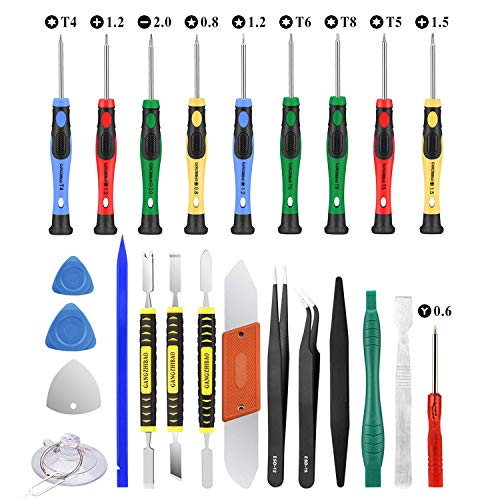
22 in 1 repair tool kit made of high quality material for cellphone disassembly and repair, durable and high precision, professional repair tools help you get more assistance while repairing devices.

High-quality materials: The SIM card removal tool is made of high-quality alloy metal steel, which is lightweight and difficult to bend. Sturdy and long-lasting. (Note: The SIM card removal tool is small in size and has a pointed bottom; Keep them away from children to avoid accidental swallowing or accidental injury.)
1. Phone Won’t Charge
- Check the charging cable and adapter for damage. If possible, try a different cable or adapter.
- Inspect the charging port for dirt or debris. Use a soft cloth or compressed air to clean it gently.
- If your phone still doesn’t charge, consider removing the battery. This can reset the connection and potentially resolve the issue.
2. Rapid Battery Drain
- Close background apps that may be using power excessively. Go to your phone’s settings to manage app usage.
- Look into your battery settings to see which apps consume the most energy.
- If the quick drain continues, removing and reinserting the battery might recalibrate the battery meter.
3. Overheating
- If your phone overheats frequently, turn it off and let it cool down. Ensure the battery is secured properly.
- Avoid charging your phone while using resource-heavy apps.
- Remove the battery to check for any swelling or damage. A damaged battery poses risks and requires replacement.
4. Unresponsive Device
- Power down your phone by holding the power button for several seconds. If it doesn’t respond, removing the battery can act as a hard reset.
- If the phone powers up after a battery removal, find the source of the problem. Check for software updates or malware.
5. Physical Damage
- Inspect the battery for signs of wear like cracks or swelling. A damaged battery should be replaced immediately to prevent hazards.
- If you notice any physical damage to the phone itself, seek professional service before attempting battery removal.
Practical Tips
- Before starting the removal process, back up your data. This protects your information in case of further issues.
- Work in a clean, well-lit area to prevent losing small components during the process.
- Use the correct tools to avoid stripping screws or damaging the device.
By understanding these common issues, you can effectively troubleshoot and maintain your LG phone’s performance.
Conclusion
Removing the battery from your LG phone can be a straightforward process when you have the right tools and steps in mind. Whether you’re troubleshooting charging issues or planning to replace an old battery it’s important to handle everything with care.
By following the guide provided you can ensure a smooth battery removal experience. Remember to keep your workspace clean and organized to avoid any mishaps.
With a little patience and the right approach you can give your device a new lease on life. Enjoy your refreshed phone and the improved performance that comes with it.
Frequently Asked Questions
What should I do if my LG phone won’t charge?
If your LG phone won’t charge, first check the charging cable and port for debris or damage. Try using a different charger or cable to see if that helps. If the problem persists, consider removing the battery (if swappable) or performing a hard reset. If none of these solutions work, seek professional assistance.
How long do LG phone batteries last?
LG phone batteries typically last between 8 to 24 hours, depending on your usage patterns. Heavy usage, such as gaming or streaming, might lead to faster battery drain. Managing background apps can help extend overall battery life.
Can I replace my LG phone battery myself?
Yes, if your LG phone has a swappable battery, you can replace it yourself. Ensure you have the right tools, like a small screwdriver and a plastic spudger, and follow DIY guidelines. For non-removable batteries, it’s best to seek professional help.
What are the tools needed for battery removal?
To remove an LG phone battery, you will need a small Phillips or Torx screwdriver, a plastic spudger, non-metallic tweezers, a soft cloth, and a clean work surface. Having these tools ready will help make the process smoother.
What are common LG phone battery issues?
Common LG phone battery issues include rapid battery drain, overheating, phones that won’t charge, and unresponsive devices. Many problems can be traced back to background apps, physical damage, or hardware issues. Regular maintenance and monitoring can prevent these problems.
How can I enhance my LG phone battery’s performance?
To enhance your LG phone battery’s performance, manage background apps, reduce screen brightness, and enable battery saver mode when needed. Regularly updating your phone’s software and performing device clean-ups can also contribute to better battery health and longevity.
