

Key Takeaways
- Know Your Model: Understanding your specific Samsung phone model is crucial for determining the correct battery replacement method and guidelines.
- Gather Tools: Essential tools like precision screwdrivers, plastic pry tools, and tweezers are necessary for safely opening your phone and replacing the battery.
- Follow Steps Carefully: Power off your device, remove the back cover gently, and locate or disconnect the battery with care to avoid damaging internal components.
- Prioritize Safety: Always work in a clean area, use proper tools, and wear safety equipment like an anti-static wrist strap to protect your phone’s delicate parts.
- Proper Battery Disposal: Adhere to local regulations for battery disposal, utilize recycling centers, and never throw old batteries in regular trash to ensure environmental safety.
Have you ever found yourself struggling with a sluggish Samsung phone that just won’t hold a charge? You’re not alone. Many people face this issue as their device ages, and replacing the battery can seem daunting. But it doesn’t have to be!
Understanding Your Samsung Phone Model
Knowing your Samsung phone model is essential before attempting a battery change. Different models have unique designs and methods for accessing the battery.
Popular Samsung Phone Models
Familiarize yourself with some common Samsung phone models that may require battery replacement:
- Galaxy S Series: These flagship devices, such as the Galaxy S9, S10, and S20, often come with non-removable batteries.
- Galaxy Note Series: Models like the Galaxy Note 9 and Note 10 feature larger screens and also utilize non-removable batteries.
- Galaxy A Series: Mid-range options like the Galaxy A10 or A50 may have removable batteries, making replacements easier.
- Galaxy J Series: Older models like the Galaxy J7 may feature removable batteries that simplify the change process.
Each model has specific guidelines for battery replacement, so knowing which one you own helps greatly.
Identifying Your Phone Type
Follow these steps to identify your specific Samsung phone type:
- Check the Model Number: Look at the back of your phone or go to Settings > About Phone. The model number provides the reference you need.
- Use the Samsung Website: Visit the official Samsung website and enter the model number for detailed information about your device.
- Consult Documentation: Your phone’s user manual or any included pamphlets often reveal model-specific details.
Identifying your phone type ensures that you follow the correct procedures for battery replacement and helps prevent any mishaps.
Tools Needed for Opening Your Samsung Phone
Gathering the right tools is essential for a successful battery replacement. With the appropriate equipment, the process becomes straightforward and efficient.
Recommended Tools
- Screwdriver Set: A precision screwdriver set with a Phillips head and a flathead is crucial for removing screws without damaging them.
- Plastic Pry Tools: Use plastic pry tools to avoid scratching or damaging the phone’s casing during the opening process.
- Tweezers: Tweezers help maneuver small parts and retrieve screws that may fall during the replacement.
- Suction Cup: A suction cup aids in lifting the screen gently away from the body of the phone, creating enough space to access the battery.
Safety Equipment
- Anti-Static Wrist Strap: An anti-static wrist strap prevents electrostatic discharge, protecting sensitive components during the process.
- Safety Glasses: Safety glasses shield your eyes from accidental debris or broken parts while you’re working on the phone.
- Work Surface Mat: A work surface mat provides a clean, organized area to keep screws and small parts secure and visible.
With these tools and safety equipment in hand, you’ll be well-prepared to tackle the battery replacement task on your Samsung phone.
Step-by-Step Guide on How to Open a Samsung Phone to Change Battery
Changing the battery of your Samsung phone can extend its life. Follow these easy steps to open your device safely and effectively.
Recommended Products

【Spare Battery Specs】EB-BA426ABY Replacement battery has a capacity of 5100mAh, the Voltage is 3.86V.

COMPATIBILITY: The battery model is EB-BR880ABY, it is only compatible with Samsung Galaxy Watch 4 (40 mm), SM-R860 SM-R865 series and Galaxy Watch 4 Classic (42mm) SM-R880 SM-R885, please carefully confirm the model of your smartwatch before purchase.

🔋 High-Capacity 6200mAh Battery for Galaxy S23 Plus Upgraded 6200mAh power delivers longer battery life than original (4700mAh). Enjoy all-day video streaming, gaming, or working without frequent recharging. Perfect for heavy users and travelers.
Power Off Your Device
Powering off your device is essential before starting the replacement process. Press and hold the power button until the power menu appears. Tap “Power Off” and confirm to shut down your phone. This step protects your device from accidental damage during the replacement.
Removing the Back Cover
Removing the back cover requires careful handling. If your model has a removable back, use your fingernail or a plastic pry tool to gently lift it at the designated notch. If your phone has a non-removable back, secure it with a suction cup to create a gap, then use a plastic pry tool to slide along the edges and detach the cover. Take your time to avoid damaging the clips or the casing.
Locating and Removing the Battery
After removing the back cover, locating the battery becomes straightforward. Use the tweezers to pull on any visible pull tab or, if necessary, gently lift the battery out from its compartment. Make sure to disconnect any connectors if they’re attached. Handle the battery carefully to prevent puncturing or damaging it.
With these steps, you’ll have your Samsung phone open and ready to replace the battery. Proceed with caution, and you’ll have your phone running smoothly in no time.
Tips for Changing the Battery Safely
Changing your Samsung phone battery can be straightforward if you follow some safety precautions. Keep these tips in mind for a successful replacement.
Recommended Products

Compatible Model: It is compatible with Samsung Galaxy Note 10+ Plus Only, Model: SM-N975, EB-BN972ABU. Not for Note 10. Please double identify and check your phone model matches before purchasing the battery.
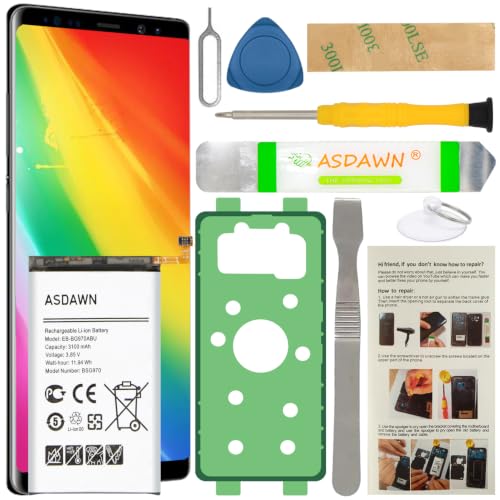
[FOR COMPATIBLE MODEL] -- Contains the instruction to guide you step by step installation, and we have professional engineers to answer all your questions about the repair process. Please verify your old battery part number and model before purchasing this replacement battery. Compatible with Samsung Galaxy S10e SM-G970, EB-BG970ABU, SM-G970F/DS, SM-G970U, SM-G970W ★NOT FOR Samsung Galaxy S10/ S10 Plus/ Note 10/ Note 10 Plus★
Avoiding Damage to Internal Components
- Power Off Your Phone: Always turn off your device before opening it. This step prevents electrical damage and accidental triggers.
- Use Proper Tools: Stick to recommended tools like precision screwdrivers and plastic pry tools. Avoid using metal tools that could scratch or damage internal components.
- Work in a Clean Area: Ensure your workspace is free of dust and debris. A clean surface reduces the risk of dirt entering your phone.
- Be Gentle: Handle all components, especially connectors and cables, gently. Forcing parts can lead to breaks or disconnections.
- Keep Track of Screws: Organize screws in a designated container. Losing screws can complicate reassembly.
- Avoid Static Electricity: Wear an anti-static wrist strap to protect sensitive parts. Alternatively, touch a grounded metal surface to discharge static before starting.
Proper Disposal of Old Batteries
- Follow Local Regulations: Check your local laws for battery disposal guidelines. Some areas have specific rules for hazardous materials.
- Use Designated Recycling Centers: Take your old battery to a certified recycling center. Many electronics stores also accept batteries for recycling.
- Keep Batteries Safe: Store old batteries in a cool, dry place until you can dispose of them. Avoid contact with metal objects to prevent short-circuiting.
- Never Throw in Regular Trash: Dispose of batteries properly to prevent environmental harm. Landfills can leak harmful chemicals if batteries are not disposed of correctly.
- Consider Battery Replacement Programs: Some manufacturers offer trade-in programs for old batteries. Explore these options to manage your disposal responsibly.
Conclusion
Replacing the battery in your Samsung phone can breathe new life into your device. With the right tools and a bit of patience you can tackle this task confidently. Remember to take your time and follow the steps carefully to avoid any mishaps.
Don’t forget to dispose of your old battery responsibly and consider checking out any manufacturer battery replacement programs. With these tips in mind you’re all set to enjoy improved performance and battery life. Happy repairing!
Frequently Asked Questions
What common issues do aging Samsung phones face?
Many users experience sluggish performance and poor battery life in aging Samsung phones. These problems often lead to frustration and a desire for solutions.
Is replacing the battery on my Samsung phone a difficult task?
Replacing the battery may seem intimidating, but it is manageable. With the right tools and guidance, most users can successfully change the battery.
How can I identify my specific Samsung phone model for battery replacement?
To identify your phone model, check the model number on the device, visit the Samsung website, or consult the user manual for assistance.
Which Samsung phone models might need a battery replacement?
Popular models that may require battery replacement include the Galaxy S Series, Galaxy Note Series, Galaxy A Series, and Galaxy J Series. Some models have non-removable batteries, while others may have removable ones.
What tools do I need for a successful battery replacement?
Essential tools include a precision screwdriver set, plastic pry tools, tweezers, a suction cup, and safety equipment like an anti-static wrist strap and safety glasses.
What is the first step to take when changing my Samsung phone’s battery?
Always start by powering off your device to prevent accidental damage. This is a critical safety step before attempting to open the phone.
How should I handle the battery during the replacement process?
Handle the battery with care to prevent puncturing or damaging it. Be gentle, and avoid applying too much force during the removal process.
What tips can help ensure a safe battery replacement?
Use proper tools, work in a clean area, organize screws, and avoid static electricity to protect sensitive components during the battery replacement process.
How should I dispose of my old Samsung phone battery?
Follow local regulations for battery disposal, use designated recycling centers, and avoid throwing them in the trash to prevent environmental harm.
Are there any programs for battery replacement offered by Samsung?
Yes, Samsung often has battery replacement programs for responsible disposal and recycling. Check their website for more details on available options.
