

Key Takeaways
- Battery Types: Understand whether your Samsung phone has a removable or non-removable battery, as this dictates the removal process.
- Proper Removal Process: Always power down your device and use appropriate tools to prevent damage when removing the battery.
- Essential Tools: Equip yourself with a Phillips-head screwdriver, plastic pry tool, and tweezers for successful battery extraction.
- Safe Handling Tips: Work on a clean surface, handle components carefully, and wear safety gear to avoid accidents during battery removal.
- Signs of Battery Failure: Be on the lookout for rapid discharge, overheating, swelling, unresponsiveness, or frequent charging, as these indicate a failing battery.
Ever found yourself in a situation where your Samsung phone just won’t turn on, and you suspect the battery might be the issue? You’re not alone. Many people face this frustrating problem, and knowing how to remove the battery can save you time and hassle.
Understanding Samsung Phone Batteries
Samsung phones utilize rechargeable lithium-ion batteries. These batteries provide strong performance and have a relatively long lifespan but require proper handling.
Types of Samsung Phone Batteries
Most Samsung phones feature either removable or non-removable batteries. Removable batteries let you easily replace them if they malfunction, while non-removable batteries are built into the device, requiring tools for removal. Examples include the Galaxy S series with non-removable batteries and the Galaxy J series, which often come with removable options. Knowing which type your phone has matters since it dictates how you proceed with battery removal.
Importance of Removing the Battery Properly
Removing the battery properly prevents potential damage to the phone. Incorrect handling can cause issues like battery swelling or even device malfunction. Always power down your device before attempting to remove the battery. If you’re using a phone with a removable battery, avoid using excessive force when taking it out. In devices with non-removable batteries, it’s best to consult a professional for assistance. This careful approach ensures your phone remains functional and safe.
Tools Required for Battery Removal
Gathering the right tools simplifies the battery removal process for your Samsung phone. Having the essentials on hand saves time and reduces the risk of damage.
Recommended Products
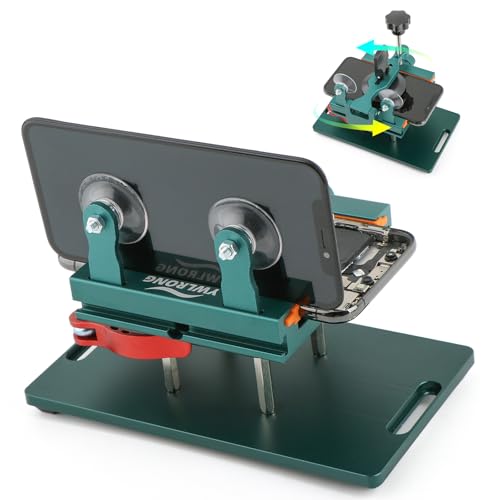
Compatible Model: Please check the product video to confirm how to use. The fixing clamp of phone screen removal tools, which compatible with iPhone 12, for iPhone 12 Pro, for iPhone 12 Pro Max, for iPhone 11, for iPhone 11 Pro, for iPhone 11 Pro Max, for iPhone 13/13 Pro/13 Pro Max, for iPhone 14,for iPhone 8, 8 Plus, SE, X, XS, XS MAX for Samsung S21/S21 Ultra/S21 Plus/S21,/S20 Plus/Samsung S20 Ultra. etc.

✔ Compatible With: Samsung Galaxy S7 S8 S8 Plus S9 S9 Plus S10,S10 Plus,S20,S20+,S20 Ultra ,S21,S21 Plus,S21 Ultra,Galaxy S22,S22 Plus,S22 Ultra,S23,S23 Ultra,Galaxy S24 Ultra,Galaxy S25 S25 Ultra,S25 Edge,Note8, Note 9,Note 10,Note 10 Plus,Note 20,Note 20 Ultra,Galaxy Z Flip 2 3 4 5 ,Galaxy Z Fold 2 3 4 5 6 7 Galaxy Tab S7 S8 S9 S10 S11Series and other Samsung Galaxy Models

HIGH QUALITY: Thin flexible steel blade easily slips between the tightest gaps and corners.
Essential Tools
- Screwdriver: A small Phillips-head screwdriver helps remove screws on the back panel.
- Plastic Pry Tool: This tool assists in safely prying open the device without scratching or damaging it.
- Tweezers: Use tweezers to grip and lift the battery from its compartment.
- Flat Surface: A clean, flat surface prevents parts from rolling away and keeps everything organized.
Optional Tools for Specific Models
- An Opening Pick: For models with tighter seals, an opening pick helps disengage clips without damaging the casing.
- Magnetizer: This tool magnetizes screws, making them easier to handle and less likely to get lost.
- Camera Lens Cloth: This cloth keeps the screen and components free from dust and fingerprints during the process.
Gather these tools before starting to ensure a smooth battery removal experience.
Step-by-Step Guide on How to Get the Battery Out of a Samsung Phone
Removing the battery from your Samsung phone can be straightforward if you follow these steps carefully. Whether your phone has a removable or non-removable battery, proper handling ensures safety and functionality.
Recommended Products
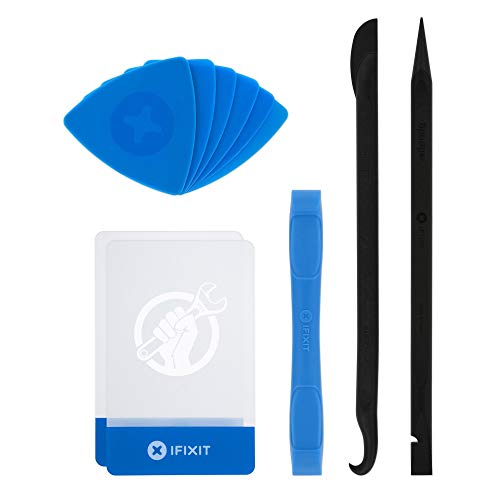
EFFECTIVE: Open your tech device and safely remove components with ease. Essential for DIY repairs like displays, batteries, motherboards, headphone jacks, joysticks, and more.

High Quality & Super Suction-- Screen suction cup is made of durable ABS and natural rubber materials, and has a long service life. The suction cup has a lifting capacity of 1-2 kg , which can help you open the phone screen.

Note: There are only chargers and no batteries in the package. Please tear off the protective film on the product screen before use
Preparing Your Samsung Phone
- Power down your device. Long-press the power button, select “Power Off,” and confirm.
- Gather necessary tools. For removable batteries, you’ll often need only your hands. Non-removable batteries may require a small Phillips-head screwdriver, a plastic pry tool, and tweezers.
Removing the Back Cover
- Locate the back cover. Identify the seams or grooves along the edges.
- Pry open gently. Use a plastic pry tool to insert into the seam, prying slowly to avoid damage. Work your way around the phone, releasing the clips, until the cover comes off.
- Set the cover aside. Place it on a clean, flat surface for safekeeping while you access the battery.
Disconnecting the Battery
- Identify the battery connector. Locate the battery connection point on the motherboard.
- Release the connector. Carefully use the plastic pry tool to lift the battery connector upward. Be cautious; applying too much force may damage the component.
Taking Out the Battery
- Grip the battery. Locate the space around the battery to get a firm hold.
- Lift the battery gently. Pull the battery straight out, avoiding any sudden moves that might risk damage to the battery or internal components.
- Dispose of or replace the battery appropriately. If you’re replacing the battery, ensure the new one matches in size and specifications.
Following these steps can help you safely remove the battery from your Samsung phone, helping to troubleshoot any power-related issues effectively.
Tips for Handling and Replacing the Battery
Proper handling of your Samsung phone’s battery guarantees safety and optimal performance. Follow these tips to ensure a smooth battery replacement process.
Recommended Products

★MULTIPURPOSE TOOLS: Suitable for fix iPhone 17 16 15 14 13 12 11 Pro Max Plus XS XR X 8 7 6S 6 Plus, iPad Pro/Air/Mini,iPod, Cellphone,Computer/PC/Laptop/Desktop(HP,ASUS,Lenovo,Apple Macbook/Macbook Air/Macbook Pro,Imac/Imac Pro),Tablet/ iPad mini/iPad Pro,SLR Cameras,Game Console(PS4, Xbox, Nintendo),Game handle/joystick and other electronic devices.

COMPATIBILITY: The battery model is EB-BR880ABY, it is only compatible with Samsung Galaxy Watch 4 (40 mm), SM-R860 SM-R865 series and Galaxy Watch 4 Classic (42mm) SM-R880 SM-R885, please carefully confirm the model of your smartwatch before purchase.

【Spare Battery Specs】EB-BA426ABY Replacement battery has a capacity of 5100mAh, the Voltage is 3.86V.
Precautions to Take
- Power Down Your Device: Always turn off your phone before attempting to remove the battery. This prevents potential electrical damage.
- Work on a Clean Surface: Use a flat, clean surface to avoid losing small parts and minimize the risk of dirt entering your device.
- Handle Components Carefully: Use plastic pry tools rather than metal ones to avoid scratching or damaging the phone’s casing.
- Wear Safety Gear: Consider using safety goggles when working with batteries to protect your eyes from any unexpected incidents.
- Avoid Overheating: Do not expose the battery to extreme temperatures. High heat can damage battery integrity and performance.
Signs of a Failing Battery
- Rapid Discharge: If your battery drains quickly despite normal use, it may indicate failing cells.
- Device Overheating: Consistent overheating during charging or regular use suggests battery trouble.
- Swelling or Bulging: Visually inspect for any swelling or deformities. A swollen battery can be dangerous and requires immediate replacement.
- Unresponsive Device: If your phone won’t turn on even after charging, the battery could be faulty.
- Frequent Charging: Needing to charge your phone multiple times a day might highlight weak battery performance.
By recognizing these signs and following the precautions, you ensure a safer and more efficient battery handling experience.
Conclusion
Getting the battery out of your Samsung phone doesn’t have to be a daunting task. By following the right steps and using the appropriate tools you can tackle battery issues with confidence. Whether you’re dealing with a removable or non-removable battery being careful and methodical will make the process smoother.
Remember to always prioritize safety by powering down your device and working on a clean surface. If you ever feel unsure about handling a non-removable battery don’t hesitate to reach out to a professional. Taking these precautions will help you keep your phone in great shape and ensure it runs smoothly for years to come. Happy troubleshooting!
Frequently Asked Questions
What should I do if my Samsung phone won’t turn on?
If your Samsung phone won’t turn on, it might be a battery issue. Start by trying to remove the battery, if possible. If your phone has a non-removable battery, try a hard reset by pressing and holding the power button for about 10 seconds. If the problem persists, consult a professional technician.
How do I remove the battery from my Samsung phone?
To remove the battery from a Samsung phone, first power off the device. For phones with removable batteries, use a small Phillips-head screwdriver and a plastic pry tool to remove the back cover, disconnect the battery, and take it out carefully. For non-removable batteries, consult a professional for safe removal.
What tools do I need to remove my Samsung phone’s battery?
To remove a Samsung phone’s battery, you’ll need a small Phillips-head screwdriver, a plastic pry tool, and tweezers. Optionally, you can use an opening pick, a magnetizer, and a camera lens cloth for specific models to simplify the process and protect your device.
How can I tell if my battery is failing?
Signs of a failing battery include rapid discharge, device overheating, swelling, unresponsiveness, and needing frequent charges. If you notice any of these symptoms, it may be time to replace your battery to ensure optimal device performance.
What precautions should I take while handling a phone battery?
When handling a phone battery, power off the device, work on a clean surface, and use plastic tools to avoid damage. Additionally, wear safety gear and keep the battery away from extreme temperatures to ensure a safe handling experience.
