Close Menu
Battery Spotlight
    Battery Spotlight
    • Home
    • Phone Batteries
    • Laptop Batteries
    • Car Batteries
      • Golf Cart Batteries
    • Battery Info
      • Battery Chargers
      • Battery Life
      • Battery Maintenance
      • Marine Batteries
      • Rechargeable Batteries
      • Solar Batteries
    • About Us
      • Contact
    Battery Spotlight
    Navigation: Home » Car Batteries » How to Prevent and Release Your Car from Battery Saver Mode
    Car Batteries

    How to Prevent and Release Your Car from Battery Saver Mode

    Jackson DoyleBy Jackson DoyleApril 9, 20245 Mins Read
    Share Facebook Twitter Pinterest LinkedIn Tumblr Email WhatsApp Copy Link
    Share
    Facebook Twitter LinkedIn Pinterest Email Copy Link

    Ever found yourself stranded with a car in battery saver mode, wondering how to get back on the road swiftly? Picture this: you’re all set to hit the road, but your car decides it’s time to conserve battery power. Frustrating, right? Don’t worry, we’ve got your back! In this article, we’ll guide you through simple steps to rescue your car from battery saver mode and get you cruising again in no time.

    Table of Contents

    Toggle
    • Understanding Battery Saver Mode
    • Signs Your Car Is in Battery Saver Mode
    • Steps to Get Your Car Out of Battery Saver Mode
    • 1. Drive your car:
    • 2. Turn off unnecessary electronics:
    • 3. Check for loose connections:
    • 4. Have the battery tested:
    • Common Causes of Battery Saver Mode Activation
    • Precautions to Avoid Battery Saver Mode
    • Conclusion
    • Frequently Asked Questions
    • What are the common causes of Battery Saver Mode activation in cars?
    • How can drivers prevent Battery Saver Mode activation?
    • Why is preventing Battery Saver Mode activation crucial for drivers?

    Understanding Battery Saver Mode

    When your car activates Battery Saver Mode, it means your vehicle’s electrical system has detected a low battery charge. It’s designed to conserve power by shutting off non-essential electrical functions.

    Here’s what happens when your car enters this mode:

    • Lights dim to reduce energy consumption.
    • Air conditioning may turn off to save power.
    • Radio and infotainment system functions might be limited.

    Driving patterns can influence how quickly your car enters Battery Saver Mode. Stop-and-go city driving or short trips can drain the battery faster, leading to this mode activation.

    It’s vital to understand the signs of Battery Saver Mode, as ignoring them could result in a stalled vehicle in the middle of the road. By recognizing these signals early, you can take action to prevent a potential breakdown.

    Signs Your Car Is in Battery Saver Mode

    If you suspect that your car is in Battery Saver Mode, there are specific signs to look out for. Here’s how you can tell if your vehicle is operating in this energy-saving mode:

    • Dimming Interior Lights: Your car’s interior lights may appear dimmer than usual.
    • Limited Radio Functions: The radio or infotainment system might not work as expected.
    • Reduced Air Conditioning: You may notice a decrease in the cooling or heating output from your air conditioning system.
    • Warning Light: Some vehicles have a specific dashboard warning light that indicates when Battery Saver Mode is active.
    SEE ALSO  How to Safely Maintain Your Sealed Varta Car Battery for Longevity

    Being aware of these indicators can help you take timely action to address the underlying issue and prevent any inconvenience while on the road.

    Steps to Get Your Car Out of Battery Saver Mode

    When faced with your car in Battery Saver Mode, worry not as there are easy steps to help you exit this mode and get back to normal functioning without a hitch. Here’s what you can do:

    Recommended Products

    GOOLOO A3 12V 3000A Portable Jump Starter with Air Compressor
    GOOLOO A3 12V 3000A Portable Jump Starter with Air Compressor

    Powerful and Durable - Powered by GOOLOO JUMPCORE technology, this 3000 amp portable car battery jumper starter provides instant restart for your 12V dead vehicles, supporting engines up to 9.0L for gas and 6.5L for diesel . Even if the battery voltage is extremely low, simply press the "BOOST" button to forcefully jump start your car. With over 1000+ charge cycles, this jump box for car battery is built to withstand extreme weather conditions ranging from -4°F to 140°F.

    VIEW LATEST PRICE

    As an affiliate, we earn on qualifying purchases.

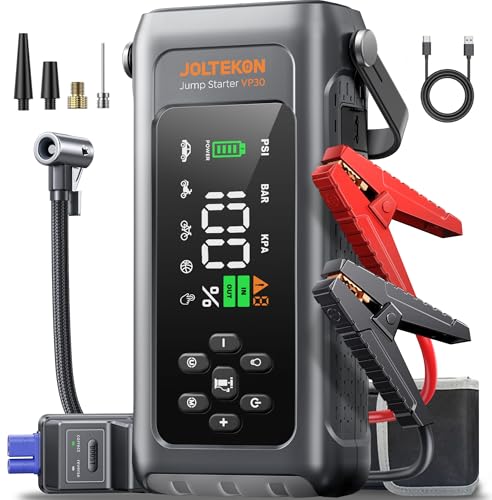
    JOLTEKON Car Battery Jump Starter with Air Compressor 4500A 150PSI, Car Jumper Starter Portable (9L Gas/8L Diesel), Jump Box Car Battery with Auto-Shutoff Tire Inflator, Jumper Cables and Light
    JOLTEKON Car Battery Jump Starter with Air Compressor 4500A 150PSI, Car Jumper Starter Portable (9L Gas/8L Diesel), Jump Box Car Battery with Auto-Shutoff Tire Inflator, Jumper Cables and Light

    【8-IN-1 CAR BATTERY JUMP STARTER】This 12V Jump Box highlights highly integrated advanced functions but is more portable, transcending general battery booster. It's a portable car jump starter, tire pump, pressure gauge, portable power bank, flashlight, SOS signal, white strobe, red strobe as triangle warning light. Portable, versatile and must-have kit, your ultimate companion for emgencies, adventures and daily use!

    VIEW LATEST PRICE

    As an affiliate, we earn on qualifying purchases.

    TowerTop 2/10/25 Amp 12V Smart Car Battery Charger, Fully Automatic Battery Maintainer with Engine Start, Auto Desulfator, Battery Repair, Winter Mode, for AGM, STD, Gel, Deep Cycle Batteries
    TowerTop 2/10/25 Amp 12V Smart Car Battery Charger, Fully Automatic Battery Maintainer with Engine Start, Auto Desulfator, Battery Repair, Winter Mode, for AGM, STD, Gel, Deep Cycle Batteries

    Efficient, Energy-Saving, and Fast Charging: The TowerTop 12v battery charger offers 4 adjustable current settings (2A/10A/25A/AUTO) to meet your diverse needs. With a max charging current of 25A, you can fully charge a 100Ah battery in under 3.5 hours. Achieving an 85% charging efficiency (industry average 75%), this battery chargers is more efficient, increasing charging speed by 1640% compared to 2A car battery charger. Not only is it energy-efficient, but it also saves you a lot of wait time

    SEE ALSO  Why Does My Car Battery Sound Like It Has Water in It
    VIEW LATEST PRICE

    As an affiliate, we earn on qualifying purchases.

    1. Drive your car:

    • Taking a 15-30 minute drive can help recharge the battery and get your car out of Battery Saver Mode.

    2. Turn off unnecessary electronics:

    • Switch off all non-essential electrical components like air conditioning, music systems, and lights to reduce battery usage.

    3. Check for loose connections:

    • Ensure that the battery terminals are tightly connected to avoid any interruptions in power supply.

    4. Have the battery tested:

    • Head to a professional mechanic for a battery test to determine if a replacement is needed.
    • To prevent future occurrences, regularly maintain your car’s battery and electrical system.

    By following these simple steps, you can quickly and effectively get your car out of Battery Saver Mode and back on the road hassle-free.

    Common Causes of Battery Saver Mode Activation

    If your car has entered Battery Saver Mode, several factors could be the root cause. Understanding these common triggers can help you pinpoint the issue and take necessary steps to resolve it effectively.

    • Frequent Short Trips: Making numerous short journeys without allowing the battery to fully recharge can lead to its depletion, triggering the Battery Saver Mode.
    • Electrical System Malfunctions: Issues with the alternator, voltage regulator, or other components in the electrical system can disrupt the charging process, forcing the vehicle into Battery Saver Mode.
    • Aging Battery: As the battery ages, its capacity to hold and deliver charge diminishes, increasing the likelihood of activation of the Battery Saver Mode, especially under heavy electrical load conditions.
    • Parasitic Drains: Continuous power consumption by certain vehicle components even when the engine is off can drain the battery over time, causing it to enter Battery Saver Mode as a protective measure.
    • Extreme Temperatures: Hot or cold weather can affect battery performance, making it harder to maintain a consistent charge level and potentially triggering the activation of Battery Saver Mode.

    By identifying and addressing these common causes, you can effectively troubleshoot the Battery Saver Mode activation in your vehicle and ensure a smoother driving experience.

    Precautions to Avoid Battery Saver Mode

    To prevent Battery Saver Mode activation in your car, here are some precautions you can take:

    • Limit Short Trips: Combine errands to reduce the number of short trips that can drain the battery.
    • Regular Maintenance: Ensure your car’s electrical system is in good condition by conducting regular maintenance checks.
    • Monitor Battery Health: Keep an eye on your battery’s age and performance to know when it may need replacement.
    • Prevent Parasitic Drains: Avoid leaving electronic devices plugged in when the engine is off to prevent parasitic drains.
    • Extreme Temperatures: Park in shaded areas or use a battery insulation kit in extreme temperatures to prevent battery problems.
    SEE ALSO  Can I Leave My Car Battery Disconnected Overnight

    By following these precautions, you can help avoid your car going into Battery Saver Mode and enjoy uninterrupted drives.

    Recommended Products

    EcoBrisa 40"x7" Battery Insulation Kit, Universal Car Battery Insulation Blanket, Anti-Conductive Truck Battery Thermal Heat Shield Cover for Cold Weather Battery Protection (Thickness 5mm, 1PCS)
    EcoBrisa 40"x7" Battery Insulation Kit, Universal Car Battery Insulation Blanket, Anti-Conductive Truck Battery Thermal Heat Shield Cover for Cold Weather Battery Protection (Thickness 5mm, 1PCS)

    High Quality Materials: EcoBrisa Battery insulation kit made from high-quality fire-withstand and insulating materials, ensuring it can endure extreme heat up to 2,000°F. It also possesses the ability to capture and neutralize harmful battery acids without being corroded so in case of leaks,insulated battery box won’t corrode.

    VIEW LATEST PRICE

    As an affiliate, we earn on qualifying purchases.

    Car Battery Insulation Kit, Includes 1 200x18cm/78.7x7.1in Battery Wrap and 1 Aluminum Foil Tape for Extreme Cold/Hot Weather Protection High Performance Thermal Shield for Vehicles Trucks & RVs
    Car Battery Insulation Kit, Includes 1 200x18cm/78.7x7.1in Battery Wrap and 1 Aluminum Foil Tape for Extreme Cold/Hot Weather Protection High Performance Thermal Shield for Vehicles Trucks & RVs

    Package List: You will receive 1 car battery insulation wrap and 1 aluminum foil tape for secure installation. The universal size fits most vehicle batteries and can be easily trimmed for custom applications in cars, trucks, and RVs.

    VIEW LATEST PRICE

    As an affiliate, we earn on qualifying purchases.

    40"x7" Universal Car Battery Insulation Kit, Car Battery Insulation Blanket
    40"x7" Universal Car Battery Insulation Kit, Car Battery Insulation Blanket

    【Upgraded Thickened Material】Constructed with premium elastic insulation material 30% thicker than comparable products, delivering exceptional heat retention. Our car battery insulation sleeve ensures reliable battery starts even in extreme cold.

    VIEW LATEST PRICE

    As an affiliate, we earn on qualifying purchases.

    Conclusion

    Keep in mind these tips to avoid your car going into Battery Saver Mode. By limiting short trips, maintaining your electrical system, monitoring battery health, preventing parasitic drains, and managing extreme temperatures, you can ensure a smooth driving experience. Stay proactive to keep your car’s battery in good condition and prevent unexpected activations of Battery Saver Mode. Safe travels!

    Frequently Asked Questions

    What are the common causes of Battery Saver Mode activation in cars?

    Battery Saver Mode can be triggered by frequent short trips, electrical system malfunctions, aging batteries, parasitic drains, and extreme temperatures.

    How can drivers prevent Battery Saver Mode activation?

    To avoid activating Battery Saver Mode, drivers should limit short trips, maintain the electrical system, monitor battery health, prevent parasitic drains, and manage extreme temperatures.

    Why is preventing Battery Saver Mode activation crucial for drivers?

    Preventing Battery Saver Mode activation ensures uninterrupted drives and avoids potential inconveniences or breakdowns while on the road.

    Share. Facebook Twitter Pinterest LinkedIn Tumblr Email WhatsApp Copy Link
    Jackson-Doyle
    Jackson Doyle

      Battery industry professional with 5+ years of experience. Bachelor of Science in Electrical Engineering from Georgia Tech. Specializes in power systems and renewable energy.

      Related Posts

      Car Batteries

      Top Online Platforms to Buy Authentic Optima Car Batteries

      January 5, 2025
      Car Batteries

      Maximize Tesla Battery Life: Practical Tips & Longevity Insights

      January 5, 2025
      Car Batteries

      Discover Who Makes Bosch Car Batteries in A Sustainable Drive for Eco-friendly Power Solutions

      January 5, 2025
      Car Batteries

      Top Companies That Deliver Car Batteries to Your Doorstep

      January 4, 2025
      Car Batteries

      Understanding Tesla Powerwall Battery: A Green Energy Solution for Your Home

      January 3, 2025
      Car Batteries

      Extending the Life of Used Car Batteries: Top Tips and Savings Guide

      January 3, 2025
      Add A Comment
      Leave A Reply Cancel Reply

      Search
      Affiliate Disclaimer

      As an Amazon Associate I earn from qualifying purchases.

      Latest Articles

      How to Replace Battery in Samsung Phone: A Step-by-Step Guide for Easy Replacement

      Android Batteries

      How to Remove Battery from Samsung Smart TV Remote: A Step-by-Step Guide for Easy Replacement

      Android Batteries

      How to Check Your Battery Health on Samsung: Simple Methods to Extend Your Phone’s Lifespan

      Android Batteries

      How Much Is a Battery for a Samsung Galaxy S6: Pricing and Replacement Options Explained

      Android Batteries

      How to Remove Battery from Samsung Galaxy S7: A Step-by-Step Guide for Easy DIY Fixes

      Android Batteries

      Why is My Battery Going Down While Charging Android – Effective Solutions to Fix the Issue

      Android Batteries
      Battery Spotlight

      Battery Spotlight is a website dedicated to helping you solve common battery problems.

      Read more about us here

      Affiliate Disclaimer
      As an Amazon Associate I earn from qualifying purchases.

      Site Navigation
      • Above Mirror Bathroom Lighting
      • Android Batteries
      • Bathroom Pendant Lighting
      • Battery Chargers
      • Battery Life
      • Battery Maintenance
      • Car Batteries
      • Ceiling Lighting Ideas
      • Golf Cart Batteries
      • Japandi Lighting
      • Laptop Batteries
      • Marine Batteries
      • Mood Lighting Living Room
      • Phone Batteries
      • Rechargeable Batteries
      • Reviews
      • Solar Batteries
      • Uncategorized
      • Vaulted Ceiling Lighting
      Latest Articles

      How to Replace Battery in Samsung Phone: A Step-by-Step Guide for Easy Replacement

      How to Remove Battery from Samsung Smart TV Remote: A Step-by-Step Guide for Easy Replacement

      How to Check Your Battery Health on Samsung: Simple Methods to Extend Your Phone’s Lifespan

      How Much Is a Battery for a Samsung Galaxy S6: Pricing and Replacement Options Explained

      How to Remove Battery from Samsung Galaxy S7: A Step-by-Step Guide for Easy DIY Fixes

      • Home
      • About
      • Contact
      • Privacy Policy
      • Editorial Policy
      • Disclaimer
      • Terms and Conditions
      • Affiliate Disclosure
      © 2026 Battery Spotlight

      Type above and press Enter to search. Press Esc to cancel.