

Key Takeaways
- Common Symptoms: Rapid battery drain, unpredictable charge levels, overheating, and unexpected shutdowns are key signs of battery issues in the Google Pixel 4 XL.
- Causes of Drain: Background apps, high screen brightness, constant GPS usage, outdated software, and degraded battery health are major contributors to battery problems.
- Basic Troubleshooting: Restart your device, review battery usage stats, and manage app backgrounds to help improve battery performance.
- Software Updates: Regularly updating your phone’s software and apps is essential to maintain optimal battery life and system performance.
- Disable Unused Features: Turn off non-essential features such as Bluetooth, Wi-Fi, and location services to conserve battery power.
- Advanced Solutions: If issues persist, consider performing a factory reset or replacing the battery for long-term restoration of device performance.
Is your Google Pixel 4 XL draining faster than you can charge it? You’re not alone. Many users face frustrating battery issues that can disrupt daily life, making it hard to stay connected when you need it most.
This article will guide you through practical steps to tackle those pesky battery problems. From adjusting settings to troubleshooting common issues, you’ll find simple solutions that can help extend your phone’s battery life. By the end, you’ll feel empowered to get your device back in top shape and keep it running smoothly throughout the day.
Understanding Google Pixel 4 XL Battery Issues
Google Pixel 4 XL users face various battery-related challenges. Identifying symptoms of battery problems and understanding potential causes is crucial for effective solutions.
Common Symptoms of Battery Problems
- Rapid Battery Drain: Your phone loses charge significantly faster than expected, often within a few hours of light use.
- Unpredictable Charge Levels: You notice fluctuations in battery percentage, sometimes dropping quickly or not reflecting actual charge levels.
- Overheating: Your device becomes warm during regular use or charging, indicating possible battery strain.
- Device Shutdowns: Your Pixel 4 XL powers off unexpectedly, even when battery indicators suggest sufficient charge.
Causes of Battery Drain
- Background Apps: Apps running in the background can consume battery resources. Regularly check app settings and limit background activity.
- Screen Brightness: Excessively high screen brightness decreases battery life quickly. Set your brightness to automatic or lower levels.
- Location Services: Constant GPS use drains battery rapidly. Turn off location services when not needed or adjust settings for specific apps.
- Software Updates: Outdated software versions might create inefficiencies in battery management. Regularly update your device to ensure optimal performance.
- Battery Health: Over time, battery wear can occur. If your battery health is low, consider a replacement to restore performance.
Identifying these symptoms and causes can guide you toward effective fixes for your Google Pixel 4 XL battery issues.
Troubleshooting Steps
Follow these practical steps to address battery issues on your Google Pixel 4 XL.
Recommended Products

1. Applicable Models:Compatible with Google Pixel XL 5.5 ,Please carefully check your mobile phone model before purchasing to avoid purchasing the wrong model and damaging your product

【Compatible Model】The battery replacement is compatible with Google Pixel 4XL G020J-B Only, not for Pixel 4. Please double identify and check your phone model matches before purchasing the battery. Note: If your system is Android 13, your phone may turn off at 40% because of the System Bug. You need to downgrade to 12 or keep your battery more then 40%.

【Compatible Models】Google Pixel 4XL 4 XL .Please check your old battery number before buying this battery.
Restart Your Device
Rebooting your device often resolves minor glitches. Hold down the power button until the power menu appears, then select “Restart.” This action refreshes the system, potentially clearing temporary issues that affect battery performance. After restarting, check if the battery drains more slowly.
Check Battery Usage Stats
Reviewing battery usage stats helps identify apps that consume excessive power. Access this by going to Settings > Battery > Battery usage. You’ll see a list of apps ranked by battery consumption. If an app uses significantly more battery than expected, consider restricting its background activity or uninstalling it. For instance, social media apps often run in the background. Limiting their background activity reduces battery drain.
Solutions to Fix Battery Issues
Follow these steps to tackle common battery problems on your Google Pixel 4 XL.
Recommended Products
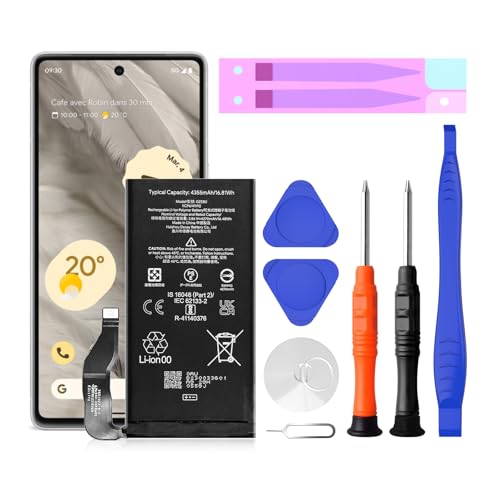
【Pixel 7 battery replacement 】quality battery replacement for Google Pixel 7 perfect fit your phone. It is safer than so-called upgraded high-capacity batteries. No potential risks during use. Multiple protection features to prevent overcharging and prevent overheating. Built-in microchip to ensure safe battery charging and improve battery life. NOTE: Please fully charge and discharge your new battery 3 to 5 cycles to release all capacity of the new battery.

G020P, Pixel 4 XL PN G020J-B

Update Software and Apps
Keeping your software and apps updated ensures optimal performance. Check for updates by going to Settings > System > System updates. Here, you’ll find any available updates for your device’s operating system.
For apps, visit the Google Play Store, tap on your profile icon, then select Manage apps & device. Update any apps that are pending to reduce compatibility issues and improve overall battery usage.
Disable Unused Features
Turning off features you don’t use stops unnecessary battery drain. Disable features like Bluetooth, Wi-Fi, and Location Services when they’re not needed. Navigate to Settings > Network & internet to toggle these options.
Additionally, consider switching off Adaptive brightness. Instead, manually adjust the screen brightness to a comfortable level. Access this in Settings > Display. Reducing screen brightness can significantly enhance battery life.
Manage Background App Refresh
Restricting background activity can help conserve battery. Go to Settings > Apps and tap on each app to check battery usage. Identify apps that have high battery usage but aren’t essential for background operation.
Select the app, tap on Battery, then choose Background restriction. Disabling background activity for these apps will prevent them from consuming power while not in use, boosting battery life across your device.
Advanced Fixes
If you’ve tried basic troubleshooting steps but still face battery issues on your Google Pixel 4 XL, consider these advanced fixes.
Recommended Products

【0 Cycle and OEM Battery Cells】OEM quality battery replacement for Google Pixel 4a perfect fit your phone. It is safer than so-called upgraded high-capacity batteries. No potential risks during use. Multiple protection features to prevent overcharging and prevent overheating. Built-in microchip to ensure safe battery charging and improve battery life. NOTE: Please fully charge and discharge your new battery 3 to 5 cycles to release all capacity of the new battery.
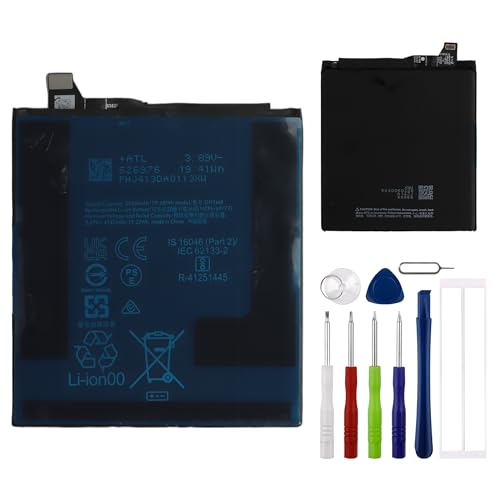
This battery is compatible with Google Pixel 9 Pro XL, to ensure that the battery you purchase is a perfect match for your device, be sure to check the model number of your device before ordering (you can check the model number of your device in the ‘Settings’ of your device).

✅【4385mAh EXACT CAPACITY】 Precision-engineered replacement battery for Google Pixel 7a – matching the original 4385mAh capacity to restore your phone's battery life to peak performance. Enjoy all-day usage for 5G connectivity, 90Hz display, and everyday multitasking without hunting for a charger
Factory Reset Your Device
Performing a factory reset can solve persistent software problems that drain your battery. Follow these steps:
- Backup Your Data: Use Google Drive or a similar service to save important files and settings.
- Open Settings: Go to the Settings app on your device.
- Select System: Scroll down and choose System.
- Tap on Reset Options: Here, you’ll find the factory reset option.
- Choose Erase All Data: Follow the prompts to confirm and erase all data on your phone.
Post-reset, restore your data and monitor battery performance. This process clears potential software glitches and may significantly improve battery life.
Replace the Battery
A degraded battery significantly impacts performance. If your device still drains quickly after following all previous steps, replacing the battery might be necessary. Here’s how:
- Check Battery Health: Use an app like AccuBattery to assess your battery’s condition.
- Visit a Professional: Seek help from a certified technician or service center. Replacing a battery involves risks that might void your warranty if not done correctly.
- Consider DIY Replacement: If you’re tech-savvy, you can find replacement kits online. Make sure to watch tutorial videos for proper installation steps.
Keep in mind that a new battery can restore your phone’s performance and longevity, making it feel like new again.
Conclusion
Tackling battery issues on your Google Pixel 4 XL doesn’t have to be a headache. By implementing the tips and tricks shared here, you can breathe new life into your device’s performance. Whether it’s adjusting settings or considering a factory reset, you’ve got the tools to make a difference.
Remember to keep an eye on your battery usage and stay updated with software changes. If all else fails you might want to think about a battery replacement. With a little effort you can enjoy a longer-lasting battery and keep your Pixel running smoothly throughout the day. Happy troubleshooting!
Frequently Asked Questions
What are common symptoms of battery drain in Google Pixel 4 XL?
Rapid battery drain, unpredictable charge levels, overheating, and unexpected shutdowns are common symptoms of battery issues in the Google Pixel 4 XL.
What causes battery drain on Google Pixel 4 XL?
Factors contributing to battery drain include background apps, high screen brightness, location services, outdated software, and declining battery health.
How can I improve the battery performance of my Pixel 4 XL?
You can improve battery performance by restarting your device, checking battery usage stats, keeping software updated, disabling unused features, and manually adjusting screen brightness.
What should I do if basic troubleshooting doesn’t fix battery drain?
If basic fixes don’t help, consider performing a factory reset to clear persistent issues or having the battery professionally replaced if necessary.
How often should I check for software updates on my device?
Regularly check for software updates in device settings and the Google Play Store to ensure optimal performance and battery health.
Can background apps affect battery life?
Yes, background apps can consume significant power, so it’s advisable to restrict background activity for non-essential apps to save battery life.
Is it possible to replace the battery myself?
Yes, battery replacement can be done as a DIY project, but check your device’s battery health first and consider consulting a professional if unsure.
