

Key Takeaways
- Understanding Battery Testing: Battery testing is crucial for diagnosing performance issues, ensuring optimal usage, and preventing unexpected shutdowns in Android devices.
- Common Battery Issues: Identify frequent problems like rapid drain, overheating, unexpected shutdowns, and charging difficulties to proactively manage your battery health.
- Preparation Steps: Properly prepare for a battery test by gathering necessary tools (apps, charger, USB cable) and setting up your device (fully charge, disconnect accessories, close background apps) for accurate results.
- Testing Procedure: Follow a systematic approach to test your battery, including downloading a testing app, charging your device, and recording observations on capacity, discharge rate, and charging behavior.
- Interpreting Results: Analyze the battery’s capacity compared to original specifications and observe performance indicators such as discharge rates, charging times, and any overheating during the test.
- Maintenance Tips: Regular charging, using the correct charger, enabling battery saver mode, and keeping your software updated can significantly enhance your battery’s lifespan and performance.
Have you ever wondered why your Android phone’s battery seems to drain faster than it should? You’re not alone. Many users face this frustrating issue, often without knowing how to pinpoint the problem. Testing your battery can provide valuable insights into its health and performance, helping you make informed decisions about your device.
Understanding Battery Testing
Battery testing provides insights into your Android device’s health and performance, crucial for addressing battery life issues. The process helps in diagnosing problems and ensuring optimal usage.
Importance of Battery Testing
Battery testing reveals essential information about battery capacity and efficiency. By testing, you can identify issues like significant capacity loss or inconsistent power delivery. Regular checks prevent unexpected shutdowns and prolong device lifespan. Awareness of battery status helps you make informed decisions, like whether to replace the battery or adjust usage habits.
Common Battery Issues in Android Devices
Common battery issues include:
- Rapid Drain: Some users notice their battery drains quickly even with minimal use.
- Overheating: High temperatures during charging may indicate battery problems or app misuse.
- Unexpected Shutdowns: This could signal a battery that can’t hold a charge or malfunctioning software.
- Charging Issues: Difficulties in charging or slow charging times are often battery-related.
Recognizing these issues early allows for proactive measures, ensuring your device stays functional and reliable.
Preparing for the Battery Test
Preparing for a battery test ensures accurate results and a smooth testing process. Gather the necessary tools and set up your Android device correctly to get started.
Recommended Products
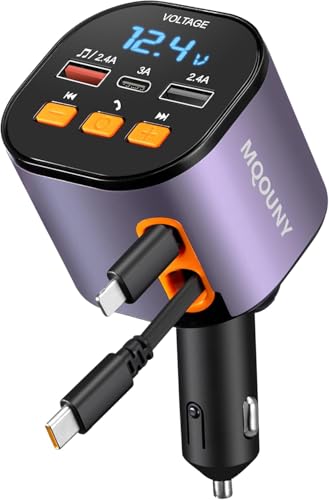
PD Retractable Cables - To enhance your driving experience, our fm transmitter includes a 30 W USB C and a 12 W USB iPhone retractable cable, eliminating the need for extra cords and effortlessly charging for both Apple and Android devices. The retractable cables of car charger extend up to 80cm and retract smoothly for a tidy car interior

3A Fast Charging & 480Mbps Data: Output power up to 3 Amp, support quick charge(QC), compatible with USB2.0 .0 Power Delivery (PD) Standard. Supports USB 2.0 speed up to 480Mbps(=60MBps). !!! NOTE: For Android Auto use, please make sure that 1, your phone support Android 5.0 or above and has downloaded Android Auto App. 2, Your car supports Android Auto function.

Short and Portable : 1feet/30cm length for charging your phone with a power bank or portable charger; tangle resistant and handy to carry in your bag or pocket. For Android Auto use, please make sure that 1, your phone has downloaded relative APP. 2, Your car supports Android Auto function.
Tools Needed for Testing
- Battery Testing Apps: Download reliable apps like AccuBattery or GSam Battery Monitor. These apps provide insights into battery health, capacity, and usage.
- Charger: Obtain a compatible charger to keep your device powered during the test. Ensure it matches your device’s specifications for optimal charging.
- USB Cable: Use a high-quality USB cable for charging and connecting to your computer, if needed.
- Battery Calibration Tools: For more advanced testing, consider tools like Battery Calibration or similar software to reset battery stats.
Setting Up Your Android Device
- Fully Charge Your Device: Charge your Android device to 100% before starting the test. This gives you a baseline for measurement.
- Disconnect All Accessories: Remove any connected accessories, such as headphones or external batteries, to avoid interference.
- Close Background Apps: Close any apps running in the background. This ensures accurate readings and prevents unnecessary battery drain.
- Enable Developer Options: If necessary, activate Developer Options by going to Settings > About Phone > tap Build Number seven times. This allows for advanced testing features.
- Adjust Settings: Set your display brightness to a moderate level. Consider disabling features like Bluetooth, Wi-Fi, and location services during the test to reduce power usage.
With these preparations, you’re ready to conduct a thorough battery test on your Android device.
Performing the Battery Test
Battery testing reveals crucial insights into your Android device’s health. Follow the steps below to conduct a thorough test.
Recommended Products

[Wide Application]: BST 360 car battery tester is designed for all 12V batteries including Regular Flooded, AGM Plate, GEL, and EFP. Based on CCA, DIN, JIS, EN, IEC, AH, SAE, BCI standards, the 100-2000 CCA battery analyzer is also compatible with Cars, Motorcycles, Trucks, RVs, ATVs, SUVs, Boats, Yachts, Lawn Mowers, Golf Carts.

HD Screen for Clear Readings: Features a wide-angle LED display that stays clear from any viewpoint. The red/yellow/green indicator lights make results instantly understandable, offering an at-a-glance health assessment. Ideal for seniors, low-light bedrooms, and quick at-a-glance health checks.

- Battery Health and charging status at a glance
Step-by-Step Testing Procedure
- Download your testing app: Install a reliable battery testing app like AccuBattery or GSam Battery Monitor from the Google Play Store.
- Charge your device: Fully charge your phone to 100% using a compatible charger and high-quality USB cable.
- Set up your device: Disconnect all accessories and close background apps to reduce power consumption during the test.
- Enable Developer Options: Go to Settings > About Phone, tap on Build Number seven times to unlock Developer Options, then navigate back to Settings > Developer Options and enable USB Debugging.
- Begin the test: Open the battery testing app and start the testing process as instructed. Monitor the data provided, such as capacity usage and discharge rates.
- Let the test run: Allow the test to run for a few hours or until your battery significantly drains. Check intervals to gather useful data.
- Record your observations: Note any unusual behavior like rapid discharge, extreme heating, or unexpected shutdowns.
Interpreting the Test Results
- Battery capacity: Compare the reported capacity to the original specifications. Significant drops indicate potential battery issues.
- Discharge rate: Review the discharge rate during the test. A normal rate suggests good performance, while a high rate may point to problems.
- Charging behavior: Analyze how long it takes to reach full charge. Slower charging can suggest battery wear or charger issues.
- App performance: Check for any apps consuming excessive battery. Adjust settings or uninstall problematic apps to improve efficiency.
- Temperature: Monitor the battery temperature throughout the test. Overheating can indicate malfunction or damage.
By following these steps and interpreting your results, you gain valuable insights into your battery’s performance, helping you maintain optimal device functionality.
Analyzing Battery Health
Analyzing battery health involves understanding various elements that affect performance. Regular assessment helps ensure your device continues to function effectively.
Recommended Products

Power Saver and Optimizer

This Device Requires a Subscription. To start using it, simply select the tariff plan that fits your needs. Check the product gallery to see the tariff plans.

Customizable Neon Colors – Personalize your clock with vibrant neon hues.
Factors Affecting Battery Performance
- Temperature: Extreme heat or cold can reduce battery efficiency. Keep your phone within 32°F to 95°F (0°C to 35°C) for optimal performance.
- Screen Brightness: High brightness drains power quickly. Reducing brightness can extend battery life.
- Background Apps: Apps running in the background consume energy. Limit background activity by closing unnecessary apps.
- Network Usage: Constantly searching for a signal, especially in weak areas, can drain the battery. Turn on Airplane Mode when not needing connectivity.
- Battery Age: As batteries age, their capacity diminishes. Expect a gradual reduction in performance after 2-3 years.
Tips for Maintaining Battery Health
- Charge Regularly: Avoid letting your battery drop below 20%. Regular charging keeps the battery healthy.
- Use the Right Charger: Always use a manufacturer-recommended charger. Non-compatible chargers can damage the battery.
- Enable Battery Saver Mode: Use this feature during extended periods without access to a charger. It limits background activity and optimizes performance.
- Update Software: Keep your device’s software updated. Manufacturers often release updates that improve battery performance.
- Avoid Full Discharge: Try not to fully discharge your battery. Instead, recharge before it reaches 0% to prolong its lifespan.
Conclusion
Testing your Android battery can make a world of difference in how your device performs. By understanding its health and efficiency you can tackle issues before they escalate. Regular checks not only help you spot potential problems but also empower you to take charge of your device’s longevity.
Remember to take notes during your tests and keep an eye on factors that can affect battery life. With a little proactive management and the right tools you can enjoy a smoother experience and get the most out of your Android device. Happy testing!
Frequently Asked Questions
What causes rapid battery drain in Android phones?
Rapid battery drain can occur due to several factors, including background apps, high screen brightness, poor network conditions, battery age, and overheating. Regularly monitoring these aspects can help identify the root causes and improve battery performance.
How can I test my Android phone’s battery health?
You can test your Android phone’s battery health by downloading reliable battery testing apps like AccuBattery or GSam Battery Monitor. After installing, fully charge your device and follow the app’s instructions to evaluate performance and capacity.
What preparations should I make before testing my battery?
Before testing your battery, download a suitable battery testing app, use a compatible charger, and employ a high-quality USB cable. Ensure your device is fully charged, close unnecessary apps, and enable Developer Options to minimize power usage during the test.
How do I interpret the results of a battery test?
To interpret battery test results, focus on metrics like battery capacity, discharge rate, charging behavior, app performance, and temperature during the test. Analyze these insights to identify potential issues and improve overall battery efficiency.
What tips can I follow to maintain my battery’s health?
To maintain battery health, charge regularly, use the correct charger, enable battery saver mode, keep software updated, and avoid fully discharging the battery. Monitoring these practices can prolong your battery’s lifespan and performance.
