

Ever found yourself in the middle of a movie, only to have your Samsung solar remote suddenly stop working? It’s frustrating when you’re not sure if it’s the battery or something else. Knowing how to check the battery level can save you from those annoying moments and keep your viewing experience smooth.
Key Takeaways
- Understand Your Samsung Solar Remote: Familiarize yourself with the features like solar charging, battery indicator, and ergonomic design to enhance usage.
- Regular Battery Monitoring: Check the battery level frequently to prevent unexpected disruptions during viewing sessions and ensure optimal performance.
- Methods to Check Battery Level: Use the TV interface or the remote control itself to quickly determine the battery status for efficient management.
- Address Battery Issues Promptly: Replace or reset your remote’s batteries as necessary to maintain functionality and avoid frustrating interruptions.
- Embrace Sustainability: Maximize the use of solar energy, reducing dependency on disposable batteries and promoting eco-friendly habits.
Understanding Samsung Solar Remote
The Samsung solar remote is designed to enhance your viewing experience while minimizing battery-related issues. This remote uses solar energy and provides extended battery life with proper care. Understanding its features not only helps in effective usage but also ensures you never encounter a dead remote unexpectedly.
Key Features
- Solar Charging: The remote charges through both sunlight and indoor lighting, allowing flexibility in usage.
- Battery Indicator: A built-in battery indicator alerts you when the charge is low, prompting you to check the battery level regularly.
- Ergonomic Design: The remote’s design focuses on comfort, fitting easily in your hand and offering intuitive button placement.
Benefits of Solar Power
- Sustainability: By harnessing solar energy, the remote reduces the need for disposable batteries, supporting eco-friendly practices.
- Cost-Effective: Saving money on batteries can ease your budget over time, especially with frequent use.
- Positioning: Keep the remote in locations that receive ample light to maximize solar charging.
- Cleaning: Regularly clean the solar panel to ensure it’s free from dust and grime for optimal performance.
Knowing how your Samsung solar remote works empowers you to utilize its features fully, ensuring a seamless movie-watching experience without interruptions.
Importance Of Checking Battery Level
Regularly checking the battery level of your Samsung solar remote enhances your viewing experience and prevents interruptions. Understanding your remote’s battery health promotes efficient usage and helps maintain its longevity.
Recommended Products
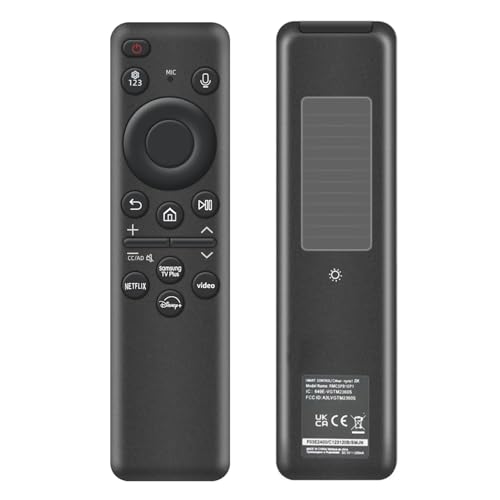
【Compatibility】 Designed for Samsung Smart TVs from 2019 to 2026, this rechargeable voice remote is a seamless substitute. 【Important Notice】This remote is compatible with All 2019–2026 Samsung TVs that support voice control. For Samsung TVs that do not support voice control or were released before 2019, the voice control feature on this remote may not function.

【Wide Compatibility】This rechargeable voice remote is designed for All 2019-2026 Samsung Smart TVs. It is a perfect replacement for Samsung TV Remotes with recharging feature.

Dual Charging & Extended Battery Life: Supports solar and USB-C charging; a 5-minute charge delivers months of use. Features a supercapacitor-boosted battery that prevents drain damage and lasts over 10 years without disposable batteries. It's time to upgrade your outdated remote with the latest Solarcell Remote.
Benefits Of Monitoring Battery Health
- Prevents Unexpected Disruptions: Keeping an eye on battery levels ensures your remote works when you need it, avoiding interruptions during your favorite shows or movies.
- Extends Battery Lifespan: Regular monitoring helps you recharge before the battery runs low, maintaining optimal performance and extending the overall lifespan of the remote.
- Enhances Functionality: A well-charged battery ensures all features of the remote function properly, providing you with seamless access to controls.
- Promotes Sustainability: Monitoring battery health encourages the effective use of solar energy, minimizing reliance on disposable batteries, and contributing to eco-friendly practices.
- Inconsistent Operation: Low battery levels often lead to intermittent functionality, causing delayed responses when you press buttons.
- Limited Range: A weakened battery reduces the remote’s range. You may find it necessary to be closer to your device for it to respond.
- Malfunctioning Features: Some advanced features, like voice control or smart device pairing, might not work effectively with a low battery, limiting your remote’s full capabilities.
- Increased Frustration: Frequent interruptions from a failing remote can lead to frustration and detract from your overall entertainment experience.
Monitoring your Samsung solar remote’s battery level brings multiple benefits and helps avoid common issues, ensuring smooth operation every time you use it.
Methods To Check Battery Level
Checking the battery level on your Samsung solar remote is simple. You can use two primary methods: the TV interface and the remote control itself.
Using The TV Interface
- Turn on your TV.
- Navigate to the settings menu using your remote.
- Select the “Support” option.
- Look for “Battery Status” or “Remote Control Information.”
- You’ll see the current battery level displayed on the screen.
This method provides a clear view of the battery status and any alerts regarding low power levels.
- Press and hold the “Home” button on your remote.
- Wait for a few seconds until the battery indicator appears on the screen.
- Note the battery level displayed; it indicates whether the charge is low or sufficient.
Using the remote control offers a quick way to check the battery without needing to access menus on the TV. Regularly monitoring the battery helps maintain optimal performance and enhances your viewing experience.
Troubleshooting Battery Issues
Battery issues can disrupt your viewing experience. Addressing these problems quickly ensures your Samsung solar remote functions effectively.
Recommended Products

【Reliable Performance】12 X Ni-MH AA 600mAh 1.2v Rechargeable Battery,Ideal for garden solar lights. (This product does not include a charger)

【 30% Precharged for Ready Use 】 For transportation safety purposes, these batteries are only precharged with 30% power, so charge them before use for longer working. In addition, recharging the battery every 3 months can make its lifespan longer

【Included products】4*AA 600mAh 1.2v Ni-MH rechargeable batteries, AA 600mAh battery is 1.97 inches long and 0.55 inches wide. (Batteries only)
Replacing The Batteries
When the battery life diminishes, replacing the batteries is essential. Follow these steps:
- Open the Battery Compartment: Locate the battery cover on the back of the remote. Slide or lift it open.
- Remove Old Batteries: Carefully take out the old batteries. Note the orientation (positive and negative sides) to insert the new ones correctly.
- Insert New Batteries: Place fresh AA rechargeable batteries in the compartment, ensuring the proper orientation.
- Close the Battery Compartment: Securely slide or press the cover back into place.
For optimal performance, use high-quality rechargeable batteries designed for solar use.
Resetting The Remote
Resetting the remote can resolve various issues, including battery recognition problems. Here’s how to reset your remote:
- Turn Off the TV: Make sure your TV is powered off.
- Disconnect the Power: Unplug the TV from the power source for about 30 seconds.
- Press and Hold Buttons: While the TV is unplugged, press and hold the “Power” and “Volume Down” buttons on the remote for about 10 seconds.
- Reconnect Power: Plug the TV back in and turn it on.
- Test the Remote: Try using the remote to ensure it works correctly.
Resetting the remote refreshes its settings and can help eliminate minor glitches associated with battery level detection.
Conclusion
Keeping an eye on your Samsung solar remote’s battery level can make a world of difference in your viewing experience. By regularly checking the battery status and following the tips outlined in this post, you can avoid those frustrating moments when your remote stops working unexpectedly.
Embracing the solar features not only extends battery life but also supports a more sustainable lifestyle. So remember to position your remote in well-lit areas and keep that solar panel clean. With a little attention to battery health, you’ll enjoy uninterrupted movie nights and a smoother overall experience. Happy viewing!
Frequently Asked Questions
How can I check the battery level on my Samsung solar remote?
You can check the battery level by navigating to the settings menu on your TV and selecting “Battery Status” or “Remote Control Information.” Alternatively, press and hold the “Home” button on the remote to quickly view the battery level.
What are the benefits of using a solar remote?
A solar remote offers sustainability by reducing the need for disposable batteries, cost-effectiveness over time, and convenience through solar charging using sunlight and indoor lighting.
Why does my Samsung solar remote stop working suddenly?
A sudden stop in functionality usually indicates low battery levels. Regularly checking the battery status and ensuring the remote is charged can prevent interruptions during use.
How can I maintain my solar remote for optimal performance?
To maintain optimal performance, regularly check the battery level, position the remote in well-lit areas, and keep the solar panel clean to enhance charging efficiency.
What should I do if my remote isn’t recognizing the batteries?
If your remote isn’t recognizing the batteries, try resetting it. Turn off your TV, unplug it, and press specific buttons on the remote. Then, reconnect the power to resolve the issue.
How do I replace the batteries in my remote?
To replace the batteries, open the battery compartment, remove the old batteries, insert new rechargeable ones, and ensure the compartment is securely closed to restore functionality.
Can low battery levels affect my viewing experience?
Yes, low battery levels can lead to inconsistent operation, limited range, and malfunctioning features, ultimately causing interruptions during your viewing experience. Regular monitoring helps prevent this.
Is solar charging effective indoors?
Yes, the Samsung solar remote can charge using indoor lighting. However, it’s most effective in well-lit areas, so place it where it receives adequate light for optimal performance.
