

Key Takeaways
- Understanding Battery Level Importance: Regularly monitoring the battery level of Sony headphones helps prevent interruptions during use and optimizes audio performance.
- Methods for Battery Checking: Use the Sony Headphones Connect app, device Bluetooth settings, or LED indicators to effectively monitor your headphone battery status.
- Impact on Performance: Low battery levels can diminish sound quality, affect feature functionality, and result in unstable Bluetooth connections.
- Troubleshooting Tips: Address common issues such as connection failures, inaccurate battery readings, and charging problems to maintain headphone performance.
- When to Replace the Battery: Consider replacing the battery if you experience rapid drainage, inconsistent performance, or charging issues, especially in older models.
Ever found yourself jamming to your favorite tunes only to be interrupted by a sudden low-battery warning? It’s frustrating when you’re in the zone, and your Sony headphones decide to call it quits. Knowing how to check the battery level can save you from those annoying surprises.
Overview Of Sony Headphones
Sony offers a wide range of headphones, catering to various listening preferences and lifestyles. Their product line includes over-ear headphones, on-ear models, and true wireless earbuds, all designed with advanced audio technology and comfort in mind.
Recommended Products
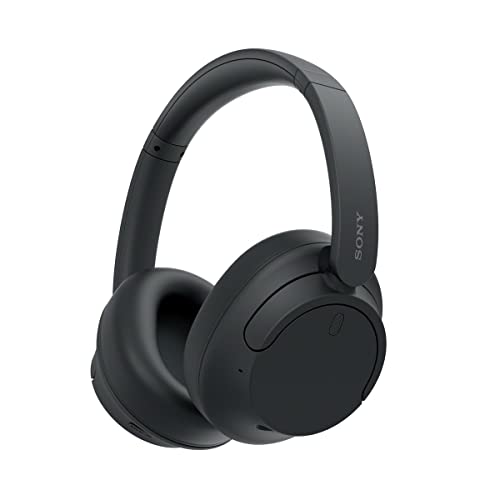
SONY’S LIGHTEST WIRELESS NOISE CANCELING HEADBAND EVER: Weighing just 192g, our lightest overhead wireless headphones with Noise Canceling yet, for incredible comfort without compromising on technology.

SONY’S LIGHTEST WIRELESS NOISE CANCELING HEADBAND EVER: Weighing just 192g, our lightest overhead wireless headphones with Noise Canceling yet, for incredible comfort without compromising on technology.
Key Features of Sony Headphones
- Noise Cancellation: Most Sony headphones feature active noise cancellation (ANC), which blocks external noise, enhancing your listening experience.
- Battery Life: Many models provide extensive battery life, lasting from 20 to 35 hours on a single charge, depending on usage.
- Sound Quality: Sony headphones often include high-resolution audio support, delivering clear and detailed sound.
- Smart Features: Some models support touch controls, voice assistant integration, and customizable sound settings through dedicated apps.
Popular Models
- WH-1000XM5: Known for top-tier ANC and a premium design, ideal for audio enthusiasts.
- WF-1000XM4: These true wireless earbuds offer impressive sound quality, making them perfect for on-the-go listening.
- MDR-7506: A studio staple, excellent for professional use due to their accurate sound reproduction.
Understanding your specific model helps check the battery level efficiently. Each model might have different methods for monitoring battery health, so knowing which features yours supports can save time and ensure uninterrupted listening.
Importance Of Battery Level Monitoring
Monitoring the battery level of your Sony headphones ensures an uninterrupted listening experience. Knowing how much power’s left gives you control over your audio sessions, so you don’t face sudden shut-offs while enjoying your favorite tracks.
Benefits Of Regular Checking
- Prevents Interruptions: Regularly checking battery levels helps avoid unexpected stops during calls or music playback.
- Enhances Performance: Maintaining a charge level above 20% can optimize audio performance and ensure clear sound quality.
- Extends Battery Life: Routinely monitoring assists in understanding usage patterns, enabling better battery maintenance and longevity.
- Informs Charging Needs: Keeping an eye on the battery level indicates when it’s time to recharge, preventing last-minute scrambles.
Impact On Performance
- Audio Quality: Low battery levels may affect sound clarity and bass response, altering the overall listening experience.
- Feature Functionality: Several features, like noise cancellation and voice assistant integration, might not function properly when battery levels drop.
- Connection Stability: A full battery improves Bluetooth connectivity, reducing dropped connections or audio glitches during use.
- Device Health: Regular monitoring reduces the risk of deep discharging the battery, which can harm its health and decrease overall lifespan.
Methods To Check Battery Level
Knowing how to check the battery level of your Sony headphones helps ensure a smooth listening experience. Here are several effective methods to track your headphone battery status.
Using Sony Headphones App
- Download the App: Install the Sony Headphones Connect app from the App Store or Google Play.
- Connect Your Headphones: Pair your Sony headphones with your smartphone via Bluetooth.
- Open the App: Launch the app to view the battery level directly on the main screen.
- Monitor Battery Health: Check for any alerts or notifications related to battery status, allowing for easier management.
Using Device Bluetooth Settings
- Access Bluetooth Settings: Navigate to the Bluetooth settings on your smartphone or tablet.
- Find Your Headphones: Locate your connected Sony headphones in the list of paired devices.
- Check Battery Level: Look for the battery percentage displayed next to the device name. This value provides a quick snapshot of remaining battery life.
Checking Through LED Indicators
- Locate LED Indicator: Identify the LED indicator light on your Sony headphones.
- Understand Color Codes: Familiarize yourself with the color meanings:
- Green indicates a full charge.
- Amber signals a low battery.
- Red means the battery is critically low.
- Pay Attention to Blinking: If the LED blinks repeatedly, it typically means the battery is almost empty.
Utilize these methods to keep track of your headphone battery levels effortlessly.
Troubleshooting Battery Level Issues
Battery level issues with Sony headphones can cause frustrations, but understanding common problems and solutions can help you restore functionality quickly.
Common Problems And Solutions
- Headphones Won’t Connect to Bluetooth
Ensure your headphones are in pairing mode. If they still won’t connect, reset the headphones according to the model instructions.
- Battery Percentage Not Displaying
Check that the headphones are connected to your device; battery percentage typically updates when connected. If it remains absent, restart your device and reconnect.
- Inaccurate Battery Readings
Reboot your headphones and device. If readings are still off, clear the pairing history and re-establish a new connection.
- Recharge Issues
Inspect the charging cable and port for damage or debris. Replace the cable if necessary, and try charging with a different power source to see if the problem persists.
When To Replace The Battery
You should consider battery replacement under these conditions:
- Rapid Drain
If your headphones lose charge significantly quicker than before, this indicates a weakened battery.
- Inconsistent Performance
Performance issues like sudden shutdowns despite having a charge suggest it’s time for a new battery.
- Charging Problems
If your headphones won’t charge after trying different cables and sources, a battery replacement is likely necessary.
- Old Age
If your headphones are several years old and show signs of battery degradation, replacing the battery can restore performance.
With these troubleshooting steps, you can effectively manage your Sony headphones’ battery issues and enhance your listening experience.
Conclusion
Staying on top of your Sony headphones’ battery level can make all the difference in your listening experience. By using the Sony Headphones Connect app or checking your device’s Bluetooth settings, you can easily monitor your battery status. Remember to pay attention to those LED indicators too—they’re your quick visual guide.
Taking a few moments to check your battery can save you from unexpected interruptions and help maintain audio quality. Plus, it can extend the life of your headphones. So keep an eye on that battery and enjoy your music without a hitch!
Frequently Asked Questions
How can I check the battery level of my Sony headphones?
You can check the battery level of your Sony headphones using several methods: the Sony Headphones Connect app, the Bluetooth settings on your connected device, or by observing the LED indicators on the headphones. Each method provides clear information about the battery status, helping you to avoid interruptions.
What are the key features of Sony headphones?
Sony headphones are equipped with features like active noise cancellation (ANC), high-resolution audio support, extensive battery life ranging from 20 to 35 hours, touch controls, and voice assistant integration. These features cater to various listening preferences and improve the audio experience.
What should I do if my headphones won’t connect via Bluetooth?
If your Sony headphones won’t connect via Bluetooth, try restarting both the headphones and the device you’re connecting to. Make sure your headphones are in pairing mode and not connected to other devices. Additionally, ensure that Bluetooth is enabled on your device and that it’s within range.
How can low battery levels affect my listening experience?
Low battery levels can disrupt audio quality, cause interruptions during playback, and decrease feature functionality. It’s best to maintain a charge above 20% for optimal performance and to prevent unexpected stops, enhancing your overall listening experience.
When should I consider replacing my headphone battery?
Consider replacing your headphone battery if you notice rapid drainage, inconsistent performance, charging issues, or if the headphones are old. These signs indicate the battery may no longer hold a reliable charge, impacting your listening experience.
